

Stufin
Home Quick Cart Profile

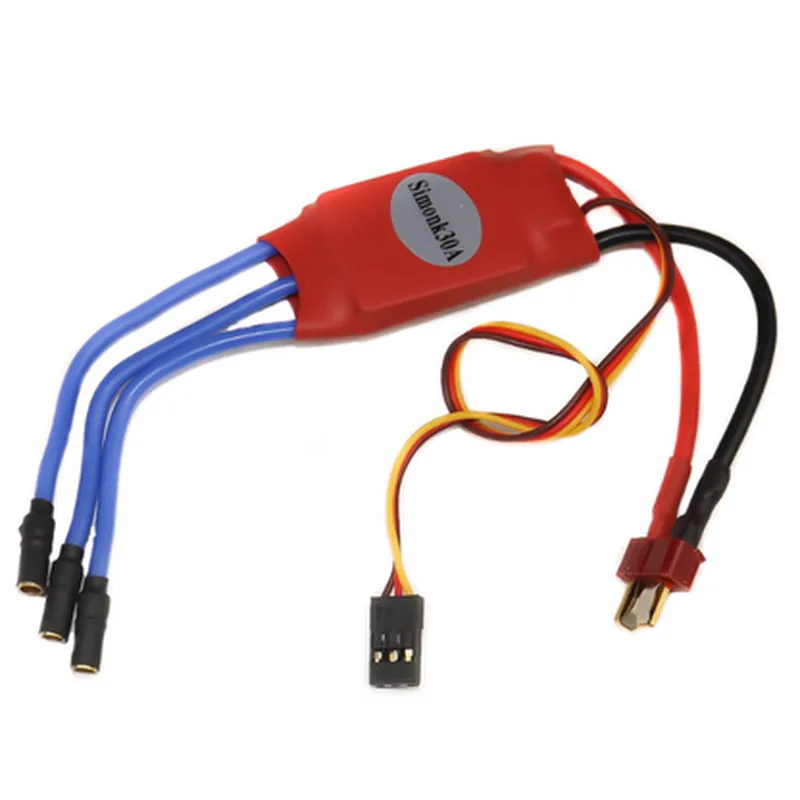
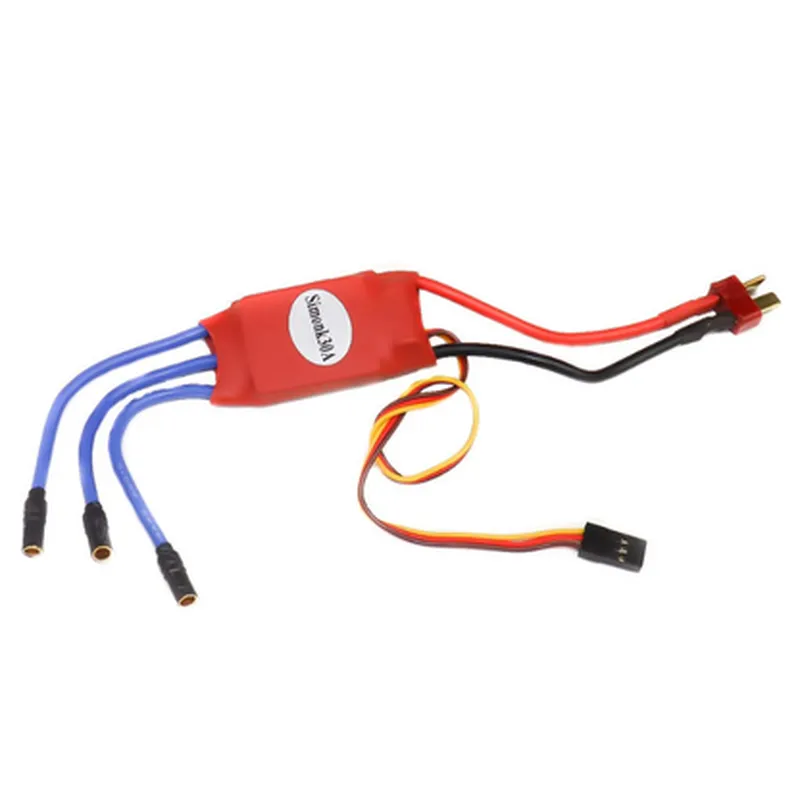
SimonK Red 30A BLDC ESC Electronic Speed Controller with Connectors

Buy Now on Stufin

Component Name

SimonK Red 30A BLDC ESC Electronic Speed Controller with Connectors

Overview

The SimonK Red 30A BLDC ESC Electronic Speed Controller with Connectors is a high-performance, compact, and reliable electronic speed controller (ESC) designed for brushless DC (BLDC) motors. This component is suitable for a wide range of applications, including drones, quadcopters, robotics, and other unmanned aerial vehicles (UAVs).

Functionality

The SimonK Red 30A BLDC ESC is responsible for controlling the speed and direction of a BLDC motor by regulating the flow of electrical energy to the motor windings. The ESC receives input signals from a flight controller or a transmitter and translates them into the necessary motor control signals to achieve the desired motor speed and direction.

Key Features

  • High-Current Capability: The ESC is capable of handling high currents up to 30A, making it suitable for demanding applications that require high power and speed.
  • BLDC Motor Support: The SimonK Red 30A BLDC ESC is specifically designed for brushless DC motors, offering high efficiency and reliability.
  • 3-Phase Operation: The ESC operates in a 3-phase configuration, providing high torque and smooth motor operation.
  • Synchronous Rectification: The ESC features synchronous rectification, which reduces power loss and increases overall efficiency.
  • High-Speed Switching: The ESC utilizes high-speed switching to minimize motor noise and ensure smooth operation.
  • Built-in Overcurrent Protection: The ESC has built-in overcurrent protection, which prevents motor damage due to excessive current draw.
  • Thermal Protection: The ESC has thermal protection, which prevents overheating and subsequent damage to the component.
  • Input and Output Connectors: The ESC comes with pre-soldered input and output connectors, making installation and connection easy and convenient.
  • Compact Design: The SimonK Red 30A BLDC ESC has a compact design, making it ideal for applications where space is limited.
  • Low Latency: The ESC has low latency, ensuring rapid response to input signals and precise motor control.

Technical Specifications

Input Voltage

5.5V - 16V

Output Current

30A continuous, 40A burst

Motor Type

Brushless DC (BLDC)

Motor Size

compatible with 2204, 2206, and other small to medium-sized motors

Control Signal

PWM (Pulse Width Modulation)

Operating Frequency

50Hz - 400Hz

Dimensions

36mm x 25mm x 12mm

Weight

18g

Applications

The SimonK Red 30A BLDC ESC is suitable for a wide range of applications, including

Drones and quadcopters

Robotics and robotic arms

Unmanned aerial vehicles (UAVs)

Electric skateboards and scooters

RC cars and boats

Industrial automation systems

Conclusion

The SimonK Red 30A BLDC ESC Electronic Speed Controller with Connectors is a high-performance, reliable, and compact component that offers precise motor control and high-speed operation. Its compact design, high-current capability, and built-in protection features make it an ideal choice for a wide range of applications where high-performance motor control is required.

Pin Configuration

  • SimonK Red 30A BLDC ESC Electronic Speed Controller with Connectors Pinout Documentation
  • The SimonK Red 30A BLDC ESC Electronic Speed Controller is a high-performance brushless motor controller designed for various applications, including drones, multirotors, and robotics. The board features a range of connectors and pins that enable connection to motors, power sources, and other peripherals. Below is a detailed explanation of each pin, including their functions and connection guidelines.
  • Pinout Structure:
  • The SimonK Red 30A BLDC ESC has the following connectors and pins:
  • Motor Connectors (3x): 3-pin connectors labeled M1, M2, and M3, each with a positive (+), negative (-), and signal (S) pin.
  • Power Connector (1x): 2-pin connector labeled VCC and GND.
  • Signal Connector (1x): 3-pin connector labeled RX, TX, and 5V.
  • Telemetry Connector (1x): 3-pin connector labeled SCL, SDA, and GND.
  • Pin-by-Pin Explanation:
  • Motor Connectors (M1, M2, M3):
  • Positive (+) Pin: Supplies power to the motor windings. Connect the positive wire from the motor to this pin.
  • Negative (-) Pin: Returns power from the motor windings. Connect the negative wire from the motor to this pin.
  • Signal (S) Pin: Provides the control signal to the motor. Connect the signal wire from the motor to this pin.
  • Power Connector:
  • VCC Pin: Supplies power to the ESC's internal circuitry. Connect the positive wire from the power source (e.g., battery) to this pin.
  • GND Pin: Ground connection for the power source. Connect the negative wire from the power source to this pin.
  • Signal Connector:
  • RX Pin (Receiver): Receivesserial communication data from the flight controller or other devices. Connect the RX wire from the flight controller to this pin.
  • TX Pin (Transmitter): Transmits serial communication data to the flight controller or other devices. Connect the TX wire from the flight controller to this pin.
  • 5V Pin: Provides a stable 5V power supply for external devices, such as flight controllers. Connect the 5V wire from the flight controller to this pin.
  • Telemetry Connector:
  • SCL Pin (Serial Clock): Provides the clock signal for I2C serial communication. Connect the SCL wire from the telemetry device (e.g., OSD) to this pin.
  • SDA Pin (Serial Data): Transfers data between the ESC and telemetry devices. Connect the SDA wire from the telemetry device to this pin.
  • GND Pin: Ground connection for the telemetry device. Connect the GND wire from the telemetry device to this pin.
  • Connection Guidelines:
  • 1. Motor Connection: Connect the motor wires to the respective M1, M2, or M3 connectors, ensuring correct polarity (positive to positive, negative to negative, and signal to signal).
  • 2. Power Connection: Connect the power source (e.g., battery) to the VCC and GND pins. Ensure the power rating matches the ESC's specifications.
  • 3. Signal Connection: Connect the RX, TX, and 5V wires from the flight controller to the Signal Connector.
  • 4. Telemetry Connection: Connect the SCL, SDA, and GND wires from the telemetry device to the Telemetry Connector.
  • Important Safety Precautions:
  • Ensure correct polarity when connecting the motor and power source to avoid damage to the ESC or motor.
  • Verify the power rating of the ESC matches the motor and power source specifications.
  • Use proper gauge wire and connectors to minimize voltage drop and ensure reliable communication.
  • By following these guidelines and understanding the pinout structure, you can safely and effectively connect your SimonK Red 30A BLDC ESC to your motor, power source, and peripherals.

Code Examples

SimonK Red 30A BLDC ESC Electronic Speed Controller with Connectors
Overview
The SimonK Red 30A BLDC ESC Electronic Speed Controller is a high-performance brushless motor controller designed for use in various robotics, drone, and RC applications. It features a high-power rating of 30A, making it suitable for demanding applications. The ESC comes with connectors, allowing for easy connection to motors, batteries, and other components.
Technical Specifications
Power Rating: 30A
 Voltage Range: 5-25V
 Motor Type: Brushless
 Control Method: PWM (Pulse Width Modulation)
 Connector Type: XT60/XT30
 Dimensions: 40mm x 23mm x 10mm
Pinout
Signal Wire:
	+ GND: Ground
	+ VCC: 5V Power
	+ SIGNAL: PWM Input
 Motor Connectors:
	+ A: Motor Phase A
	+ B: Motor Phase B
	+ C: Motor Phase C
 Battery Connector:
	+ VTX: Battery Positive
	+ VNX: Battery Negative
Code Examples
### Example 1: Basic PWM Control with Arduino
In this example, we will demonstrate how to control the SimonK Red 30A BLDC ESC using an Arduino board.
```c++
const int pwmPin = 9;  // Choose a PWM pin on your Arduino board
void setup() {
  pinMode(pwmPin, OUTPUT);
}
void loop() {
  // Set the motor speed to 50% (128/255)
  analogWrite(pwmPin, 128);
  delay(1000);
  
  // Set the motor speed to 100% (255/255)
  analogWrite(pwmPin, 255);
  delay(1000);
  
  // Set the motor speed to 0% (0/255)
  analogWrite(pwmPin, 0);
  delay(1000);
}
```
### Example 2: Drone Motor Control with Raspberry Pi and Python
In this example, we will demonstrate how to control the SimonK Red 30A BLDC ESC using a Raspberry Pi and Python.
```python
import RPi.GPIO as GPIO
import time
# Set up GPIO mode
GPIO.setmode(GPIO.BCM)
# Define the PWM pin
pwm_pin = 18
# Set up the PWM pin as an output
GPIO.setup(pwm_pin, GPIO.OUT)
# Create a PWM object
pwm = GPIO.PWM(pwm_pin, 50)  # 50 Hz frequency
# Start the PWM
pwm.start(0)  # Initialize with 0% Duty Cycle
try:
    while True:
        # Set the motor speed to 50% Duty Cycle
        pwm.ChangeDutyCycle(50)
        time.sleep(1)
        
        # Set the motor speed to 100% Duty Cycle
        pwm.ChangeDutyCycle(100)
        time.sleep(1)
        
        # Set the motor speed to 0% Duty Cycle
        pwm.ChangeDutyCycle(0)
        time.sleep(1)
except KeyboardInterrupt:
    # Stop the PWM
    pwm.stop()
    GPIO.cleanup()
```
Remember to adjust the pin numbers and other settings according to your specific setup. Additionally, ensure that your motor and battery are compatible with the ESC and that you follow proper safety precautions when working with electrical systems.