Stufin
Home Quick Cart Profile

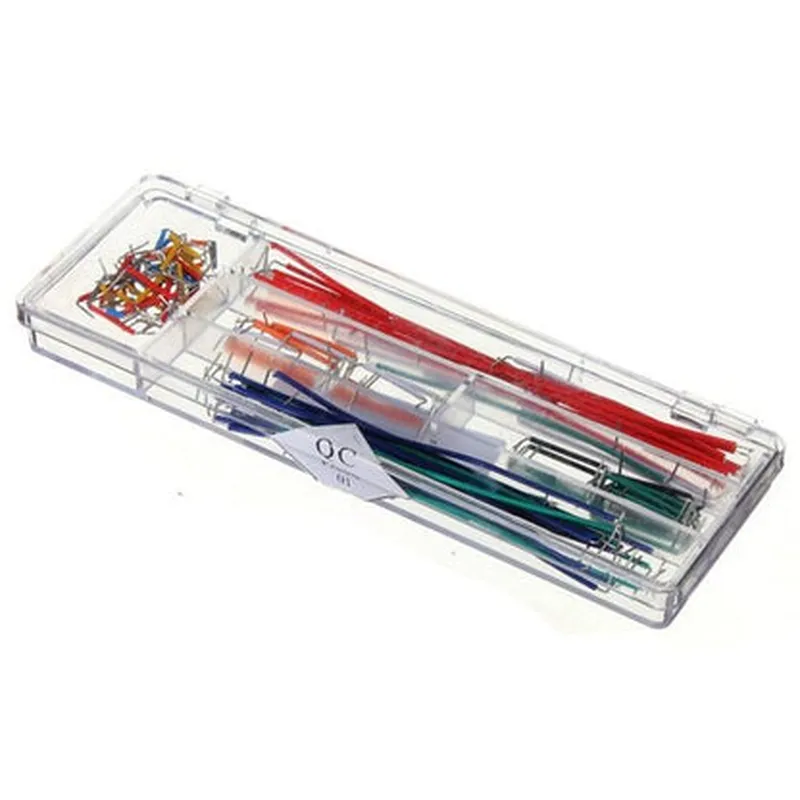
Solderless Breadboard Jumper Wire Connectors (140pcs)


Buy Now on Stufin

Component Name

Solderless Breadboard Jumper Wire Connectors (140pcs)
Description

The Solderless Breadboard Jumper Wire Connectors are a set of 140 individual connectors designed for easy and convenient connections between components on a breadboard or other prototyping platforms. These connectors simplify the development and testing of electronic circuits, allowing users to focus on building and experimenting with their projects without the need for soldering.

Functionality

The Solderless Breadboard Jumper Wire Connectors serve as a reliable and efficient way to connect and disconnect components on a breadboard. They enable users to

Create temporary connections between components

Experiment with different circuit configurations

Test and debug electronic circuits

Prototype and develop projects quickly and efficiently

Key Features

  • Solderless Connection: No soldering is required, making it easy to use and reuse the connectors without damaging the components or the breadboard.
  • Breadboard Compatibility: The connectors are designed to fit standard 0.1" spacing breadboards, ensuring compatibility with a wide range of prototyping platforms.
  • 140-Piece Set: The package includes a large quantity of connectors, making it ideal for frequent users, educators, or those who work on multiple projects simultaneously.
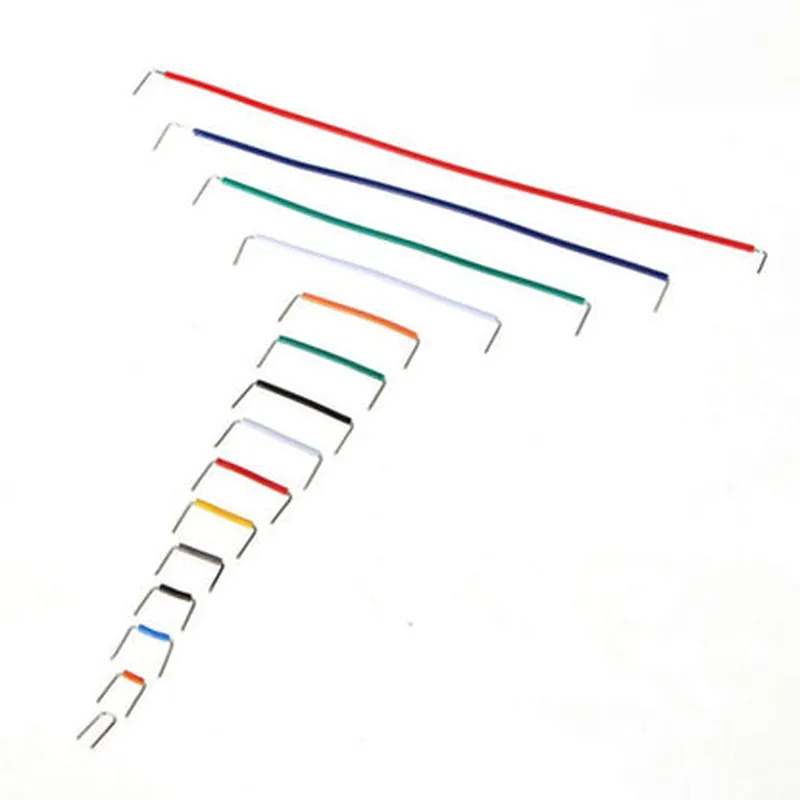
  • Color-Coded: The connectors are color-coded, with different colors indicating different wire sizes (20 AWG, 22 AWG, and 24 AWG), ensuring easy identification and organization.
  • Flexible Wire: The connectors feature flexible wire that can be bent and shaped to fit complex circuit layouts, making it easier to work with compact or densely populated breadboards.
  • Durable Construction: The connectors are built with durable materials, ensuring they can withstand repeated use and handling without compromising their performance or reliability.
  • Easy to Use: The connectors are simple to use, with a compact design that allows for easy insertion and removal from the breadboard.

Material

Copper wire with PVC insulation

Wire gauge

20 AWG, 22 AWG, and 24 AWG

Length

14 cm (5.5 inches)

Breadboard compatibility

Standard 0.1" spacing

Operating temperature

-20C to 80C (-4F to 176F)

Package includes

140 individual connectors

Applications

The Solderless Breadboard Jumper Wire Connectors are ideal for various applications, including

Prototyping and development of electronic circuits

Education and training in electronics and programming

Hobbyist projects and DIY electronics

Proof-of-concept development and testing

Research and development in IoT, robotics, and other fields

Pin Configuration

  • Solderless Breadboard Jumper Wire Connectors (140pcs) Documentation
  • Overview
  • The Solderless Breadboard Jumper Wire Connectors is a set of 140 pieces of jumper wires specifically designed for use with breadboards, prototyping, and DIY electronic projects. These connectors provide a convenient and secure way to connect components, sensors, and modules without the need for soldering.
  • Pin Structure and Description
  • Each jumper wire connector consists of a single wire with a male header pin on one end and a female header socket on the other end. The pins are color-coded to indicate their length and type.
  • Male Header Pin (MCP) Side:
  • 1. MCP Pin Shape: The male header pin is a single, straight pin with a square or rectangular cross-section.
  • 2. MCP Pin Material: The pin is typically made of a copper alloy or brass, ensuring good electrical conductivity and durability.
  • 3. MCP Pin Size: The male header pin has a standard 0.025" (0.64mm) square or 0.025" (0.64mm) diameter round cross-section, compatible with most breadboards and prototyping platforms.
  • Female Header Socket (FHS) Side:
  • 1. FHS Socket Shape: The female header socket is a hollow, cylindrical receptacle with a square or rectangular interior.
  • 2. FHS Socket Material: The socket is typically made of a copper alloy or phosphor bronze, ensuring good electrical conductivity and durability.
  • 3. FHS Socket Size: The female header socket has a standard 0.025" (0.64mm) square or 0.025" (0.64mm) diameter round interior, compatible with most male header pins.
  • Color-Coding and Length:
  • The jumper wire connectors come in various lengths, and each length is color-coded for easy identification:
  • 10cm (4 inches) - Red
  • 15cm (6 inches) - Yellow
  • 20cm (8 inches) - Green
  • 30cm (12 inches) - Blue
  • 40cm (16 inches) - White
  • 50cm (20 inches) - Black
  • Connecting the Pins:
  • To connect the pins:
  • Step 1: Identify the male header pin (MCP) side and the female header socket (FHS) side of the jumper wire connector.
  • Step 2: Insert the male header pin into the female header socket, ensuring a secure connection.
  • Step 3: Gently push the pin into the socket until it clicks or feels snug.
  • Step 4: Verify the connection by gently tugging on the wire; it should not come loose easily.
  • Tips and Precautions:
  • Handle the jumper wire connectors with care to avoid bending or damaging the pins.
  • Use the correct length of jumper wire connector to avoid excessive strain or stress on the connections.
  • Keep the jumper wire connectors clean and dry to ensure reliable connections.
  • Avoid over-tightening or forcing the connections, as this can damage the pins or sockets.
  • By following these guidelines and understanding the pin structure and connection process, you can effectively use the Solderless Breadboard Jumper Wire Connectors (140pcs) in your DIY projects and prototyping endeavors.

Code Examples

Solderless Breadboard Jumper Wire Connectors (140pcs) Documentation
Overview
The Solderless Breadboard Jumper Wire Connectors are a set of 140 individual wire connectors designed for use with breadboards, protoboards, and other electronic projects. They provide a convenient and easy way to connect components, sensors, and modules to a breadboard without the need for soldering.
Connector Specifications
Total Count: 140 pieces
 Wire Gauge: 20 AWG (0.8 mm)
 Wire Length: 20 cm (7.9 in)
 Connector Type: Male-to-Male, Male-to-Female, Female-to-Female
 Insulation: PVC (Polyvinyl Chloride)
 Operating Temperature: -20C to 80C (-4F to 176F)
Using the Jumper Wire Connectors with Arduino
The following example demonstrates how to use the Solderless Breadboard Jumper Wire Connectors to connect an LED to an Arduino Uno board.
Example 1: LED Circuit with Arduino
Hardware Requirements
Arduino Uno board
 1 x LED
 1 x 220  resistor
 2 x Jumper Wire Connectors (Male-to-Male)
Software Requirements
Arduino IDE (version 1.8.13 or later)
Code
```c
const int ledPin = 13;  // Choose any digital pin on the Arduino board
void setup() {
  pinMode(ledPin, OUTPUT);
}
void loop() {
  digitalWrite(ledPin, HIGH);
  delay(1000);
  digitalWrite(ledPin, LOW);
  delay(1000);
}
```
Connections
1. Connect the positive leg of the LED to a digital pin on the Arduino board (e.g., Pin 13) using a Male-to-Male Jumper Wire Connector.
2. Connect the negative leg of the LED to a ground pin on the Arduino board using another Male-to-Male Jumper Wire Connector.
3. Connect the 220  resistor in series with the LED to limit the current.
Using the Jumper Wire Connectors with Raspberry Pi
The following example demonstrates how to use the Solderless Breadboard Jumper Wire Connectors to connect a button to a Raspberry Pi 4B.
Example 2: Button with Raspberry Pi
Hardware Requirements
Raspberry Pi 4B
 1 x Button
 1 x Breadboard
 2 x Jumper Wire Connectors (Female-to-Male)
Software Requirements
Raspbian OS (version 10 or later)
 Python 3.x
Code
```python
import RPi.GPIO as GPIO
# Set up GPIO mode
GPIO.setmode(GPIO.BCM)
# Define the button pin
button_pin = 17
# Set up the button pin as an input
GPIO.setup(button_pin, GPIO.IN, pull_up_down=GPIO.PUD_UP)
while True:
    # Read the button state
    button_state = GPIO.input(button_pin)
    if button_state == False:
        print("Button pressed!")
    else:
        print("Button released!")
    time.sleep(0.1)
```
Connections
1. Connect one end of a Female-to-Male Jumper Wire Connector to the button's signal pin.
2. Connect the other end of the Jumper Wire Connector to a GPIO pin on the Raspberry Pi (e.g., Pin 17).
3. Connect the button's ground pin to a ground pin on the Raspberry Pi using another Female-to-Male Jumper Wire Connector.
Tips and Precautions
Always handle the Jumper Wire Connectors by the insulation to prevent damage to the wires.
 Ensure the connectors are securely seated on the breadboard or PCB to prevent accidental disconnections.
 Use the correct gauge of wire for your project to minimize voltage drops and heat generation.