Stufin
Home Quick Cart Profile

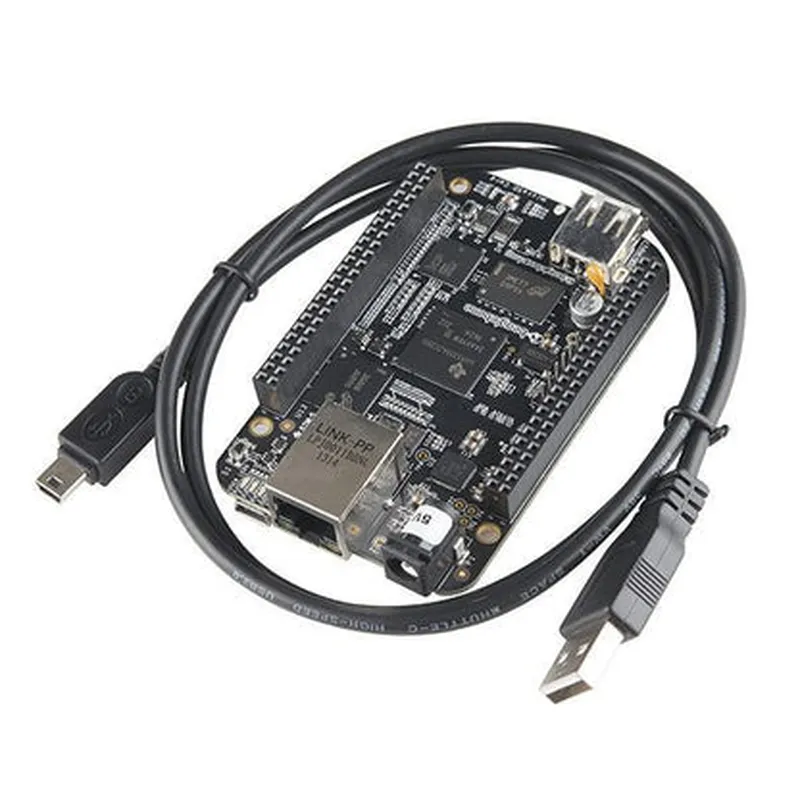
BeagleBone Black Rev C (4GB Flash Memory)

Buy Now on Stufin

Microcontroller and Processor

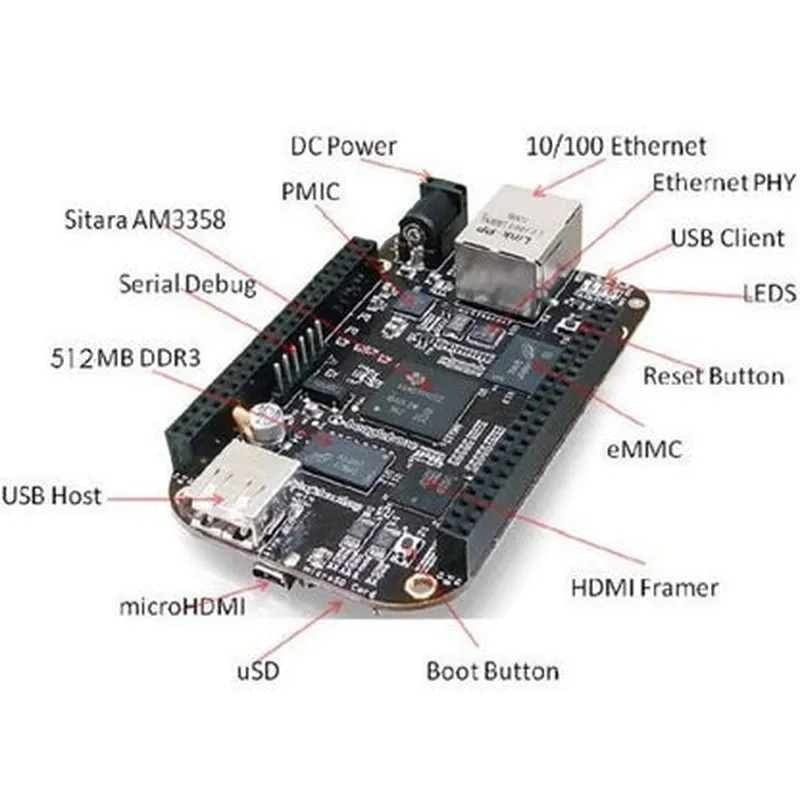
The BeagleBone Black Rev C is based on the Texas Instruments Sitara AM335x processor, which features a 1GHz ARM Cortex-A8 core, 512KB of L2 cache, and 3D graphics acceleration.


Memory and Storage

The board has 512MB of DDR3 RAM and 4GB of on-board flash memory, providing sufficient resources for running complex applications and storing data.

Peripherals and Interfaces

The BeagleBone Black Rev C offers a wide range of peripherals and interfaces, including
+ USB1x USB 2.0 host, 1x USB 2.0 device
+ Ethernet1x 10/100 Mbps RJ45
+ UART2x 3.3V UART headers (6-pin and 9-pin)
+ I2C2x I2C buses
+ SPI1x SPI bus
+ CAN1x CAN bus
+ HDMI1x HDMI output (up to 1080p @ 30Hz)
+ LCD1x LCD interface (supports up to 24-bit color displays)

Power and Reset

The board can be powered through the USB interface or an external 5V power supply. It also features a reset button and a power button.

Key Features

The BeagleBone Black Rev C offers several key features that make it an attractive choice for IoT and robotics projects

Open-SourceThe BeagleBone Black Rev C is an open-source platform, which means that users have access to a vast community of developers, a wide range of operating systems, and a vast repository of projects and tutorials.

Expandability

The board has two 46-pin headers, each with 23 GPIO pins, providing ample opportunities for expansion and customization using capes (add-on boards).

Low Power Consumption

The BeagleBone Black Rev C has a low power consumption profile, making it suitable for battery-powered or energy-harvesting applications.

Real-Time Operating System (RTOS) SupportThe board supports various RTOS options, including PRU-ICSS, which enables real-time processing and industrial control systems.

Specifications

Processor

Texas Instruments Sitara AM335x

Clock Speed

1GHz

RAM

512MB DDR3

Flash Memory

4GB on-board

Operating Temperature

0C to 50C

Dimensions

86.36mm x 53.33mm x 17.78mm

Weight

approximately 2 ounces (57 grams)

Conclusion

The BeagleBone Black Rev C is a powerful and versatile single-board computer that offers a unique combination of performance, flexibility, and expandability. With its rich set of peripherals, interfaces, and features, it is an ideal choice for a wide range of applications, from IoT and robotics to automation, industrial control, and more.

Pin Configuration

  • BeagleBone Black Rev C (4GB Flash Memory) Pinout Explanation
  • The BeagleBone Black Rev C (4GB Flash Memory) is a popular single-board computer (SBC) designed for IoT projects and embedded systems development. It features a 1GHz AM335x processor, 4GB of onboard flash memory, and a wide range of interfaces for connectivity and expansion. In this documentation, we will delve into the pinout explanation of the BeagleBone Black Rev C, covering each pin individually.
  • _PINOUT STRUCTURE:_
  • The BeagleBone Black Rev C has a total of 92 pins, divided into two 46-pin headers (P8 and P9) along the edges of the board. The pinout is organized into several categories, including:
  • GPIO (General-Purpose Input/Output)
  • UART (Universal Asynchronous Receiver-Transmitter)
  • SPI (Serial Peripheral Interface)
  • I2C (Inter-Integrated Circuit)
  • PWM (Pulse-Width Modulation)
  • ADC (Analog-to-Digital Converter)
  • Power and Ground
  • _PINOUT EXPLANATION (POINT-BY-POINT):_
  • P8 Header (46 pins)
  • 1. P8_1 - VDD_3V3: 3.3V power supply pin
  • 2. P8_2 - VDD_1V8: 1.8V power supply pin
  • 3. P8_3 - GND: Ground pin
  • 4. P8_4 - UART0_TX: UART0 transmit pin
  • 5. P8_5 - UART0_RX: UART0 receive pin
  • 6. P8_6 - I2C2_SCL: I2C2 clock pin
  • 7. P8_7 - I2C2_SDA: I2C2 data pin
  • 8. P8_8 - GPIO_66: General-purpose input/output pin
  • 9. P8_9 - GPIO_67: General-purpose input/output pin
  • 10. P8_10 - GPIO_68: General-purpose input/output pin
  • 11. P8_11 - GPIO_69: General-purpose input/output pin
  • 12. P8_12 - GPIO_70: General-purpose input/output pin
  • 13. P8_13 - GPIO_71: General-purpose input/output pin
  • 14. P8_14 - GPIO_72: General-purpose input/output pin
  • 15. P8_15 - GPIO_73: General-purpose input/output pin
  • 16. P8_16 - GPIO_74: General-purpose input/output pin
  • 17. P8_17 - GPIO_75: General-purpose input/output pin
  • 18. P8_18 - GPIO_76: General-purpose input/output pin
  • 19. P8_19 - GPIO_77: General-purpose input/output pin
  • 20. P8_20 - GPIO_78: General-purpose input/output pin
  • 21. P8_21 - GPIO_79: General-purpose input/output pin
  • 22. P8_22 - GPIO_80: General-purpose input/output pin
  • 23. P8_23 - GPIO_81: General-purpose input/output pin
  • 24. P8_24 - GPIO_82: General-purpose input/output pin
  • 25. P8_25 - GPIO_83: General-purpose input/output pin
  • 26. P8_26 - GPIO_84: General-purpose input/output pin
  • 27. P8_27 - GPIO_85: General-purpose input/output pin
  • 28. P8_28 - GPIO_86: General-purpose input/output pin
  • 29. P8_29 - GPIO_87: General-purpose input/output pin
  • 30. P8_30 - GPIO_88: General-purpose input/output pin
  • 31. P8_31 - GPIO_89: General-purpose input/output pin
  • 32. P8_32 - GPIO_90: General-purpose input/output pin
  • 33. P8_33 - GPIO_91: General-purpose input/output pin
  • 34. P8_34 - GPIO_92: General-purpose input/output pin
  • 35. P8_35 - ADC_IN: Analog-to-digital converter input pin
  • 36. P8_36 - ADC_VREF: Analog-to-digital converter voltage reference pin
  • 37. P8_37 - ADC_GND: Analog-to-digital converter ground pin
  • 38. P8_38 - UART2_TX: UART2 transmit pin
  • 39. P8_39 - UART2_RX: UART2 receive pin
  • 40. P8_40 - UART1_TX: UART1 transmit pin
  • 41. P8_41 - UART1_RX: UART1 receive pin
  • 42. P8_42 - PWM0: Pulse-width modulation output pin
  • 43. P8_43 - PWM1: Pulse-width modulation output pin
  • 44. P8_44 - PWM2: Pulse-width modulation output pin
  • 45. P8_45 - PWM3: Pulse-width modulation output pin
  • 46. P8_46 - GND: Ground pin
  • P9 Header (46 pins)
  • 1. P9_1 - VDD_3V3: 3.3V power supply pin
  • 2. P9_2 - VDD_1V8: 1.8V power supply pin
  • 3. P9_3 - GND: Ground pin
  • 4. P9_4 - SPI0_CS0: SPI0 chip select 0 pin
  • 5. P9_5 - SPI0_CS1: SPI0 chip select 1 pin
  • 6. P9_6 - SPI0_CLK: SPI0 clock pin
  • 7. P9_7 - SPI0_D0: SPI0 data 0 pin
  • 8. P9_8 - SPI0_D1: SPI0 data 1 pin
  • 9. P9_9 - I2C1_SCL: I2C1 clock pin
  • 10. P9_10 - I2C1_SDA: I2C1 data pin
  • 11. P9_11 - GPIO_23: General-purpose input/output pin
  • 12. P9_12 - GPIO_24: General-purpose input/output pin
  • 13. P9_13 - GPIO_25: General-purpose input/output pin
  • 14. P9_14 - GPIO_26: General-purpose input/output pin
  • 15. P9_15 - GPIO_27: General-purpose input/output pin
  • 16. P9_16 - GPIO_28: General-purpose input/output pin
  • 17. P9_17 - GPIO_29: General-purpose input/output pin
  • 18. P9_18 - GPIO_30: General-purpose input/output pin
  • 19. P9_19 - GPIO_31: General-purpose input/output pin
  • 20. P9_20 - GPIO_32: General-purpose input/output pin
  • 21. P9_21 - GPIO_33: General-purpose input/output pin
  • 22. P9_22 - GPIO_34: General-purpose input/output pin
  • 23. P9_23 - GPIO_35: General-purpose input/output pin
  • 24. P9_24 - GPIO_36: General-purpose input/output pin
  • 25. P9_25 - GPIO_37: General-purpose input/output pin
  • 26. P9_26 - GPIO_38: General-purpose input/output pin
  • 27. P9_27 - GPIO_39: General-purpose input/output pin
  • 28. P9_28 - GPIO_40: General-purpose input/output pin
  • 29. P9_29 - GPIO_41: General-purpose input/output pin
  • 30. P9_30 - GPIO_42: General-purpose input/output pin
  • 31. P9_31 - GPIO_43: General-purpose input/output pin
  • 32. P9_32 - GPIO_44: General-purpose input/output pin
  • 33. P9_33 - GPIO_45: General-purpose input/output pin
  • 34. P9_34 - GPIO_46: General-purpose input/output pin
  • 35. P9_35 - GPIO_47: General-purpose input/output pin
  • 36. P9_36 - GPIO_48: General-purpose input/output pin
  • 37. P9_37 - GPIO_49: General-purpose input/output pin
  • 38. P9_38 - GPIO_50: General-purpose input/output pin
  • 39. P9_39 - GPIO_51: General-purpose input/output pin
  • 40. P9_40 - GPIO_52: General-purpose input/output pin
  • 41. P9_41 - GPIO_53: General-purpose input/output pin
  • 42. P9_42 - GPIO_54: General-purpose input/output pin
  • 43. P9_43 - GPIO_55: General-purpose input/output pin
  • 44. P9_44 - GPIO_56: General-purpose input/output pin
  • 45. P9_45 - GPIO_57: General-purpose input/output pin
  • 46. P9_46 - GND: Ground pin
  • CONNECTION GUIDE:
  • When connecting to the BeagleBone Black Rev C, ensure that you:
  • Use a compatible breadboard or PCB with a 2x23 pin header layout
  • Match the pin numbers and functions between the BeagleBone Black and your circuit
  • Observe proper voltage and current ratings for each pin
  • Use pull-up or pull-down resistors as necessary for input pins
  • Implement proper grounding and shielding to minimize noise and interference
  • Remember to consult the BeagleBone Black Rev C datasheet and documentation for more detailed information on pin usage, electrical characteristics, and safety guidelines.

Code Examples

BeagleBone Black Rev C (4GB Flash Memory) Documentation
Overview
The BeagleBone Black Rev C is a single-board computer designed for Internet of Things (IoT) projects, robotics, and automation. It features a powerful AM335x 1GHz ARM Cortex-A8 processor, 512MB of RAM, and 4GB of flash memory. This documentation provides an overview of the board's features, technical specifications, and code examples to get you started with your projects.
Hardware Specifications
Processor: AM335x 1GHz ARM Cortex-A8
 RAM: 512MB DDR3
 Flash Memory: 4GB
 Operating System: Angstrom Linux (default) or other compatible OS
 Connectivity: Ethernet, Wi-Fi, USB, HDMI, UART, I2C, SPI, and more
 Power: 5V DC input, 1.5A recommended
Software Support
The BeagleBone Black Rev C supports various programming languages, including:
Python
 C/C++
 Java
 Node.js
 Lua
Code Examples
### Example 1: Blinking LED using Python
In this example, we'll use Python to blink an LED connected to GPIO pin 17 on the BeagleBone Black Rev C.
Hardware Requirements
BeagleBone Black Rev C
 Breadboard
 LED
 1k resistor
 Jumper wires
Software Requirements
Python 2.7 or higher
 Adafruit_BBIO library (install using `pip install Adafruit_BBIO`)
Code
```python
import Adafruit_BBIO.GPIO as GPIO
import time
# Set up GPIO 17 as an output
GPIO.setup("P9_17", GPIO.OUT)
while True:
    # Turn on the LED
    GPIO.output("P9_17", GPIO.HIGH)
    time.sleep(1)
    
    # Turn off the LED
    GPIO.output("P9_17", GPIO.LOW)
    time.sleep(1)
```
Note: Make sure to install the Adafruit_BBIO library and import it in your Python script.
### Example 2: Reading Temperature and Humidity using C
In this example, we'll use C to read temperature and humidity data from a DHT11 sensor connected to the BeagleBone Black Rev C.
Hardware Requirements
BeagleBone Black Rev C
 Breadboard
 DHT11 temperature and humidity sensor
 Jumper wires
Software Requirements
GCC compiler
 WiringPi library (install using `opkg update && opkg install wiringpi`)
Code
```c
#include <stdio.h>
#include <wiringPi.h>
#include <wiringPiI2C.h>
#define DHT11_PIN 17 // GPIO 17
int main() {
    wiringPiSetupGpio();
// Set up GPIO 17 as an input
    pinMode(DHT11_PIN, INPUT);
while (1) {
        int dht_data[5] = {0};
        int i;
// Read data from DHT11 sensor
        for (i = 0; i < 5; i++) {
            dht_data[i] = digitalRead(DHT11_PIN);
            delay(10);
        }
// Calculate temperature and humidity
        float temperature = (dht_data[2] + dht_data[3] / 10.0);
        float humidity = dht_data[0] + dht_data[1] / 10.0;
printf("Temperature: %0.1fC, Humidity: %0.1f%%
", temperature, humidity);
delay(1000); // 1 second delay
    }
return 0;
}
```
Note: Make sure to install the WiringPi library and include its headers in your C program.
These examples demonstrate the basic usage of the BeagleBone Black Rev C in Python and C. You can explore more advanced projects and applications using this board, leveraging its powerful processor and diverse set of interfaces.