

Stufin
Home Quick Cart Profile

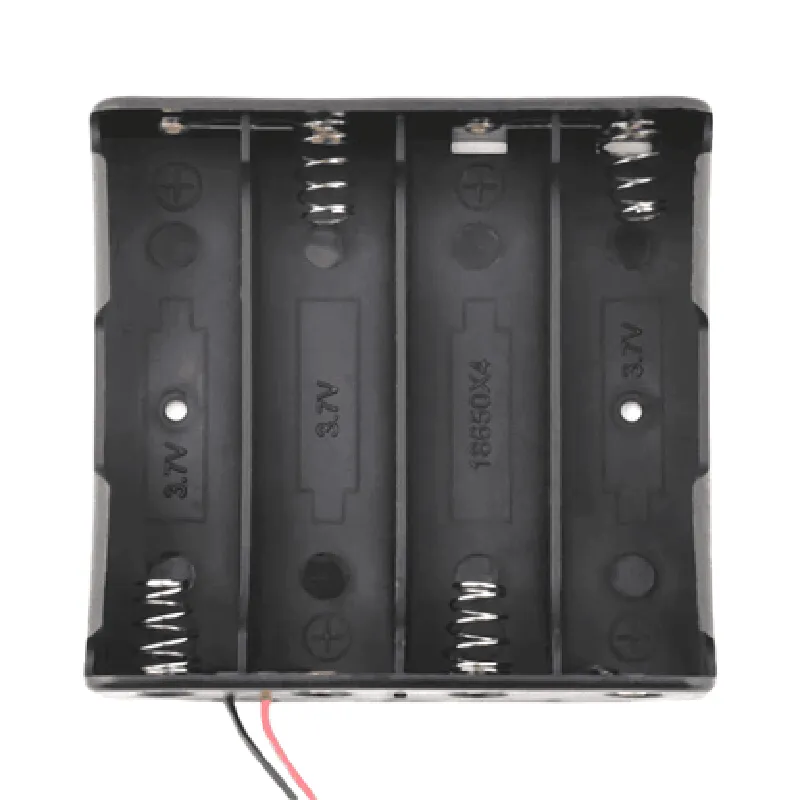
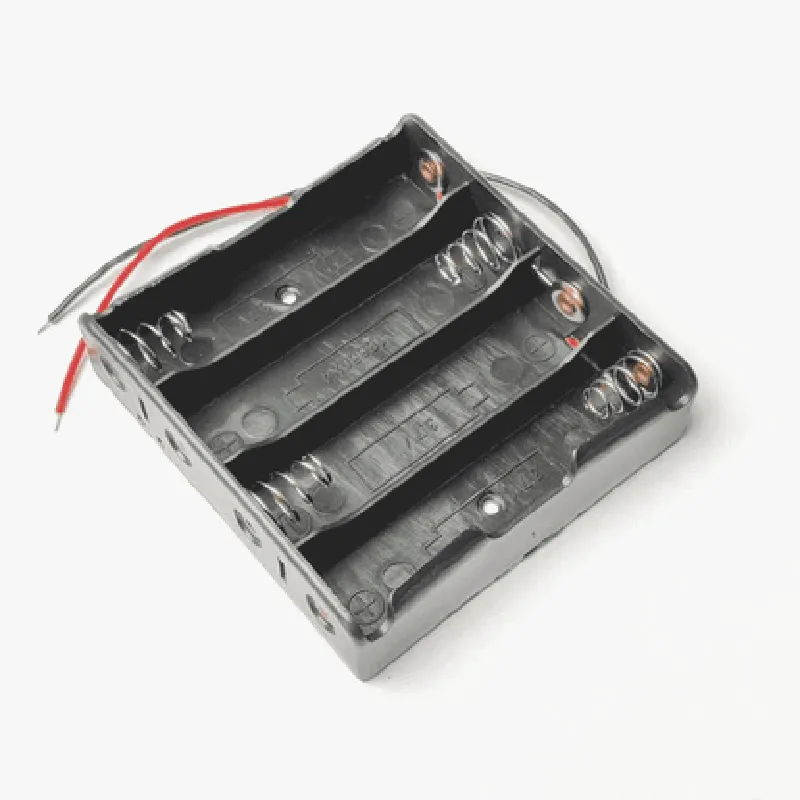
4 Cell 18650 Lithium ion Battery Holder

Buy Now on Stufin

Component Name

4 Cell 18650 Lithium-ion Battery Holder

Overview

The 4 Cell 18650 Lithium-ion Battery Holder is a compact and versatile component designed to hold and connect four 18650 lithium-ion batteries in series. This battery holder is specifically designed for IoT applications, robotics, and electronic projects that require reliable and efficient power supply.

Functionality

The primary function of the 4 Cell 18650 Lithium-ion Battery Holder is to securely hold four 18650 lithium-ion batteries in a single unit, providing a convenient and organized way to power electronic devices. The battery holder connects the batteries in series, allowing the total voltage to be quadrupled, making it suitable for applications that require higher voltages.

Key Features

  • Battery Compatibility: Designed to hold four 18650 lithium-ion batteries, each with a maximum capacity of 3600mAh.
  • Series Connection: The battery holder connects the batteries in series, allowing the total voltage to be quadrupled, resulting in a total voltage output of 14.8V (4 x 3.7V).
  • Compact Design: The battery holder is compact and lightweight, making it easy to integrate into small electronic devices and IoT applications.
  • Secure Battery Retention: The battery holder features spring-loaded contacts that securely hold the batteries in place, ensuring reliable connections and preventing battery movement.
  • Protective Insulation: The battery holder is designed with protective insulation to prevent short circuits and electrical shock.
  • Easy Installation: The battery holder features a simple and easy-to-use design, making it easy to install and replace batteries.
  • Robust Construction: The battery holder is built with high-quality materials, ensuring durability and reliability in various environmental conditions.
  • Wire Leads: The battery holder is equipped with wire leads, making it easy to connect to electronic devices and IoT applications.
  • Reusability: The battery holder is reusable, allowing users to replace batteries as needed.

Technical Specifications

Battery Type

18650 Lithium-ion

Number of Cells

4

Total Capacity

Up to 14.4Ah (4 x 3600mAh)

Total Voltage

14.8V (4 x 3.7V)

Dimensions

70mm x 40mm x 20mm (L x W x H)

Weight

50g

Operating Temperature

-20C to 40C

Wire Leads

20 AWG, 150mm long

Applications

The 4 Cell 18650 Lithium-ion Battery Holder is suitable for various IoT applications, including

Robotics and robotic platforms

Electronic devices and gadgets

IoT sensors and monitoring systems

Wireless communication devices

Portable power solutions

Prototyping and development boards

Safety Precautions

Handle batteries with care to avoid short circuits and electrical shock.

Ensure proper installation and connection of batteries to the holder.

Avoid overcharging or undercharging batteries.

Keep the battery holder away from children and pets.

By providing a secure, reliable, and efficient way to connect four 18650 lithium-ion batteries, the 4 Cell 18650 Lithium-ion Battery Holder is an ideal component for various IoT applications and electronic projects.

Pin Configuration

  • 4 Cell 18650 Lithium ion Battery Holder Documentation
  • The 4 Cell 18650 Lithium ion Battery Holder is a compact and convenient module designed to hold four 18650 lithium-ion batteries, providing a reliable power source for various IoT and electronic projects. The module features a set of pins that allow for easy connection and management of the batteries. In this documentation, we will break down the pins one by one, explaining their functions and providing a step-by-step guide on how to connect them.
  • Pinout Diagram
  • The pinout diagram for the 4 Cell 18650 Lithium ion Battery Holder is as follows:
  • | Pin Number | Pin Name | Function |
  • | --- | --- | --- |
  • | 1 | B1- | Negative terminal of Battery 1 |
  • | 2 | B1+ | Positive terminal of Battery 1 |
  • | 3 | B2- | Negative terminal of Battery 2 |
  • | 4 | B2+ | Positive terminal of Battery 2 |
  • | 5 | B3- | Negative terminal of Battery 3 |
  • | 6 | B3+ | Positive terminal of Battery 3 |
  • | 7 | B4- | Negative terminal of Battery 4 |
  • | 8 | B4+ | Positive terminal of Battery 4 |
  • | 9 | B- | Negative terminal of the battery pack (output) |
  • | 10 | B+ | Positive terminal of the battery pack (output) |
  • Pin Description and Connection Guide
  • Here's a detailed explanation of each pin and how to connect them:
  • 1. B1- (Pin 1):
  • Function: Negative terminal of Battery 1
  • Connection: Insert the negative terminal of the first 18650 battery into this pin
  • 2. B1+ (Pin 2):
  • Function: Positive terminal of Battery 1
  • Connection: Insert the positive terminal of the first 18650 battery into this pin
  • 3. B2- (Pin 3):
  • Function: Negative terminal of Battery 2
  • Connection: Insert the negative terminal of the second 18650 battery into this pin
  • 4. B2+ (Pin 4):
  • Function: Positive terminal of Battery 2
  • Connection: Insert the positive terminal of the second 18650 battery into this pin
  • 5. B3- (Pin 5):
  • Function: Negative terminal of Battery 3
  • Connection: Insert the negative terminal of the third 18650 battery into this pin
  • 6. B3+ (Pin 6):
  • Function: Positive terminal of Battery 3
  • Connection: Insert the positive terminal of the third 18650 battery into this pin
  • 7. B4- (Pin 7):
  • Function: Negative terminal of Battery 4
  • Connection: Insert the negative terminal of the fourth 18650 battery into this pin
  • 8. B4+ (Pin 8):
  • Function: Positive terminal of Battery 4
  • Connection: Insert the positive terminal of the fourth 18650 battery into this pin
  • 9. B- (Pin 9):
  • Function: Negative terminal of the battery pack (output)
  • Connection: Connect the negative wire of your project's power source to this pin
  • 10. B+ (Pin 10):
  • Function: Positive terminal of the battery pack (output)
  • Connection: Connect the positive wire of your project's power source to this pin
  • Important Notes
  • Make sure to insert the batteries correctly, following the polarity marks on the holder and the batteries.
  • Ensure the batteries are fully seated and securely connected to the holder to avoid any electrical shorts or damage.
  • When connecting the battery pack to your project, make sure to follow proper electrical safety precautions and observe polarity.
  • By following this documentation, you should be able to correctly connect the 4 Cell 18650 Lithium ion Battery Holder to your project and utilize the power provided by the four 18650 batteries.

Code Examples

4 Cell 18650 Lithium ion Battery Holder Documentation
Overview
The 4 Cell 18650 Lithium ion Battery Holder is a compact and convenient way to house and connect four 18650 rechargeable lithium-ion batteries. This holder is designed for use in IoT projects, robotics, and other applications where reliable and efficient power storage is essential.
Features
Holds four 18650 rechargeable lithium-ion batteries
 Compact design with a small footprint
 Easy to install and connect batteries
 Supports battery monitoring and balancing (optional)
 Suitable for IoT projects, robotics, and other applications
Technical Specifications
Battery Type: 18650 rechargeable lithium-ion
 Number of Batteries: 4
 Operating Voltage: 12.8V (4S configuration)
 Maximum Continuous Current: 5A
 Dimensions: 60mm x 30mm x 20mm
 Material: Plastic (PC)
Using the 4 Cell 18650 Lithium ion Battery Holder
The following code examples demonstrate how to use the 4 Cell 18650 Lithium ion Battery Holder in various contexts.
Example 1: Arduino IoT Project
In this example, we'll use the battery holder to power an Arduino board and a Wi-Fi module to create a simple IoT device.
Hardware Requirements
4 x 18650 rechargeable lithium-ion batteries
 1 x 4 Cell 18650 Lithium ion Battery Holder
 1 x Arduino Board (e.g., Arduino Uno)
 1 x Wi-Fi Module (e.g., ESP8266)
 Jumper wires
Software Requirements
Arduino IDE
Code
```c
const int batteryPin = A0; // Analog input pin for battery voltage measurement
const int wifiPin = 2; // Digital output pin for Wi-Fi module
void setup() {
  pinMode(wifiPin, OUTPUT);
  digitalWrite(wifiPin, HIGH); // Enable Wi-Fi module
}
void loop() {
  int batteryVoltage = analogRead(batteryPin);
  float batteryLevel = (batteryVoltage / 1024.0)  12.8; // Calculate battery level (0-12.8V)
  
  // Send battery level data to the cloud or perform other IoT tasks
  Serial.println("Battery Level: " + String(batteryLevel) + "V");
  
  delay(1000);
}
```
Example 2: Raspberry Pi Robot
In this example, we'll use the battery holder to power a Raspberry Pi and a motor controller for a robot.
Hardware Requirements
4 x 18650 rechargeable lithium-ion batteries
 1 x 4 Cell 18650 Lithium ion Battery Holder
 1 x Raspberry Pi (e.g., Raspberry Pi 4)
 1 x Motor Controller (e.g., L298N)
 Jumper wires
 Robot chassis and motors
Software Requirements
Raspbian OS
 Python programming language
Code
```python
import RPi.GPIO as GPIO
import time
# Define GPIO pins for motor control
leftMotorForward = 17
leftMotorBackward = 23
rightMotorForward = 24
rightMotorBackward = 25
GPIO.setmode(GPIO.BCM)
GPIO.setup(leftMotorForward, GPIO.OUT)
GPIO.setup(leftMotorBackward, GPIO.OUT)
GPIO.setup(rightMotorForward, GPIO.OUT)
GPIO.setup(rightMotorBackward, GPIO.OUT)
while True:
    # Read battery voltage from a separate ADC module (not shown)
    batteryVoltage = 12.5  # Replace with actual battery voltage reading
    
    # Control the robot's movement based on battery level
    if batteryVoltage > 11.5:
        GPIO.output(leftMotorForward, GPIO.HIGH)
        GPIO.output(rightMotorForward, GPIO.HIGH)
    else:
        GPIO.output(leftMotorBackward, GPIO.HIGH)
        GPIO.output(rightMotorBackward, GPIO.HIGH)
    
    time.sleep(1)
```
These examples demonstrate how to use the 4 Cell 18650 Lithium ion Battery Holder to power IoT devices and robots. You can modify the code to suit your specific application and requirements. Always ensure proper battery monitoring and balancing to prevent damage to the batteries or the holder.