

Stufin
Home Quick Cart Profile

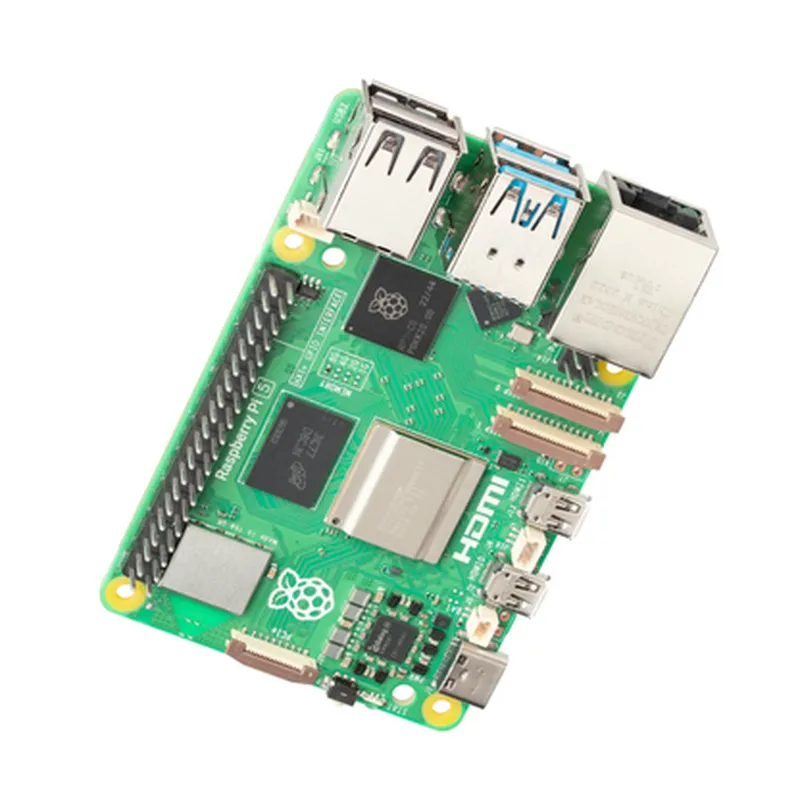
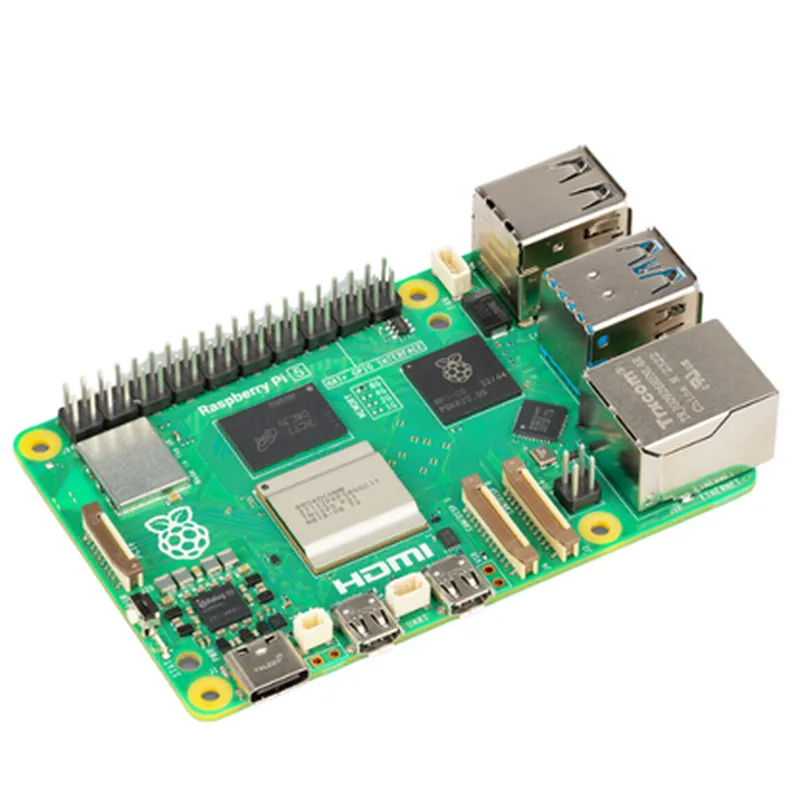
Raspberry Pi 5 Model 8GB RAM

Buy Now on Stufin

Dimensions

85 x 56 mm

Operating Temperature

0C to 50C

Power Supply

USB-C (5V, 3A)

GPIO

40-pin header (GPIO, I2C, SPI, UART, I2S)

Display

1x HDMI 2.0 (4K at 60Hz), 1x DSI display connector

Camera

1x Camera Serial Interface (CSI) connector

Storage

MicroSD card slot (up to 1TB)

Certifications and Compliance

The Raspberry Pi 5 Model 8GB RAM meets various certifications and compliance standards, including

CE

Conformit Europene (European Conformity)

FCC

Federal Communications Commission (USA)

RoHS

Restriction of Hazardous Substances (EU)

WEEE

Waste Electrical and Electronic Equipment (EU)

Conclusion

The Raspberry Pi 5 Model 8GB RAM offers a powerful and feature-rich platform for a wide range of applications, from DIY projects to industrial automation and IoT development. With its enhanced processing power, increased memory capacity, and improved connectivity, it is an ideal choice for demanding projects that require high performance, reliability, and versatility.

Pin Configuration

  • Raspberry Pi 5 Model 8GB RAM Pinout Guide
  • The Raspberry Pi 5 Model 8GB RAM is a powerful single-board computer featuring a 40-pin GPIO header, which provides a wide range of possibilities for connecting sensors, actuators, and other devices. Here's a detailed explanation of each pin, categorized by function:
  • Power Pins ( Pins 1-4, 17, and 38)
  • 1. 3.3V Power (Pin 1): Provides 3.3V power output to external devices.
  • 2. 5V Power (Pin 2): Provides 5V power output to external devices.
  • 3. Ground (Pin 3, 17, and 38): Provides a ground connection for external devices.
  • Digital I/O Pins (Pins 7-16, 18-25, and 32-39)
  • 4. GPIO 2 (Pin 7): General-purpose input/output pin, can be configured as an input or output.
  • 5. GPIO 3 (Pin 8): General-purpose input/output pin, can be configured as an input or output.
  • 6. GPIO 4 (Pin 9): General-purpose input/output pin, can be configured as an input or output.
  • 7. GPIO 5 (Pin 10): General-purpose input/output pin, can be configured as an input or output.
  • 8. GPIO 6 (Pin 11): General-purpose input/output pin, can be configured as an input or output.
  • 9. GPIO 7 (Pin 12): General-purpose input/output pin, can be configured as an input or output.
  • 10. GPIO 8 (Pin 13): General-purpose input/output pin, can be configured as an input or output.
  • 11. GPIO 9 (Pin 14): General-purpose input/output pin, can be configured as an input or output.
  • 12. GPIO 10 (Pin 15): General-purpose input/output pin, can be configured as an input or output.
  • 13. GPIO 11 (Pin 16): General-purpose input/output pin, can be configured as an input or output.
  • 14. GPIO 12 (Pin 18): General-purpose input/output pin, can be configured as an input or output.
  • 15. GPIO 13 (Pin 19): General-purpose input/output pin, can be configured as an input or output.
  • 16. GPIO 14 (Pin 20): General-purpose input/output pin, can be configured as an input or output.
  • 17. GPIO 15 (Pin 21): General-purpose input/output pin, can be configured as an input or output.
  • 18. GPIO 16 (Pin 22): General-purpose input/output pin, can be configured as an input or output.
  • 19. GPIO 17 (Pin 23): General-purpose input/output pin, can be configured as an input or output.
  • 20. GPIO 18 (Pin 24): General-purpose input/output pin, can be configured as an input or output.
  • 21. GPIO 19 (Pin 25): General-purpose input/output pin, can be configured as an input or output.
  • 22. GPIO 20 (Pin 32): General-purpose input/output pin, can be configured as an input or output.
  • 23. GPIO 21 (Pin 33): General-purpose input/output pin, can be configured as an input or output.
  • 24. GPIO 22 (Pin 34): General-purpose input/output pin, can be configured as an input or output.
  • 25. GPIO 23 (Pin 35): General-purpose input/output pin, can be configured as an input or output.
  • 26. GPIO 24 (Pin 36): General-purpose input/output pin, can be configured as an input or output.
  • 27. GPIO 25 (Pin 37): General-purpose input/output pin, can be configured as an input or output.
  • 28. GPIO 26 (Pin 39): General-purpose input/output pin, can be configured as an input or output.
  • UART Pins (Pins 8-10 and 32-33)
  • 29. TXD (Pin 8): UART transmit data pin, used for serial communication.
  • 30. RXD (Pin 10): UART receive data pin, used for serial communication.
  • 31. CTS (Pin 32): UART clear to send pin, used for serial communication flow control.
  • 32. RTS (Pin 33): UART request to send pin, used for serial communication flow control.
  • SPI Pins (Pins 19-21)
  • 33. SPI_MOSI (Pin 19): SPI master out slave in pin, used for SPI communication.
  • 34. SPI_MISO (Pin 20): SPI master in slave out pin, used for SPI communication.
  • 35. SPI_CLK (Pin 21): SPI clock pin, used for SPI communication.
  • I2C Pins (Pins 3 and 5)
  • 36. SDA (Pin 3): I2C data pin, used for I2C communication.
  • 37. SCL (Pin 5): I2C clock pin, used for I2C communication.
  • Camera Interface Pins (Pins 28-31)
  • 38. CAM_CLK (Pin 28): Camera clock pin, used for camera interface.
  • 39. CAM_D0 (Pin 29): Camera data 0 pin, used for camera interface.
  • 40. CAM_D1 (Pin 30): Camera data 1 pin, used for camera interface.
  • 41. CAM_D2 (Pin 31): Camera data 2 pin, used for camera interface.
  • HDMI and Audio Pins (Pins 34-40)
  • 42. HDMI_D2+ (Pin 34): HDMI data 2+ pin, used for HDMI output.
  • 43. HDMI_D2- (Pin 35): HDMI data 2- pin, used for HDMI output.
  • 44. HDMI_D1+ (Pin 36): HDMI data 1+ pin, used for HDMI output.
  • 45. HDMI_D1- (Pin 37): HDMI data 1- pin, used for HDMI output.
  • 46. HDMI_D0+ (Pin 38): HDMI data 0+ pin, used for HDMI output.
  • 47. HDMI_D0- (Pin 39): HDMI data 0- pin, used for HDMI output.
  • 48. Audio_Out (Pin 40): Audio output pin, used for analog audio output.
  • Additional Pins
  • 49. PWR_LOW (Pin 6): Power low indicator pin, used to indicate when the power supply voltage drops below 4.65V.
  • 50. RUN (Pin 26): Run pin, used to reset the Raspberry Pi or put it into a low-power state.
  • 51. Boot_Mode (Pin 27): Boot mode selection pin, used to select the boot mode (e.g., USB or SD card).
  • When connecting pins, it's essential to ensure the correct polarity and voltage levels to avoid damaging your Raspberry Pi or external devices. Always refer to the official Raspberry Pi documentation and datasheets for specific pin usage and configuration guidelines.
  • Connecting Pins:
  • When connecting pins, follow these general guidelines:
  • 1. Use a breadboard or a PCB with clearly labeled pins to avoid confusion.
  • 2. Use jumper wires or pin headers with the correct pin pitch (2.54mm for Raspberry Pi) to connect devices.
  • 3. Ensure the pinouts are correct and match the pin assignments listed above.
  • 4. Be cautious when handling the Raspberry Pi and external devices to avoid static electricity damage.
  • 5. Verify the voltage and current ratings of the devices and ensure they are within the recommended specifications.
  • 6. Use a multimeter or oscilloscope to debug connections and ensure correct signal levels.
  • Remember to always follow proper safety precautions when working with electronic components and ensure you have the necessary knowledge and experience before attempting complex projects.

Code Examples

Raspberry Pi 5 Model 8GB RAM
The Raspberry Pi 5 Model 8GB RAM is a powerful and compact single-board computer (SBC) that is ideal for a wide range of Internet of Things (IoT) applications. With its 8GB of RAM, quad-core Cortex-A72 CPU, and extensive peripheral capabilities, this board provides a robust platform for prototyping and developing innovative IoT projects.
Technical Specifications:
Processor: Broadcom BCM2711B0 quad-core Cortex-A72 CPU
 RAM: 8GB LPDDR4-2400 SDRAM
 Storage: MicroSD card slot
 Operating System: Raspberry Pi OS (based on Linux)
 Connectivity: Dual-band 802.11ac wireless LAN, Bluetooth 5.0, Gigabit Ethernet, USB 3.0, HDMI 2.0
 GPIO: 40-pin header with GPIO, I2C, SPI, UART, and I2S interfaces
Code Examples:
### Example 1: Reading Temperature and Humidity using DHT11 Sensor
This example demonstrates how to use the Raspberry Pi 5 Model 8GB RAM to read temperature and humidity data from a DHT11 sensor.
Hardware Requirements:
Raspberry Pi 5 Model 8GB RAM
 DHT11 temperature and humidity sensor
 Breadboard and jumper wires
Software Requirements:
Raspberry Pi OS (latest version)
 Python 3.x installed on the Raspberry Pi
 DHT11 library for Python (install using `pip install dht11`)
Code:
```python
import dht11
# Initialize the DHT11 sensor
dht_sensor = dht11.DHT11(pin=17)  # Pin 17 is used for data communication
while True:
    # Read temperature and humidity data from the sensor
    temperature = dht_sensor.read_temperature()
    humidity = dht_sensor.read_humidity()
# Print the data to the console
    print(f"Temperature: {temperature}C, Humidity: {humidity}%")
# Wait for 1 second before taking the next reading
    time.sleep(1)
```
### Example 2: Controlling an LED using GPIO and Python
This example demonstrates how to use the Raspberry Pi 5 Model 8GB RAM to control an LED using the GPIO interface and Python.
Hardware Requirements:
Raspberry Pi 5 Model 8GB RAM
 LED (any color)
 1 k resistor
 Breadboard and jumper wires
Software Requirements:
Raspberry Pi OS (latest version)
 Python 3.x installed on the Raspberry Pi
 RPi.GPIO library for Python (install using `pip install RPi.GPIO`)
Code:
```python
import RPi.GPIO as GPIO
# Set up the GPIO mode to BCM
GPIO.setmode(GPIO.BCM)
# Define the LED pin as an output
led_pin = 18
GPIO.setup(led_pin, GPIO.OUT)
try:
    while True:
        # Toggle the LED on and off
        GPIO.output(led_pin, GPIO.HIGH)
        time.sleep(0.5)
        GPIO.output(led_pin, GPIO.LOW)
        time.sleep(0.5)
except KeyboardInterrupt:
    # Clean up the GPIO resources
    GPIO.cleanup()
```
### Example 3: Streaming Video using Camera Module and OpenCV
This example demonstrates how to use the Raspberry Pi 5 Model 8GB RAM to capture and stream video using the Camera Module and OpenCV.
Hardware Requirements:
Raspberry Pi 5 Model 8GB RAM
 Raspberry Pi Camera Module
 MicroUSB camera cable
Software Requirements:
Raspberry Pi OS (latest version)
 Python 3.x installed on the Raspberry Pi
 OpenCV library for Python (install using `pip install opencv-python`)
Code:
```python
import cv2
# Initialize the camera
cap = cv2.VideoCapture(0)
while True:
    # Capture a frame from the camera
    ret, frame = cap.read()
# Convert the frame to grayscale
    gray = cv2.cvtColor(frame, cv2.COLOR_BGR2GRAY)
# Display the grayscale frame
    cv2.imshow('Grayscale Video', gray)
# Exit on key press
    if cv2.waitKey(1) & 0xFF == ord('q'):
        break
# Release the camera resources
cap.release()
cv2.destroyAllWindows()
```
These examples demonstrate the versatility and capability of the Raspberry Pi 5 Model 8GB RAM in various IoT applications. Whether it's reading sensor data, controlling peripherals, or streaming video, this SBC is an excellent choice for prototyping and developing innovative projects.