Stufin
Home Quick Cart Profile

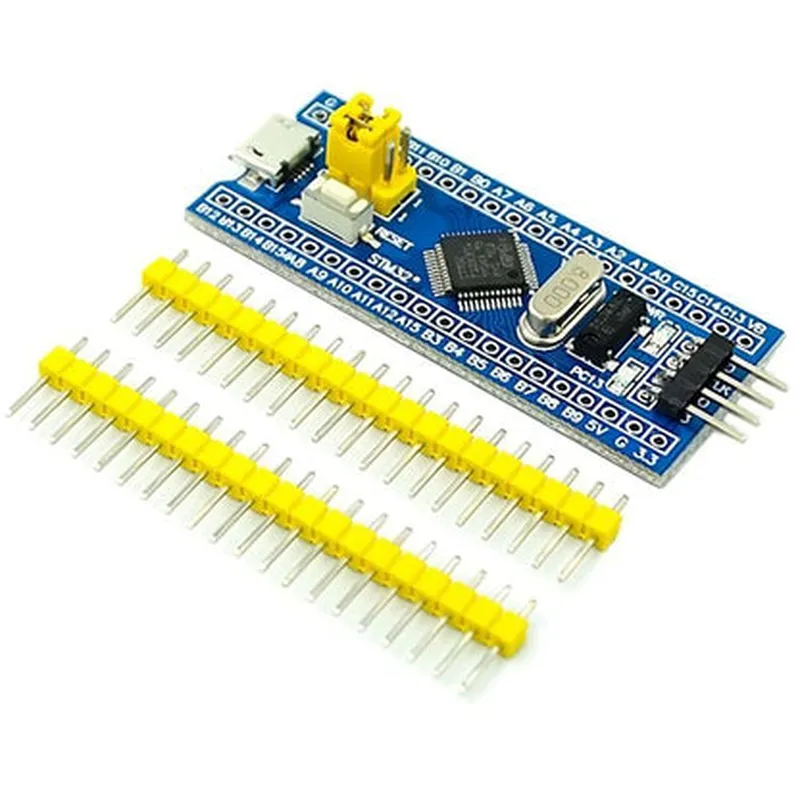
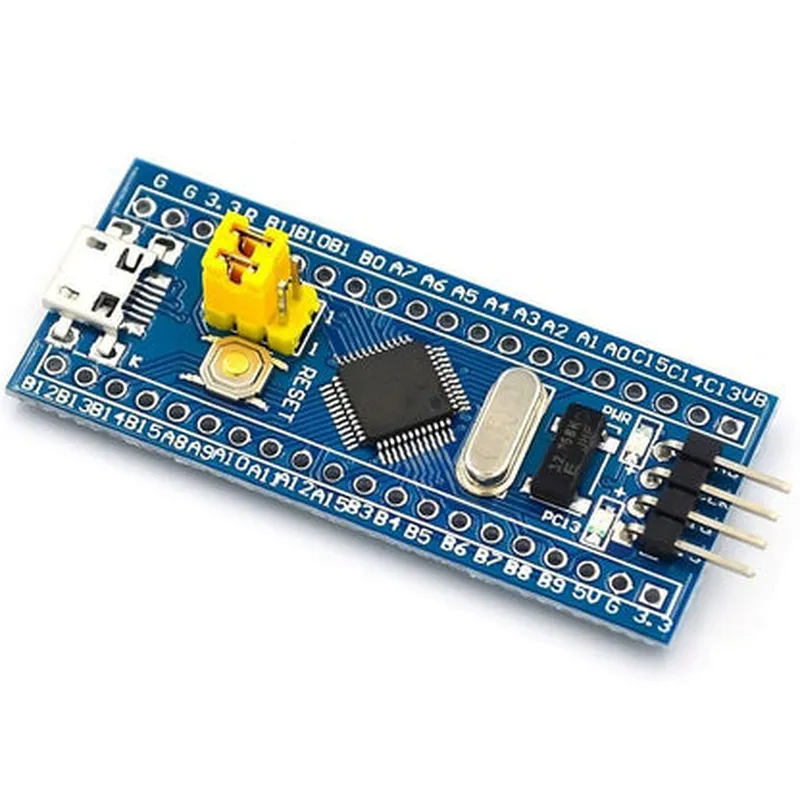
STM32F103C8T6 ARM Development Board

Buy Now on Stufin

Component Name

STM32F103C8T6 ARM Development Board

Overview

The STM32F103C8T6 ARM Development Board is a microcontroller-based development platform designed for prototyping and developing IoT projects. It is based on the STM32F103C8T6 microcontroller, a 32-bit ARM Cortex-M3 processor from STMicroelectronics. This board provides a versatile and feature-rich platform for developing a wide range of applications, including robotics, automation, and IoT devices.

Key Features

  • Microcontroller: STM32F103C8T6, a 32-bit ARM Cortex-M3 processor with a maximum clock speed of 72 MHz.
  • Flash Memory: 64 KB of flash memory for program storage.
  • SRAM: 20 KB of static RAM for data storage.
  • Interface: Multiple interfaces, including:

USART

2 ( UART, USART)

SPI

2

I2C1
I2S1

CAN

1

USB

1 (OTG or Device)

  • Analog-to-Digital Converter (ADC): 12-bit, 16-channel ADC with a conversion rate of up to 1 million samples per second.
  • Digital-to-Analog Converter (DAC): 2 x 12-bit DACs.
  • Timers: 7 timers (4 x 16-bit, 2 x 32-bit, and 1 x SysTick timer)
  • GPIO: 80 GPIO pins, with multiple pin multiplexing capabilities.
  • Operating Voltage: 2.0-3.6 V
  • Power Consumption: Low power consumption, with a sleep mode current of approximately 2 A.

Functionality

  • Robotics: Develop robotic platforms with sensors, actuators, and communication interfaces.
  • Automation: Implement automation systems for industrial or home automation applications.
  • IoT Devices: Design and develop IoT devices with Wi-Fi, Bluetooth, or Ethernet connectivity.
  • Sensor Integration: Integrate various sensors, such as temperature, humidity, and motion sensors, for data acquisition and processing.
  • Machine Learning: Develop machine learning-based applications using the onboard ADC and DAC peripherals.
The STM32F103C8T6 ARM Development Board is designed to provide a flexible and versatile platform for prototyping and developing IoT projects. It can be used for a wide range of applications, including

Development Tools

  • Keil Vision: A popular IDE for developing and debugging ARM-based applications.
  • IAR Embedded Workbench: A feature-rich IDE for developing and debugging embedded systems.
  • STMicroelectronics' STM32CubeMX: A graphical configuration tool for generating initialization code and configuring peripherals.
  • mbed: A free, open-source platform for developing IoT applications using C/C++.
The STM32F103C8T6 ARM Development Board is supported by a range of development tools, including

Benefits

  • High Performance: The STM32F103C8T6 microcontroller provides a high-performance processing platform for demanding applications.
  • Low Power Consumption: The board's low power consumption makes it suitable for battery-powered devices and IoT applications.
  • Rich Peripherals: The board's multiple interfaces and peripherals provide flexibility and versatility for a wide range of applications.
  • Ease of Use: The board is supported by a range of development tools and resources, making it accessible to both beginners and experienced developers.

Conclusion

The STM32F103C8T6 ARM Development Board is a powerful and versatile platform for developing IoT projects and prototyping embedded systems. Its rich peripherals, high performance, and low power consumption make it an ideal choice for a wide range of applications, from robotics and automation to IoT devices and machine learning-based projects.

Pin Configuration

  • STM32F103C8T6 ARM Development Board Pinout Guide
  • The STM32F103C8T6 ARM Development Board is a popular microcontroller board based on the STM32F103C8T6 microcontroller from STMicroelectronics. This board features a 32-bit ARM Cortex-M3 processor, 64 KB of flash memory, and 20 KB of SRAM. The board has a total of 37 pins, which are divided into several categories, including power pins, digital I/O pins, analog input pins, and communication interface pins.
  • Power Pins (7)
  • 1. VCC (Pin 1): +3.3V power supply pin. This pin is used to power the microcontroller and other components on the board.
  • 2. GND (Pin 2, 19, 36, and 37): Ground pins. These pins are used to connect the board to a common ground point.
  • 3. VBAT (Pin 30): Battery voltage pin. This pin is used to connect an external battery or power source.
  • 4. 3V3 (Pin 31): +3.3V regulated power output pin. This pin provides a stable 3.3V power supply.
  • 5. VREF+ (Pin 32): Voltage reference pin. This pin is used as a reference voltage for analog-to-digital conversions.
  • 6. VREF- (Pin 33): Voltage reference pin. This pin is used as a reference voltage for analog-to-digital conversions.
  • 7. NRST (Pin 34): Reset pin. This pin is used to reset the microcontroller when connected to a low logical level.
  • Digital I/O Pins (15)
  • 1. PA0 (Pin 3): Digital I/O pin. This pin can be used as a general-purpose input/output pin.
  • 2. PA1 (Pin 5): Digital I/O pin. This pin can be used as a general-purpose input/output pin.
  • 3. PA2 (Pin 7): Digital I/O pin. This pin can be used as a general-purpose input/output pin.
  • 4. PA3 (Pin 9): Digital I/O pin. This pin can be used as a general-purpose input/output pin.
  • 5. PA4 (Pin 11): Digital I/O pin. This pin can be used as a general-purpose input/output pin.
  • 6. PA5 (Pin 13): Digital I/O pin. This pin can be used as a general-purpose input/output pin.
  • 7. PA6 (Pin 15): Digital I/O pin. This pin can be used as a general-purpose input/output pin.
  • 8. PA7 (Pin 17): Digital I/O pin. This pin can be used as a general-purpose input/output pin.
  • 9. PA8 (Pin 20): Digital I/O pin. This pin can be used as a general-purpose input/output pin.
  • 10. PA9 (Pin 22): Digital I/O pin. This pin can be used as a general-purpose input/output pin.
  • 11. PA10 (Pin 24): Digital I/O pin. This pin can be used as a general-purpose input/output pin.
  • 12. PA11 (Pin 26): Digital I/O pin. This pin can be used as a general-purpose input/output pin.
  • 13. PA12 (Pin 28): Digital I/O pin. This pin can be used as a general-purpose input/output pin.
  • 14. PA13 (Pin 29): Digital I/O pin. This pin can be used as a general-purpose input/output pin.
  • 15. PA14 (Pin 35): Digital I/O pin. This pin can be used as a general-purpose input/output pin.
  • Analog Input Pins (5)
  • 1. ADC1_IN0 (Pin 4): Analog input pin 0. This pin can be used as an analog input for the ADC converter.
  • 2. ADC1_IN1 (Pin 6): Analog input pin 1. This pin can be used as an analog input for the ADC converter.
  • 3. ADC1_IN2 (Pin 8): Analog input pin 2. This pin can be used as an analog input for the ADC converter.
  • 4. ADC1_IN3 (Pin 10): Analog input pin 3. This pin can be used as an analog input for the ADC converter.
  • 5. ADC1_IN4 (Pin 12): Analog input pin 4. This pin can be used as an analog input for the ADC converter.
  • Communication Interface Pins (10)
  • 1. USART1_TX (Pin 14): USART1 transmit pin. This pin is used for serial communication using the USART1 interface.
  • 2. USART1_RX (Pin 16): USART1 receive pin. This pin is used for serial communication using the USART1 interface.
  • 3. USART2_TX (Pin 21): USART2 transmit pin. This pin is used for serial communication using the USART2 interface.
  • 4. USART2_RX (Pin 23): USART2 receive pin. This pin is used for serial communication using the USART2 interface.
  • 5. SPI1_SCK (Pin 25): SPI1 clock pin. This pin is used for serial communication using the SPI1 interface.
  • 6. SPI1_MISO (Pin 27): SPI1 master in-slave out pin. This pin is used for serial communication using the SPI1 interface.
  • 7. SPI1_MOSI (Pin 18): SPI1 master out-slave in pin. This pin is used for serial communication using the SPI1 interface.
  • 8. I2C1_SCL (Pin 38): I2C1 clock pin. This pin is used for serial communication using the I2C1 interface.
  • 9. I2C1_SDA (Pin 39): I2C1 data pin. This pin is used for serial communication using the I2C1 interface.
  • 10. CAN_RX (Pin 40): CAN receive pin. This pin is used for serial communication using the CAN interface.
  • CAN_TX (Pin 41): CAN transmit pin. This pin is used for serial communication using the CAN interface.
  • Connecting the Pins
  • When connecting the pins, make sure to use the correct polarity and voltage levels to avoid damaging the microcontroller or other components on the board. Here are some general guidelines to follow:
  • Digital I/O pins can be connected to external devices such as LEDs, buttons, and sensors using a suitable voltage level (typically 3.3V) and a current-limiting resistor.
  • Analog input pins can be connected to external analog devices such as potentiometers, thermistors, and photocells using a suitable voltage level (typically 3.3V) and a current-limiting resistor.
  • Communication interface pins can be connected to external devices such as serial terminals, USB-to-UART bridges, and other microcontrollers using a suitable communication protocol and voltage level.
  • Power pins should be connected to a stable power source with a suitable voltage level (typically 3.3V or 5V) and a suitable current rating.
  • Remember to consult the datasheet and user manual for the STM32F103C8T6 microcontroller and any external devices you are using to ensure compatible voltage levels, current ratings, and communication protocols.

Code Examples

STM32F103C8T6 ARM Development Board Documentation
Overview
The STM32F103C8T6 is a popular ARM-based microcontroller development board, part of the STM32 family of 32-bit microcontrollers from STMicroelectronics. This board is widely used in IoT projects, robotics, and embedded system applications due to its high performance, low power consumption, and rich peripheral set.
Key Features
Cortex-M3 32-bit RISC processor with 64 KB of Flash memory and 20 KB of SRAM
 Operating frequency up to 72 MHz
 12-bit ADC with 16 channels
 2 x 12-bit DAC
 3 x USART, 2 x UART, 2 x SPI, 2 x I2C, 1 x I2S, 1 x CAN
 3 x Timers, 1 x Watchdog timer, 1 x RTC
 USB 2.0 FS device, SD/MMC interface
 Power management: 2.0 V to 3.6 V power supply, low power modes
Code Examples
### Example 1: Blinking LED using GPIO
In this example, we will use the GPIO peripheral to blink an LED connected to pin PA5.
Hardware Requirements
STM32F103C8T6 development board
 LED
 Resistor (1 k)
 Breadboard and jumper wires
Software Requirements
Keil Vision IDE or STM32CubeMX
 ARM GCC compiler
Code
```c
#include "stm32f10x.h"
int main(void)
{
    // Initialize GPIOA peripheral
    RCC_AHBPeriphClockCmd(RCC_AHBPeriph_GPIOA, ENABLE);
// Configure PA5 as output
    GPIO_InitTypeDef GPIO_InitStruct;
    GPIO_InitStruct.GPIO_Pin = GPIO_Pin_5;
    GPIO_InitStruct.GPIO_Mode = GPIO_Mode_Out;
    GPIO_InitStruct.GPIO_Speed = GPIO_Speed_2MHz;
    GPIO_Init(GPIOA, &GPIO_InitStruct);
while (1)
    {
        // Set PA5 high (LED on)
        GPIO_SetBits(GPIOA, GPIO_Pin_5);
        delay(500); // 500 ms delay
// Set PA5 low (LED off)
        GPIO_ResetBits(GPIOA, GPIO_Pin_5);
        delay(500); // 500 ms delay
    }
}
void delay(uint32_t time)
{
    volatile uint32_t i;
    for (i = 0; i < time; i++);
}
```
Explanation
We first enable the GPIOA peripheral clock using the `RCC_AHBPeriphClockCmd` function.
 We then configure PA5 as an output using the `GPIO_Init` function.
 In the main loop, we toggle the state of PA5 using the `GPIO_SetBits` and `GPIO_ResetBits` functions, which control the LED connected to this pin.
 The `delay` function is used to introduce a 500 ms delay between each toggle operation.
### Example 2: UART Communication using USART1
In this example, we will use the USART1 peripheral to send and receive data over the serial interface.
Hardware Requirements
STM32F103C8T6 development board
 Serial terminal software (e.g., PuTTY)
 USB-to-TTL serial adapter (e.g., FT232R)
Software Requirements
Keil Vision IDE or STM32CubeMX
 ARM GCC compiler
Code
```c
#include "stm32f10x.h"
int main(void)
{
    // Initialize USART1 peripheral
    RCC_APB2PeriphClockCmd(RCC_APB2Periph_USART1, ENABLE);
// Configure USART1 as asynchronous mode
    USART_InitTypeDef USART_InitStruct;
    USART_InitStruct.USART_BaudRate = 9600;
    USART_InitStruct.USART_WordLength = USART_WordLength_8b;
    USART_InitStruct.USART_StopBits = USART_StopBits_1;
    USART_InitStruct.USART_Parity = USART_Parity_None;
    USART_InitStruct.USART_Mode = USART_Mode_Tx | USART_Mode_Rx;
    USART_Init(USART1, &USART_InitStruct);
while (1)
    {
        char buff[10];
// Receive data from serial terminal
        USART_ReceiveData(USART1, (uint16_t)buff);
// Process received data
        printf("Received: %s
", buff);
// Send response back to serial terminal
        USART_SendData(USART1, (uint16_t )"Hello, STM32!
");
        delay(1000); // 1 second delay
    }
}
void delay(uint32_t time)
{
    volatile uint32_t i;
    for (i = 0; i < time; i++);
}
```
Explanation
We first enable the USART1 peripheral clock using the `RCC_APB2PeriphClockCmd` function.
 We then configure USART1 as an asynchronous mode using the `USART_Init` function.
 In the main loop, we receive data from the serial terminal using the `USART_ReceiveData` function and process it.
 We then send a response back to the serial terminal using the `USART_SendData` function.
 The `delay` function is used to introduce a 1 second delay between each transmission.
These examples demonstrate the basic usage of the STM32F103C8T6 development board's GPIO and USART peripherals. You can build upon these examples to create more complex IoT projects using this board.