All specifications are subject to change without notice. Please refer to the manufacturer's datasheet for the most up-to-date information.


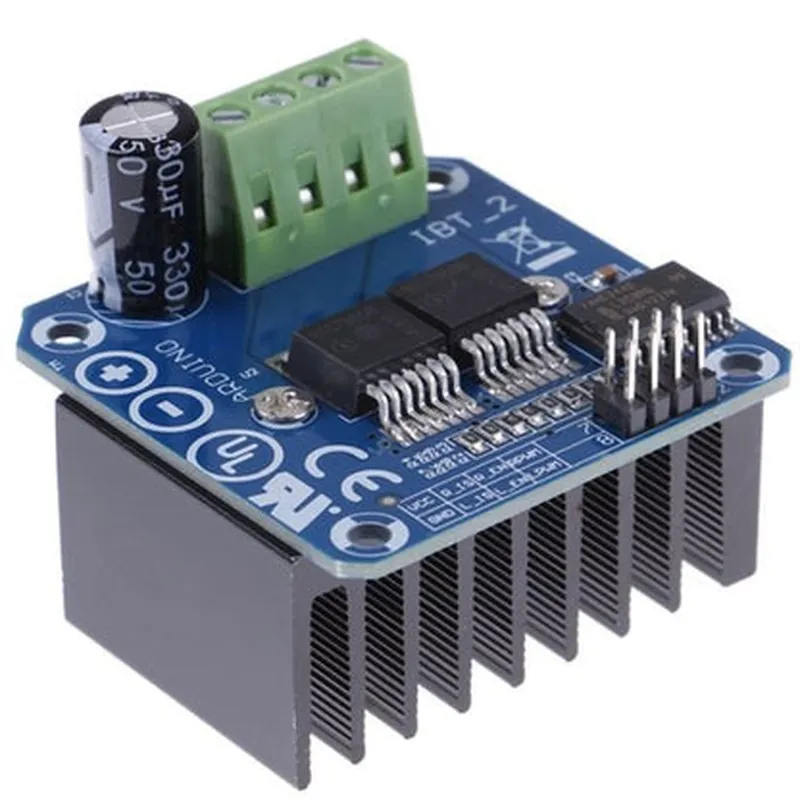
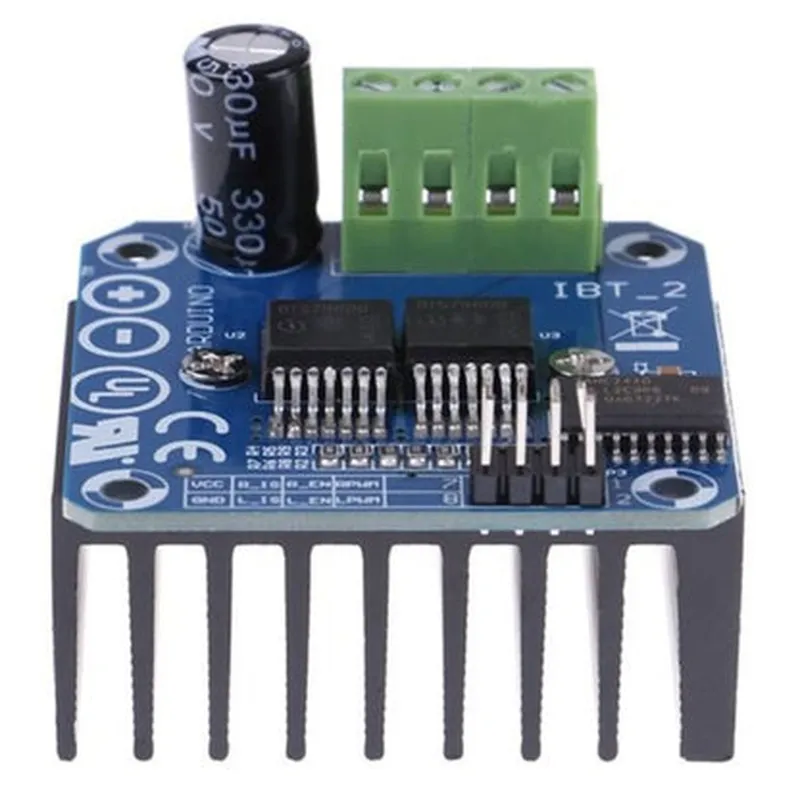
All specifications are subject to change without notice. Please refer to the manufacturer's datasheet for the most up-to-date information.
BTS7960B 43A H-Bridge Motor Driver DocumentationOverviewThe BTS7960B is a high-current, high-performance H-bridge motor driver IC designed for driving DC motors, solenoids, and other inductive loads. It is capable of handling high currents up to 43A and is suitable for use in a wide range of applications, including robotics, electric vehicles, and industrial automation.Pinout and Functional DescriptionThe BTS7960B has a 24-pin package and the following pinout:VCC (pins 1, 24): Power supply voltage (5V to 27V)
GND (pins 2, 3, 4, 23): Ground
IN1 (pin 5), IN2 (pin 6): Input control signals (logic level)
EN (pin 7): Enable input (active high)
RBOOT (pin 8): Bootstrap diode connection
LB (pin 9), HB (pin 10): Low-side and high-side driver outputs
SENSE (pin 11): Current sense output
VSENSE (pin 12): Voltage sense input
THERMAL (pin 13): Overtemperature detection output
DIAG (pin 14): Diagnostic output
NC (pins 15-22): No connectionExample Code### Example 1: Basic Motor Control with ArduinoThis example demonstrates how to use the BTS7960B to control a DC motor using an Arduino board.```cpp
const int IN1 = 2; // Input control signal 1
const int IN2 = 3; // Input control signal 2
const int EN = 4; // Enable inputvoid setup() {
pinMode(IN1, OUTPUT);
pinMode(IN2, OUTPUT);
pinMode(EN, OUTPUT);
}void loop() {
// Forward direction
digitalWrite(IN1, HIGH);
digitalWrite(IN2, LOW);
digitalWrite(EN, HIGH);
delay(1000);// Reverse direction
digitalWrite(IN1, LOW);
digitalWrite(IN2, HIGH);
digitalWrite(EN, HIGH);
delay(1000);// Stop motor
digitalWrite(EN, LOW);
delay(1000);
}
```### Example 2: PWM Motor Control with ESP32This example demonstrates how to use the BTS7960B to control a DC motor using Pulse Width Modulation (PWM) with an ESP32 board.```cpp
const int IN1 = 18; // Input control signal 1
const int IN2 = 19; // Input control signal 2
const int EN = 23; // Enable input
const int PWM_CHANNEL = 0; // PWM channelvoid setup() {
pinMode(IN1, OUTPUT);
pinMode(IN2, OUTPUT);
pinMode(EN, OUTPUT);
ledcSetup(PWM_CHANNEL, 5000, 10); // Set up PWM channel
ledcAttachPin(EN, PWM_CHANNEL); // Attach PWM channel to enable pin
}void loop() {
// Set motor speed using PWM
ledcWrite(PWM_CHANNEL, 512); // 50% duty cycle
digitalWrite(IN1, HIGH);
digitalWrite(IN2, LOW);
delay(1000);ledcWrite(PWM_CHANNEL, 1023); // 100% duty cycle
digitalWrite(IN1, HIGH);
digitalWrite(IN2, LOW);
delay(1000);ledcWrite(PWM_CHANNEL, 0); // 0% duty cycle (stop motor)
digitalWrite(IN1, LOW);
digitalWrite(IN2, LOW);
delay(1000);
}
```### Example 3: Current Sensing and Overcurrent Protection with Raspberry PiThis example demonstrates how to use the BTS7960B's current sense output to monitor motor current and implement overcurrent protection using a Raspberry Pi.```python
import RPi.GPIO as GPIO
import timeGPIO.setmode(GPIO.BCM)IN1 = 17 # Input control signal 1
IN2 = 23 # Input control signal 2
EN = 24 # Enable input
SENSE = 25 # Current sense outputGPIO.setup(IN1, GPIO.OUT)
GPIO.setup(IN2, GPIO.OUT)
GPIO.setup(EN, GPIO.OUT)
GPIO.setup(SENSE, GPIO.IN)def read_current_sense():
# Read current sense output (approx. 100mV/A)
current = (GPIO.input(SENSE) 3.3) / 100
return currentwhile True:
# Set motor direction and enable
GPIO.output(IN1, GPIO.HIGH)
GPIO.output(IN2, GPIO.LOW)
GPIO.output(EN, GPIO.HIGH)# Monitor motor current
current = read_current_sense()
if current > 10: # Overcurrent threshold (10A)
print("Overcurrent detected! Stopping motor.")
GPIO.output(EN, GPIO.LOW)
time.sleep(1)
else:
print("Motor current:", current, "A")time.sleep(0.1)
```Notes and ConsiderationsThe BTS7960B requires a bootstrap capacitor (typically 100nF to 1uF) connected between the RBOOT pin and the high-side driver output (HB) to ensure proper operation.
The EN input should be driven high to enable the motor driver. Driving it low will disable the driver and shut down the motor.
The current sense output (SENSE) can be used to monitor motor current and implement overcurrent protection. The output voltage is approximately 100mV/A.
The BTS7960B has built-in overtemperature protection, which can be monitored using the THERMAL output. When the junction temperature exceeds 170C, the THERMAL output will go low.
Always follow proper PCB design and layout guidelines to ensure reliable operation and minimize electromagnetic interference (EMI).
Consult the datasheet and application notes for more detailed information on using the BTS7960B in your specific application.