12V DC


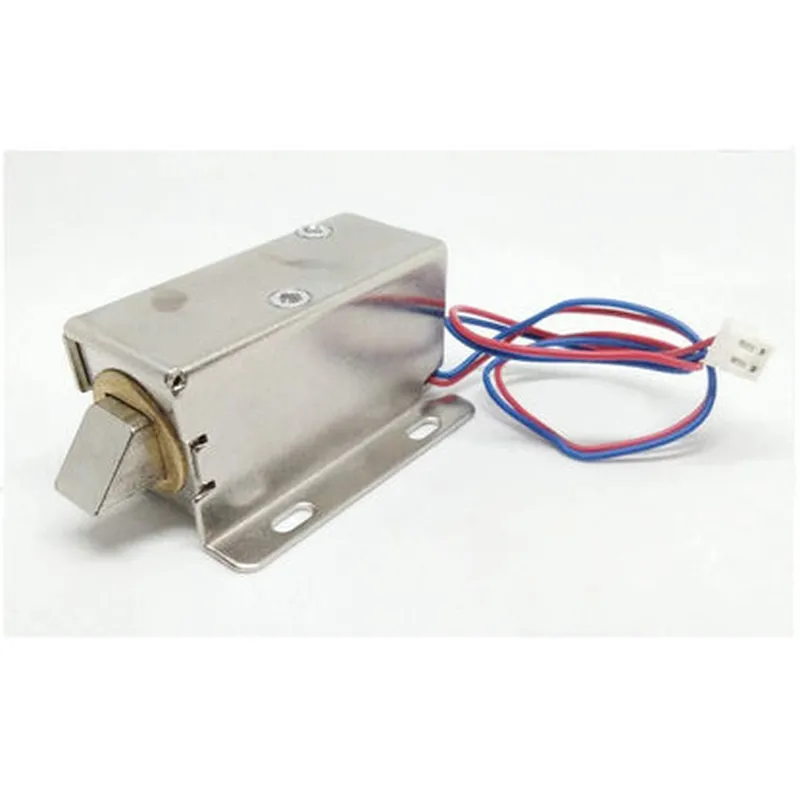

12V DC
1A (max)
10N.m (min)
10ms (typ)
12W (max)
-20C to 60C
-40C to 80C
60mm x 40mm x 30mm (L x W x H)
200g
Application Notes
The 12V DC Solenoid for Electric Door Lock is suitable for use in a wide range of applications, including access control systems, security systems, automation systems, and more.
The device should be installed and operated in accordance with the manufacturer's instructions and local safety guidelines.
The solenoid must be used in conjunction with a suitable power supply and control system, ensuring reliable and consistent operation.
Safety Precautions
The device should be handled with care, avoiding excessive force or vibration, which may damage the internal components.
Ensure the solenoid is installed in a well-ventilated area, away from flammable materials and ignition sources.
Avoid exposing the device to extreme temperatures, humidity, or moisture, which may affect its performance and reliability.
By following the guidelines and specifications outlined in this documentation, the 12V DC Solenoid for Electric Door Lock can be safely and effectively integrated into various applications, providing reliable and efficient door lock control.
12V DC Solenoid for Electric Door Lock DocumentationOverviewThe 12V DC Solenoid for Electric Door Lock is a widely used component in IoT projects that require electronic door locking mechanisms. This solenoid is designed to operate at 12V DC and is commonly used in access control systems, home automation, and security systems.Pinout and DimensionsThe solenoid has two pins:Positive (VCC): 12V DC input
Negative (GND): Ground connectionThe solenoid's dimensions are typically:Length: 60mm
Width: 30mm
Height: 40mmOperating CharacteristicsVoltage: 12V DC
Current: 1A (max)
Power: 12W (max)
Operating Temperature: -20C to 70C
Door Locking/Unloading Time: 1-2 secondsExample 1: Basic Door Lock Control using ArduinoIn this example, we'll demonstrate how to control the solenoid using an Arduino board to lock and unlock a door.```c
const int solenoidPin = 2; // Pin 2 for solenoid controlvoid setup() {
pinMode(solenoidPin, OUTPUT);
}void loop() {
// Lock the door (activate the solenoid)
digitalWrite(solenoidPin, HIGH);
delay(1000); // Hold the door locked for 1 second// Unlock the door (de-activate the solenoid)
digitalWrite(solenoidPin, LOW);
delay(1000); // Hold the door unlocked for 1 second
}
```Example 2: Door Lock Control using Raspberry Pi (Python)In this example, we'll demonstrate how to control the solenoid using a Raspberry Pi board and Python programming language.```python
import RPi.GPIO as GPIO
import timeGPIO.setmode(GPIO.BCM)
solenoid_pin = 17 # Pin 17 for solenoid control
GPIO.setup(solenoid_pin, GPIO.OUT)while True:
# Lock the door (activate the solenoid)
GPIO.output(solenoid_pin, GPIO.HIGH)
time.sleep(1) # Hold the door locked for 1 second# Unlock the door (de-activate the solenoid)
GPIO.output(solenoid_pin, GPIO.LOW)
time.sleep(1) # Hold the door unlocked for 1 second
```Example 3: Integration with a Home Automation System (Node-RED)In this example, we'll demonstrate how to integrate the solenoid with a home automation system using Node-RED.Node-RED Flow
```json
[{"id":"lock_door","type":"rpi-gpio out","z":"b0770513.344f","name":"","pin":"17","state":"on","detect":"1","x":230,"y":140,"wires":[]},
{"id":"unlock_door","type":"rpi-gpio out","z":"b0770513.344f","name":"","pin":"17","state":"off","detect":"1","x":230,"y":200,"wires":[]}][{"id":"lock_button","type":"ui_button","z":"b0770513.344f","name":"","group":"Automation","order":0,"width":0,"height":0,"passthru":true,"label":"Lock","tooltip":"","color":"","bgcolor":"","icon":"","payload":"lock","x":130,"y":140,"wires":[["lock_door"]]},
{"id":"unlock_button","type":"ui_button","z":"b0770513.344f","name":"","group":"Automation","order":0,"width":0,"height":0,"passthru":true,"label":"Unlock","tooltip":"","color":"","bgcolor":"","icon":"","payload":"unlock","x":130,"y":200,"wires":[["unlock_door"]]}]
```In this example, we create two UI buttons in Node-RED, "Lock" and "Unlock", which control the solenoid accordingly.Safety PrecautionsAlways ensure the solenoid is properly connected to a 12V DC power source and a suitable switching device (e.g., transistor or relay) to avoid overheating or electrical shock.
Use proper electrical insulation and follow safety guidelines when working with electrical components.TroubleshootingVerify proper voltage supply and connections to the solenoid.
Check for any signs of overheating or burned components.
Consult the datasheet or manufacturer's documentation for specific troubleshooting guidelines.By following these examples and guidelines, you can effectively integrate the 12V DC Solenoid for Electric Door Lock into your IoT projects, ensuring secure and reliable door locking mechanisms.