Stufin
Home Quick Cart Profile

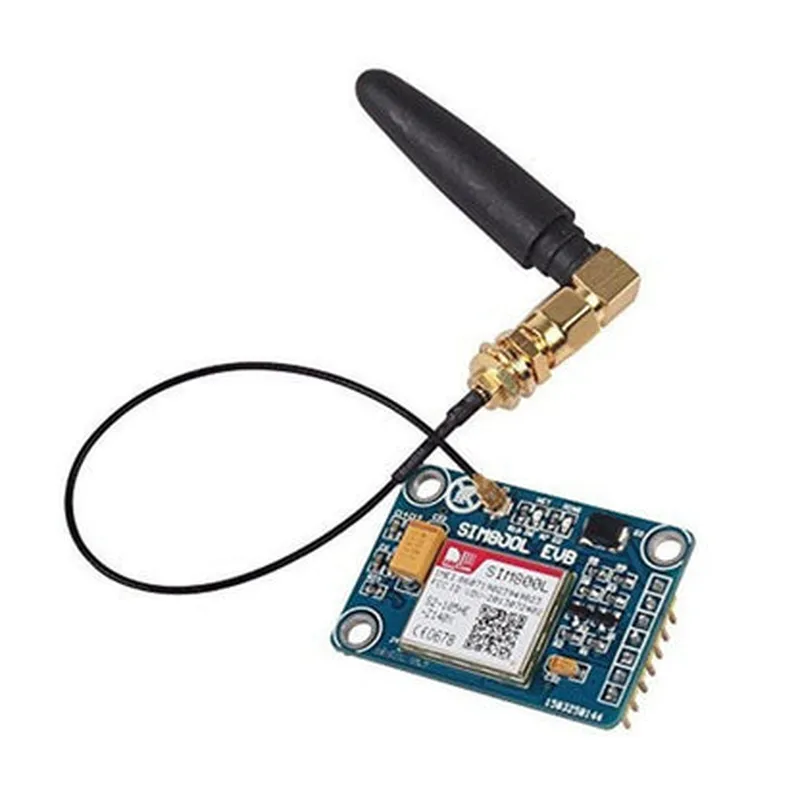
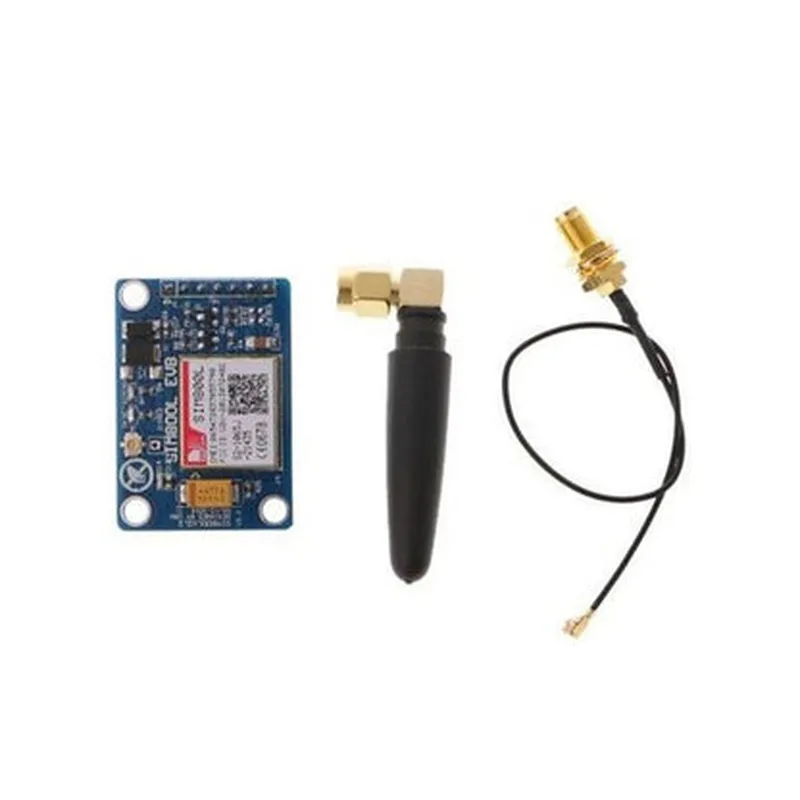
SIM800L V2 GSM GPRS Module

Buy Now on Stufin

Component Name

SIM800L V2 GSM GPRS Module

Overview

The SIM800L V2 GSM GPRS Module is a compact, quad-band GSM/GPRS module designed for use in a wide range of Internet of Things (IoT) applications. This module is based on the SIM800L chip from SIMCom, a leading provider of wireless communication modules. The SIM800L V2 module offers a robust and reliable solution for adding wireless connectivity to IoT devices, enabling them to communicate with the outside world using cellular networks.

Functionality

The SIM800L V2 GSM GPRS Module provides the following functionalities
GSM/GPRS ConnectivityThe module allows IoT devices to connect to cellular networks, enabling them to send and receive data, make voice calls, and send SMS messages.
Quad-Band SupportThe module supports four frequency bands, allowing it to operate on various cellular networks worldwide, including 850MHz, 900MHz, 1800MHz, and 1900MHz.

Data Transmission

The module supports GPRS Class 10 data transmission, with a maximum upload speed of 85.6 kbps and a maximum download speed of 107.2 kbps.

Voice Calls

The module supports making and receiving voice calls, allowing IoT devices to communicate with users and other devices.

SMS Messaging

The module supports sending and receiving SMS messages, enabling IoT devices to send notifications, receive commands, and interact with users.

GPIO Interface

The module provides a GPIO interface, allowing it to interact with other components and peripherals, such as sensors, displays, and microcontrollers.

Key Features

Small Form Factor

The SIM800L V2 module is compact, measuring only 24.4mm x 24.4mm x 3.2mm, making it ideal for use in space-constrained IoT applications.

Low Power Consumption

The module has a low power consumption, typically around 1.5mA in idle mode, making it suitable for battery-powered IoT devices.

UART and USB Interfaces

The module provides both UART and USB interfaces, allowing it to communicate with microcontrollers and PCs.

SIM Card Slot

The module has a built-in SIM card slot, making it easy to install and replace SIM cards.

Antenna Interface

The module has an antenna interface, supporting both internal and external antennas.

Operating Temperature

The module operates over a temperature range of -40C to +85C, making it suitable for use in a wide range of IoT applications.

Applications

The SIM800L V2 GSM GPRS Module is suitable for use in a variety of IoT applications, including

Remote Monitoring

The module can be used to enable remote monitoring applications, such as tracking devices, industrial automation, and remote sensing.

M2M CommunicationThe module can be used to enable machine-to-machine (M2M) communication, allowing devices to communicate with each other and with the cloud.

IoT Devices

The module can be used in IoT devices, such as smart home appliances, wearables, and automotive systems.

GPS Tracking

The module can be used in conjunction with GPS modules to enable location-based services and tracking applications.

Ordering Information

Part Number

SIM800L V2

Package

LCC (Leadless Chip Carrier)

RoHS Compliance

Yes

Operating Frequency

Quad-band (850MHz, 900MHz, 1800MHz, 1900MHz)

Documentation

Datasheet

SIM800L V2 GSM GPRS Module Datasheet (PDF)

User Manual

SIM800L V2 GSM GPRS Module User Manual (PDF)

Application Notes

SIM800L V2 GSM GPRS Module Application Notes (PDF)

Note

The documentation and specifications may vary depending on the manufacturer and supplier.

Pin Configuration

  • SIM800L V2 GSM GPRS Module Pinout Explanation
  • The SIM800L V2 GSM GPRS Module is a powerful and compact module that enables wireless communication for IoT applications. This documentation provides a detailed explanation of each pin and how to connect them.
  • Pinout Structure:
  • The SIM800L V2 module has a total of 24 pins, arranged in two rows of 12 pins each. The pins are labeled on the top and bottom of the module, respectively.
  • Top Row ( Pins 1-12 ):
  • 1. VCC (Power Supply): This pin is used to supply power to the module. A voltage between 3.4V to 4.5V is recommended.
  • 2. GND (Ground): This is the ground pin, used to connect the module to a common ground.
  • 3. TXD (Transmit Data): This pin is used to transmit data from the microcontroller to the SIM800L module.
  • 4. RXD (Receive Data): This pin is used to receive data from the SIM800L module to the microcontroller.
  • 5. PWRKEY (Power Key): This pin is used to control the power on/off state of the module. A high logic level (3.3V) turns the module on, while a low logic level (0V) turns it off.
  • 6. RST (Reset): This pin is used to reset the module. A low logic level (0V) resets the module, while a high logic level (3.3V) releases the reset state.
  • 7. SLEEP (Sleep Mode): This pin is used to put the module into sleep mode. A low logic level (0V) puts the module into sleep mode, while a high logic level (3.3V) wakes it up.
  • 8. RI (Ring Indicator): This pin is used to indicate the receipt of an incoming call or SMS.
  • 9. DTR (Data Terminal Ready): This pin is used to indicate the readiness of the module to transmit data.
  • 10. DSR (Data Set Ready): This pin is used to indicate the readiness of the module to receive data.
  • 11. DCD (Data Carrier Detect): This pin is used to detect the presence of a data carrier.
  • 12. CTS (Clear to Send): This pin is used to indicate that the module is ready to send data.
  • Bottom Row ( Pins 13-24 ):
  • 13. VRTC (RTC Power): This pin is used to supply power to the Real-Time Clock (RTC).
  • 14. VIO (IO Voltage): This pin is used to select the voltage for the digital IO pins (3.3V or 1.8V).
  • 15. SIM VCC (SIM Card Power): This pin is used to supply power to the SIM card.
  • 16. SIM_CLK (SIM Card Clock): This pin is used to provide a clock signal to the SIM card.
  • 17. SIM_IO (SIM Card IO): This pin is used for data exchange with the SIM card.
  • 18. MICP (Microphone Positive): This pin is connected to the positive terminal of the microphone.
  • 19. MICN (Microphone Negative): This pin is connected to the negative terminal of the microphone.
  • 20. SPKP (Speaker Positive): This pin is connected to the positive terminal of the speaker.
  • 21. SPKN (Speaker Negative): This pin is connected to the negative terminal of the speaker.
  • 22. ANT (Antenna): This pin is connected to an external antenna for improved signal reception.
  • 23. Reserve (Reserved Pin): This pin is reserved for future use and should not be connected.
  • 24. GND (Ground): This is another ground pin, used to connect the module to a common ground.
  • Connection Structure:
  • When connecting the SIM800L V2 module to a microcontroller or other components, ensure that the connections are made according to the following structure:
  • Power Supply: Connect VCC to a 3.4V to 4.5V power source, and GND to a common ground.
  • UART Connection: Connect TXD to the microcontroller's RX pin, and RXD to the microcontroller's TX pin.
  • Reset and Power Control: Connect RST to a reset button or a logic signal, and PWRKEY to a power control signal (e.g., a logic signal from a microcontroller).
  • SIM Card Interface: Connect SIM VCC to a 1.8V or 3.3V power source, SIM_CLK to a clock signal, and SIM_IO to the SIM card's IO pins.
  • Audio Interface: Connect MICP to the microphone's positive terminal, MICN to the microphone's negative terminal, SPKP to the speaker's positive terminal, and SPKN to the speaker's negative terminal.
  • Antenna Connection: Connect ANT to an external antenna for improved signal reception.
  • Remember to follow proper electromagnetic interference (EMI) and electromagnetic compatibility (EMC) guidelines when designing your PCB or connecting the module to other components.

Code Examples

SIM800L V2 GSM GPRS Module Documentation
Overview
The SIM800L V2 is a quad-band GSM/GPRS module that supports GSM850, EGSM900, DCS1800, and PCS1900 frequencies. It is a popular choice for IoT projects that require cellular connectivity. This module is compatible with a wide range of microcontrollers and can be used for various applications, including SMS, voice calls, and data transmission.

Pinout
The SIM800L V2 module has a total of 24 pins, with the following pinout:
| Pin | Description |
| --- | --- |
| 1 | VBAT (Battery Power) |
| 2 | VCC (Power Supply) |
| 3 | GND (Ground) |
| 4 | TXD (Transmit Data) |
| 5 | RXD (Receive Data) |
| 6 | RTS (Request to Send) |
| 7 | CTS (Clear to Send) |
| 8 | DTR (Data Terminal Ready) |
| 9 | DSR (Data Set Ready) |
| 10 | RI (Ring Indicator) |
| 11 | VIO (Voltage Input/Output) |
| 12-24 | GPIO (General Purpose Input/Output) |
Communication Protocols
The SIM800L V2 module supports the following communication protocols:
GSM 07.07 and 07.05 (SMS)
 GSM 07.10 (Voice Call)
 TCP/IP (Data Transmission)
Code Examples
### Example 1: Sending SMS using Arduino
In this example, we will use the SIM800L V2 module to send an SMS using an Arduino board.
Hardware Requirements:
Arduino Uno or compatible board
 SIM800L V2 module
 SIM card with a valid phone number
 Breadboard and jumper wires
Software Requirements:
Arduino IDE (version 1.8.x or later)
Code:
```cpp
#include <SoftwareSerial.h>
#define SIM800_TX_PIN 10
#define SIM800_RX_PIN 11
SoftwareSerial sim800(SIM800_TX_PIN, SIM800_RX_PIN);
void setup() {
  Serial.begin(9600);
  sim800.begin(9600);
// Wait for the module to initialize
  delay(1000);
// Check if the module is ready
  sim800.println("AT");
  delay(1000);
  while (!sim800.available());
  String response = sim800.readStringUntil('
');
  if (response.indexOf("OK") != -1) {
    Serial.println("SIM800L V2 module is ready");
  } else {
    Serial.println("SIM800L V2 module not responding");
    return;
  }
// Send SMS
  sim800.println("AT+CMGF=1");
  delay(1000);
  sim800.println("AT+CMGS=""+1234567890""");
  delay(1000);
  sim800.println("Hello from SIM800L V2!");
  delay(1000);
  sim800.println((char)26);
  delay(1000);
}
void loop() {
  // Nothing to do here
}
```
### Example 2: Making a Voice Call using Python
In this example, we will use the SIM800L V2 module to make a voice call using a Raspberry Pi board and Python.
Hardware Requirements:
Raspberry Pi (any model)
 SIM800L V2 module
 SIM card with a valid phone number
 Breadboard and jumper wires
Software Requirements:
Raspbian OS (version 10 or later)
 Python 3.x
Code:
```python
import serial
# Initialize the serial connection
ser = serial.Serial('/dev/ttyUSB0', 9600, timeout=1)
# Wait for the module to initialize
ser.write(b'AT
')
response = ser.readline()
if b'OK' in response:
    print("SIM800L V2 module is ready")
else:
    print("SIM800L V2 module not responding")
    exit()
# Make a voice call
ser.write(b'ATD+1234567890;
')
response = ser.readline()
if b'OK' in response:
    print("Call connected")
else:
    print("Call failed")
```
### Example 3: HTTP GET Request using MicroPython
In this example, we will use the SIM800L V2 module to send an HTTP GET request using a MicroPython board, such as the ESP32 or ESP8266.
Hardware Requirements:
MicroPython board (ESP32 or ESP8266)
 SIM800L V2 module
 SIM card with a valid phone number
 Breadboard and jumper wires
Software Requirements:
MicroPython firmware (version 1.1 or later)
Code:
```python
import machine
import urequests
# Initialize the serial connection
uart = machine.UART(1, 9600)
# Wait for the module to initialize
uart.write(b'AT
')
response = uart.readline()
if b'OK' in response:
    print("SIM800L V2 module is ready")
else:
    print("SIM800L V2 module not responding")
    exit()
# Set up the GPRS connection
uart.write(b'AT+SAPBR=3,1,"CONTYPE","GPRS"
')
response = uart.readline()
if b'OK' in response:
    print("GPRS connection established")
else:
    print("GPRS connection failed")
    exit()
# Send an HTTP GET request
response = urequests.get('http://example.com')
print(response.text)
# Close the GPRS connection
uart.write(b'AT+SAPBR=0,1
')
```
These code examples demonstrate the basic functionality of the SIM800L V2 module. You can use these examples as a starting point for your IoT projects that require cellular connectivity.