

Stufin
Home Quick Cart Profile

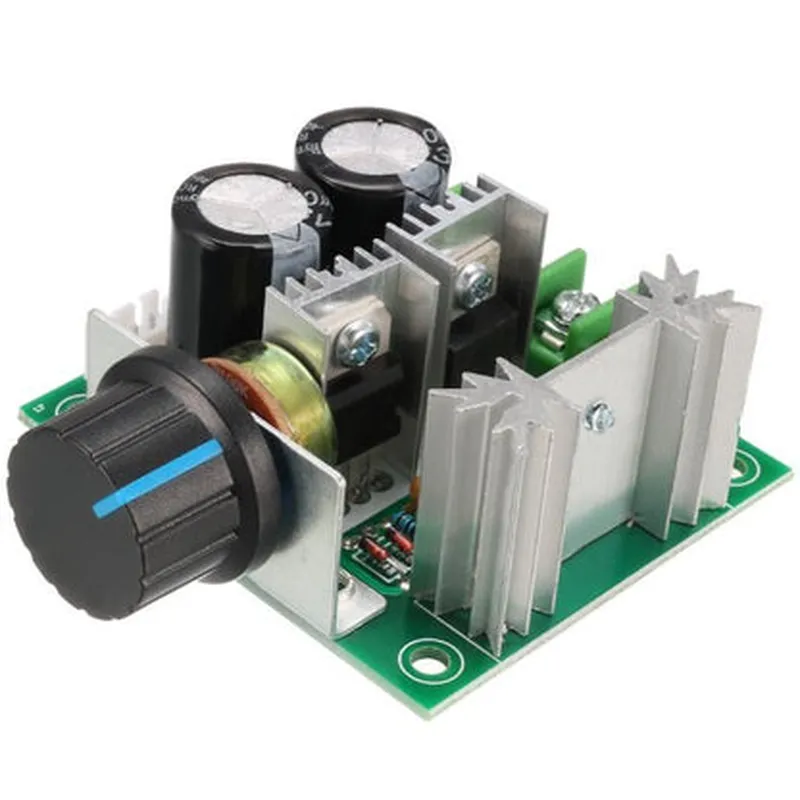
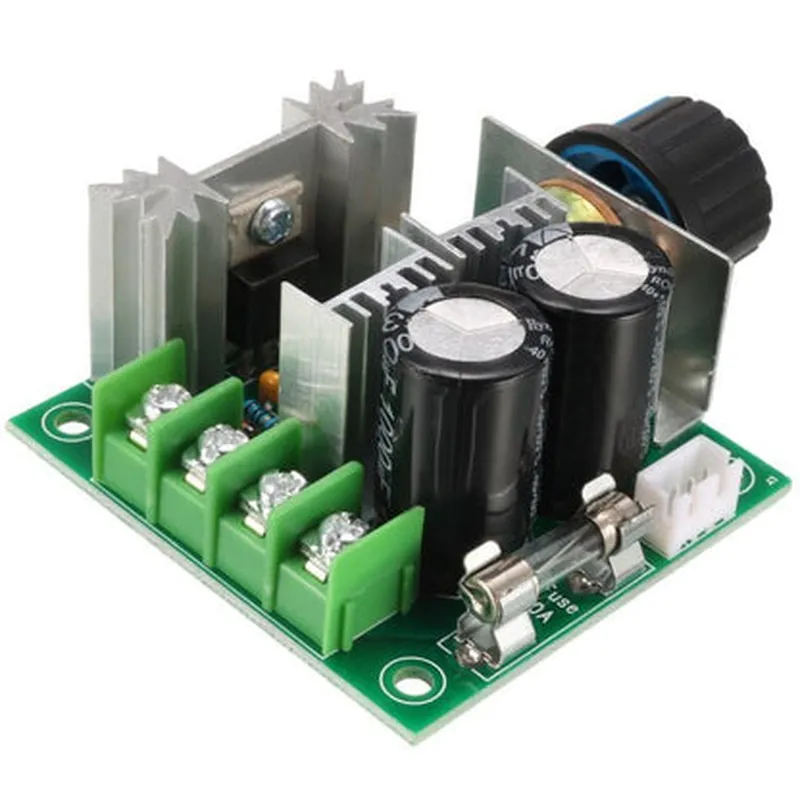
12V 10A PWM DC Motor Speed Controller

Buy Now on Stufin

Component Name

12V 10A PWM DC Motor Speed Controller

Overview

The 12V 10A PWM DC Motor Speed Controller is a high-performance, high-current DC motor driver designed to control the speed of DC motors in a variety of applications, including robotics, automation, and industrial systems. This component is a Pulse-Width Modulation (PWM) based motor speed controller, capable of delivering up to 10A of continuous current at 12V DC.

Functionality

The 12V 10A PWM DC Motor Speed Controller is designed to provide precise control over the speed of a DC motor. It accepts a PWM signal from a microcontroller or other control device and converts it into a corresponding voltage and current output to the motor. The PWM signal is used to regulate the motor speed by varying the width of the pulses, allowing for smooth and continuous speed control.

Key Features

  • High-Current Capability: The controller can deliver up to 10A of continuous current, making it suitable for high-torque and high-speed DC motor applications.
  • 12V DC Operation: The controller operates from a 12V DC power supply, making it compatible with a wide range of applications.
  • PWM Control: The controller accepts a PWM signal from an external control device, allowing for precise speed control and low-speed operation.
  • Overcurrent Protection: The controller features built-in overcurrent protection to prevent damage to the motor or controller in case of excessive current draw.
  • Short-Circuit Protection: The controller is protected against short-circuits, ensuring safe operation and preventing damage to the motor or controller.
  • High-Efficiency: The controller achieves high efficiency (>90%) to minimize heat generation and reduce power losses.
  • Compact Design: The controller features a compact design, making it suitable for incorporation into space-constrained systems.
  • Electrical Isolation: The controller provides electrical isolation between the input and output stages, ensuring safe operation and reducing the risk of electrical shock.

Specifications

Input Voltage

12V DC

Output Voltage

12V DC

Continuous Current

10A

Peak Current

15A

Operational Frequency

20kHz (typical)

PWM Frequency

Up to 20kHz

Efficiency

>90%

Operating Temperature

-20C to +85C

Package Size

45mm x 30mm x 15mm (L x W x H)

Applications

Robotics

The 12V 10A PWM DC Motor Speed Controller is suitable for robotics applications, where precise speed control and high torque are required.

Automation

The controller can be used in automation systems, such as conveyor belts, pumps, and valves.

Industrial Systems

The controller is suitable for industrial applications, including industrial pumps, compressors, and blowers.

Precautions

Voltage and Current Ratings

Ensure that the input voltage and current do not exceed the rated values to prevent damage to the controller.

Motor Selection

Choose a motor that is compatible with the controller's output voltage and current ratings.

Heat Dissipation

Ensure adequate heat dissipation to prevent overheating and reduce the risk of damage to the controller.

By following proper precautions and guidelines, the 12V 10A PWM DC Motor Speed Controller can provide reliable and efficient motor speed control in a wide range of applications.

Pin Configuration

  • 12V 10A PWM DC Motor Speed Controller Documentation
  • Pinout Explanation
  • The 12V 10A PWM DC Motor Speed Controller has the following pins:
  • 1. VCC (Power Supply) Pin
  • Function: Power supply input for the controller
  • Voltage: 12V DC
  • Description: This pin is used to connect the power supply to the controller. The recommended power supply range is 10V to 14V DC.
  • 2. GND (Ground) Pin
  • Function: Ground connection
  • Description: This pin is used to connect the ground of the power supply and the motor to the controller.
  • 3. VM (Motor Voltage) Pin
  • Function: Motor voltage input
  • Voltage: 12V DC (same as VCC)
  • Description: This pin is used to connect the positive terminal of the motor to the controller.
  • 4. VH (Motor Voltage) Pin
  • Function: Motor voltage input
  • Voltage: 12V DC (same as VCC)
  • Description: This pin is used to connect the negative terminal of the motor to the controller.
  • 5. PWMA (PWM Signal) Pin
  • Function: Pulse Width Modulation (PWM) signal input
  • Description: This pin is used to connect the PWM signal from a microcontroller or other control device to control the motor speed.
  • 6. EN (Enable) Pin
  • Function: Enable/disable motor control
  • Description: This pin is used to enable or disable the motor control. When connected to VCC, the motor control is enabled. When connected to GND, the motor control is disabled.
  • 7. FB (Feedback) Pin
  • Function: Motor speed feedback output
  • Description: This pin provides a feedback signal indicating the motor speed. The signal can be connected to a microcontroller or other control device for monitoring and control purposes.
  • Connection Structure
  • Here is the recommended connection structure for the 12V 10A PWM DC Motor Speed Controller:
  • 1. Connect the power supply (12V DC) to the VCC and GND pins.
  • 2. Connect the motor to the VM and VH pins. Ensure the motor polarity is correct (VM to motor positive terminal, VH to motor negative terminal).
  • 3. Connect the PWM signal from a microcontroller or other control device to the PWMA pin.
  • 4. Connect the EN pin to VCC to enable motor control, or connect to GND to disable motor control.
  • 5. Connect the FB pin to a microcontroller or other control device for motor speed feedback monitoring.
  • Important Notes
  • Make sure to use a suitable power supply that can provide enough current for the motor and controller.
  • Ensure the motor is properly connected to the VM and VH pins, with correct polarity.
  • Use a suitable PWM signal frequency and duty cycle for motor control.
  • Use a suitable microcontroller or control device that can generate a PWM signal and monitor the motor speed feedback.
  • Follow proper safety precautions when working with electrical circuits and motors.

Code Examples

12V 10A PWM DC Motor Speed Controller Documentation
Overview
The 12V 10A PWM DC Motor Speed Controller is a compact and efficient module designed to control the speed of DC motors. It supports a maximum current of 10A and operates on a 12V power supply. The controller uses Pulse-Width Modulation (PWM) to regulate the motor speed, allowing for precise and efficient control.
Features
Operating voltage: 12V
 Maximum current: 10A
 PWM frequency: 20kHz
 Input Control Signal: 0-5V
 Compatible with most DC motors
Pinout
VCC: 12V power supply
 GND: Ground
 IN: Input control signal (0-5V)
 OUT: Motor output
 EN: Enable pin (active high)
Code Examples
### Example 1: Basic Motor Speed Control with Arduino
In this example, we will use the 12V 10A PWM DC Motor Speed Controller to control the speed of a DC motor using an Arduino board.
```c++
const int pwmPin = 3;  // PWM output pin on Arduino
const int enPin = 2;  // Enable pin on the motor controller
void setup() {
  pinMode(pwmPin, OUTPUT);
  pinMode(enPin, OUTPUT);
  digitalWrite(enPin, HIGH); // Enable the motor controller
}
void loop() {
  // Set the motor speed using PWM (0-255)
  int motorSpeed = 128; // 50% duty cycle
  analogWrite(pwmPin, motorSpeed);
  delay(1000);
  
  // Change the motor speed
  motorSpeed = 200; // 80% duty cycle
  analogWrite(pwmPin, motorSpeed);
  delay(1000);
}
```
### Example 2: Motor Speed Control with Raspberry Pi (Python)
In this example, we will use the 12V 10A PWM DC Motor Speed Controller to control the speed of a DC motor using a Raspberry Pi board.
```python
import RPi.GPIO as GPIO
import time
# Set up GPIO mode
GPIO.setmode(GPIO.BCM)
# Define the PWM and enable pins
pwmPin = 18
enPin = 23
# Set up the pins as outputs
GPIO.setup(pwmPin, GPIO.OUT)
GPIO.setup(enPin, GPIO.OUT)
# Enable the motor controller
GPIO.output(enPin, GPIO.HIGH)
try:
    while True:
        # Set the motor speed using PWM (0-100%)
        motorSpeed = 50  # 50% duty cycle
        GPIO.output(pwmPin, GPIO.HIGH)
        time.sleep(motorSpeed / 100)
        GPIO.output(pwmPin, GPIO.LOW)
        time.sleep((100 - motorSpeed) / 100)
        
        # Change the motor speed
        motorSpeed = 80  # 80% duty cycle
        GPIO.output(pwmPin, GPIO.HIGH)
        time.sleep(motorSpeed / 100)
        GPIO.output(pwmPin, GPIO.LOW)
        time.sleep((100 - motorSpeed) / 100)
except KeyboardInterrupt:
    # Clean up GPIO on exit
    GPIO.cleanup()
```
Note: In both examples, make sure to connect the input control signal (IN) to the corresponding digital output pin on the microcontroller board (Arduino or Raspberry Pi). The enable pin (EN) should be connected to a digital output pin as well.