Stufin
Home Quick Cart Profile

14 in 1 Educational DIY Solar Transformers Robot Toy


Buy Now on Stufin

Component Name

14 in 1 Educational DIY Solar Transformers Robot Toy
Overview

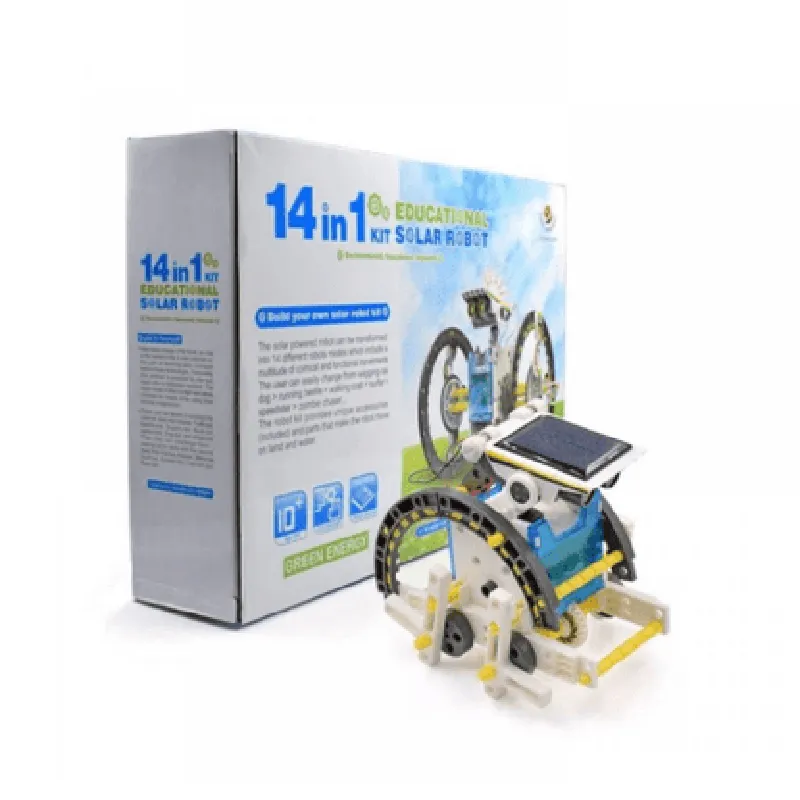
The 14 in 1 Educational DIY Solar Transformers Robot Toy is a versatile and interactive learning tool designed for students and hobbyists to explore the world of robotics, solar energy, and electronics. This innovative component combines multiple functions into one comprehensive platform, making it an excellent choice for educational institutions, DIY enthusiasts, and individuals looking to develop their skills in STEM fields (Science, Technology, Engineering, and Mathematics).
Functionality

  • Solar Power Generation: The device comes equipped with a solar panel that converts sunlight into electrical energy, powering the robot's movements and functions.
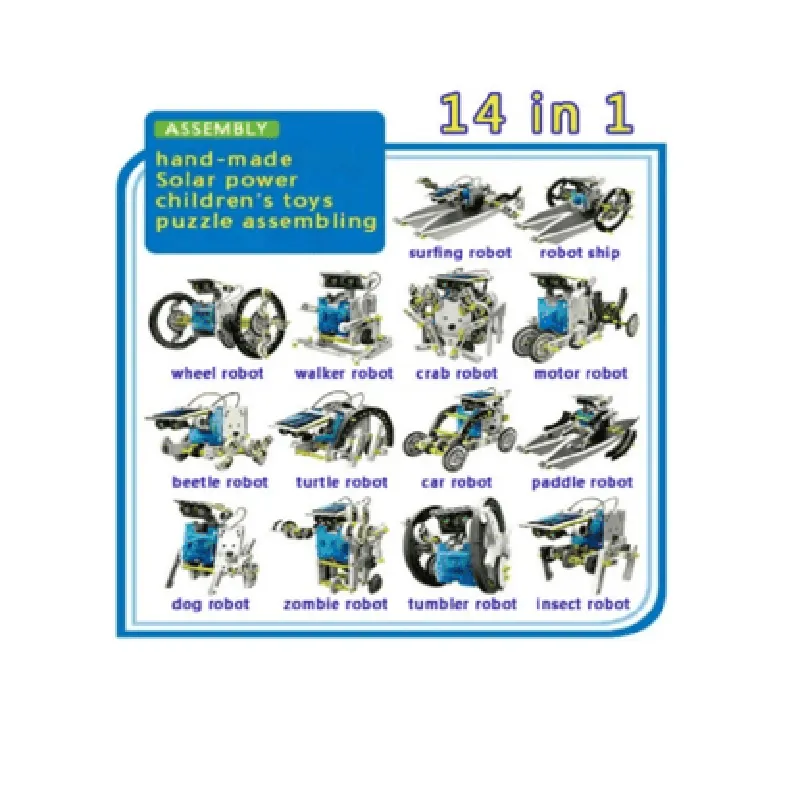
  • Robotics Platform: The component features a modular robotic platform that can be assembled into 14 different robotic models, including a car, tank, and walking robot, among others.
  • Microcontroller-Based Control: The robot is controlled by a built-in microcontroller that can be programmed using popular programming languages like Scratch, Arduino, or Python.
  • Sensor Integration: The robot is equipped with various sensors, including infrared, ultrasonic, and touch sensors, which enable it to interact with its environment and respond to obstacles.
  • Mechanical Assembly: Users can develop their mechanical skills by assembling and disassembling the robot's components, gaining hands-on experience with gears, motors, and transmission systems.
The 14 in 1 Educational DIY Solar Transformers Robot Toy is a modular system that allows users to build and create various robotic models using renewable solar energy. The component's primary functions include

Key Features

  • Modular Design: The component's modular design allows users to easily assemble and disassemble the robot, promoting creativity, critical thinking, and problem-solving skills.
  • Solar-Powered: The solar panel ensures a sustainable and renewable energy source, teaching users about the importance of environmental conservation and energy efficiency.
  • Programmable: The built-in microcontroller can be programmed using popular programming languages, enabling users to develop their coding skills and create custom robot behaviors.
  • Sensor-Based Interactions: The various sensors integrated into the robot enable it to interact with its environment, respond to obstacles, and perform tasks autonomously.
  • Educational Value: The component is designed to meet educational standards, providing a comprehensive learning experience for students and hobbyists in STEM fields.
  • Durable Construction: The robot's components are built to withstand repeated assembly and disassembly, ensuring a long lifespan and minimal maintenance.

Solar Panel

2V, 1.5W

Microcontroller

Arduino-compatible

Sensors

Infrared, ultrasonic, touch, and others

Motor

DC motor with gearbox

Transmission System

Gearbox and transmission shaft

Material

High-quality ABS plastic and metal components

Dimensions

20 x 15 x 10 cm ( robot size varies depending on the assembled model)

Weight

500g

Recommended Age

10 years and above

Programming Languages

Scratch, Arduino, Python, and others

Applications

  • STEM Education: Ideal for educational institutions, schools, and universities to teach students about robotics, solar energy, and programming.
  • DIY Projects: Suitable for hobbyists and DIY enthusiasts looking to develop their skills in robotics and electronics.
  • Research and Development: Can be used as a platform for prototyping and testing new robotic designs, sensor integrations, and solar-powered systems.

By combining cutting-edge technology with educational principles, the 14 in 1 Educational DIY Solar Transformers Robot Toy provides a unique learning experience that fosters creativity, innovation, and critical thinking.

Pin Configuration

  • 14 in 1 Educational DIY Solar Transformers Robot Toy - Pinout Explanation
  • The 14 in 1 Educational DIY Solar Transformers Robot Toy is an interactive and educational IoT component that allows users to build and program various robotic structures using solar power. This documentation provides a detailed explanation of each pin on the robot's interface, along with guidance on how to connect them.
  • Pinout Structure:
  • The robot's interface consists of 14 pins, divided into two rows: Row A (labeled A0-A6) and Row B (labeled B0-B7). Each pin has a specific function, which is described below:
  • Row A (A0-A6)
  • 1. A0 - VCC (Power Supply): This pin provides power to the robot's components. Connect a 3V-6V DC power source to this pin.
  • 2. A1 - GND (Ground): This pin serves as the ground connection for the robot. Connect to a common ground point or the negative terminal of the power source.
  • 3. A2 - Solar Panel Positive: Connect the positive terminal of the solar panel to this pin, allowing the robot to harness solar energy.
  • 4. A3 - Solar Panel Negative: Connect the negative terminal of the solar panel to this pin, completing the solar panel connection.
  • 5. A4 - Motor A Positive: This pin controls the positive terminal of Motor A. Connect to the positive wire of the motor.
  • 6. A5 - Motor A Negative: This pin controls the negative terminal of Motor A. Connect to the negative wire of the motor.
  • 7. A6 - Button/Sensor Input: This pin is reserved for connecting buttons or sensors to the robot's microcontroller.
  • Row B (B0-B7)
  • 1. B0 - Motor B Positive: This pin controls the positive terminal of Motor B. Connect to the positive wire of the motor.
  • 2. B1 - Motor B Negative: This pin controls the negative terminal of Motor B. Connect to the negative wire of the motor.
  • 3. B2 - LED/Road Light Positive: This pin controls the positive terminal of the LED or road light. Connect to the positive wire of the LED.
  • 4. B3 - LED/Road Light Negative: This pin controls the negative terminal of the LED or road light. Connect to the negative wire of the LED.
  • 5. B4 - Buzzer/Alarm Positive: This pin controls the positive terminal of the buzzer or alarm. Connect to the positive wire of the buzzer.
  • 6. B5 - Buzzer/Alarm Negative: This pin controls the negative terminal of the buzzer or alarm. Connect to the negative wire of the buzzer.
  • 7. B6 - IR Receiver Input: This pin is reserved for connecting an infrared (IR) receiver module to the robot's microcontroller.
  • 8. B7 - Microcontroller Communication: This pin is reserved for communication with the robot's microcontroller, such as programming or data transmission.
  • Connection Guidelines:
  • 1. Ensure proper polarity when connecting components to the robot's interface to avoid damage.
  • 2. Use suitable wire gauges and insulation to prevent electrical shorts or damage.
  • 3. Follow the manufacturer's instructions for motor, LED, and buzzer connections.
  • 4. When connecting sensors or buttons, ensure they are compatible with the robot's microcontroller and follow the relevant documentation.
  • 5. For solar panel connections, ensure the panel is rated for the robot's voltage and current requirements.
  • By following this pinout explanation and connection guidelines, you can successfully assemble and program your 14 in 1 Educational DIY Solar Transformers Robot Toy.

Code Examples

Component Name: 14 in 1 Educational DIY Solar Transformers Robot Toy
Overview:
The 14 in 1 Educational DIY Solar Transformers Robot Toy is a versatile and interactive educational kit that combines solar power and robotics to teach students about renewable energy, robotics, and programming. This kit consists of 14 different robot models that can be built using a single set of modular components, powered by a solar panel, and controlled using a built-in microcontroller.
Hardware Components:
Solar Panel
 Microcontroller Board
 Motor Drivers
 Sensors (Touch, Sound, and Light)
 LED Indicators
 Breadboard and Jumper Wires
 Plastic Chassis and Accessories (for building different robot models)
Programming Languages:
The microcontroller board can be programmed using various languages, including:
Scratch ( graphical programming language)
 C++
 Python
Example 1: Basic Robot Movement using Scratch
In this example, we will demonstrate how to program the robot to move forward and backward using Scratch.
Hardware Requirements:
Assemble the robot model with the microcontroller board and motor drivers.
 Connect the solar panel to the microcontroller board.
Scratch Code:
```scratch
when green flag clicked
  set motor A to 100
  set motor B to 100
  wait 2 seconds
  set motor A to -100
  set motor B to -100
  wait 2 seconds
  repeat forever
```
Explanation:
In this code, we use the `when green flag clicked` block to initialize the program. We then set motor A and motor B to 100 (full speed forward) and wait for 2 seconds. Next, we set motor A and motor B to -100 (full speed backward) and wait for another 2 seconds. The `repeat forever` block allows the program to loop continuously.
Example 2: Touch Sensor-controlled Robot using C++
In this example, we will demonstrate how to program the robot to respond to touch sensor inputs using C++.
Hardware Requirements:
Assemble the robot model with the microcontroller board, motor drivers, and touch sensor.
 Connect the solar panel to the microcontroller board.
C++ Code:
```c
#include <Arduino.h>
const int touchPin = A0;  // Touch sensor pin
const int motorAPin = 9;  // Motor A pin
const int motorBPin = 10;  // Motor B pin
void setup() {
  pinMode(touchPin, INPUT);
  pinMode(motorAPin, OUTPUT);
  pinMode(motorBPin, OUTPUT);
}
void loop() {
  int touchValue = analogRead(touchPin);
  if (touchValue > 500) {  // Adjust the threshold value as needed
    digitalWrite(motorAPin, HIGH);
    digitalWrite(motorBPin, HIGH);
  } else {
    digitalWrite(motorAPin, LOW);
    digitalWrite(motorBPin, LOW);
  }
  delay(50);
}
```
Explanation:
In this code, we use the `analogRead()` function to read the touch sensor value and store it in the `touchValue` variable. We then use an `if` statement to check if the touch sensor value is above a certain threshold (500 in this case). If the condition is true, we set motor A and motor B to HIGH (forward direction). If the condition is false, we set motor A and motor B to LOW (stop). The `delay(50)` function introduces a 50ms delay between each iteration.
Example 3: Solar-powered Line Follower using Python
In this example, we will demonstrate how to program the robot to follow a line using a solar-powered line follower algorithm in Python.
Hardware Requirements:
Assemble the robot model with the microcontroller board, motor drivers, and light sensors.
 Connect the solar panel to the microcontroller board.
Python Code:
```python
import microcontroller
# Define the light sensor pins
left_sensor = microcontroller.Pin(16, microcontroller.Pin.IN)
right_sensor = microcontroller.Pin(17, microcontroller.Pin.IN)
# Define the motor pins
motor_a = microcontroller.Pin(9, microcontroller.Pin.OUT)
motor_b = microcontroller.Pin(10, microcontroller.Pin.OUT)
while True:
  left_value = left_sensor.value()
  right_value = right_sensor.value()
  
  if left_value > 500 and right_value > 500:  # Adjust the threshold values as needed
    # Both sensors detect the line, move forward
    motor_a.value(True)
    motor_b.value(True)
  elif left_value > 500:
    # Only left sensor detects the line, turn left
    motor_a.value(True)
    motor_b.value(False)
  elif right_value > 500:
    # Only right sensor detects the line, turn right
    motor_a.value(False)
    motor_b.value(True)
  else:
    # Neither sensor detects the line, stop
    motor_a.value(False)
    motor_b.value(False)
  
  microcontroller.delay(50)
```
Explanation:
In this code, we use the `microcontroller` module to interact with the microcontroller board. We define the light sensor pins and motor pins, and then use a `while` loop to continuously read the sensor values and control the motors accordingly. The algorithm uses simple threshold values to determine the line detection and motor control.
These examples demonstrate the versatility of the 14 in 1 Educational DIY Solar Transformers Robot Toy and its potential for teaching various concepts in robotics, programming, and renewable energy.