Stufin
Home Quick Cart Profile

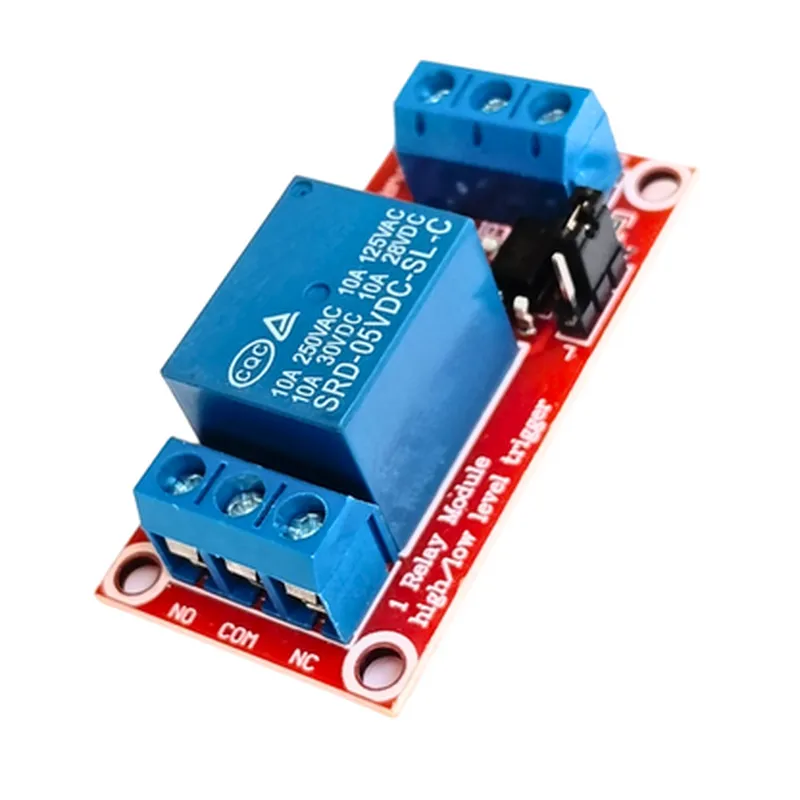
1CH 5v Relay Board High/Low Level Trigger with Optocoupler

Buy Now on Stufin

Component Name

1CH 5V Relay Board High/Low Level Trigger with Optocoupler

Overview

The 1CH 5V Relay Board High/Low Level Trigger with Optocoupler is a versatile and compact relay module designed for use in a wide range of IoT applications. This board provides a convenient and reliable way to control high-power devices using low-power microcontrollers or other logic devices.

Functionality

The relay board is designed to switch on/off a high-power device using a low-power signal from a microcontroller or other logic device. The board features a single-channel relay, which can be triggered by a high or low logic level signal. The relay is controlled by an optocoupler, which provides electrical isolation between the input signal and the relay, ensuring safe and reliable operation.

Key Features

Single-Channel RelayThe board features a single relay channel, which can switch on/off a high-power device.
High/Low Level TriggerThe relay can be triggered by either a high logic level (VCC) or a low logic level (GND) signal, making it compatible with a wide range of microcontrollers and logic devices.

Optocoupler Isolation

The optocoupler provides electrical isolation between the input signal and the relay, ensuring safe and reliable operation.

5V Operating VoltageThe board operates on a 5V supply voltage, making it compatible with most microcontrollers and logic devices.

Standard Pinout

The board features a standard pinout, with VCC, GND, and IN pins for easy connection to microcontrollers or other logic devices.

Relay Specifications

+ Relay TypeSPDT (Single Pole Double Throw)
+ Contact Rating10A/250VAC, 10A/30VDC
+ Operating Temperature-40C to 85C

Optocoupler Specifications

+ TypePhototriac Coupler
+ Isolation Voltage5,300Vpeak
+ Operating Temperature-40C to 85C

Board Dimensions

18.5mm x 24.5mm x 18.5mm (L x W x H)

Weight

20g

Applications

The 1CH 5V Relay Board High/Low Level Trigger with Optocoupler is suitable for a wide range of IoT applications, including

Home automation systems

Industrial control systems

Robotics and mechatronics

Security systems

Smart lighting systems

Operating Conditions

Operating Temperature

-40C to 85C

Storage Temperature

-40C to 125C

Humidity

20% to 80% RH (non-condensing)

Certifications and Compliance

RoHS compliant

CE marked

FCC compliant

Warranty and Support

1-year limited warranty

Dedicated technical support team

Comprehensive documentation and resources available online

Pin Configuration

  • 1CH 5V Relay Board High/Low Level Trigger with Optocoupler Documentation
  • Overview
  • The 1CH 5V Relay Board is a single-channel relay module designed for high/low level trigger applications. It features an optocoupler for electrical isolation and is suitable for a wide range of IoT and automation projects.
  • Pinout Description
  • The relay board has 6 pins, labeled as follows:
  • 1. VCC (5V Power Supply)
  • Pin function: Power supply for the relay module
  • Pin type: Input
  • Voltage: 5V DC
  • Description: Connect a 5V power source to this pin to power the relay module.
  • 2. GND (Ground)
  • Pin function: Ground connection
  • Pin type: Input
  • Voltage: 0V
  • Description: Connect the ground wire of the power supply to this pin.
  • 3. IN (Input Signal)
  • Pin function: High/low level trigger input
  • Pin type: Input
  • Voltage: 0V or 5V
  • Description: Connect a digital output from a microcontroller or other device to this pin to control the relay. A high level (5V) will turn the relay ON, and a low level (0V) will turn it OFF.
  • 4. Relay Output (Normally Open - NO)
  • Pin function: Relay output (normally open)
  • Pin type: Output
  • Voltage: Depends on the relay state (max. 250V AC or 30V DC)
  • Description: This pin is connected to one terminal of the relay's normally open (NO) contact. When the relay is ON, this pin will be connected to the common (COM) terminal.
  • 5. Relay Output (Common - COM)
  • Pin function: Relay output (common)
  • Pin type: Output
  • Voltage: Depends on the relay state (max. 250V AC or 30V DC)
  • Description: This pin is connected to the common (COM) terminal of the relay. It is connected to the normally open (NO) contact when the relay is ON, and to the normally closed (NC) contact when the relay is OFF.
  • 6. Relay Output (Normally Closed - NC)
  • Pin function: Relay output (normally closed)
  • Pin type: Output
  • Voltage: Depends on the relay state (max. 250V AC or 30V DC)
  • Description: This pin is connected to one terminal of the relay's normally closed (NC) contact. When the relay is OFF, this pin will be connected to the common (COM) terminal.
  • Connection Structure
  • To use the relay board, follow these steps:
  • 1. Connect the VCC pin to a 5V power source.
  • 2. Connect the GND pin to the ground wire of the power supply.
  • 3. Connect the IN pin to a digital output from a microcontroller or other device.
  • 4. Connect the load (e.g., a light bulb, motor, or other device) to the Relay Output (NO) and Relay Output (COM) pins.
  • 5. Make sure to observe the maximum voltage and current ratings of the relay when connecting the load.
  • Note: The optocoupler provides electrical isolation between the input and relay output, ensuring safe and reliable operation.
  • Remember to handle the relay board with care, as it contains sensitive electronic components. Always follow proper safety precautions when working with electricity and electronic circuits.

Code Examples

1CH 5V Relay Board High/Low Level Trigger with Optocoupler Documentation
Overview
The 1CH 5V Relay Board High/Low Level Trigger with Optocoupler is a convenient and compact module designed to control high-power devices using a low-power signal. The relay board features an optocoupler that provides electrical isolation between the control signal and the relay, ensuring safe and reliable operation.
Features
1-channel relay with high/low level trigger
 5V operating voltage
 Optocoupler for electrical isolation
 Relay switching capacity: 10A/250VAC, 10A/30VDC
 Module size: 45mm x 28mm
Pinout
VCC: 5V power supply
 GND: Ground
 IN: Input signal (high/low level trigger)
 COM: Relay common terminal
 NC: Relay normally closed terminal
 NO: Relay normally open terminal
Code Examples
### Example 1: Arduino Control with High-Level Trigger
In this example, we will use an Arduino Uno board to control the relay module. The relay will turn on when the input signal is HIGH (5V) and turn off when the input signal is LOW (0V).
```c++
const int relayPin = 2;  // Choose a digital pin on the Arduino board
void setup() {
  pinMode(relayPin, OUTPUT);
}
void loop() {
  digitalWrite(relayPin, HIGH); // Turn on the relay
  delay(1000);
  digitalWrite(relayPin, LOW); // Turn off the relay
  delay(1000);
}
```
### Example 2: Raspberry Pi Control with Low-Level Trigger
In this example, we will use a Raspberry Pi board to control the relay module. The relay will turn on when the input signal is LOW (0V) and turn off when the input signal is HIGH (5V).
```python
import RPi.GPIO as GPIO
import time
GPIO.setmode(GPIO.BCM)
relay_pin = 17  # Choose a GPIO pin on the Raspberry Pi board
GPIO.setup(relay_pin, GPIO.OUT)
while True:
  GPIO.output(relay_pin, GPIO.LOW)  # Turn on the relay
  time.sleep(1)
  GPIO.output(relay_pin, GPIO.HIGH)  # Turn off the relay
  time.sleep(1)
```
### Example 3: ESP32 Control with High-Level Trigger using MicroPython
In this example, we will use an ESP32 board running MicroPython to control the relay module. The relay will turn on when the input signal is HIGH (5V) and turn off when the input signal is LOW (0V).
```python
import machine
import time
relay_pin = machine.Pin(25, machine.Pin.OUT)
while True:
  relay_pin.value(1)  # Turn on the relay
  time.sleep(1)
  relay_pin.value(0)  # Turn off the relay
  time.sleep(1)
```
Note: Before using the relay board, ensure that the input signal is within the specified voltage range (5V) and the relay is properly connected to the load and power supply.