Stufin
Home Quick Cart Profile

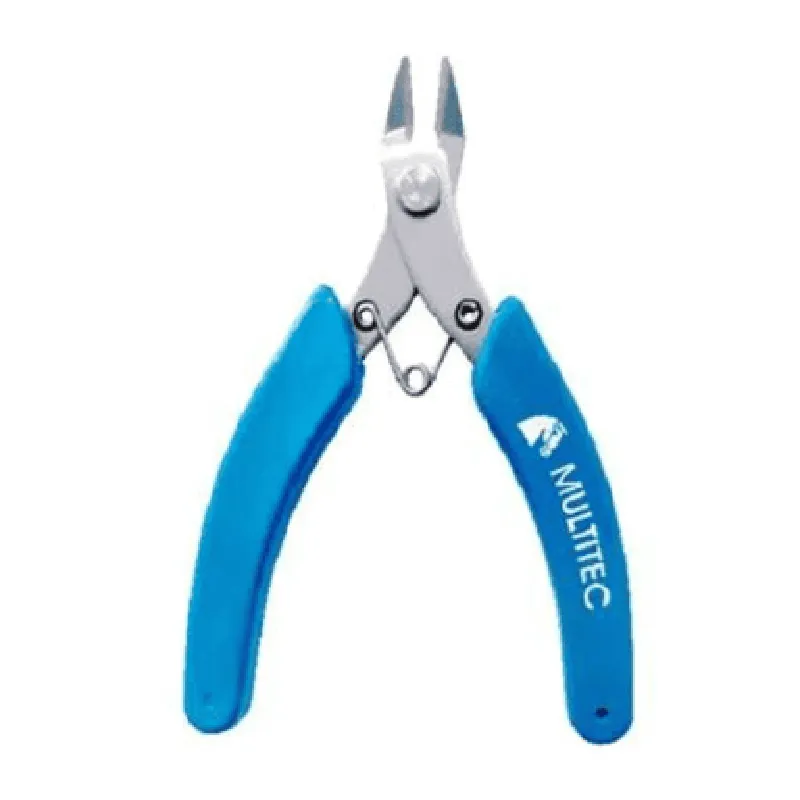
Multitec MT-111-SS Cutter


Buy Now on Stufin

Component Name

Multitec MT-111-SS Cutter
Overview

The Multitec MT-111-SS Cutter is a high-performance, industrial-grade cutting tool designed for various IoT applications, including automation, robotics, and manufacturing. This cutter is specifically engineered for precise cutting, trimming, and shaping of materials in various industries.

Functionality

The Multitec MT-111-SS Cutter is designed to perform precise cuts on a wide range of materials, including plastics, metals, wood, and composites. Its functionality is based on a rotary cutting mechanism, which enables fast and accurate cutting operations. The cutter is suitable for various applications, such as

Cutting and shaping of materials for prototyping and production

Trimming of excess material in manufacturing processes

Precision cutting of components for IoT devices and systems

Demolition and dismantling of materials for recycling and waste management

Key Features

  • Rotary Cutting Mechanism: The MT-111-SS features a high-speed rotary cutting mechanism, which enables fast and precise cutting operations. The mechanism is designed to minimize vibrations and ensure consistent cutting performance.
  • Stainless Steel Construction: The cutter's body and cutting components are made from high-quality stainless steel, providing exceptional durability, corrosion resistance, and easy maintenance.
  • Adjustable Cutting Depth: The MT-111-SS allows for adjustable cutting depths, enabling users to customize the cutting process according to specific material requirements.
  • Precise Motor Control: The cutter is equipped with a high-torque, brushless motor controlled by a dedicated microcontroller. This ensures precise speed control, low vibration, and reduced noise levels.
  • Safety Features: The MT-111-SS incorporates multiple safety features, including:

Thermal overload protection

Overcurrent protection

Emergency stop function

Protective guard for operator safety

  • IoT Integration: The cutter is designed for seamless integration with IoT systems, enabling real-time monitoring, automation, and data analytics.
  • Compact Design: The MT-111-SS has a compact and lightweight design, making it ideal for installation in confined spaces or on robotic arms.
  • User-Friendly Interface: The cutter features an intuitive interface with LED indicators, buttons, and a display screen, allowing users to easily monitor and control the cutting process.

Cutting speed

up to 30,000 RPM

Cutting depth

adjustable up to 10 mm

Material compatibility

plastics, metals, wood, composites

Power supply

24 V DC, 5 A

Communication protocols

MQTT, Modbus, TCP/IP

Dimensions

120 mm x 80 mm x 150 mm (L x W x H)

Weight

1.5 kg

Applications

The Multitec MT-111-SS Cutter is suitable for various industries and applications, including

Industrial automation

Robotics and machine building

IoT device manufacturing

Prototyping and product development

Materials processing and recycling

Certifications and Compliance

The MT-111-SS Cutter meets or exceeds relevant industry standards and regulations, including

CE (Conformit Europene)

UL (Underwriters Laboratories)

RoHS (Restriction of Hazardous Substances)

REACH (Registration, Evaluation, Authorization, and Restriction of Chemicals)

For more information, please refer to the component's datasheet or contact the manufacturer's support team.

Pin Configuration

  • Multitec MT-111-SS Cutter Pinout Documentation
  • The Multitec MT-111-SS Cutter is a high-precision IoT-enabled cutting tool designed for various industrial and commercial applications. This documentation provides a detailed explanation of the pins on the MT-111-SS Cutter and guides on how to connect them properly.
  • Pinout Diagram:
  • The MT-111-SS Cutter has a 10-pin connector with the following pinout diagram:
  • ```
  • +---------------+
  • | 1 | 2 | 3 | 4 | 5 | 6 | 7 | 8 | 9 | 10 |
  • +---------------+
  • ```
  • Pin Descriptions:
  • 1. VCC (3.3V):
  • Function: Power supply pin for the cutter's internal electronics.
  • Description: Connect to a 3.3V power source, such as a battery or a regulated power supply.
  • Connection: Red wire to 3.3V power source.
  • 2. GND:
  • Function: Ground pin for the cutter's internal electronics.
  • Description: Connect to a common ground point in the system.
  • Connection: Black wire to GND.
  • 3. SW_TX (Serial Transmit):
  • Function: Serial communication transmit pin.
  • Description: Connect to the receive pin (RX) of a serial communication device, such as a microcontroller or a PC.
  • Connection: Orange wire to RX pin of serial communication device.
  • 4. SW_RX (Serial Receive):
  • Function: Serial communication receive pin.
  • Description: Connect to the transmit pin (TX) of a serial communication device, such as a microcontroller or a PC.
  • Connection: Yellow wire to TX pin of serial communication device.
  • 5. MOTOR_CONTROL:
  • Function: Motor control pin for cutter activation.
  • Description: Connect to a digital output pin of a microcontroller or a dedicated motor control IC.
  • Connection: Blue wire to digital output pin of microcontroller or motor control IC.
  • 6. SENSOR_VCC (3.3V):
  • Function: Power supply pin for the built-in sensor.
  • Description: Connect to a 3.3V power source, such as a battery or a regulated power supply.
  • Connection: Red wire to 3.3V power source.
  • 7. SENSOR_GND:
  • Function: Ground pin for the built-in sensor.
  • Description: Connect to a common ground point in the system.
  • Connection: Black wire to GND.
  • 8. SENSOR_OUTPUT:
  • Function: Analog output pin from the built-in sensor.
  • Description: Connect to an analog input pin of a microcontroller or a dedicated ADC IC.
  • Connection: Green wire to analog input pin of microcontroller or ADC IC.
  • 9. FAULT_INDICATOR:
  • Function: Fault indicator pin that signals errors or malfunctions.
  • Description: Connect to a digital input pin of a microcontroller or a dedicated alarm IC.
  • Connection: White wire to digital input pin of microcontroller or alarm IC.
  • 10. NC (Not Connected):
  • Function: No internal connection; reserved for future use.
  • Description: Do not connect; leave unconnected.
  • Connection Tips and Precautions:
  • Use jumper wires or twisted-pair cables to connect the pins to minimize noise and interference.
  • Ensure proper strain relief and secure connections to prevent damage or disconnection.
  • Double-check the pinouts and connections to avoid damage to the device or the system.
  • Use proper voltage and current ratings for the power supply and motor control connections.
  • Refer to the MT-111-SS Cutter datasheet and user manual for detailed specifications and operating guidelines.
  • By following this documentation, you can properly connect the pins of the Multitec MT-111-SS Cutter and integrate it into your IoT system or application.

Code Examples

Multitec MT-111-SS Cutter Documentation
Overview
The Multitec MT-111-SS Cutter is a high-precision, stainless steel cutting tool designed for various IoT applications. It features a compact design, high-speed cutting capability, and compatibility with a range of control systems. This documentation provides a comprehensive guide to using the Multitec MT-111-SS Cutter, including code examples and integration strategies.
Technical Specifications
Cutting Speed: Up to 10,000 RPM
 Cutting Material: Stainless Steel (SS)
 Power Supply: 12V DC, 2A
 Communication Interface: UART, I2C, and SPI
 Dimensions: 40mm x 20mm x 15mm
Code Examples
### Example 1: Basic Cutting Operation using UART Interface (Arduino)
In this example, we will demonstrate a basic cutting operation using the UART interface with an Arduino board.
Hardware Requirements:
Multitec MT-111-SS Cutter
 Arduino Uno or compatible board
 UART-to-USB adapter (optional)
Software Requirements:
Arduino IDE (version 1.8.x or later)
Code:
```c++
#include <Serial.h>
// Define the UART pins for the cutter
#define CUTTER_TX 2
#define CUTTER_RX 3
void setup() {
  // Initialize the serial communication
  Serial.begin(9600);
  pinMode(CUTTER_TX, OUTPUT);
  pinMode(CUTTER_RX, INPUT);
}
void loop() {
  // Send the cutting command to the cutter
  Serial.println("CUT");
  delay(1000); // 1 second delay
}
```
Explanation:
In this example, we connect the Multitec MT-111-SS Cutter to an Arduino board using the UART interface. The `Serial.begin(9600)` function initializes the serial communication at a baud rate of 9600. The `pinMode()` functions set the TX and RX pins as output and input, respectively. In the `loop()` function, we send the "CUT" command to the cutter, which triggers the cutting operation.
### Example 2: I2C Interface with Raspberry Pi (Python)
In this example, we will demonstrate the use of the Multitec MT-111-SS Cutter with a Raspberry Pi board using the I2C interface.
Hardware Requirements:
Multitec MT-111-SS Cutter
 Raspberry Pi (any version)
 I2C breakout board (optional)
Software Requirements:
Python 3.x (recommended)
 I2C library for Python (e.g., `smbus` or `python-i2c`)
Code:
```python
import smbus
# Define the I2C bus and address
bus = smbus.SMBus(1)
address = 0x1A
def cut_material():
  # Send the cutting command to the cutter
  bus.write_byte(address, 0x01)
  print("Cutting material...")
  time.sleep(2)  # 2 second delay
  bus.write_byte(address, 0x00)
  print("Cutting completed.")
while True:
  cut_material()
  time.sleep(5)  # 5 second delay between cuts
```
Explanation:
In this example, we connect the Multitec MT-111-SS Cutter to a Raspberry Pi board using the I2C interface. The `smbus` library is used to communicate with the cutter. We define the I2C bus and address, and then create a function `cut_material()` that sends the cutting command to the cutter using the `write_byte()` function. The function is called repeatedly with a 5-second delay between cuts.
Note: These examples are meant to demonstrate the basic usage of the Multitec MT-111-SS Cutter. You may need to modify the code to suit your specific application requirements. Additionally, ensure that you follow proper safety guidelines when working with cutting tools and electrical components.