Stufin
Home Quick Cart Profile

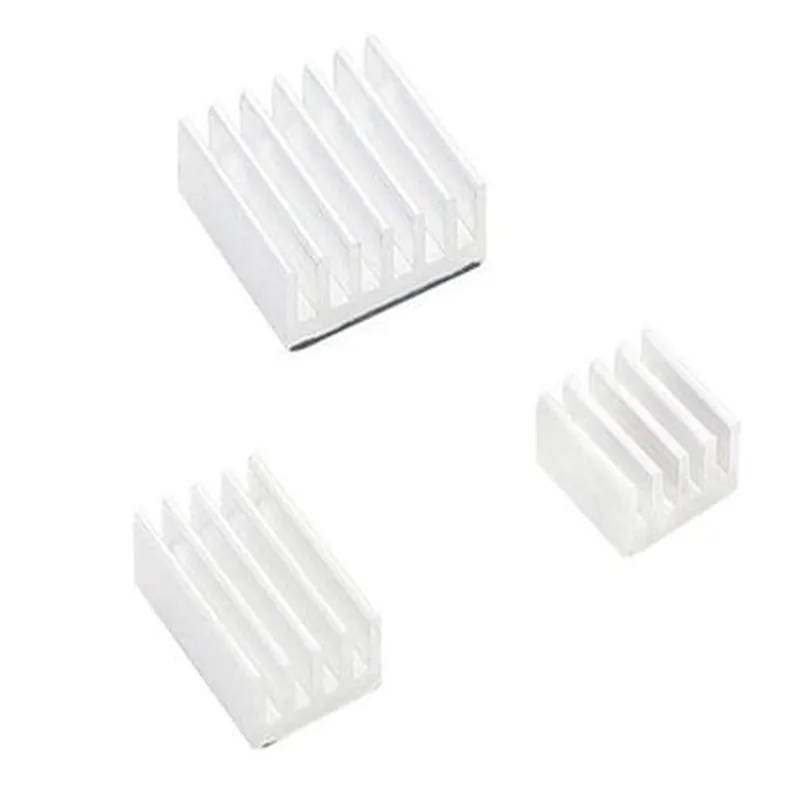
Raspberry Pi 3 in 1 Heat Sink Aluminium for Raspberry Pi 4B (White) - Pack of 1


Buy Now on Stufin

Component Name

Raspberry Pi 3 in 1 Heat Sink Aluminium for Raspberry Pi 4B (White) - Pack of 1
Description

The Raspberry Pi 3 in 1 Heat Sink Aluminium is a compact, high-performance heat dissipation solution designed specifically for the Raspberry Pi 4B single-board computer. This heat sink is an essential component for maintaining optimal operating temperatures, ensuring reliable performance, and preventing overheating issues in demanding applications.

Functionality

The primary function of this heat sink is to efficiently dissipate heat generated by the Raspberry Pi 4B's CPU, GPU, and other components. It achieves this through a combination of conduction, convection, and radiation mechanisms, effectively reducing the temperature of the board and preventing thermal throttling.

Key Features

  • Compact Design: The heat sink is designed to fit snugly onto the Raspberry Pi 4B, with a compact footprint that doesn't obstruct adjacent components or wiring.
  • 3-in-1 Design: This heat sink features three separate heat dissipation zones, each optimized for the CPU, GPU, and other components, ensuring efficient heat management for the entire board.
  • Aluminium Construction: The heat sink is crafted from high-quality aluminium, renowned for its excellent thermal conductivity, durability, and lightweight properties.
  • White Anodized Finish: The heat sink features a white anodized finish, which enhances its thermal performance, provides corrosion resistance, and gives it a sleek, modern appearance.
  • Easy Installation: The heat sink is designed for hassle-free installation, with pre-drilled holes and a secure mounting system that ensures a snug fit onto the Raspberry Pi 4B.
  • High-Performance Thermal Interface: The heat sink features a high-quality thermal interface material that fills gaps and provides an efficient thermal pathway, allowing for optimal heat transfer between the board and the heat sink.
  • Pack of 1: This product is supplied as a single unit, making it an ideal solution for DIY projects, prototyping, or upgrading existing Raspberry Pi 4B setups.

Material

Aluminium

Finish

White Anodized

Dimensions

(L x W x H) mm (Please check the manufacturer's documentation for exact dimensions)

Weight

(Please check the manufacturer's documentation for exact weight)

Compatibility

Raspberry Pi 4B

Applications

This heat sink is suitable for a wide range of applications, including

IoT projects

Robotics and automation

Media centers and digital signage

Home automation and security systems

Industrial control systems

Prototyping and proof-of-concept development

Conclusion

The Raspberry Pi 3 in 1 Heat Sink Aluminium is a high-performance, compact, and efficient heat dissipation solution designed specifically for the Raspberry Pi 4B. Its 3-in-1 design, premium materials, and easy installation make it an ideal choice for anyone looking to maintain optimal operating temperatures and prevent overheating issues in their projects.

Pin Configuration

  • Raspberry Pi 3 in 1 Heat Sink Aluminium for Raspberry Pi 4B (White) - Pack of 1
  • GPIO Pinout Explanation:
  • The Raspberry Pi 3 in 1 Heat Sink Aluminium for Raspberry Pi 4B (White) is designed to facilitate cooling and thermal management on the Raspberry Pi 4B. The heat sink is equipped with a 40-pin GPIO header that provides access to the various interfaces and peripherals of the Raspberry Pi 4B. Here's a detailed explanation of each pin:
  • Pin Structure:
  • The 40-pin GPIO header is divided into two rows, each with 20 pins. The pins are numbered 1-20 on the top row and 21-40 on the bottom row.
  • Top Row (Pins 1-20):
  • 1. 3V3 Power: 3.3V power output from the Raspberry Pi 4B.
  • 2. GPIO 2: General-purpose input/output pin, can be used as an input, output, or for specific functions like I2C or SPI.
  • 3. GPIO 3: General-purpose input/output pin, can be used as an input, output, or for specific functions like I2C or SPI.
  • 4. GPIO 4: General-purpose input/output pin, can be used as an input, output, or for specific functions like I2C or SPI.
  • 5. GPIO 5: General-purpose input/output pin, can be used as an input, output, or for specific functions like I2C or SPI.
  • 6. GPIO 6: General-purpose input/output pin, can be used as an input, output, or for specific functions like I2C or SPI.
  • 7. GPIO 7: General-purpose input/output pin, can be used as an input, output, or for specific functions like I2C or SPI.
  • 8. TXD (UART): Transmit data pin for UART serial communication.
  • 9. RXD (UART): Receive data pin for UART serial communication.
  • 10. GPIO 10: General-purpose input/output pin, can be used as an input, output, or for specific functions like I2C or SPI.
  • 11. GPIO 11: General-purpose input/output pin, can be used as an input, output, or for specific functions like I2C or SPI.
  • 12. GPIO 12: General-purpose input/output pin, can be used as an input, output, or for specific functions like I2C or SPI.
  • 13. GPIO 13: General-purpose input/output pin, can be used as an input, output, or for specific functions like I2C or SPI.
  • 14. GND: Ground pin, provides a common ground connection for the Raspberry Pi 4B.
  • 15. GPIO 15: General-purpose input/output pin, can be used as an input, output, or for specific functions like I2C or SPI.
  • 16. GPIO 16: General-purpose input/output pin, can be used as an input, output, or for specific functions like I2C or SPI.
  • 17. 3V3 Power: 3.3V power output from the Raspberry Pi 4B.
  • 18. GPIO 18: General-purpose input/output pin, can be used as an input, output, or for specific functions like I2C or SPI.
  • 19. GPIO 19: General-purpose input/output pin, can be used as an input, output, or for specific functions like I2C or SPI.
  • 20. GPIO 20: General-purpose input/output pin, can be used as an input, output, or for specific functions like I2C or SPI.
  • Bottom Row (Pins 21-40):
  • 21. GPIO 21: General-purpose input/output pin, can be used as an input, output, or for specific functions like I2C or SPI.
  • 22. GPIO 22: General-purpose input/output pin, can be used as an input, output, or for specific functions like I2C or SPI.
  • 23. GPIO 23: General-purpose input/output pin, can be used as an input, output, or for specific functions like I2C or SPI.
  • 24. GPIO 24: General-purpose input/output pin, can be used as an input, output, or for specific functions like I2C or SPI.
  • 25. GND: Ground pin, provides a common ground connection for the Raspberry Pi 4B.
  • 26. GPIO 26: General-purpose input/output pin, can be used as an input, output, or for specific functions like I2C or SPI.
  • 27. GPIO 27: General-purpose input/output pin, can be used as an input, output, or for specific functions like I2C or SPI.
  • 28. GPIO 28: General-purpose input/output pin, can be used as an input, output, or for specific functions like I2C or SPI.
  • 29. GPIO 29: General-purpose input/output pin, can be used as an input, output, or for specific functions like I2C or SPI.
  • 30. GND: Ground pin, provides a common ground connection for the Raspberry Pi 4B.
  • 31. GPIO 31: General-purpose input/output pin, can be used as an input, output, or for specific functions like I2C or SPI.
  • 32. GPIO 32: General-purpose input/output pin, can be used as an input, output, or for specific functions like I2C or SPI.
  • 33. GPIO 33: General-purpose input/output pin, can be used as an input, output, or for specific functions like I2C or SPI.
  • 34. GND: Ground pin, provides a common ground connection for the Raspberry Pi 4B.
  • 35. GPIO 35: General-purpose input/output pin, can be used as an input, output, or for specific functions like I2C or SPI.
  • 36. GPIO 36: General-purpose input/output pin, can be used as an input, output, or for specific functions like I2C or SPI.
  • 37. GPIO 37: General-purpose input/output pin, can be used as an input, output, or for specific functions like I2C or SPI.
  • 38. GPIO 38: General-purpose input/output pin, can be used as an input, output, or for specific functions like I2C or SPI.
  • 39. GND: Ground pin, provides a common ground connection for the Raspberry Pi 4B.
  • 40. GPIO 40: General-purpose input/output pin, can be used as an input, output, or for specific functions like I2C or SPI.
  • Connecting the Pins:
  • To connect the pins, you can use jumper wires, breadboards, or custom PCBs. Here are some general guidelines:
  • Use male-to-female jumper wires to connect the GPIO pins to external components, such as sensors, actuators, or LEDs.
  • Use breadboards to prototype and connect multiple components together.
  • Use custom PCBs for more complex and permanent connections.
  • Always ensure that you are using the correct voltage levels and current ratings when connecting components to the GPIO pins.
  • Refer to the Raspberry Pi 4B documentation and the datasheet for the specific component you are connecting for more information on pinouts, voltage levels, and current ratings.
  • Remember to handle the heat sink and GPIO pins with care to avoid damage or electrical shock.

Code Examples

Raspberry Pi 3 in 1 Heat Sink Aluminium for Raspberry Pi 4B (White) - Pack of 1
Overview
The Raspberry Pi 3 in 1 Heat Sink Aluminium is a high-quality heat sink designed specifically for the Raspberry Pi 4B. This heat sink is made of aluminum and comes in a white finish. It is designed to effectively dissipate heat generated by the Raspberry Pi 4B, ensuring reliable operation and prolonging its lifespan.
Technical Specifications
Material: Aluminum
 Finish: White
 Compatibility: Raspberry Pi 4B
 Dimensions: 65mm x 45mm x 10mm (L x W x H)
 Weight: 20g
Installation
The heat sink is easy to install on the Raspberry Pi 4B. Simply attach the heat sink to the CPU and other heat-generating components using the provided thermal tape or screws.
Code Examples
### Example 1: Python Script for Temperature Monitoring with the Heat Sink
This example demonstrates how to use the Raspberry Pi 4B with the heat sink to monitor temperature readings using Python.
```python
import os
import time
# Import the required libraries
import pygame
import RPi.GPIO as GPIO
import Adafruit_DHT
# Set up the GPIO pins
GPIO.setmode(GPIO.BCM)
# Define the pin for the temperature sensor
DHT_PIN = 4
# Initialize the temperature sensor
humidity, temperature = Adafruit_DHT.read_retry(Adafruit_DHT.DHT11, DHT_PIN)
# Print the temperature reading
print(f"Temperature: {temperature:.2f}C")
# Monitor temperature readings every 5 seconds
while True:
    humidity, temperature = Adafruit_DHT.read_retry(Adafruit_DHT.DHT11, DHT_PIN)
    print(f"Temperature: {temperature:.2f}C")
    time.sleep(5)
```
### Example 2: Using the Heat Sink with a Raspberry Pi 4B in a Home Automation System
This example demonstrates how to use the Raspberry Pi 4B with the heat sink in a home automation system to control lights and fans based on temperature readings.
```python
import RPi.GPIO as GPIO
import time
# Set up the GPIO pins
GPIO.setmode(GPIO.BCM)
# Define the pins for the lights and fans
LIGHT_PIN = 17
FAN_PIN = 23
# Initialize the lights and fans as outputs
GPIO.setup(LIGHT_PIN, GPIO.OUT)
GPIO.setup(FAN_PIN, GPIO.OUT)
# Define the temperature threshold for turning on the lights and fans
TEMP_THRESHOLD = 30
# Monitor temperature readings every 5 seconds
while True:
    # Read the temperature using a temperature sensor (e.g., DS18B20)
    temperature = read_temperature()
# Turn on the lights and fans if the temperature exceeds the threshold
    if temperature > TEMP_THRESHOLD:
        GPIO.output(LIGHT_PIN, GPIO.HIGH)
        GPIO.output(FAN_PIN, GPIO.HIGH)
    else:
        GPIO.output(LIGHT_PIN, GPIO.LOW)
        GPIO.output(FAN_PIN, GPIO.LOW)
time.sleep(5)
```
Note: The above code examples are for illustration purposes only and may require modifications to work with your specific setup and requirements.