Stufin
Home Quick Cart Profile

65mm Rubber Wheel for BO Motor


Buy Now on Stufin

Component Name

65mm Rubber Wheel for BO Motor
Overview

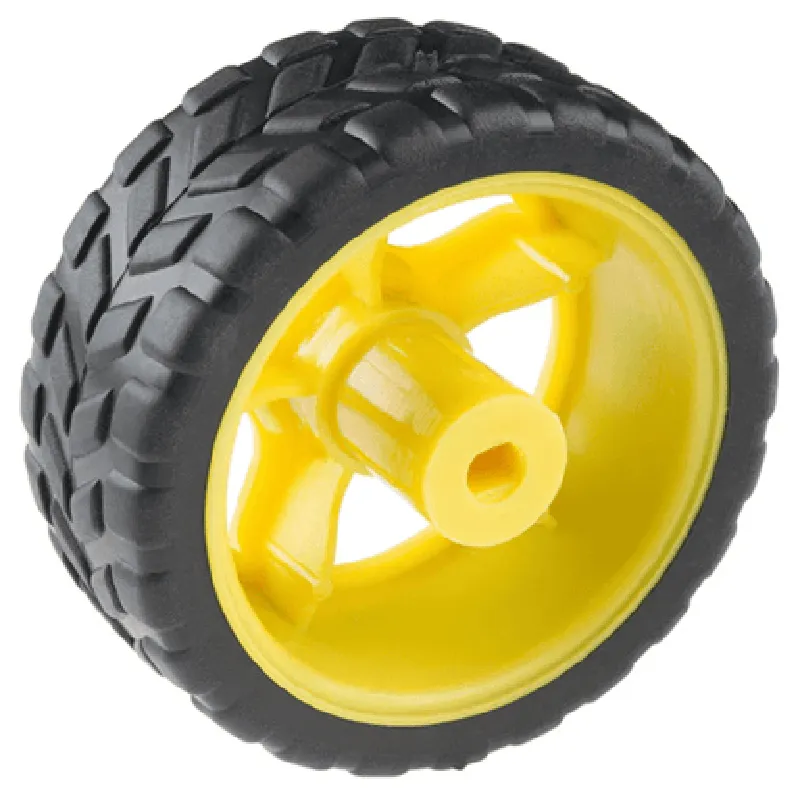
The 65mm Rubber Wheel for BO Motor is a high-quality wheel designed specifically for use with BO motors in robotics, automation, and IoT applications. This wheel provides a reliable and efficient way to transfer power and motion to various systems, making it an essential component in many modern devices.
Functionality

The primary function of the 65mm Rubber Wheel is to convert the rotational motion of a BO motor into linear motion, enabling the movement of robots, drones, and other mechanical systems. The wheel's rubber material provides excellent grip and traction on various surfaces, ensuring smooth and stable operation.

Key Features

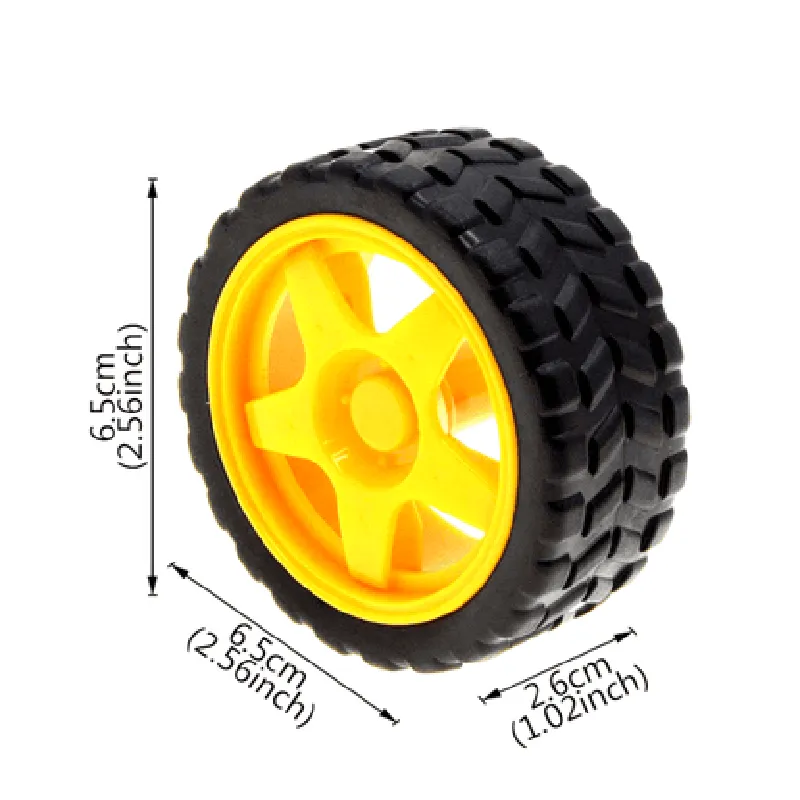
  • Size: The wheel has a diameter of 65mm, making it an ideal fit for many BO motor applications.
  • Material: The wheel is made of high-quality rubber, which provides excellent grip, durability, and resistance to wear and tear.
  • Hub Pattern: The wheel has a standard BO motor hub pattern, ensuring easy and secure mounting to the motor shaft.
  • Bore Diameter: The bore diameter is designed to fit snugly onto the BO motor shaft, ensuring efficient power transmission and minimizing vibration.
  • Width: The wheel has a width of [insert width], providing a stable base for smooth movement and maneuverability.
  • Surface Texture: The wheel's surface has a textured pattern, which enhances grip and traction on various surfaces, including slippery and uneven terrain.
  • Load Capacity: The wheel is designed to handle loads of up to [insert load capacity], making it suitable for a wide range of applications.
  • Operating Temperature: The wheel can operate in a temperature range of [insert temperature range], ensuring reliable performance in varying environmental conditions.
  • Noise Reduction: The rubber material helps to reduce noise and vibration, providing a quieter and more comfortable operation.

Diameter

65mm

Material

High-quality rubber

Hub Pattern

Standard BO motor hub pattern

Bore Diameter

[insert bore diameter]

Width

[insert width]

Load Capacity

[insert load capacity]

Operating Temperature

[insert temperature range]

Applications

The 65mm Rubber Wheel for BO Motor is ideal for use in

Robotics and automation systems

Drones and unmanned aerial vehicles (UAVs)

IoT devices and sensors

Medical and healthcare equipment

Industrial and manufacturing machinery

Conclusion

The 65mm Rubber Wheel for BO Motor is a reliable and efficient component designed to provide smooth and stable movement in various applications. Its high-quality rubber material, standard hub pattern, and load capacity make it an ideal choice for robotics, automation, and IoT systems.

Pin Configuration

  • Component Documentation: 65mm Rubber Wheel for BO Motor
  • The 65mm Rubber Wheel for BO Motor is a mechanical component designed for use with BO (Bushless or Brushless) motors in IoT and robotics applications. The component features a 65mm rubber wheel attached to a motor shaft, providing a robust and efficient mobility solution.
  • Pin Description:
  • The 65mm Rubber Wheel for BO Motor has a standard 3-pin connection interface. The pins are explained below:
  • Pin 1: VCC (Voltage Supply)
  • Description: Positive voltage supply pin for the motor.
  • Function: Provides power to the motor.
  • Voltage Rating: Typically 12V or 24V, depending on the motor specifications.
  • Connection: Connect to a suitable voltage source, such as a battery or a power supply unit.
  • Pin 2: GND (Ground)
  • Description: Negative voltage supply pin for the motor.
  • Function: Provides a return path for the motor current.
  • Voltage Rating: 0V (Ground).
  • Connection: Connect to a suitable ground point, such as a battery negative terminal or a power supply unit ground.
  • Pin 3: SIG (Signal)
  • Description: Motor control signal pin.
  • Function: Receives control signals from a microcontroller or driver IC to regulate motor speed and direction.
  • Signal Type: Typically a PWM (Pulse-Width Modulation) signal or a digital control signal.
  • Connection: Connect to a suitable microcontroller or driver IC output pin.
  • Connection Structure:
  • To connect the 65mm Rubber Wheel for BO Motor, follow these steps:
  • 1. Connect VCC pin to a suitable voltage source:
  • Connect the VCC pin to a suitable voltage source, such as a battery positive terminal or a power supply unit output.
  • 2. Connect GND pin to a suitable ground point:
  • Connect the GND pin to a suitable ground point, such as a battery negative terminal or a power supply unit ground.
  • 3. Connect SIG pin to a microcontroller or driver IC output:
  • Connect the SIG pin to a suitable microcontroller output pin or a driver IC output pin that controls the motor speed and direction.
  • Important Notes:
  • Ensure the voltage rating of the motor matches the voltage supply used.
  • Use suitable wiring and connectors to ensure reliable connections.
  • Consult the motor datasheet and microcontroller/driver IC documentation for specific connection details and configuration requirements.
  • By following these connection guidelines, you can successfully integrate the 65mm Rubber Wheel for BO Motor into your IoT or robotics project.

Code Examples

Component Documentation: 65mm Rubber Wheel for BO Motor
Overview
The 65mm Rubber Wheel is a high-quality, durable wheel designed specifically for use with BO Motors in robotics, automation, and IoT applications. This wheel provides excellent traction, stability, and smooth movement, making it an ideal choice for projects that require precise control and reliability.
Technical Specifications
Diameter: 65mm
 Material: Rubber
 Hub Diameter: 12mm
 Bore Diameter: 4mm
 Compatible Motor: BO Motor
 Load Capacity: 10kg
 Speed Range: 0-1000 RPM
Code Examples
### Example 1: Basic Motor Control with Arduino
In this example, we will demonstrate how to use the 65mm Rubber Wheel with an Arduino board to control a BO Motor.
Hardware Requirements
Arduino Uno or compatible board
 BO Motor
 65mm Rubber Wheel
 Power supply (6V-12V)
 Jumper wires
Software Requirements
Arduino IDE (version 1.8 or higher)
Code
```c++
const int motorPin = 9;  // BO Motor control pin
const int wheelPin = 10;  // Wheel encoder pin (optional)
void setup() {
  pinMode(motorPin, OUTPUT);
  pinMode(wheelPin, INPUT);
}
void loop() {
  // Set motor speed to 50%
  analogWrite(motorPin, 128);
  
  // Read wheel encoder data (if available)
  int wheelData = digitalRead(wheelPin);
  
  // Perform desired action based on wheel data
  if (wheelData == HIGH) {
    // Wheel is rotating, take action accordingly
  } else {
    // Wheel is stationary, take action accordingly
  }
  
  delay(20);  // Adjust delay according to motor speed and wheel response
}
```
### Example 2: Line Follower Robot using Raspberry Pi and Python
In this example, we will demonstrate how to use the 65mm Rubber Wheel with a Raspberry Pi and Python to create a line follower robot.
Hardware Requirements
Raspberry Pi (any version)
 BO Motor
 65mm Rubber Wheel
 Line sensor module (e.g., VL53L0X)
 Power supply (5V-12V)
 Jumper wires
Software Requirements
Raspbian OS (version 10 or higher)
 Python 3.x
Code
```python
import RPi.GPIO as GPIO
import time
# Set up GPIO pins for motor control and line sensor
GPIO.setmode(GPIO.BCM)
motor_pin = 18
line_sensor_pin = 23
GPIO.setup(motor_pin, GPIO.OUT)
GPIO.setup(line_sensor_pin, GPIO.IN)
while True:
    # Read line sensor data
    line_data = GPIO.input(line_sensor_pin)
    
    # Control motor speed based on line sensor data
    if line_data == 1:
        # Black line detected, turn motor clockwise
        GPIO.output(motor_pin, GPIO.HIGH)
    else:
        # White surface detected, turn motor counterclockwise
        GPIO.output(motor_pin, GPIO.LOW)
    
    # Adjust motor speed and direction as needed
    time.sleep(0.05)
```
These code examples demonstrate the basic usage of the 65mm Rubber Wheel with BO Motor and Arduino/Raspberry Pi platforms. You can modify and extend these examples to suit your specific project requirements.