Stufin
Home Quick Cart Profile

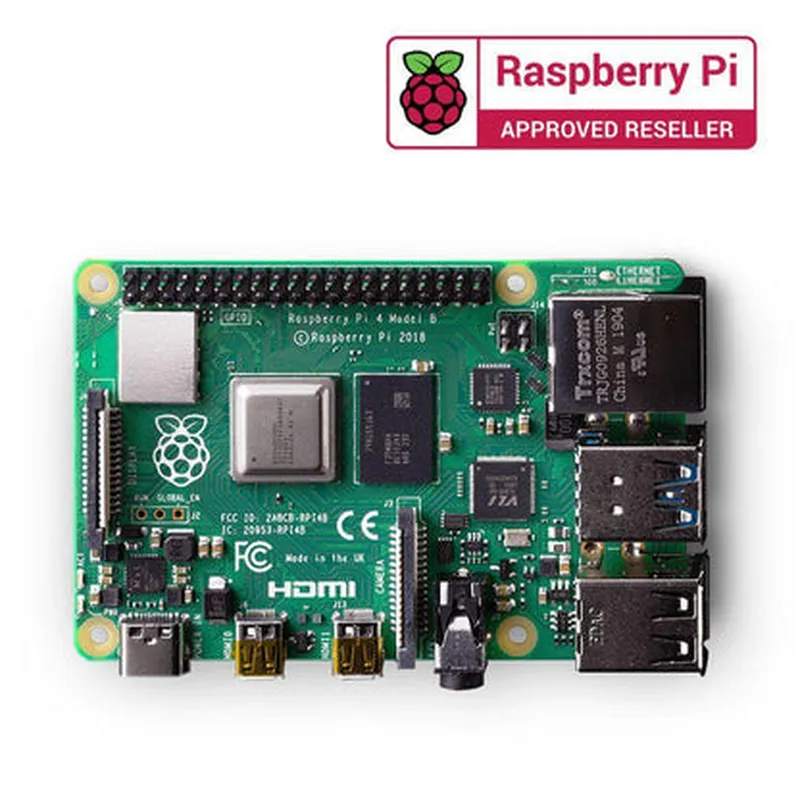
Raspberry Pi 4 Model B (1GB Ram)

Buy Now on Stufin

microSD card slot

Supports up to 1TB of storage, allowing users to store and boot their operating system, programs, and data.

### Graphics and Display

Dual HDMI 2.0a portsSupports 4K resolution at 60Hz, enabling dual-monitor setups and high-quality video output.
OpenGL ES 3.0Enables 3D graphics acceleration and support for graphic-intensive applications.

### Networking and Connectivity

Dual-band 802.11ac Wi-FiOffers reliable and fast wireless connectivity, supporting up to 5GHz frequencies.
Bluetooth 5.0Provides low-power, high-speed wireless communication for peripherals and devices.

Gigabit Ethernet

Supports wired networking with a maximum speed of 1000 Mbps.

2x USB 3.0 portsEnables fast data transfer and peripheral connectivity.

### Input/Output and Expansion

40-pin GPIO headerProvides access to GPIO pins for custom projects, IoT applications, and interfacing with external devices.
2x micro-HDMI portsSupports dual-monitor setups and high-quality video output.
USB-C power deliveryEnables power delivery up to 15W, supporting efficient and safe charging.

Audio Jack

Supports analog audio output.

### Power and Operating System

5V DC power inputOperates from a 5V DC power supply, with a recommended minimum of 3A.
Linux and Windows 10 IoT supportCompatible with a wide range of operating systems, including Raspbian, Ubuntu, and Windows 10 IoT Enterprise.

### Other Features

H.265 and H.264 decodeEnables hardware-accelerated video decoding for efficient multimedia processing.

Compliance with industrial and safety standards

Meets requirements for CE, FCC, and RoHS, ensuring a safe and reliable operating environment.

Applications and Use Cases

-------------------------------

The Raspberry Pi 4 Model B (1GB Ram) is suitable for a wide range of applications, including

IoT projects and automation

Home automation and smart home systems

Media centers and digital signage

Robotics and artificial intelligence

Industrial automation and control systems

Educational projects and prototyping

Proof-of-concept development and prototyping

Conclusion

--------------

The Raspberry Pi 4 Model B (1GB Ram) is a powerful, feature-rich, and affordable single-board computer, ideal for a wide range of applications. Its enhanced processing power, increased memory, and advanced features make it an excellent choice for IoT developers, hobbyists, and students. With its compact size, low power consumption, and extensive ecosystem of accessories and software, the Raspberry Pi 4 Model B is an ideal platform for creating innovative and cost-effective solutions.

Pin Configuration

  • Raspberry Pi 4 Model B (1GB RAM) Pinout Guide
  • The Raspberry Pi 4 Model B (1GB RAM) has a 40-pin GPIO header that provides access to various interfaces and functionalities. Here's a comprehensive guide to each pin, explaining its purpose and how to connect them:
  • Power Pins (Pins 1-6)
  • 1. 3.3V Power (Pin 1): Provides 3.3V power output from the Raspberry Pi.
  • Connection: Connect to a device that requires 3.3V power supply.
  • 2. 5V Power (Pin 2): Provides 5V power output from the Raspberry Pi.
  • Connection: Connect to a device that requires 5V power supply.
  • 3. 5V Power (Pin 3): Provides 5V power output from the Raspberry Pi.
  • Connection: Connect to a device that requires 5V power supply.
  • 4. Ground (Pin 4): Provides ground connection.
  • Connection: Connect to a device's ground pin or a breadboard's ground rail.
  • 5. Ground (Pin 5): Provides ground connection.
  • Connection: Connect to a device's ground pin or a breadboard's ground rail.
  • 6. Ground (Pin 6): Provides ground connection.
  • Connection: Connect to a device's ground pin or a breadboard's ground rail.
  • GPIO Pins (Pins 7-26)
  • 7. GPIO 2 (Pin 7): General-purpose input/output pin.
  • Connection: Connect to a sensor, actuator, or module that requires GPIO input/output.
  • 8. GPIO 3 (Pin 8): General-purpose input/output pin.
  • Connection: Connect to a sensor, actuator, or module that requires GPIO input/output.
  • 9. GPIO 4 (Pin 9): General-purpose input/output pin.
  • Connection: Connect to a sensor, actuator, or module that requires GPIO input/output.
  • 10. GPIO 5 (Pin 10): General-purpose input/output pin.
  • Connection: Connect to a sensor, actuator, or module that requires GPIO input/output.
  • 11. GPIO 6 (Pin 11): General-purpose input/output pin.
  • Connection: Connect to a sensor, actuator, or module that requires GPIO input/output.
  • 12. GPIO 7 (Pin 12): General-purpose input/output pin.
  • Connection: Connect to a sensor, actuator, or module that requires GPIO input/output.
  • 13. GPIO 8 (Pin 13): General-purpose input/output pin.
  • Connection: Connect to a sensor, actuator, or module that requires GPIO input/output.
  • 14. GPIO 9 (Pin 14): General-purpose input/output pin.
  • Connection: Connect to a sensor, actuator, or module that requires GPIO input/output.
  • 15. GPIO 10 (Pin 15): General-purpose input/output pin.
  • Connection: Connect to a sensor, actuator, or module that requires GPIO input/output.
  • 16. GPIO 11 (Pin 16): General-purpose input/output pin.
  • Connection: Connect to a sensor, actuator, or module that requires GPIO input/output.
  • 17. GPIO 12 (Pin 17): General-purpose input/output pin.
  • Connection: Connect to a sensor, actuator, or module that requires GPIO input/output.
  • 18. GPIO 13 (Pin 18): General-purpose input/output pin.
  • Connection: Connect to a sensor, actuator, or module that requires GPIO input/output.
  • 19. GPIO 14 (Pin 19): General-purpose input/output pin.
  • Connection: Connect to a sensor, actuator, or module that requires GPIO input/output.
  • 20. GPIO 15 (Pin 20): General-purpose input/output pin.
  • Connection: Connect to a sensor, actuator, or module that requires GPIO input/output.
  • 21. GPIO 16 (Pin 21): General-purpose input/output pin.
  • Connection: Connect to a sensor, actuator, or module that requires GPIO input/output.
  • 22. GPIO 17 (Pin 22): General-purpose input/output pin.
  • Connection: Connect to a sensor, actuator, or module that requires GPIO input/output.
  • 23. GPIO 18 (Pin 23): General-purpose input/output pin.
  • Connection: Connect to a sensor, actuator, or module that requires GPIO input/output.
  • 24. GPIO 19 (Pin 24): General-purpose input/output pin.
  • Connection: Connect to a sensor, actuator, or module that requires GPIO input/output.
  • 25. GPIO 20 (Pin 25): General-purpose input/output pin.
  • Connection: Connect to a sensor, actuator, or module that requires GPIO input/output.
  • 26. GPIO 21 (Pin 26): General-purpose input/output pin.
  • Connection: Connect to a sensor, actuator, or module that requires GPIO input/output.
  • Specialized Pins (Pins 27-40)
  • 27. ID_SD (Pin 27): I2C clock signal.
  • Connection: Connect to an I2C device's SCL pin.
  • 28. ID_SC (Pin 28): I2C data signal.
  • Connection: Connect to an I2C device's SDA pin.
  • 29. GPIO 22 (Pin 29): General-purpose input/output pin.
  • Connection: Connect to a sensor, actuator, or module that requires GPIO input/output.
  • 30. GPIO 23 (Pin 30): General-purpose input/output pin.
  • Connection: Connect to a sensor, actuator, or module that requires GPIO input/output.
  • 31. GPIO 24 (Pin 31): General-purpose input/output pin.
  • Connection: Connect to a sensor, actuator, or module that requires GPIO input/output.
  • 32. GPIO 25 (Pin 32): General-purpose input/output pin.
  • Connection: Connect to a sensor, actuator, or module that requires GPIO input/output.
  • 33. UART_TXD (Pin 33): UART transmit data signal.
  • Connection: Connect to a UART device's RX pin.
  • 34. UART_RXD (Pin 34): UART receive data signal.
  • Connection: Connect to a UART device's TX pin.
  • 35. GPIO 26 (Pin 35): General-purpose input/output pin.
  • Connection: Connect to a sensor, actuator, or module that requires GPIO input/output.
  • 36. GPIO 27 (Pin 36): General-purpose input/output pin.
  • Connection: Connect to a sensor, actuator, or module that requires GPIO input/output.
  • 37. GPIO 28 (Pin 37): General-purpose input/output pin.
  • Connection: Connect to a sensor, actuator, or module that requires GPIO input/output.
  • 38. SPI_CE0_N (Pin 38): SPI chip enable 0 signal (active low).
  • Connection: Connect to a SPI device's CE0 pin.
  • 39. SPI_CE1_N (Pin 39): SPI chip enable 1 signal (active low).
  • Connection: Connect to a SPI device's CE1 pin.
  • 40. SPI_CLK (Pin 40): SPI clock signal.
  • Connection: Connect to a SPI device's CLK pin.
  • Important Notes:
  • Make sure to use the correct voltage levels and current ratings when connecting devices to the Raspberry Pi.
  • Use a breadboard or a PCB to connect devices to the Raspberry Pi's GPIO pins.
  • Be careful not to short-circuit pins, as it can damage the Raspberry Pi.
  • Refer to the Raspberry Pi documentation and diagrams for more information on pin connections and usage.

Code Examples

Raspberry Pi 4 Model B (1GB Ram) Documentation
Overview
The Raspberry Pi 4 Model B is a single-board computer designed for IoT, robotics, and other applications. This model features 1GB of RAM, making it an affordable and compact solution for various projects.
Technical Specifications
Processor: Broadcom BCM2711B0 quad-core Cortex-A72 (ARMv8) 64-bit SoC
 RAM: 1GB LPDDR4
 Storage: microSD card slot
 Networking: Gigabit Ethernet, 2.4GHz and 5GHz IEEE 802.11b/g/n/ac wireless LAN, Bluetooth 5.0
 GPIO: 40-pin GPIO header
 Operating System: Raspbian OS (based on Linux)
Code Examples
### Example 1: Blinking an LED using Python
This example demonstrates how to use the Raspberry Pi's GPIO pins to control an LED.
Hardware Requirements:
Raspberry Pi 4 Model B (1GB Ram)
 Breadboard
 LED
 1 k resistor
 Jumper wires
Software Requirements:
Raspbian OS (latest version)
 Python 3.x
Code:
```python
import RPi.GPIO as GPIO
import time
# Set up GPIO mode
GPIO.setmode(GPIO.BCM)
# Define the GPIO pin for the LED
LED_PIN = 17
# Set up the LED pin as an output
GPIO.setup(LED_PIN, GPIO.OUT)
while True:
    # Turn the LED on
    GPIO.output(LED_PIN, GPIO.HIGH)
    time.sleep(1)
    # Turn the LED off
    GPIO.output(LED_PIN, GPIO.LOW)
    time.sleep(1)
```
Explanation:
This code uses the RPi.GPIO library to interact with the Raspberry Pi's GPIO pins. It sets up the LED pin as an output and then enters an infinite loop, toggling the LED on and off every second using the `GPIO.output()` function.
### Example 2: Reading Temperature and Humidity using DHT11 Sensor and Python
This example demonstrates how to use the Raspberry Pi to read temperature and humidity data from a DHT11 sensor.
Hardware Requirements:
Raspberry Pi 4 Model B (1GB Ram)
 DHT11 temperature and humidity sensor
 Breadboard
 Jumper wires
Software Requirements:
Raspbian OS (latest version)
 Python 3.x
 `Adafruit_DHT` library (install using `pip install Adafruit_DHT`)
Code:
```python
import Adafruit_DHT
# Set up the DHT11 sensor
sensor = Adafruit_DHT.DHT11
# Define the GPIO pin for the DHT11 sensor
DHT_PIN = 4
while True:
    # Read temperature and humidity data
    humidity, temperature = Adafruit_DHT.read_retry(sensor, DHT_PIN)
# Print the data
    print("Temperature: {:.1f}C  Humidity: {:.1f}%".format(temperature, humidity))
# Wait 5 seconds before taking the next reading
    time.sleep(5)
```
Explanation:
This code uses the `Adafruit_DHT` library to interact with the DHT11 sensor. It sets up the sensor and defines the GPIO pin used to connect it to the Raspberry Pi. The code then enters an infinite loop, reading temperature and humidity data every 5 seconds using the `read_retry()` function and printing it to the console.
These examples demonstrate the versatility and ease of use of the Raspberry Pi 4 Model B (1GB Ram) in IoT and robotics projects.