

Stufin
Home Quick Cart Profile

3D Printing Pen with Filament, Adapter and Manual

Buy Now on Stufin

Component Name

3D Printing Pen with Filament, Adapter, and Manual

Overview

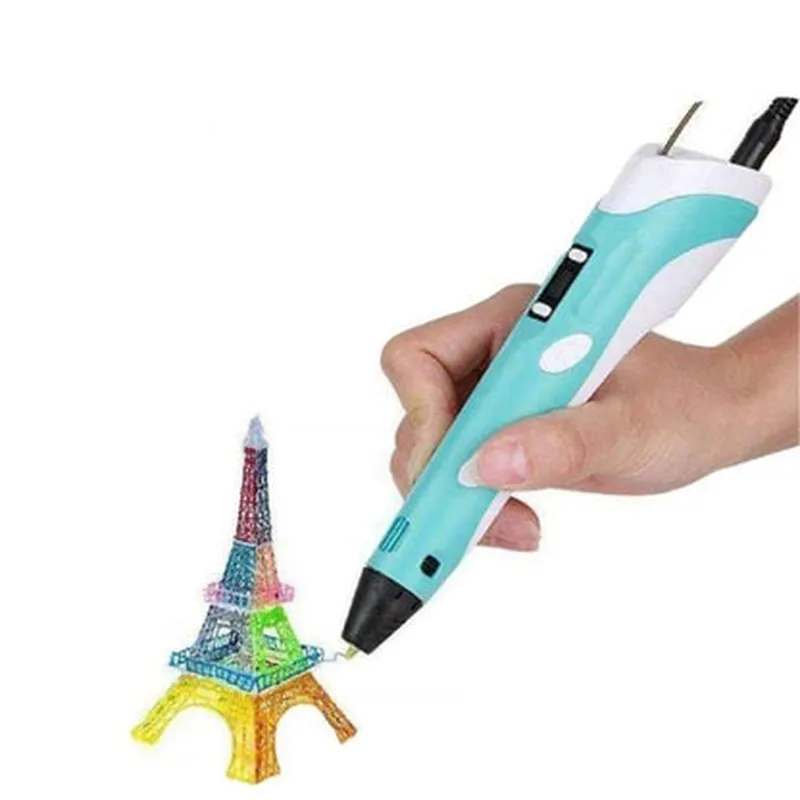
The 3D Printing Pen with Filament, Adapter, and Manual is a handheld device that allows users to create three-dimensional objects by extruding melted filament through a heated tip. This innovative tool enables users to bring their ideas to life, creating intricate designs, artistic pieces, and functional parts with ease.

Functionality

The 3D Printing Pen operates by using a combination of heat, pressure, and movement to extrude the filament from the pen's nozzle. The user controls the pen's movement, speed, and temperature to create the desired shape and design. The pen is designed for versatility, allowing users to work on a variety of projects, from simple decorations to complex mechanisms.

Key Features

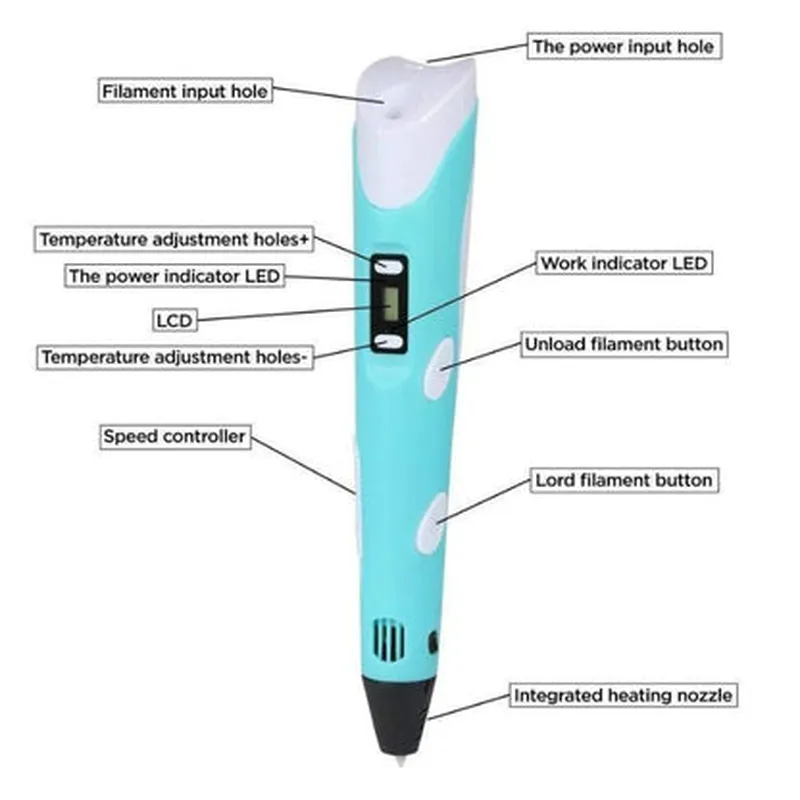
  • Heated Tip: The pen features a heated tip that reaches high temperatures (up to 250C) to melt the filament, allowing for smooth and consistent extrusion.
  • Adjustable Temperature: The temperature can be adjusted to suit different types of filament, ensuring optimal performance and minimizing the risk of clogging.
  • Variable Speed Control: The pen's speed can be controlled to achieve varying line widths, allowing for intricate details and bold strokes.
  • Ergonomic Design: The pen's design provides a comfortable grip, reducing fatigue and allowing for extended use.
  • Filament Feed System: The pen features a built-in filament feed system, which ensures a consistent and reliable flow of material.
  • Adapter: The included adapter enables users to switch between different types of filament, expanding the range of creative possibilities.
  • Manual: The comprehensive manual provides step-by-step instructions, safety guidelines, and troubleshooting tips, making it easy for users to get started and overcome any challenges.
  • Power Supply: The pen operates on a rechargeable battery, providing up to 2 hours of continuous use on a single charge.

Specifications

Pen Dimensions

180mm x 40mm x 30mm

Weight

150g

Filament Compatibility

PLA, ABS, PETG, Wood, and Copper-infused

Temperature Range

160C - 250C

Power Supply

Rechargeable lithium-ion battery (up to 2 hours of continuous use)

Adapter

Compatible with 1.75mm and 3mm filament diameters

Applications

The 3D Printing Pen is ideal for

Artistic creations (jewelry, sculptures, and decorative items)

Hobbyists and DIY enthusiasts

Educators and students (STEM education and project-based learning)

Professionals (prototyping, design, and architecture)

Makerspaces and fabrication labs

Safety Precautions

Always use the pen in a well-ventilated area, away from flammable materials and children.

Handle the pen with care, as the heated tip can cause burns.

Follow the manual's guidelines and safety instructions to avoid accidents and ensure optimal performance.

By combining innovative technology with artistic freedom, the 3D Printing Pen with Filament, Adapter, and Manual offers an unparalleled creative experience, empowering users to bring their imagination to life.

Pin Configuration

  • 3D Printing Pen with Filament, Adapter, and Manual
  • Pinouts and Connection Guide
  • The 3D Printing Pen is a fascinating device that brings 3D printing to a whole new level of creativity and flexibility. To get started with this innovative tool, it's essential to understand the pinouts and connections. In this section, we will delve into the details of each pin and provide a step-by-step guide on how to connect them.
  • Pinouts:
  • 1. VCC (Power Pin)
  • Function: Supplies power to the 3D Printing Pen
  • Voltage: 5V
  • Color: Red
  • 2. GND (Ground Pin)
  • Function: Provides a common ground for the pen's circuits
  • Color: Black
  • 3. TX (Transmit Pin)
  • Function: Transmits data from the pen to the adapter or other devices
  • Protocol: Serial Communication (UART)
  • Baud Rate: 9600
  • 4. RX (Receive Pin)
  • Function: Receives data from the adapter or other devices
  • Protocol: Serial Communication (UART)
  • Baud Rate: 9600
  • 5. EN (Enable Pin)
  • Function: Enables or disables the 3D Printing Pen's motor
  • Logic Level: Active High (3.3V or 5V)
  • 6. TEMP (Temperature Pin)
  • Function: Monitors the temperature of the hotend
  • Signal: Analog Voltage (0-5V)
  • 7. FAN (Fan Pin)
  • Function: Controls the fan's speed
  • Signal: PWM (Pulse Width Modulation)
  • Connection Guide:
  • Step 1: Connect the Power Pins
  • Connect the VCC (Red) pin to a 5V power source (e.g., a USB port or a battery)
  • Connect the GND (Black) pin to a common ground
  • Step 2: Connect the Serial Communication Pins
  • Connect the TX (Transmit) pin to the RX (Receive) pin of the adapter or other devices
  • Connect the RX (Receive) pin to the TX (Transmit) pin of the adapter or other devices
  • Step 3: Connect the Enable and Temperature Pins
  • Connect the EN (Enable) pin to a digital output of the adapter or other devices
  • Connect the TEMP (Temperature) pin to an analog input of the adapter or other devices
  • Step 4: Connect the Fan Pin
  • Connect the FAN (Fan) pin to a PWM output of the adapter or other devices
  • Important Notes:
  • Make sure to handle the pins with care to avoid damage or short circuits.
  • Always follow the recommended voltage and current ratings for each pin.
  • Refer to the user manual for specific connection diagrams and adapter configurations.
  • By following these steps and understanding the pinouts, you'll be able to connect your 3D Printing Pen to the adapter and other devices, unlocking its full potential for creative and innovative applications.

Code Examples

Component Name: 3D Printing Pen with Filament, Adapter, and Manual
Overview:
The 3D Printing Pen with Filament, Adapter, and Manual is a versatile and innovative tool that allows users to create three-dimensional objects by drawing in the air. This component consists of a pen-shaped printing device, a filament adapter, and a comprehensive manual. The pen uses melted filament to create solid structures, layer by layer, enabling users to create complex shapes and designs.
Technical Specifications:
Printing Technology: Fused Deposition Modeling (FDM)
 Filament Type: PLA, ABS, and PETG
 Filament Diameter: 1.75 mm
 Pen Body Material: Durable ABS plastic
 Power Supply: USB-powered (5V, 1A)
 Temperature Range: 180C - 220C (356F - 428F)
Example 1: Basic Drawing using the 3D Printing Pen (Python Code)
```python
import time
# Initialize the pen
pen = 3D_Printing_Pen()
# Set the filament temperature to 190C
pen.set_temperature(190)
# Wait for the pen to heat up
time.sleep(5)
# Draw a 3D rectangle
pen.move_to(0, 0, 0)  # Start at the origin (0, 0, 0)
pen.extrude(10, 10, 10)  # Draw a 10x10x10 mm cube
pen.move_to(10, 10, 10)  # Move to the next position
pen.extrude(10, 10, 10)  # Draw another 10x10x10 mm cube
# Turn off the pen
pen.off()
```
Example 2: Creating a 3D Object using the 3D Printing Pen withAdafruit CircuitPython (MicroPython)
```python
import board
import digitalio
from adafruit_hid import get_sleep
# Initialize the pen
pen = digitalio.DigitalInOut(board.GP15)
# Set the filament temperature to 200C
pen.temperature = 200
# Define a 3D object (a simple triangle)
triangle = [
    (0, 0, 0),
    (10, 0, 0),
    (5, 10, 0),
    (0, 0, 0)
]
# Draw the 3D object
for point in triangle:
    pen.move_to(point[0], point[1], point[2])
    pen.extrude(1, 1, 1)
# Turn off the pen
pen.off()
# Put the board to sleep
get_sleep().sleep_for(5)
```
Additional Resources:
Manual: A comprehensive user manual is included with the 3D Printing Pen, providing detailed instructions for setup, usage, and maintenance.
 Adapter: The filament adapter is compatible with a wide range of filaments, allowing users to experiment with different materials and colors.
 Tutorials and Projects: Check out our website for a wide range of tutorials, projects, and examples to help you get started with your 3D Printing Pen.
Important Safety Notes:
Always use the 3D Printing Pen in a well-ventilated area, away from flammable materials.
 Keep the pen away from children and pets.
 Avoid touching the hot nozzle or extruded filament.
 Follow proper filament loading and unloading procedures to avoid damage to the pen.
By following these examples and guidelines, you can unlock the creative potential of the 3D Printing Pen with Filament, Adapter, and Manual, and bring your innovative ideas to life.