Stufin
Home Quick Cart Profile

NE555 + CD4017 Water Flowing Light LED Module DIY Kit


Buy Now on Stufin

Component Name

NE555 + CD4017 Water Flowing Light LED Module DIY Kit
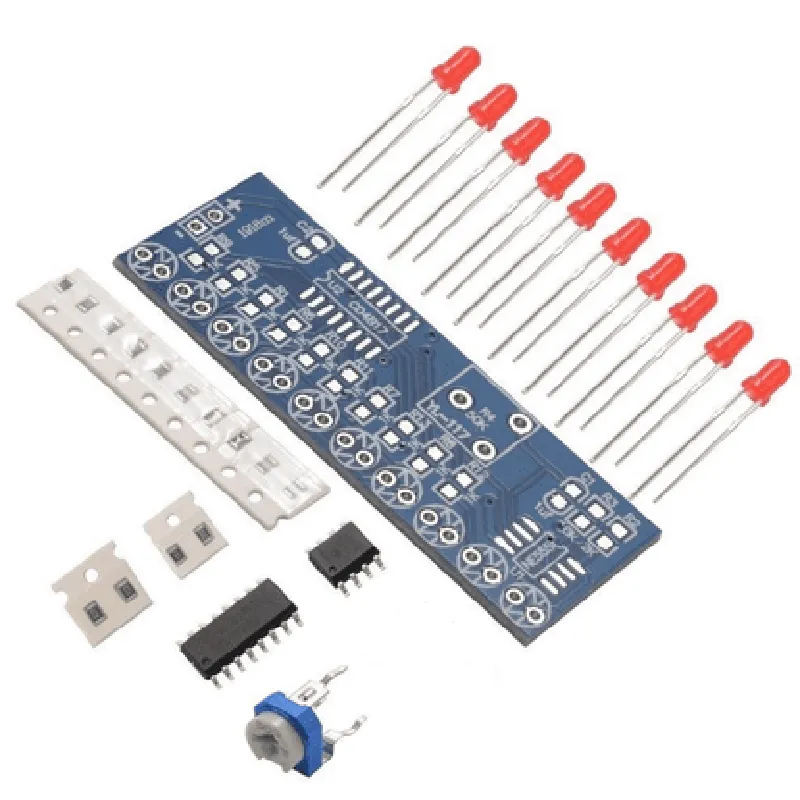
Overview

The NE555 + CD4017 Water Flowing Light LED Module DIY Kit is an innovative Internet of Things (IoT) component designed to create a mesmerizing water flowing light effect using LEDs. This DIY kit is an excellent project for electronics enthusiasts, hobbyists, and makers who want to experiment with creative lighting solutions.
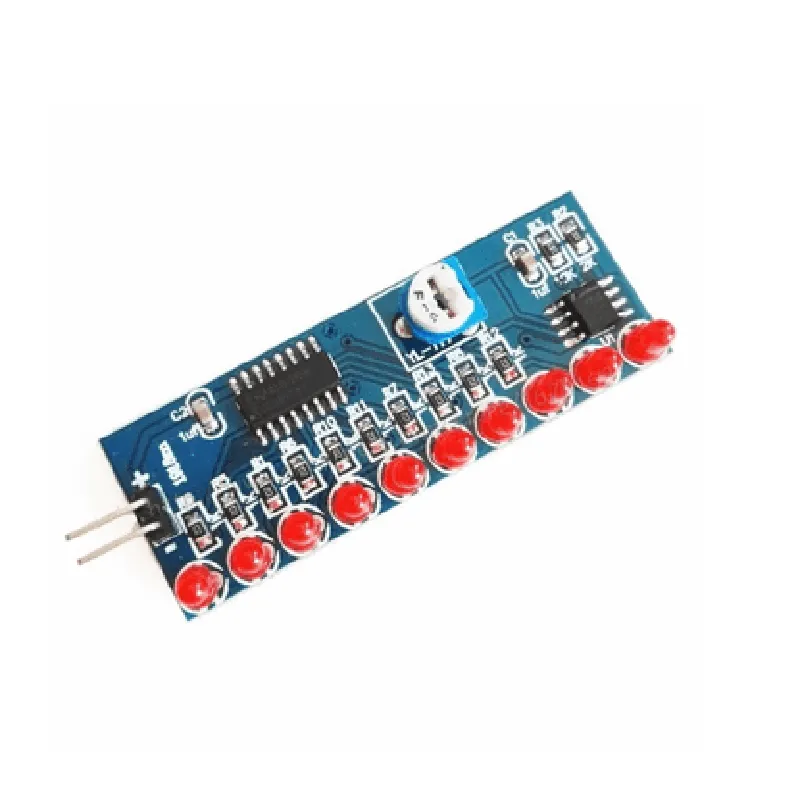
Functionality

The NE555 + CD4017 Water Flowing Light LED Module DIY Kit is a self-contained circuit that simulates a water flowing effect using LEDs. The module consists of a timer circuit (NE555) and a decade counter (CD4017) that work together to create a sequential lighting pattern. When powered, the module produces a continuous flowing light effect, giving the illusion of water flowing.

Key Features

  • NE555 Timer IC: The NE555 is a popular timer IC that generates a square wave output, which is used to drive the CD4017 decade counter.
  • CD4017 Decade Counter IC: The CD4017 is a decade counter IC that can count up to 10 outputs. It is used to sequence the LED lights, creating a flowing effect.
  • 10-LED Array: The module features an array of 10 LEDs that are connected to the outputs of the CD4017. As the CD4017 counts, each LED is sequentially illuminated, creating the flowing effect.
  • Adjustable Timing: The module allows for adjustable timing using a potentiometer connected to the NE555 timer IC. This enables users to adjust the flow rate of the LED lights.
  • DIY-Friendly: The kit is designed for DIY enthusiasts, with a simple and easy-to-assemble circuit board. No soldering is required, making it accessible to makers of all skill levels.
  • Low Power Consumption: The module operates at a low voltage (DC 5-12V) and consumes minimal power, making it suitable for battery-powered applications.
  • Compact Design: The module is designed to be compact, making it easy to integrate into various projects, such as decorative lighting, art installations, or interactive exhibits.

Operating Voltage

DC 5-12V

Power Consumption

50mA

NE555 Timer IC Frequency1-100 Hz (adjustable)
CD4017 Decade Counter IC Outputs10

LED Array

10 x LEDs (5mm or 3mm, depending on the kit)

Adjustability

Potentiometer-controlled timing adjustment

Dimensions

50mm x 35mm (module size may vary depending on the manufacturer)

Applications

  • Decorative Lighting: Use the NE555 + CD4017 Water Flowing Light LED Module DIY Kit to create unique and captivating lighting effects for home decor, exhibitions, or events.
  • Art Installations: The module's flowing effect can be used to create interactive art installations that respond to sound, movement, or other environmental factors.
  • Interactive Exhibits: Incorporate the module into interactive exhibits that showcase the beauty of technology and art.

Conclusion

The NE555 + CD4017 Water Flowing Light LED Module DIY Kit is an engaging and easy-to-use component that allows makers to create mesmerizing water flowing light effects. With its adjustable timing, compact design, and low power consumption, this module is an excellent addition to any IoT project or DIY endeavor.

Pin Configuration

  • Component Name: NE555 + CD4017 Water Flowing Light LED Module DIY Kit
  • Overview: This module is a DIY kit that combines the NE555 timer IC and CD4017 decade counter IC to create a water flowing light effect using LEDs. The kit is ideal for hobbyists and technical enthusiasts looking to create interactive LED displays.
  • NE555 Pinout:
  • The NE555 timer IC is a 8-pin device, and its pinout is as follows:
  • 1. GND (Ground): Pin 1
  • Connected to the negative terminal of the power source (e.g., battery) and other components that share a common ground.
  • 2. TRIGGER: Pin 2
  • Input pin that triggers the timer IC to start timing when the voltage falls below 1/3 of the supply voltage.
  • 3. OUTPUT: Pin 3
  • Output pin that provides a high or low signal based on the timer's operation.
  • 4. RESET: Pin 4
  • Active-low reset pin that resets the timer IC when connected to ground.
  • 5. CONTROL VOLTAGE: Pin 5
  • Input pin that allows for external control of the timer's threshold and trigger points.
  • 6. THRESHOLD: Pin 6
  • Input pin that determines the upper threshold voltage.
  • 7. (DIS)CHARGE: Pin 7
  • Output pin that connects to a capacitor to discharge it when the timer IC is in reset mode.
  • 8. VCC (Supply Voltage): Pin 8
  • Positive power supply pin connected to the positive terminal of the power source (e.g., battery).
  • CD4017 Pinout:
  • The CD4017 decade counter IC is a 16-pin device, and its pinout is as follows:
  • 1. GND (Ground): Pin 8
  • Connected to the negative terminal of the power source (e.g., battery) and other components that share a common ground.
  • 2. VCC (Supply Voltage): Pin 16
  • Positive power supply pin connected to the positive terminal of the power source (e.g., battery).
  • 3. CLOCK: Pin 14
  • Input pin that receives the clock signal from the NE555 timer IC.
  • 4. CLOCK INHIBIT: Pin 13
  • Input pin that inhibits the clock signal when connected to ground.
  • 5. OUTPUTS (Q0-Q9): Pins 1-10
  • Output pins that provide a high signal on each output in sequence, depending on the clock count.
  • 6. CARRY OUT: Pin 15
  • Output pin that provides a carry signal when the counter reaches the maximum count.
  • 7. RESET: Pin 12
  • Active-low reset pin that resets the counter IC when connected to ground.
  • Connection Structure:
  • To connect the pins, follow these steps:
  • Step 1: Connect Power
  • Connect the positive terminal of the power source (e.g., battery) to the VCC pin (Pin 8) of the NE555 timer IC.
  • Connect the negative terminal of the power source (e.g., battery) to the GND pin (Pin 1) of the NE555 timer IC.
  • Connect the positive terminal of the power source (e.g., battery) to the VCC pin (Pin 16) of the CD4017 decade counter IC.
  • Connect the negative terminal of the power source (e.g., battery) to the GND pin (Pin 8) of the CD4017 decade counter IC.
  • Step 2: Connect NE555 Timer IC
  • Connect the trigger pin (Pin 2) of the NE555 timer IC to a suitable triggering source (e.g., a button or a sensor).
  • Connect the output pin (Pin 3) of the NE555 timer IC to the clock pin (Pin 14) of the CD4017 decade counter IC.
  • Connect the discharge pin (Pin 7) of the NE555 timer IC to a capacitor and a resistor in series.
  • Connect the control voltage pin (Pin 5) of the NE555 timer IC to a suitable voltage source (e.g., a voltage divider).
  • Step 3: Connect CD4017 Decade Counter IC
  • Connect the clock pin (Pin 14) of the CD4017 decade counter IC to the output pin (Pin 3) of the NE555 timer IC.
  • Connect the carry out pin (Pin 15) of the CD4017 decade counter IC to a suitable indicator (e.g., an LED).
  • Connect each output pin (Pins 1-10) of the CD4017 decade counter IC to an LED and a suitable resistor in series.
  • Step 4: Add LEDs and Resistors
  • Connect each LED to a suitable resistor and an output pin (Pins 1-10) of the CD4017 decade counter IC.
  • Connect the other end of each LED to the GND pin (Pin 8) of the CD4017 decade counter IC.
  • By following these steps, you should be able to connect the NE555 + CD4017 Water Flowing Light LED Module DIY Kit correctly. Ensure that you have a suitable power source, resistors, capacitors, and LEDs to complete the project.

Code Examples

NE555 + CD4017 Water Flowing Light LED Module DIY Kit
Overview
The NE555 + CD4017 Water Flowing Light LED Module DIY Kit is a creative and interactive electronic module that simulates a water flowing effect using LEDs. The module is powered by a NE555 timer IC and a CD4017 decade counter IC, which work together to create a mesmerizing and dynamic lighting effect. This module is perfect for DIY enthusiasts, hobbyists, and students looking to create visually appealing projects.
Technical Specifications
Operating Voltage: 5V - 12V
 Power Consumption: 100mA (max)
 Number of LEDs: 10
 LED Color: Red or Blue (depending on the kit)
 NE555 Timer IC: Used for generating the clock signal
 CD4017 Decade Counter IC: Used for counting and controlling the LED sequence
Pinout
The module has the following pins:
VCC: Power supply (5V - 12V)
 GND: Ground
 IN: Input pin for the clock signal (connected to the NE555 timer IC)
 OUT: Output pin for the LED sequence (connected to the CD4017 decade counter IC)
Code Examples
### Example 1: Basic Water Flowing Light Effect
In this example, we'll use an Arduino Uno board to control the NE555 + CD4017 Water Flowing Light LED Module DIY Kit. The code will generate a basic water flowing light effect.
```c++
const int clockPin = 2;  // Connect the clock signal output from NE555 to Arduino pin 2
const int ledPin = 13;  // Connect the LED output from CD4017 to Arduino pin 13
void setup() {
  pinMode(clockPin, OUTPUT);
  pinMode(ledPin, OUTPUT);
}
void loop() {
  // Generate a clock signal (50Hz) to drive the CD4017 decade counter
  digitalWrite(clockPin, HIGH);
  delayMicroseconds(10);
  digitalWrite(clockPin, LOW);
  delayMicroseconds(10);
// Toggle the LED output to create the water flowing effect
  digitalWrite(ledPin, !digitalRead(ledPin));
  delay(50);
}
```
### Example 2: Water Flowing Light Effect with Speed Control
In this example, we'll use a potentiometer to control the speed of the water flowing light effect.
```c++
const int clockPin = 2;  // Connect the clock signal output from NE555 to Arduino pin 2
const int ledPin = 13;  // Connect the LED output from CD4017 to Arduino pin 13
const int potPin = A0;  // Connect the potentiometer to Arduino analog input 0
int potValue = 0;
int delayTime = 0;
void setup() {
  pinMode(clockPin, OUTPUT);
  pinMode(ledPin, OUTPUT);
  pinMode(potPin, INPUT);
}
void loop() {
  // Read the potentiometer value (0-1023)
  potValue = analogRead(potPin);
// Map the potentiometer value to a delay time (10-100ms)
  delayTime = map(potValue, 0, 1023, 10, 100);
// Generate a clock signal to drive the CD4017 decade counter
  digitalWrite(clockPin, HIGH);
  delayMicroseconds(10);
  digitalWrite(clockPin, LOW);
  delayMicroseconds(10);
// Toggle the LED output to create the water flowing effect
  digitalWrite(ledPin, !digitalRead(ledPin));
  delay(delayTime);
}
```
These code examples demonstrate the basic operation of the NE555 + CD4017 Water Flowing Light LED Module DIY Kit. You can modify the code to create different patterns, colors, and effects to suit your creative project needs.