Stufin
Home Quick Cart Profile

TB6600 Stepper Motor Driver

Buy Now on Stufin

Component Name

TB6600 Stepper Motor Driver

Overview

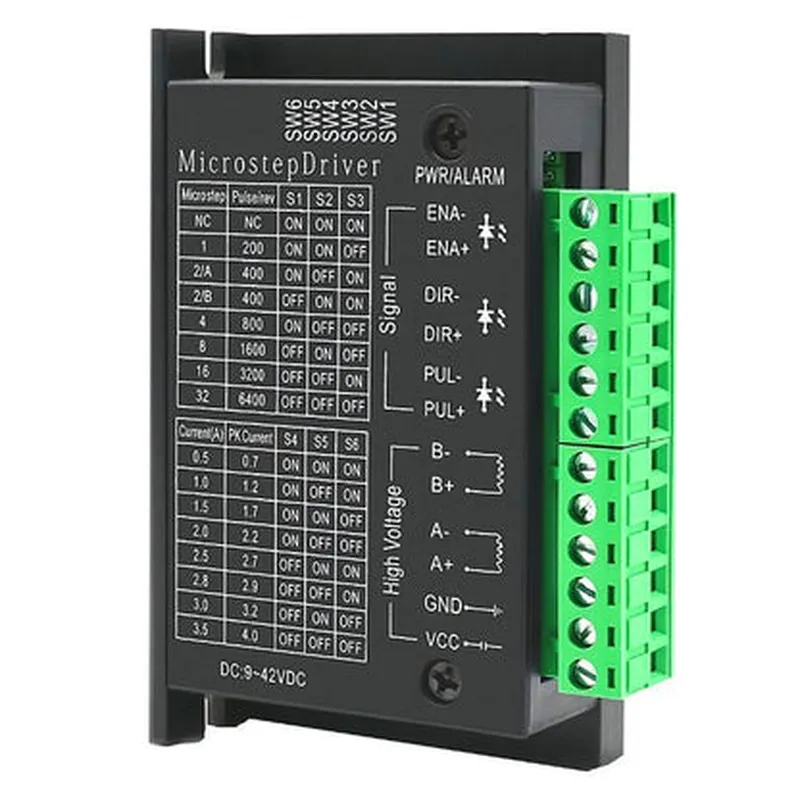
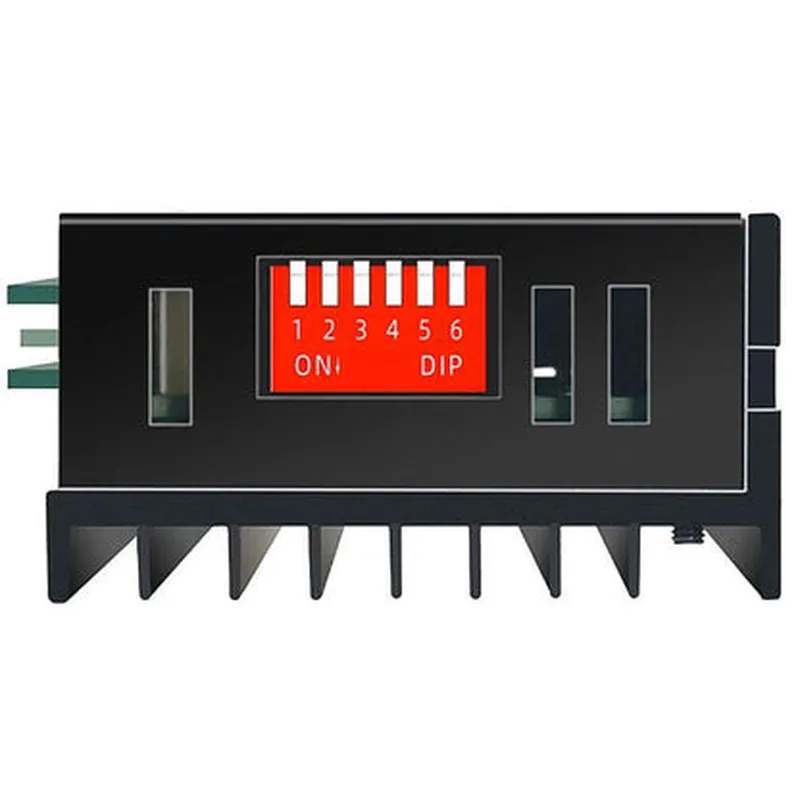
The TB6600 Stepper Motor Driver is a micro-stepping motor driver solution designed to control and drive bipolar stepper motors. This driver incorporates advanced micro-stepping technology, allowing for smoother and quieter motor operation. The TB6600 is a popular choice among makers, engineers, and hobbyists for its ease of use, high reliability, and versatility in various applications, including robotics, CNC machines, 3D printers, and automation systems.

Functionality

The TB6600 Stepper Motor Driver is responsible for converting digital signals from a microcontroller or computer into analog signals that control the stepper motor's rotation. The driver uses a combination of pulse-width modulation (PWM) and micro-stepping techniques to achieve precise control over the motor's speed, direction, and position.

Key Features

  • Micro-stepping: The TB6600 supports up to 16 micro-steps per full step, allowing for precise motor positioning and smoother operation.
  • High Current Capability: The driver can handle motor currents up to 4.5A (peak) and 2.2A (continuous), making it suitable for a wide range of stepper motor applications.
  • Voltage Range: The TB6600 operates with input voltages from 10V to 42V, providing flexibility for use in various power supply configurations.
  • Adjustable Current Limiting: The driver features adjustable current limiting, allowing users to set the maximum current output to prevent motor overloading and ensure safe operation.
  • Overheat Protection: The TB6600 includes built-in thermal protection, which automatically shuts down the driver in case of overheating, preventing damage to the component.
  • Low RDS(on) MOSFETs: The driver employs low RDS(on) MOSFETs, reducing energy losses and increasing overall system efficiency.
  • Compact Design: The TB6600 is available in a compact, surface-mount package, making it ideal for use in space-constrained applications.
  • Simple Interface: The driver features a simple, 5-wire interface (IN1, IN2, Enable, Ground, and VCC) that can be easily connected to a microcontroller or computer.

Applications

The TB6600 Stepper Motor Driver is suitable for a wide range of applications, including

Robotics and automation systems

CNC machines and 3D printers

Medical devices and equipment

Industrial automation and control systems

Security systems and Access control

Consumer appliances and gadgets

Input Voltage

10V to 42V

Output Current

up to 4.5A (peak) and 2.2A (continuous)

Micro-stepping Resolutionup to 16 micro-steps per full step

Logic Voltage

5V

Operating Frequency

up to 100 kHz

Package Type

Surface-mount (QFN24)

Dimensions

4mm x 4mm x 0.9mm

Operating Temperature

-40C to 125C

Conclusion

The TB6600 Stepper Motor Driver is a highly versatile and reliable component, offering a range of features that make it an ideal choice for various applications. Its micro-stepping capabilities, high current handling, and adjustable current limiting make it well-suited for precise motor control and high-performance applications.

Pin Configuration

  • TB6600 Stepper Motor Driver Documentation
  • Pin Description:
  • The TB6600 Stepper Motor Driver has a total of 16 pins, which can be divided into the following categories: power supply, motor connection, control signals, and status indicators. Here's a detailed explanation of each pin:
  • Power Supply Pins:
  • VCC (Pin 1): Input voltage for the driver's internal logic circuitry. Typically, a 5V power supply is used.
  • GND (Pin 2): Ground connection for the power supply.
  • VM (Pin 15): Motor voltage input. This pin is used to power the stepper motor. The recommended voltage range is 10V to 35V.
  • GND (Pin 16): Ground connection for the motor voltage input.
  • Motor Connection Pins:
  • A+ (Pin 3): Positive connection for the A-phase of the stepper motor.
  • A- (Pin 4): Negative connection for the A-phase of the stepper motor.
  • B+ (Pin 5): Positive connection for the B-phase of the stepper motor.
  • B- (Pin 6): Negative connection for the B-phase of the stepper motor.
  • Control Signal Pins:
  • DIR (Pin 7): Direction control input. A high logic level (H) sets the motor direction to clockwise, while a low logic level (L) sets the direction to counterclockwise.
  • STEP (Pin 8): Step control input. A pulse signal is applied to this pin to control the stepper motor's rotation.
  • ENABLE (Pin 9): Enable input. A high logic level (H) enables the driver, while a low logic level (L) disables it.
  • Status Indicator Pins:
  • BUSY (Pin 10): Busy status output. This pin is high when the driver is processing a command or pulse signal.
  • FAULT (Pin 11): Fault status output. This pin is high when the driver detects an error or fault condition.
  • Reserved Pins:
  • Pin 12: Reserved (do not use)
  • Pin 13: Reserved (do not use)
  • Pin 14: Reserved (do not use)
  • Connection Structure:
  • Here's a recommended connection structure for the TB6600 Stepper Motor Driver:
  • 1. Power Supply:
  • Connect VCC (Pin 1) to a 5V power supply.
  • Connect GND (Pin 2) to the power supply's ground.
  • 2. Motor Connection:
  • Connect A+ (Pin 3) to the A-phase positive terminal of the stepper motor.
  • Connect A- (Pin 4) to the A-phase negative terminal of the stepper motor.
  • Connect B+ (Pin 5) to the B-phase positive terminal of the stepper motor.
  • Connect B- (Pin 6) to the B-phase negative terminal of the stepper motor.
  • 3. Control Signals:
  • Connect DIR (Pin 7) to a digital output from a microcontroller or other control device.
  • Connect STEP (Pin 8) to a digital output from a microcontroller or other control device.
  • Connect ENABLE (Pin 9) to a digital output from a microcontroller or other control device.
  • 4. Status Indicators:
  • Connect BUSY (Pin 10) to a digital input on a microcontroller or other monitoring device.
  • Connect FAULT (Pin 11) to a digital input on a microcontroller or other monitoring device.
  • 5. Motor Voltage Input:
  • Connect VM (Pin 15) to a motor voltage power supply (10V to 35V).
  • Connect GND (Pin 16) to the motor voltage power supply's ground.
  • Note: Ensure proper isolation and decoupling of the power supplies and motor connections to prevent noise and interference.

Code Examples

TB6600 Stepper Motor Driver Documentation
Overview
The TB6600 is a high-power stepper motor driver designed for driving bipolar stepper motors. It is a popular choice for various applications, including CNC machines, 3D printers, and robotics. This driver features a high current output, adjustable microstepping, and a compact design.
Pinout
The TB6600 has the following pinout:
| Pin | Function |
| --- | --- |
| VCC | Power supply (recommended 12-24V) |
| GND | Ground |
| ENA | Enable input (active low) |
| DIR | Direction input |
| PUL | Pulse input |
| M0-M2 | Microstep resolution selection |
| RST | Reset input (active low) |
| LED | Status indicator LED |
Connection Diagram
Here is a basic connection diagram for the TB6600:
```
          +-----------+
          |  TB6600  |
          +-----------+
                  |
                  |
                  v
+-----------+  +-----------+  +-----------+
|  Stepper  |  |  Power   |  |  Microcon- |
|  Motor    |  |  Supply  |  |  troller   |
+-----------+  +-----------+  +-----------+
|  A+      |  |  VCC     |  |  DIR      |
|  A-      |  |  GND     |  |  PUL      |
|  B+      |           |           |
|  B-      |           |           |
+-----------+           +-----------+
```
Code Examples
### Example 1: Basic Stepper Motor Control using Arduino
In this example, we will demonstrate how to control a bipolar stepper motor using the TB6600 and an Arduino board.
```c++
#define DIR_PIN 2  // Direction pin
#define PUL_PIN 3  // Pulse pin
#define ENA_PIN 4  // Enable pin
void setup() {
  pinMode(DIR_PIN, OUTPUT);
  pinMode(PUL_PIN, OUTPUT);
  pinMode(ENA_PIN, OUTPUT);
  digitalWrite(ENA_PIN, HIGH);  // Enable the driver
}
void loop() {
  digitalWrite(DIR_PIN, HIGH);  // Set direction to clockwise
  for (int i = 0; i < 100; i++) {
    digitalWrite(PUL_PIN, HIGH);
    delayMicroseconds(500);
    digitalWrite(PUL_PIN, LOW);
    delayMicroseconds(500);
  }
  digitalWrite(DIR_PIN, LOW);  // Set direction to counterclockwise
  for (int i = 0; i < 100; i++) {
    digitalWrite(PUL_PIN, HIGH);
    delayMicroseconds(500);
    digitalWrite(PUL_PIN, LOW);
    delayMicroseconds(500);
  }
}
```
### Example 2: Microstepping Control using Raspberry Pi (Python)
In this example, we will demonstrate how to control a bipolar stepper motor using the TB6600 and a Raspberry Pi, with microstepping enabled.
```python
import RPi.GPIO as GPIO
import time
GPIO.setmode(GPIO.BCM)
DIR_PIN = 17  # Direction pin
PUL_PIN = 23  # Pulse pin
ENA_PIN = 24  # Enable pin
M0_PIN = 25  # Microstep pin 0
M1_PIN = 8   # Microstep pin 1
M2_PIN = 7   # Microstep pin 2
GPIO.setup(DIR_PIN, GPIO.OUT)
GPIO.setup(PUL_PIN, GPIO.OUT)
GPIO.setup(ENA_PIN, GPIO.OUT)
GPIO.setup(M0_PIN, GPIO.OUT)
GPIO.setup(M1_PIN, GPIO.OUT)
GPIO.setup(M2_PIN, GPIO.OUT)
GPIO.output(ENA_PIN, GPIO.HIGH)  # Enable the driver
GPIO.output(M0_PIN, GPIO.LOW)  # Set microstepping to 1/16
GPIO.output(M1_PIN, GPIO.HIGH)
GPIO.output(M2_PIN, GPIO.HIGH)
while True:
    GPIO.output(DIR_PIN, GPIO.HIGH)  # Set direction to clockwise
    for i in range(100):
        GPIO.output(PUL_PIN, GPIO.HIGH)
        time.sleep(0.001)
        GPIO.output(PUL_PIN, GPIO.LOW)
        time.sleep(0.001)
    GPIO.output(DIR_PIN, GPIO.LOW)  # Set direction to counterclockwise
    for i in range(100):
        GPIO.output(PUL_PIN, GPIO.HIGH)
        time.sleep(0.001)
        GPIO.output(PUL_PIN, GPIO.LOW)
        time.sleep(0.001)
```
Notes
Make sure to adjust the pin connections and code according to your specific setup.
 The TB6600 requires an external power supply for the motor, and the logic voltage (VCC) should be within the motor driver's recommended range.
 When using microstepping, adjust the M0-M2 pins to select the desired microstep resolution.
 Always check the datasheet and documentation for your specific motor and microcontroller or single-board computer for compatibility and specific usage guidelines.