

Stufin
Home Quick Cart Profile

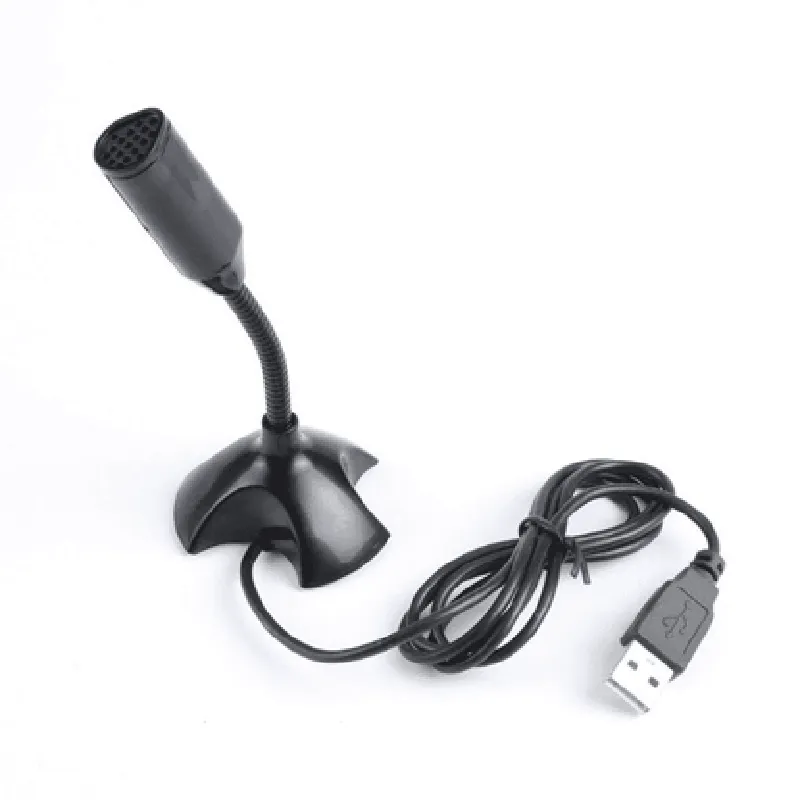
USB Microphone for Raspberry Pi (Color may Vary)

Buy Now on Stufin

Component Name

USB Microphone for Raspberry Pi (Color may Vary)

Overview

The USB Microphone for Raspberry Pi is a compact, plug-and-play audio input device designed specifically for use with Raspberry Pi single-board computers. This microphone is ideal for a wide range of IoT projects, including voice-controlled applications, speech recognition, and audio streaming.

Functionality

The USB Microphone for Raspberry Pi is a simple, easy-to-use device that captures high-quality audio signals and transmits them to the connected Raspberry Pi board via a USB interface. The microphone is connected to the Raspberry Pi using a standard USB-A connector, making it easy to integrate into existing projects.

Key Features

  • Plug-and-Play Connectivity: The microphone is designed for seamless integration with Raspberry Pi boards, eliminating the need for additional setup or configuration.
  • High-Quality Audio Capture: The microphone is capable of capturing high-fidelity audio signals, making it suitable for a wide range of applications, including speech recognition, voice control, and audio streaming.
  • Compact Design: The microphone's compact design makes it easy to integrate into IoT projects, minimizing space requirements and reducing overall system complexity.
  • USB Interface: The microphone connects to the Raspberry Pi using a standard USB-A connector, ensuring compatibility with a wide range of systems and devices.
  • Omni-Directional Pickup Pattern: The microphone's omni-directional pickup pattern allows it to capture audio signals from all directions, providing a more comprehensive and accurate audio experience.
  • Raspberry Pi Compatibility: The microphone is specifically designed for use with Raspberry Pi boards, ensuring optimal performance and compatibility.
  • Color May Vary: The microphone's color may vary, but its functionality and performance remain consistent across all color options.

Technical Specifications

Microphone Type

Electret Condenser Microphone

Polar Pattern

Omni-Directional

Frequency Response

100 Hz - 16 kHz

Sensitivity

-42 dB 3 dB

Impedance

2.2 k

Connector Type

USB-A

Cable Length

1.5 meters (4.9 feet)

Power Requirements

Bus-powered via USB

Operating System

Compatible with Raspberry Pi OS and other Linux-based operating systems

Applications

The USB Microphone for Raspberry Pi is suitable for a wide range of IoT projects, including

Voice-controlled applications

Speech recognition systems

Audio streaming and online broadcasting

Home automation and smart home systems

Robotics and artificial intelligence projects

Educational and research projects

Conclusion

The USB Microphone for Raspberry Pi is a reliable, easy-to-use audio input device designed specifically for use with Raspberry Pi single-board computers. Its compact design, high-quality audio capture, and plug-and-play connectivity make it an ideal choice for a wide range of IoT projects and applications.

Pin Configuration

  • USB Microphone for Raspberry Pi (Color may Vary) Pinout Documentation
  • The USB Microphone for Raspberry Pi is a plug-and-play audio input device designed for use with Raspberry Pi boards. The microphone connects to the Raspberry Pi via a standard USB interface and provides a convenient way to add voice commands, audio recording, and other audio-related functionality to your projects.
  • Pinout Structure:
  • The USB Microphone has a standard USB connector with four pins, which are:
  • Pin 1: VCC (5V Power)
  • Function: Power supply for the microphone
  • Description: Provides 5V power from the Raspberry Pi to the microphone
  • Connection: Connect to the 5V power pin on the Raspberry Pi (e.g., Pin 2 on the Raspberry Pi 4)
  • Pin 2: D- (Data -)
  • Function: Data transmission line (negative)
  • Description: Carries data from the microphone to the Raspberry Pi
  • Connection: Connect to the USB data pin on the Raspberry Pi (e.g., Pin 7 on the Raspberry Pi 4)
  • Pin 3: D+ (Data +)
  • Function: Data transmission line (positive)
  • Description: Carries data from the microphone to the Raspberry Pi
  • Connection: Connect to the USB data pin on the Raspberry Pi (e.g., Pin 8 on the Raspberry Pi 4)
  • Pin 4: GND (Ground)
  • Function: Ground connection for the microphone
  • Description: Provides a common ground between the microphone and the Raspberry Pi
  • Connection: Connect to a ground pin on the Raspberry Pi (e.g., Pin 6 on the Raspberry Pi 4)
  • Connection Procedure:
  • To connect the USB Microphone to your Raspberry Pi:
  • 1. Insert the USB Microphone into a free USB port on the Raspberry Pi.
  • 2. Ensure the USB Microphone is securely connected and seated properly in the USB port.
  • 3. The Raspberry Pi will automatically detect the microphone and configure it as a valid audio input device.
  • Tips and Considerations:
  • Make sure to connect the microphone to a powered USB port on the Raspberry Pi.
  • Avoid connecting the microphone to a USB hub or extender, as it may not provide sufficient power or cause signal degradation.
  • If you're using a Raspberry Pi with a USB-C port, you may need a USB-C to USB-A adapter to connect the microphone.
  • The USB Microphone is a plug-and-play device, so no additional drivers or software configuration are required.
  • By following these pinout connections and guidelines, you can successfully integrate the USB Microphone into your Raspberry Pi project and start capturing high-quality audio input.

Code Examples

USB Microphone for Raspberry Pi (Color may Vary) Documentation
Overview
The USB Microphone for Raspberry Pi is a compact, plug-and-play audio input device designed specifically for use with Raspberry Pi boards. It provides a convenient way to add high-quality audio capabilities to your projects, allowing you to capture and process audio data with ease.
Technical Specifications
Connectivity: USB 2.0
 Microphone Type: Omnidirectional condenser
 Sensitivity: 4.5mV/Pa
 Frequency Response: 20Hz - 20kHz
 Signal-to-Noise Ratio: 80dB
 Power Consumption: 5V, 100mA
Getting Started
Before using the USB Microphone, ensure that your Raspberry Pi is running a compatible operating system (e.g., Raspbian) and has the necessary audio drivers installed.
Code Examples
### Example 1: Basic Audio Recording using Python
Use the following Python code to record audio from the USB Microphone and save it to a WAV file:
```python
import pyaudio
import wave
# Open the microphone stream
CHUNK = 1024
FORMAT = pyaudio.paInt16
CHANNELS = 1
RATE = 44100
RECORD_SECONDS = 5
p = pyaudio.PyAudio()
stream = p.open(format=FORMAT,
                channels=CHANNELS,
                rate=RATE,
                input=True,
                frames_per_buffer=CHUNK)
print("Recording...")
frames = []
for i in range(0, int(RATE / CHUNK  RECORD_SECONDS)):
    data = stream.read(CHUNK)
    frames.append(data)
print("Finished recording")
# Close the microphone stream
stream.stop_stream()
stream.close()
p.terminate()
# Save the recorded audio to a WAV file
wf = wave.open("output.wav", "wb")
wf.setnchannels(CHANNELS)
wf.setsampwidth(p.get_sample_size(FORMAT))
wf.setframerate(RATE)
wf.writeframes(b"".join(frames))
wf.close()
```
### Example 2: Speech Recognition using Google Cloud Speech-to-Text API
Use the following Python code to recognize spoken words using the Google Cloud Speech-to-Text API:
```python
import pyaudio
import wave
import os
from google.cloud import speech
# Set up the Speech-to-Text client
client = speech.SpeechClient()
# Open the microphone stream
CHUNK = 1024
FORMAT = pyaudio.paInt16
CHANNELS = 1
RATE = 44100
p = pyaudio.PyAudio()
stream = p.open(format=FORMAT,
                channels=CHANNELS,
                rate=RATE,
                input=True,
                frames_per_buffer=CHUNK)
print("Listening...")
 frames = []
while True:
    data = stream.read(CHUNK)
    frames.append(data)
# Convert the audio frames to a byte string
    audio = b"".join(frames)
# Create a Speech-to-Text request
    audio_object = speech.types.RecognitionAudio(content=audio)
    config = speech.types.RecognitionConfig(
        encoding=speech.enums.RecognitionConfig.AudioEncoding.LINEAR16,
        sample_rate_hertz=RATE,
        language_code="en-US")
# Perform speech recognition
    response = client.recognize(config, audio_object)
# Print the recognized text
    for result in response.results:
        for alternative in result.alternatives:
            print("Transcript: {}".format(alternative.transcript))
# Exit on a keyboard interrupt (e.g., Ctrl+C)
    try:
        pass
    except KeyboardInterrupt:
        break
# Close the microphone stream
stream.stop_stream()
stream.close()
p.terminate()
```
Note: You'll need to install the `google-cloud-speech` library and set up a Google Cloud project with the Speech-to-Text API enabled to use this example.
These examples demonstrate the basic functionality of the USB Microphone for Raspberry Pi. You can use this component in a variety of applications, such as voice assistants, audio recorders, and speech recognition systems.