Stufin
Home Quick Cart Profile

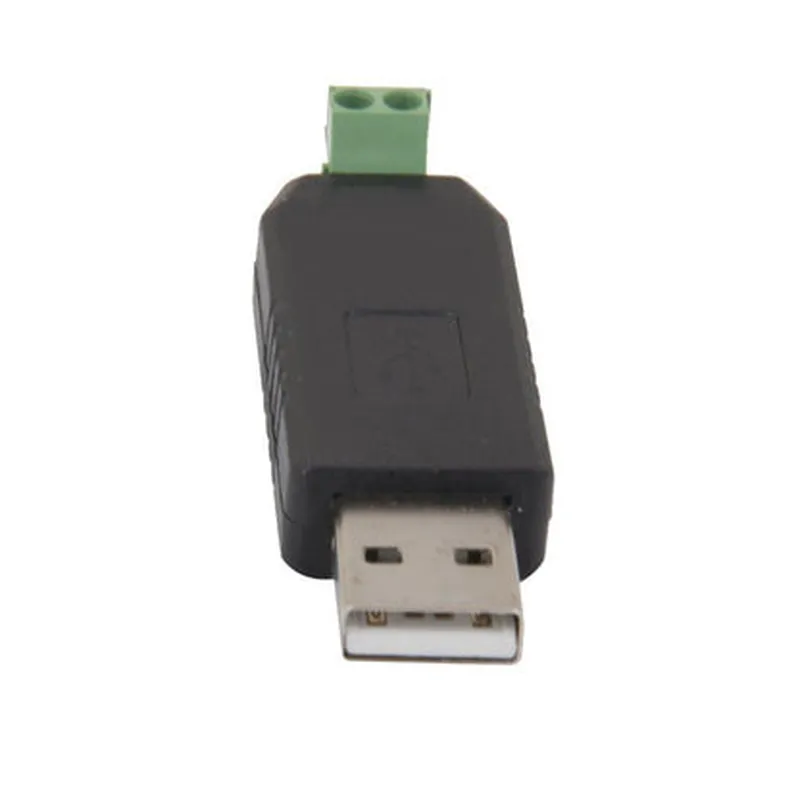
USB CH340 To RS485 Converter Adapter Module


Buy Now on Stufin

Component Name

USB CH340 To RS485 Converter Adapter Module
Description

The USB CH340 To RS485 Converter Adapter Module is a versatile and compact device that enables the conversion of USB data signals to RS485 signals, facilitating communication between devices with different interfaces. This adapter module is designed to provide a reliable and efficient way to connect USB-enabled devices to RS485-based systems, making it an ideal solution for various industrial, commercial, and IoT applications.

Functionality

  • USB to RS485 Conversion: The module converts USB data signals to RS485 signals, allowing devices with USB interfaces to communicate with devices that use RS485 interfaces.
  • Baudrate Conversion: The module supports baudrate conversion, enabling communication between devices with different baudrate requirements.
  • Hardware Flow Control: The module provides hardware flow control, ensuring reliable data transmission and preventing data loss.
The USB CH340 To RS485 Converter Adapter Module performs the following functions

Key Features

  • CH340 Chipset: The module is based on the CH340 chipset, a widely used and reliable USB-to-serial converter chip.
  • USB 2.0 Compliant: The module is compliant with USB 2.0 standards, ensuring high-speed data transfer rates up to 480 Mbps.
  • RS485 Interface: The module features a standard 9-pin D-subminiature connector for RS485 connections.
  • Configurable Baudrate: The module supports baudrates from 300 bps to 1 Mbps, making it compatible with a wide range of devices.
  • Hardware Flow Control: The module provides RTS and CTS signals for hardware flow control, ensuring reliable data transmission.
  • LED Indicators: The module features LED indicators for power, USB, and RS485 signal status.
  • Compact Design: The module is designed to be compact and lightweight, making it ideal for space-constrained applications.
  • Wide Operating Temperature: The module operates within a wide temperature range of -40C to 85C, making it suitable for various environments.
  • RoHS Compliant: The module is RoHS compliant, ensuring it meets environmental regulations.

Input Voltage

5V DC

Input Current

50mA (typical)

Output Voltage

2.5V (RS485)

Data Transfer Rate

Up to 1 Mbps

Operating Temperature

-40C to 85C

Storage Temperature

-40C to 125C

Dimensions

38 x 24 x 12 mm

Weight

20g

Applications

The USB CH340 To RS485 Converter Adapter Module is suitable for various applications, including

Industrial automation systems

IoT devices and sensors

Medical devices

Point-of-sale (POS) systems

Building automation systems

Surveillance systems

Conclusion

The USB CH340 To RS485 Converter Adapter Module is a reliable and efficient solution for converting USB data signals to RS485 signals, enabling communication between devices with different interfaces. Its compact design, wide operating temperature range, and RoHS compliance make it an ideal choice for various industrial, commercial, and IoT applications.

Pin Configuration

  • USB CH340 To RS485 Converter Adapter Module Pinout Explanation
  • The USB CH340 To RS485 Converter Adapter Module is a versatile module that allows for serial communication between a USB device and an RS485 device. Here's a detailed explanation of each pin on the module:
  • USB Side:
  • 1. VCC (5V): This pin provides the power supply to the module, which is typically connected to a 5V power source.
  • 2. GND: This pin is the ground connection for the module, connected to the ground of the power source.
  • 3. D+: This pin represents the USB data positive line, used for transmitting data from the module to the USB device.
  • 4. D-: This pin represents the USB data negative line, used for receiving data from the USB device to the module.
  • RS485 Side:
  • 1. A (RS485+): This pin is the positive line of the RS485 signal, responsible for transmitting data from the module to the RS485 device.
  • 2. B (RS485-): This pin is the negative line of the RS485 signal, responsible for receiving data from the RS485 device to the module.
  • 3. GND: This pin is the ground connection for the RS485 side, connected to the ground of the RS485 device.
  • Additional Pins:
  • 1. RO (Receive Output): This pin is an output from the CH340 chip, indicating the receive status of the module. It's usually connected to an LED or a logic gate for indication purposes.
  • 2. DE (Driver Enable): This pin is used to enable or disable the RS485 driver. When set high, the driver is enabled, and when set low, the driver is disabled.
  • 3. RE (Receive Enable): This pin is used to control the receiving mode of the module. When set high, the module is in receiving mode, and when set low, the module is in transmitting mode.
  • Connection Structure:
  • To connect the pins, follow this structure:
  • USB Connection:
  • VCC (5V) 5V Power Source
  • GND GND of Power Source
  • D+ USB Data Positive Line (to USB device)
  • D- USB Data Negative Line (to USB device)
  • RS485 Connection:
  • A (RS485+) RS485 Positive Line (to RS485 device)
  • B (RS485-) RS485 Negative Line (to RS485 device)
  • GND GND of RS485 device
  • Additional Connections:
  • RO (Receive Output) LED or Logic Gate (optional)
  • DE (Driver Enable) Microcontroller or Logic Gate (optional)
  • RE (Receive Enable) Microcontroller or Logic Gate (optional)
  • Note:
  • Ensure proper voltage levels and signal directions when connecting the pins to avoid damage to the module or connected devices.
  • Refer to the datasheet of the CH340 chip and the RS485 device for specific connection and configuration details.
  • By following this pinout explanation and connection structure, you can successfully integrate the USB CH340 To RS485 Converter Adapter Module into your IoT project.

Code Examples

USB CH340 to RS485 Converter Adapter Module Documentation
Overview
The USB CH340 to RS485 Converter Adapter Module is a compact and versatile module that allows users to convert USB signals to RS485 signals, enabling communication between devices that operate on different protocols. This module is based on the popular CH340 chip, which provides a reliable and efficient conversion process.
Features
Converts USB 2.0 signals to RS485 signals
 Supports data transfer rates up to 1Mbps
 Compatible with Windows, Mac, and Linux operating systems
 Onboard 3.3V and 5V voltage regulators
 LED indicators for power and transmit/receive status
 Compact design with a 4-pin RS485 interface
Pinout
| Pin | Function |
| --- | --- |
| VCC | 3.3V or 5V power input |
| GND | Ground |
| TXD | RS485 transmit data |
| RXD | RS485 receive data |
Example 1: Using the Converter with an Arduino Board
In this example, we'll demonstrate how to use the USB CH340 to RS485 Converter Adapter Module with an Arduino board to communicate with a RS485 device.
Hardware Requirements:
Arduino Board (e.g., Arduino Uno)
 USB CH340 to RS485 Converter Adapter Module
 RS485 device (e.g., a temperature sensor)
Software Requirements:
Arduino IDE (version 1.8 or later)
Code Example:
```cpp
#include <SoftwareSerial.h>
// Define the RX and TX pins for the RS485 communication
#define RS485_RX 2
#define RS485_TX 3
// Create a SoftwareSerial object to communicate with the RS485 device
SoftwareSerial rs485(RS485_RX, RS485_TX);
void setup() {
  // Initialize the serial communication with the RS485 device
  rs485.begin(9600);
}
void loop() {
  // Send a command to the RS485 device
  rs485.println("Read temperature");
// Read the response from the RS485 device
  char Buffer[10];
  rs485.setTimeout(500);
  rs485.readBytesUntil('
', Buffer, 10);
// Print the received data
  Serial.println(Buffer);
  delay(1000);
}
```
Example 2: Using the Converter with a Python Script (Windows)
In this example, we'll demonstrate how to use the USB CH340 to RS485 Converter Adapter Module with a Python script to communicate with a RS485 device in a Windows environment.
Hardware Requirements:
USB CH340 to RS485 Converter Adapter Module
 RS485 device (e.g., a temperature sensor)
Software Requirements:
Python 3.x (with pyserial library installed)
Code Example:
```python
import serial
# Open the serial port connected to the RS485 device
ser = serial.Serial('COM3', 9600, timeout=1)  # Replace COM3 with the actual COM port
while True:
    # Send a command to the RS485 device
    ser.write(b'Read temperature
')
# Read the response from the RS485 device
    response = ser.readline().decode('utf-8').strip()
# Print the received data
    print(response)
    time.sleep(1)
```
Note: In this example, replace `COM3` with the actual COM port assigned to the USB CH340 to RS485 Converter Adapter Module.
These examples demonstrate the basic usage of the USB CH340 to RS485 Converter Adapter Module in different contexts. You can modify the code to suit your specific application requirements.