Stufin
Home Quick Cart Profile

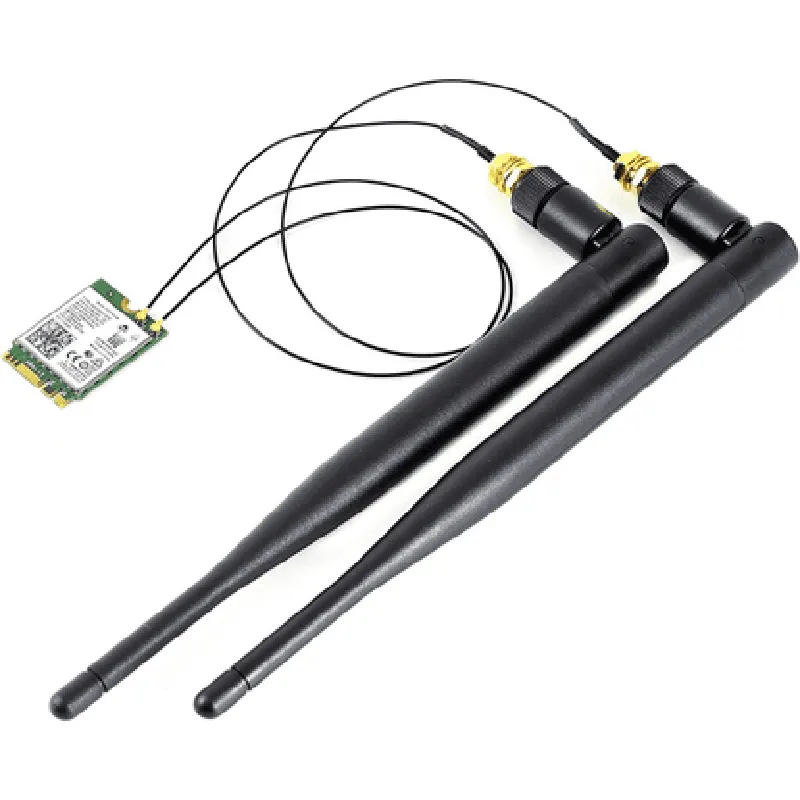
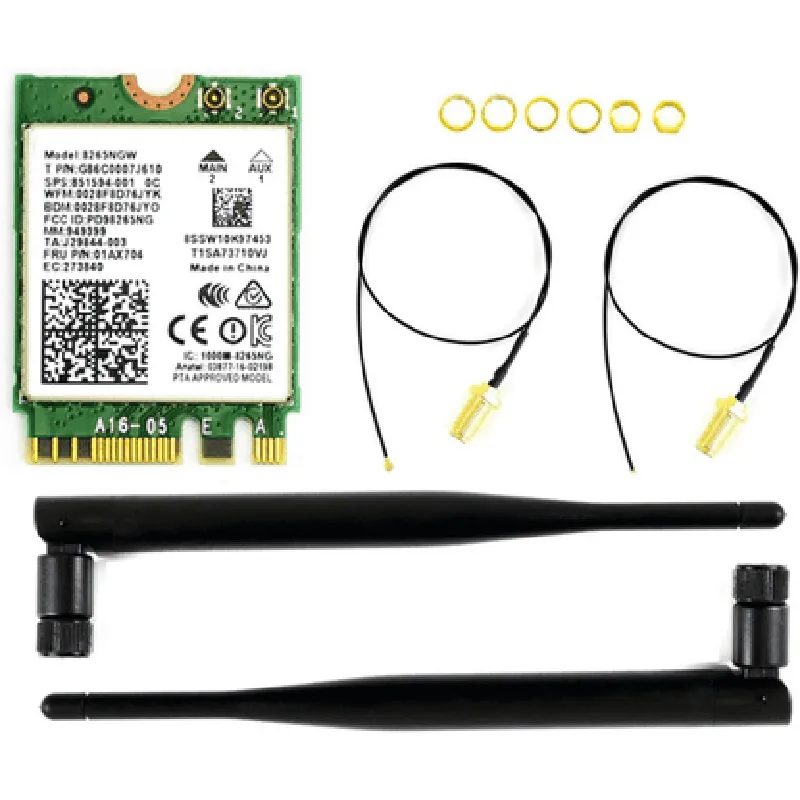
AC8265 Wireless NIC for Jetson Nano

Buy Now on Stufin

Maximum data transfer rate

2 Mbps

Supports Bluetooth Low Energy (BLE) for low-power applications

  • Integration

Designed specifically for the NVIDIA Jetson Nano platform

Compatible with Jetson Nano's 40-pin GPIO header

Easy to integrate into existing projects and applications

  • Operating Temperature
  • Industrial-grade operating temperature range-40C to 85C

    Suitable for use in harsh environments and industrial applications

    • Power Management

Low power consumption

1.5 W (typical) and 2.5 W (maximum)

Supports power-saving modes to reduce energy consumption

  • Security

Supports WPA2-PSK, WPA2-EAP, and WEP encryption for secure Wi-Fi connections

Supports Secure Boot and cryptographic accelerators for secure data transmission

Physical Characteristics

Dimensions

22 mm x 30 mm x 2.5 mm (0.87 in x 1.18 in x 0.1 in)

Weight

5 grams (0.18 oz)

Interface

40-pin GPIO header compatible with Jetson Nano

Certifications and Compliance

FCC, CE, and TELEC certified

Compliant with RoHS, REACH, and WEEE regulations

Documentation and Resources

Datasheet

provides detailed technical specifications and operating parameters

User manual

offers step-by-step installation and configuration guides

API documentation

provides programming interfaces and development resources for developers

By combining high-performance wireless capabilities with the powerful Jetson Nano platform, the AC8265 Wireless NIC enables developers to create innovative IoT projects and applications that require reliable wireless communication.

Pin Configuration

  • AC8265 Wireless NIC for Jetson Nano Pinout Documentation
  • The AC8265 Wireless NIC is a popular Wi-Fi module designed for the NVIDIA Jetson Nano platform, enabling wireless connectivity for IoT applications. This documentation provides a detailed explanation of each pin on the AC8265 module, along with connection guidelines.
  • Pinout Structure:
  • The AC8265 module has a total of 24 pins, arranged in two rows of 12 pins each. The pins are labeled as follows:
  • Row 1:
  • 1. GND (Ground): Digital ground connection.
  • Connect to the Jetson Nano's GND pin or a common ground plane on your custom board.
  • 2. VCC (Power): 3.3V power supply input.
  • Connect to the Jetson Nano's 3.3V power rail or a suitable power source on your custom board.
  • 3. UART_RXD (UART Receive Data): Receive data line for serial communication.
  • Connect to the Jetson Nano's UART_TXD pin (UART transmitter) for serial communication.
  • 4. UART_TXD (UART Transmit Data): Transmit data line for serial communication.
  • Connect to the Jetson Nano's UART_RXD pin (UART receiver) for serial communication.
  • 5. WAKE_HOST (Wake Host): Active-low input to wake up the host from low power mode.
  • Connect to the Jetson Nano's GPIO pin (e.g., GPIO18) to control the wake-up mechanism.
  • 6. HOST_WAKE (Host Wake): Output signal indicating the host is awake.
  • Connect to the Jetson Nano's GPIO pin (e.g., GPIO17) to monitor the host's wake-up status.
  • 7. IRQ (Interrupt Request): Interrupt output to the host.
  • Connect to the Jetson Nano's GPIO pin (e.g., GPIO23) to handle interrupts generated by the AC8265.
  • 8. SDIO_CLK (SDIO Clock): Clock signal for SDIO interface.
  • Connect to the Jetson Nano's SDMMC_CLK pin for SDIO clocking.
  • 9. SDIO_CMD (SDIO Command): Command signal for SDIO interface.
  • Connect to the Jetson Nano's SDMMC_CMD pin for SDIO command transmission.
  • 10. SDIO_D0 (SDIO Data 0): Data signal 0 for SDIO interface.
  • Connect to the Jetson Nano's SDMMC_D0 pin for SDIO data transfer.
  • 11. SDIO_D1 (SDIO Data 1): Data signal 1 for SDIO interface.
  • Connect to the Jetson Nano's SDMMC_D1 pin for SDIO data transfer.
  • 12. ANT_SEL (Antenna Select): Antenna selection input (active-high).
  • Connect to a GPIO pin on the Jetson Nano (e.g., GPIO20) to control antenna selection.
  • Row 2:
  • 1. RST_N (Reset): Active-low reset input.
  • Connect to the Jetson Nano's RST_N pin or a suitable reset signal on your custom board.
  • 2. PWR_EN (Power Enable): Power enable input (active-high).
  • Connect to a GPIO pin on the Jetson Nano (e.g., GPIO21) to control power enable.
  • 3. EXT_LNA_EN (External LNA Enable): External low-noise amplifier enable input (active-high).
  • Connect to a GPIO pin on the Jetson Nano (e.g., GPIO22) to control external LNA enable.
  • 4. EXT_PA_EN (External PA Enable): External power amplifier enable input (active-high).
  • Connect to a GPIO pin on the Jetson Nano (e.g., GPIO24) to control external PA enable.
  • 5. WLAN_EN (WLAN Enable): WLAN enable input (active-high).
  • Connect to a GPIO pin on the Jetson Nano (e.g., GPIO25) to control WLAN enable.
  • 6. BT_EN (Bluetooth Enable): Bluetooth enable input (active-high).
  • Connect to a GPIO pin on the Jetson Nano (e.g., GPIO26) to control Bluetooth enable.
  • 7. BT_RST_N (Bluetooth Reset): Bluetooth reset input (active-low).
  • Connect to the Jetson Nano's RST_N pin or a suitable reset signal on your custom board for Bluetooth reset.
  • 8. reserved (Reserved): Reserved pin, do not connect.
  • 9. reserved (Reserved): Reserved pin, do not connect.
  • 10. NC (No Connect): No internal connection, do not connect.
  • 11. NC (No Connect): No internal connection, do not connect.
  • 12. NC (No Connect): No internal connection, do not connect.
  • Important Connection Notes:
  • Ensure all unused pins are left unconnected or terminated with a suitable resistor (e.g., 1k) to prevent noise and electromagnetic interference (EMI).
  • Verify the AC8265 module's operating voltage is set to 3.3V before connecting it to the Jetson Nano or your custom board.
  • Use a suitable level shifter, if necessary, to match the voltage levels between the AC8265 module and the Jetson Nano or your custom board.
  • By following this pinout documentation, you can successfully connect the AC8265 Wireless NIC to the Jetson Nano or your custom board, enabling reliable Wi-Fi connectivity for your IoT applications.

Code Examples

AC8265 Wireless NIC for Jetson Nano Documentation
Overview
The AC8265 Wireless NIC is a wireless network interface card (NIC) designed for the NVIDIA Jetson Nano, a small and powerful AI computing platform. This module provides a reliable Wi-Fi connection, enabling wireless communication and Internet connectivity for IoT projects and applications.
Features
IEEE 802.11a/b/g/n Wi-Fi standards
 2.4 GHz frequency band
 Maximum data transfer rate of 300 Mbps
 WPA/WPA2 encryption support
 Compact design, compatible with Jetson Nano development boards
Software Support
The AC8265 Wireless NIC is supported by the Linux operating system, and drivers are available for the Jetson Nano's Linux kernel.
Example 1: Connecting to a Wi-Fi Network (C++)
In this example, we will demonstrate how to connect to a Wi-Fi network using the AC8265 Wireless NIC on a Jetson Nano board.
```cpp
#include <iostream>
#include <string>
#include <cstdlib>
#include <cstring>
#include <iwlib.h>
int main() {
    // Set Wi-Fi interface name (usually wlan0)
    char ifname[] = "wlan0";
// Set SSID and password for the Wi-Fi network
    char ssid[] = "your_wifi_ssid";
    char password[] = "your_wifi_password";
// Initialize Wi-Fi interface
    iw_priv_args priv_args;
    iwpriv_init(&priv_args, ifname);
// Set Wi-Fi mode to station (client) mode
    iw_set_mode(ifname, IW_MODE_STATION);
// Scan for available Wi-Fi networks
    iw_scan(ifname, IW_SCAN_TYPE_NO_SSID, NULL);
// Connect to the desired Wi-Fi network
    iwreq req;
    memset(&req, 0, sizeof(iwreq));
    strncpy(reqifr_name, ifname, IFNAMSIZ);
    req.u.essid.essid_length = strlen(ssid);
    memcpy(req.u.essid.essid, ssid, req.u.essid.essid_length);
    req.u.essid.flags |= IW_ENCODE_ENABLED | IW_ENCODE_NOKEY;
    req.u.essid.key_size = strlen(password);
    memcpy(req.u.essid.key, password, req.u.essid.key_size);
    if (iw_set_ext(ifname, SIOCSIWESSID, &req) != 0) {
        std::cerr << "Failed to set ESSID" << std::endl;
        return -1;
    }
std::cout << "Connected to Wi-Fi network " << ssid << std::endl;
return 0;
}
```
Example 2: Sending Data over Wi-Fi (Python)
In this example, we will demonstrate how to send data over Wi-Fi using the AC8265 Wireless NIC on a Jetson Nano board.
```python
import socket
# Set Wi-Fi interface name (usually wlan0)
ifname = "wlan0"
# Create a socket object
sock = socket.socket(socket.AF_INET, socket.SOCK_STREAM)
# Set the destination IP address and port
dst_ip = "192.168.1.100"
dst_port = 8080
# Connect to the destination socket
sock.connect((dst_ip, dst_port))
# Send data over Wi-Fi
data = "Hello, IoT World!"
sock.sendall(data.encode())
print("Data sent over Wi-Fi:", data)
# Close the socket
sock.close()
```
Example 3: Creating a Wi-Fi Access Point (AP) ( Bash Script)
In this example, we will demonstrate how to create a Wi-Fi access point (AP) using the AC8265 Wireless NIC on a Jetson Nano board.
```bash
#!/bin/bash
# Set Wi-Fi interface name (usually wlan0)
ifname=wlan0
# Set AP mode
sudo ip link set $ifname down
sudo iw $ifname set type ap
sudo ip link set $ifname up
# Set AP configuration
sudo iw $ifname info
sudo iw $ifname set ssid "JetsonNanoAP"
sudo iw $ifname set channel 6
sudo iw $ifname set txpower 20
# Start AP service
sudo hostapd -B /etc/hostapd/hostapd.conf
```
Note: The above examples are for illustration purposes only and may require modification to work with your specific setup. Ensure that you have the necessary dependencies installed and configured properly on your Jetson Nano board.