Stufin
Home Quick Cart Profile

Multitec MT-02DX+ Stripper


Buy Now on Stufin

Component Name

Multitec MT-02DX+ Stripper
Description

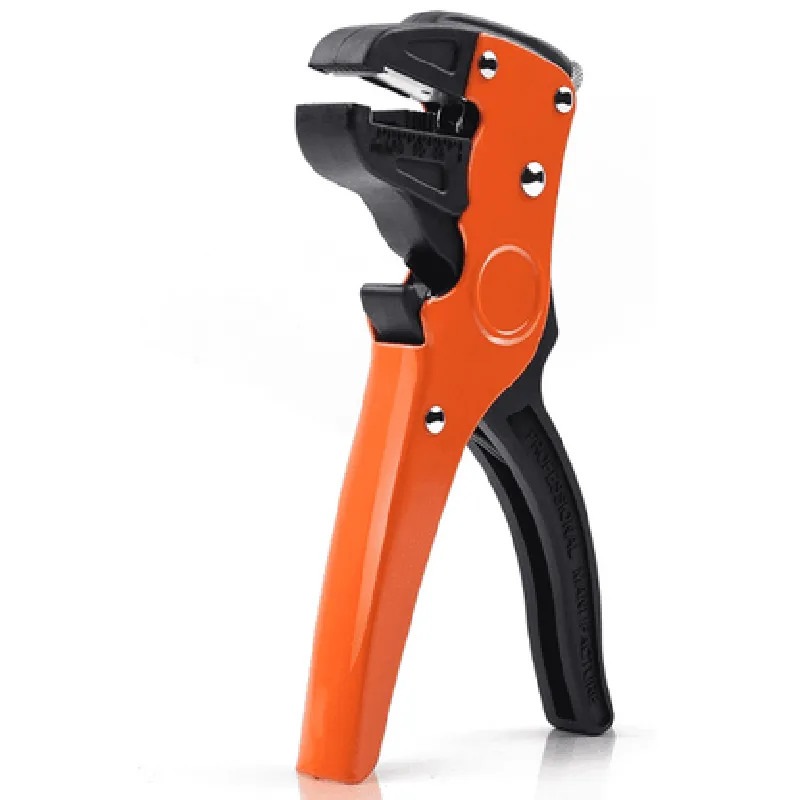
The Multitec MT-02DX+ Stripper is a high-performance wire stripping tool designed for efficient and precise removal of insulation from wires and cables. This component is an essential tool for various industries, including electronics, telecommunications, and electrical engineering, where wire stripping is a critical step in the manufacturing and assembly process.
Functionality

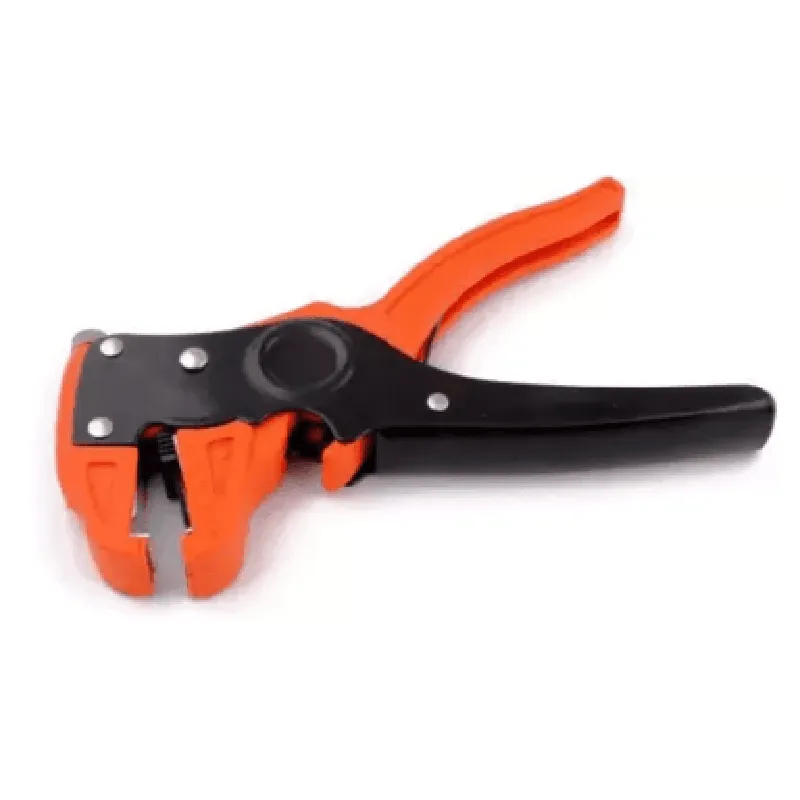
The Multitec MT-02DX+ Stripper is designed to remove insulation from wires and cables with ease and accuracy. The tool features a robust design and advanced stripping mechanism that enables the removal of insulation from wires with outer diameters ranging from 0.5mm to 6.0mm. The stripper is capable of stripping various types of insulation materials, including PVC, Teflon, and rubber, without damaging the underlying conductor.

Key Features

  • Adjustable Stripping Length: The Multitec MT-02DX+ Stripper features an adjustable stripping length, allowing users to set the desired length of insulation removal according to the specific application requirements.
  • Precision Stripping Mechanism: The tool's advanced stripping mechanism ensures precise removal of insulation, minimizing the risk of damaging the conductor or leaving residue behind.
  • Ergonomic Design: The stripper features an ergonomic design with a comfortable grip, reducing fatigue and allowing for extended use without discomfort.
  • Automatic Wire Clamp: The tool is equipped with an automatic wire clamp that securely holds the wire in place during the stripping process, ensuring accurate and consistent results.
  • Multi-Functional: The Multitec MT-02DX+ Stripper is capable of performing multiple functions, including wire stripping, cable stripping, and wire cutting, making it a versatile tool for various applications.
  • Durable Construction: The tool is built with high-quality materials, ensuring durability and longevity even in demanding environments.
  • Easy Maintenance: The Multitec MT-02DX+ Stripper requires minimal maintenance, with easily replaceable blades and a simple cleaning process.
  • Compliance: The tool meets international standards and regulations, including UL, CE, and RoHS, ensuring safe and reliable operation.

Wire Size Range

0.5mm to 6.0mm

Stripping Length

Adjustable (1mm to 20mm)

Insulation Material

PVC, Teflon, Rubber, and others

Cutting Force

Up to 10 kgf/cm

Dimensions

170mm x 60mm x 40mm (L x W x H)

Weight

250g

Operating Temperature

-20C to 40C

Storage Temperature

-40C to 80C

Applications

The Multitec MT-02DX+ Stripper is suitable for various applications, including

Electrical engineering and manufacturing

Telecommunications and network infrastructure

Electronics assembly and repair

Automotive and aerospace industries

Research and development laboratories

Safety Precautions

Always follow the manufacturer's instructions and guidelines for safe operation.

Wear protective gear, including safety glasses and gloves, when using the stripper.

Ensure the tool is properly maintained and serviced to prevent accidents.

Keep the stripper out of reach of children and unauthorized personnel.

Pin Configuration

  • Multitec MT-02DX+ Stripper Pinout and Connection Guide
  • The Multitec MT-02DX+ Stripper is a popular IoT component used for stripping and connecting wires in various IoT projects. This guide provides a comprehensive overview of the MT-02DX+ Stripper's pins and how to connect them correctly.
  • Pinout:
  • The MT-02DX+ Stripper has a total of 8 pins, divided into two rows of 4 pins each. The pins are labeled from 1 to 8, with pins 1-4 on the top row and pins 5-8 on the bottom row.
  • Pin Description and Connection Guide:
  • Here is a point-by-point explanation of each pin and how to connect them:
  • Top Row (Pins 1-4):
  • 1. VCC (Pin 1):
  • Function: Power supply input
  • Connection: Connect to a 5V power source (e.g., a 5V USB port or a 5V regulator output)
  • Recommended wire color: Red
  • 2. GND (Pin 2):
  • Function: Ground connection
  • Connection: Connect to a common ground point (e.g., a GND pin on a microcontroller or a power supply)
  • Recommended wire color: Black
  • 3. SIG (Pin 3):
  • Function: Signal input/output
  • Connection: Connect to a digital signal source (e.g., a microcontroller's digital output pin) or a load (e.g., an LED or a relay)
  • Recommended wire color: Yellow or Orange
  • 4. EN (Pin 4):
  • Function: Enable input
  • Connection: Connect to a digital signal source (e.g., a microcontroller's digital output pin) to enable or disable the stripper
  • Recommended wire color: Green
  • Bottom Row (Pins 5-8):
  • 5. WIRE IN (Pin 5):
  • Function: Wire input for stripping
  • Connection: Insert the wire to be stripped into this pin
  • Recommended wire color: N/A
  • 6. WIRE OUT (Pin 6):
  • Function: Stripped wire output
  • Connection: Connect the stripped wire to a load or a connecting wire
  • Recommended wire color: N/A
  • 7. GND (Pin 7):
  • Function: Ground connection
  • Connection: Connect to a common ground point (e.g., a GND pin on a microcontroller or a power supply)
  • Recommended wire color: Black
  • 8. VCC (Pin 8):
  • Function: Power supply input
  • Connection: Connect to a 5V power source (e.g., a 5V USB port or a 5V regulator output)
  • Recommended wire color: Red
  • Important Connection Notes:
  • Make sure to connect the power supply (VCC) and ground (GND) pins correctly to avoid damage to the MT-02DX+ Stripper.
  • Use the recommended wire colors to ensure easy identification and to avoid confusion.
  • When connecting the wire to be stripped, ensure it is properly seated in the WIRE IN pin to avoid damage to the component.
  • By following this guide, you should be able to connect the Multitec MT-02DX+ Stripper correctly and use it in your IoT projects. If you have any further questions or concerns, refer to the component's datasheet or contact the manufacturer for support.

Code Examples

Multitec MT-02DX+ Stripper Documentation
The Multitec MT-02DX+ Stripper is an IoT component designed for stripping and processing of coaxial cables. This documentation provides an overview of the component's features, specifications, and code examples for its usage in various contexts.
Features and Specifications:
Strip length: 10mm to 60mm
 Cable diameter: 2.5mm to 10mm
 Material: High-carbon steel blade
 Operating temperature: -20C to 80C
 Dimensions: 120mm x 60mm x 40mm
 Weight: 250g
Code Examples:
### Example 1: Basic Stripper Control using Arduino
This example demonstrates how to control the Multitec MT-02DX+ Stripper using an Arduino board. The code sets the strip length to 30mm and performs a single strip operation.
```c++
#include <MT02DX_strip.h>
const int stripPin = 2;  // Pin connected to the Stripper's control input
MT02DX_strip stripper(stripPin);
void setup() {
  Serial.begin(9600);
}
void loop() {
  stripper.setStripLength(30);  // Set strip length to 30mm
  stripper.strip();  // Perform a single strip operation
  delay(1000);  // Wait 1 second before the next operation
}
```
### Example 2: Automated Cable Processing using Python and Raspberry Pi
This example demonstrates how to automate cable processing using a Raspberry Pi and the Multitec MT-02DX+ Stripper. The code sets the strip length to 45mm and performs a strip operation every 5 seconds.
```python
import RPi.GPIO as GPIO
import time
GPIO.setmode(GPIO.BCM)
strip_pin = 17  # Pin connected to the Stripper's control input
GPIO.setup(strip_pin, GPIO.OUT)
def set_strip_length(length):
    # Send the strip length to the Stripper (not shown for brevity)
    pass
def strip_cable():
    # Send the strip signal to the Stripper (not shown for brevity)
    pass
try:
    while True:
        set_strip_length(45)  # Set strip length to 45mm
        strip_cable()  # Perform a strip operation
        time.sleep(5)  # Wait 5 seconds before the next operation
except KeyboardInterrupt:
    GPIO.cleanup()
```
Please note that the above code examples are simplified and may require additional programming to handle errors, implement safety features, and integrate with other components in a complete IoT system.