

Stufin
Home Quick Cart Profile

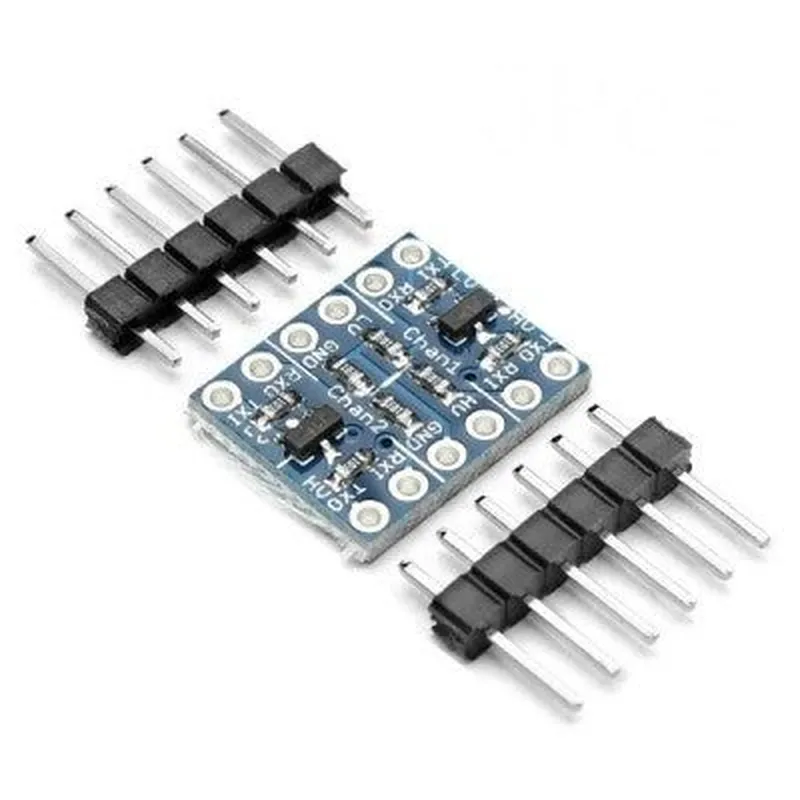
2 Channel Logic Level Converter (I2C, UART, 5V-3.3V)

Buy Now on Stufin

Component Name

2 Channel Logic Level Converter (I2C, UART, 5V-3.3V)

Overview

The 2 Channel Logic Level Converter is a versatile and compact module designed to facilitate seamless communication between devices operating at different voltage levels. This converter module is specifically designed to convert logic levels between 5V and 3.3V, making it an ideal solution for projects that require integration of 5V microcontrollers with 3.3V peripherals or sensors.

Functionality

The 2 Channel Logic Level Converter module provides bidirectional voltage level shifting for two independent channels, supporting I2C (Inter-Integrated Circuit) and UART (Universal Asynchronous Receiver-Transmitter) communication protocols. This allows devices operating at 5V to communicate with devices operating at 3.3V, and vice versa, without the risk of data corruption or damage due to voltage mismatch.

Key Features

  • Bi-Directional Voltage Level Shifting: The module can convert signals in both directions, i.e., from 5V to 3.3V and from 3.3V to 5V, ensuring that data is transmitted correctly and accurately.
  • Dual-Channel Support: The module features two independent channels, allowing users to convert two separate signals simultaneously, making it suitable for applications that require multiple voltage level conversions.
  • I2C and UART Protocol Support: The module supports both I2C and UART communication protocols, making it compatible with a wide range of devices and applications.
  • 5V to 3.3V Conversion: The module can convert 5V signals to 3.3V, enabling 5V microcontrollers to communicate with 3.3V peripherals or sensors.
  • 3.3V to 5V Conversion: The module can also convert 3.3V signals to 5V, allowing 3.3V devices to communicate with 5V peripherals or sensors.
  • Low Power Consumption: The module has a low power consumption, making it suitable for battery-powered devices and applications where power efficiency is crucial.
  • Compact Design: The module features a compact design, making it easy to integrate into small-form-factor projects and applications.
  • Easy to Use: The module is simple to use, requiring minimal external components and featuring a straightforward interface.

Technical Specifications

Input Voltage

5V or 3.3V

Output Voltage

3.3V or 5V

Conversion Channels

2 (Independent)

Communication Protocols

I2C, UART

Operating Frequency

Up to 400 kHz (I2C), Up to 1 Mbps (UART)

Power Consumption

< 10mA

Operating Temperature

-40C to 85C

Dimensions

15.5 mm x 17.5 mm (0.61 in x 0.69 in)

Applications

The 2 Channel Logic Level Converter module is suitable for a wide range of applications, including

IoT projects

Robotics and automation

Embedded systems

Wearable devices

Industrial control systems

Sensor networks

Conclusion

The 2 Channel Logic Level Converter module is a reliable and efficient solution for voltage level shifting between 5V and 3.3V devices. Its compact design, low power consumption, and easy-to-use interface make it an ideal choice for a variety of applications. With its ability to support I2C and UART protocols, this module is an essential tool for anyone working with devices that operate at different voltage levels.

Pin Configuration

  • 2 Channel Logic Level Converter (I2C, UART, 5V-3.3V) Pinout Explanation
  • The 2 Channel Logic Level Converter is a bi-directional voltage-level translator that enables communication between devices with different voltage levels, specifically between 5V and 3.3V. This module is designed to convert logic levels for I2C and UART communication protocols.
  • Pinout:
  • Here's a detailed explanation of each pin on the module:
  • Header 1 (5V Side):
  • VCC (5V): Power supply pin for the 5V side of the module. Connect to a 5V power source.
  • TX (5V): Transmit data pin for UART communication on the 5V side.
  • RX (5V): Receive data pin for UART communication on the 5V side.
  • SCL (5V): Clock pin for I2C communication on the 5V side.
  • SDA (5V): Data pin for I2C communication on the 5V side.
  • Header 2 (3.3V Side):
  • VCC (3.3V): Power supply pin for the 3.3V side of the module. Connect to a 3.3V power source.
  • TX (3.3V): Transmit data pin for UART communication on the 3.3V side.
  • RX (3.3V): Receive data pin for UART communication on the 3.3V side.
  • SCL (3.3V): Clock pin for I2C communication on the 3.3V side.
  • SDA (3.3V): Data pin for I2C communication on the 3.3V side.
  • How to Connect the Pins:
  • Here's a general guide on how to connect the pins:
  • 5V Device Connection:
  • + Connect VCC (5V) to a 5V power source.
  • + Connect TX (5V) to the TX pin of your 5V device (e.g., Arduino Uno).
  • + Connect RX (5V) to the RX pin of your 5V device.
  • + Connect SCL (5V) to the SCL pin of your 5V device (if using I2C).
  • + Connect SDA (5V) to the SDA pin of your 5V device (if using I2C).
  • 3.3V Device Connection:
  • + Connect VCC (3.3V) to a 3.3V power source.
  • + Connect TX (3.3V) to the TX pin of your 3.3V device (e.g., ESP8266).
  • + Connect RX (3.3V) to the RX pin of your 3.3V device.
  • + Connect SCL (3.3V) to the SCL pin of your 3.3V device (if using I2C).
  • + Connect SDA (3.3V) to the SDA pin of your 3.3V device (if using I2C).
  • Important Notes:
  • Make sure to connect the VCC pins to the corresponding voltage levels (5V or 3.3V) to avoid damage to the module or connected devices.
  • The logic level converter is bi-directional, meaning it can translate voltage levels in both directions (5V to 3.3V and 3.3V to 5V).
  • Ensure that the UART and I2C communication protocols are configured correctly on your devices to match the corresponding pins on the logic level converter module.
  • By following these connection guidelines, you can successfully integrate the 2 Channel Logic Level Converter into your IoT project, enabling seamless communication between devices with different voltage levels.

Code Examples

2 Channel Logic Level Converter (I2C, UART, 5V-3.3V) Documentation
Overview
The 2 Channel Logic Level Converter is a versatile bidirectional voltage-level translator designed to facilitate communication between devices operating at different voltage levels. This module is specifically designed to convert signals between 5V and 3.3V, making it ideal for connecting 5V microcontrollers (such as Arduino boards) to 3.3V peripherals (like sensors, displays, or modules).
Key Features
2 independent channels for voltage-level conversion
 Supports I2C and UART protocols
 5V to 3.3V and 3.3V to 5V bidirectional conversion
 High-speed conversion up to 10 Mbps
 Small form factor and low power consumption
Pinout
| Pin | Function |
| --- | --- |
| HV1 | 5V Input/Output Channel 1 |
| LV1 | 3.3V Input/Output Channel 1 |
| HV2 | 5V Input/Output Channel 2 |
| LV2 | 3.3V Input/Output Channel 2 |
| VCC | Power Supply (5V) |
| GND | Ground |
Example 1: Using the Logic Level Converter with Arduino and a 3.3V OLED Display
In this example, we'll demonstrate how to connect a 3.3V OLED display to an Arduino board using the 2 Channel Logic Level Converter.
Hardware Connection
Connect the 5V output from the Arduino board to the HV1 pin on the Logic Level Converter.
 Connect the SCL (clock) pin of the OLED display to the LV1 pin on the Logic Level Converter.
 Connect the SDA (data) pin of the OLED display to the LV1 pin on the Logic Level Converter.
 Connect the 3.3V power supply from the OLED display to the VCC pin on the Logic Level Converter.
Arduino Code
```c
#include <Wire.h>
#define OLED_SDA 2 // Connect to LV1 on the Logic Level Converter
#define OLED_SCL 3 // Connect to LV1 on the Logic Level Converter
void setup() {
  Wire.begin(); // Initialize I2C communication
  // Initialize OLED display
  Wire.beginTransmission(0x3C);
  Wire.write(0x00);
  Wire.endTransmission();
}
void loop() {
  // Send data to OLED display
  Wire.beginTransmission(0x3C);
  Wire.write(0x01);
  Wire.write("Hello, World!");
  Wire.endTransmission();
  delay(1000);
}
```
Example 2: Using the Logic Level Converter with Raspberry Pi and a 5V GPS Module
In this example, we'll demonstrate how to connect a 5V GPS module to a Raspberry Pi using the 2 Channel Logic Level Converter.
Hardware Connection
Connect the UART TX pin of the GPS module to the HV2 pin on the Logic Level Converter.
 Connect the UART RX pin of the GPS module to the HV2 pin on the Logic Level Converter.
 Connect the UART RX pin of the Raspberry Pi to the LV2 pin on the Logic Level Converter.
 Connect the UART TX pin of the Raspberry Pi to the LV2 pin on the Logic Level Converter.
Raspberry Pi Code (Python)
```python
import serial
# Open the serial connection to the GPS module
ser = serial.Serial('/dev/ttyUSB0', 9600)
while True:
    # Read data from the GPS module
    data = ser.readline()
    print(data.decode())
```
Tips and Precautions
Ensure that the power supply voltage to the Logic Level Converter is stable and within the recommended range (5V).
 Use proper termination resistors for I2C and UART lines to prevent signal reflections and damage to the devices.
 When using the Logic Level Converter with UART, ensure that the baud rates and data formats are compatible between the devices.
By following these examples and guidelines, you can successfully integrate the 2 Channel Logic Level Converter into your IoT projects, enabling seamless communication between devices operating at different voltage levels.