Stufin
Home Quick Cart Profile

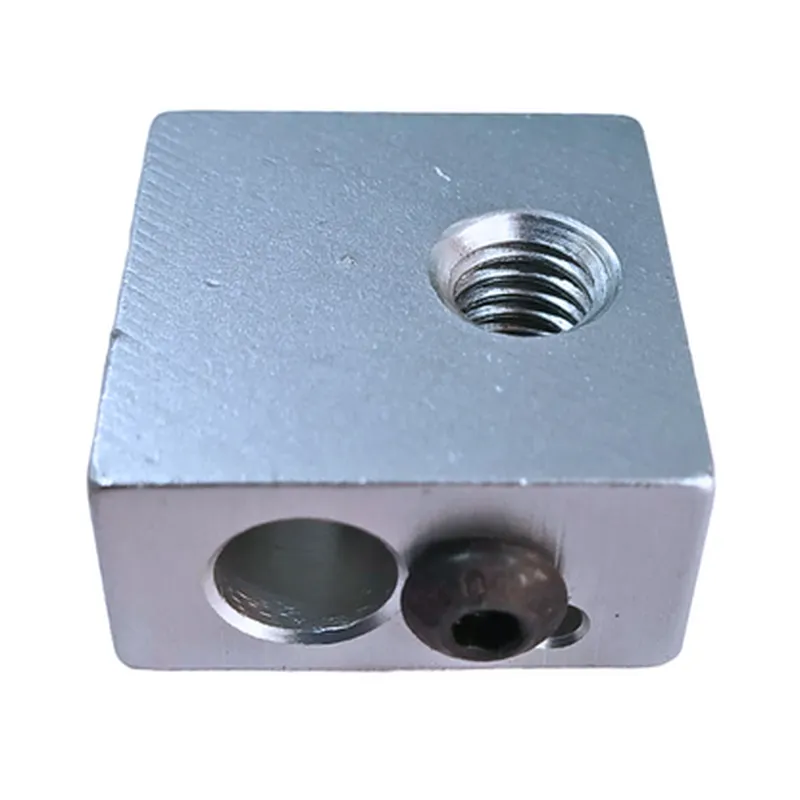
Aluminium Hot End Heating Block MK8 For 3D Printers


Buy Now on Stufin

Component Name

Aluminium Hot End Heating Block MK8 For 3D Printers
Description

The Aluminium Hot End Heating Block MK8 is a crucial component in 3D printing technology, designed specifically for Fused Deposition Modelling (FDM) and Fused Filament Fabrication (FFF) 3D printers. It is a critical part of the hotend assembly, responsible for melting andextruding thermoplastic materials to create three-dimensional objects.

Functionality

The Aluminium Hot End Heating Block MK8 serves as a thermal interface between the heater element and the extruded filament. Its primary function is to heat the filament to a high temperature, typically between 200C to 300C, depending on the type of material being used. The heated filament is then pushed through the nozzle, allowing it to be deposited onto the build platform in a precise and controlled manner.

Key Features

  • Material: The heating block is made from high-quality aluminum alloy, providing excellent heat conductivity and durability.
  • MK8 Design: The heating block is designed specifically for MK8 extruders, ensuring compatibility with a wide range of 3D printers.
  • Heat Distribution: The block is designed to distribute heat evenly, ensuring consistent and efficient melting of the filament.
  • Temperature Range: The heating block can withstand extremely high temperatures, making it suitable for use with a variety of thermoplastic materials.
  • Thermal Insulation: The block is designed to minimize heat loss, reducing the risk of thermal runaway and improving overall printing efficiency.
  • Easy Installation: The heating block is easy to install and replace, making it an ideal choice for DIY enthusiasts and professional 3D printing applications.
  • Compact Design: The block's compact design ensures minimal space requirements, making it suitable for use in a wide range of 3D printers.
  • Compatibility: The Aluminium Hot End Heating Block MK8 is compatible with a wide range of 3D printing materials, including ABS, PLA, PETG, and more.
  • Corrosion Resistance: The aluminum alloy construction provides excellent corrosion resistance, ensuring a long lifespan and minimal maintenance requirements.
  • Precision Engineering: The heating block is precision-engineered to ensure accurate and consistent performance, resulting in high-quality 3D prints.

Material

Aluminum alloy

Dimensions

20mm x 20mm x 10mm (LxWxH)

Temperature Range

200C to 300C

Heater Element Compatibility

Compatible with M6x1 heater elements

Thermocouple Compatibility

Compatible with PT100, K-type, and J-type thermocouples

Weight

approximately 50g

Applications

The Aluminium Hot End Heating Block MK8 is an essential component in 3D printing technology, suitable for a wide range of applications, including

Hobbyist and DIY 3D printing

Professional 3D printing services

Prototyping and model making

Research and development

Education and training

By incorporating the Aluminium Hot End Heating Block MK8 into a 3D printing system, users can achieve high-quality prints with consistent and efficient performance.

Pin Configuration

  • Aluminium Hot End Heating Block MK8 For 3D Printers - Pinout Explanation and Connection Guide
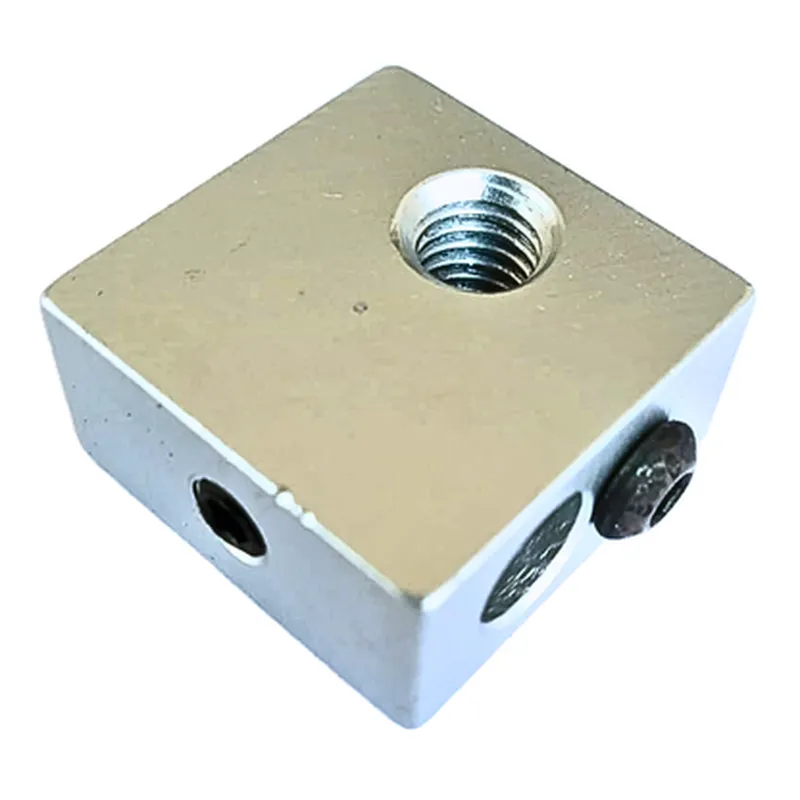
  • The Aluminium Hot End Heating Block MK8 is a crucial component in 3D printing, responsible for heating the extruded filament to the desired temperature. This documentation provides a detailed explanation of the pins on the heating block and a step-by-step guide on how to connect them.
  • Pinout:
  • The Aluminium Hot End Heating Block MK8 has a total of 4 pins:
  • | Pin Number | Pin Function | Description |
  • | --- | --- | --- |
  • | 1 | Thermistor Signal (T) | Connects to the thermistor temperature sensor |
  • | 2 | Heater Power (+) | Supplies power to the heating element |
  • | 3 | Heater Power (-) | Returns power from the heating element to the printer's main board |
  • | 4 | Heatbreak/Thermocouple (H) | Optional connection for thermocouple or heatbreak sensor |
  • Pin Connection Guide:
  • To connect the pins properly, follow these steps:
  • Step 1: Connect the Thermistor Signal (T) Pin
  • Connect the thermistor temperature sensor to Pin 1 (T) on the heating block.
  • The thermistor sensor is usually supplied with the heating block and is connected to the printer's main board.
  • Make sure to connect the thermistor wires to the correct pins on the main board, usually labeled as "T" or "Thermistor".
  • Step 2: Connect the Heater Power (+) Pin
  • Connect the positive wire of the heating element to Pin 2 (+) on the heating block.
  • The heating element is usually a resistive heating coil or a ceramic heating element.
  • Ensure the wire is securely connected to the heating element and the heating block.
  • Step 3: Connect the Heater Power (-) Pin
  • Connect the negative wire of the heating element to Pin 3 (-) on the heating block.
  • This wire completes the circuit and returns power from the heating element to the printer's main board.
  • Make sure to connect the wire to the correct pin on the main board, usually labeled as "HP" or "Heater Power".
  • Step 4: Optional - Connect the Heatbreak/Thermocouple (H) Pin
  • If your printer is equipped with a thermocouple or heatbreak sensor, connect it to Pin 4 (H) on the heating block.
  • This pin is optional and only required if you're using a thermocouple or heatbreak sensor to monitor the temperature of the hot end.
  • Connect the thermocouple or heatbreak sensor wires to the correct pins on the main board, usually labeled as "TC" or "Heatbreak".
  • Important Safety Considerations:
  • Always ensure the heating block is properly connected to the printer's main board and power supply to avoid electrical shocks or fires.
  • Never touch the heating element or thermistor sensor with your bare hands, as they can cause burns or electrical shocks.
  • Follow proper wiring and connection procedures to avoid short circuits or electrical damage to the printer.
  • By following this guide, you should be able to correctly connect the pins on the Aluminium Hot End Heating Block MK8 and ensure safe and proper operation of your 3D printer.

Code Examples

Aluminium Hot End Heating Block MK8 For 3D Printers
Overview
The Aluminium Hot End Heating Block MK8 is a high-performance heating block designed for 3D printing applications. It is compatible with the MK8 extruder and features an aluminum construction for efficient heat dissipation. This component is widely used in FFF/FDM 3D printers for its reliability and consistent performance.
Technical Specifications
Material: Aluminum
 Compatibility: MK8 extruder
 Operating Temperature: Up to 300C
 Power Rating: 30W
 Heating Element: Resistive heating element
 Dimensions: 20x20x10mm
hookup and Usage
The Aluminium Hot End Heating Block MK8 can be controlled using a 3D printer's mainboard or an external temperature controller. Here are some examples of how to use this component in various contexts:
Example 1: Using the Aluminium Hot End Heating Block MK8 with an Arduino Mega 2560 and RAMPS 1.4
In this example, we will use the Aluminium Hot End Heating Block MK8 with an Arduino Mega 2560 and RAMPS 1.4 to control the temperature of the hotend.
```c++
#include <Arduino.h>
#include <MAX6675.h>
// Define the thermocouple pin
#define THERMO_PIN 13
// Define the heating element pin
#define HEATER_PIN 9
// Create an instance of the MAX6675 library
MAX6675 thermocouple(THERMO_PIN);
void setup() {
  // Initialize the serial communication
  Serial.begin(115200);
// Set the heating element pin as an output
  pinMode(HEATER_PIN, OUTPUT);
}
void loop() {
  // Read the temperature from the thermocouple
  int temperature = thermocouple.readCelsius();
// Set the target temperature to 200C
  int targetTemperature = 200;
// If the temperature is below the target temperature, turn on the heating element
  if (temperature < targetTemperature) {
    digitalWrite(HEATER_PIN, HIGH);
  } else {
    digitalWrite(HEATER_PIN, LOW);
  }
// Print the current temperature to the serial monitor
  Serial.print("Temperature: ");
  Serial.print(temperature);
  Serial.println("C");
// Wait for 1 second before taking the next reading
  delay(1000);
}
```
Example 2: Using the Aluminium Hot End Heating Block MK8 with a RepRapArduino Mega (RAMBo)
In this example, we will use the Aluminium Hot End Heating Block MK8 with a RepRapArduino Mega (RAMBo) to control the temperature of the hotend.
```c++
#include <RepRapFirmware.h>
// Define the heating element pin
#define HEATER_PIN 2.3
void setup() {
  // Initialize the heating element pin as an output
  pinMode(HEATER_PIN, OUTPUT);
}
void loop() {
  // Set the target temperature to 200C
  int targetTemperature = 200;
// Use the M104 command to set the temperature
  M104(targetTemperature);
// Wait for 1 second before taking the next reading
  delay(1000);
}
```
Note: These examples are for illustration purposes only and may require modifications to work with your specific setup. Please ensure that you have the necessary knowledge and experience to work with high-temperature components and electrical circuits.
Safety Precautions
Handle the Aluminium Hot End Heating Block MK8 with care, as it can reach extremely high temperatures.
 Ensure proper insulation and heat dissipation to prevent damage to the component or surrounding electronics.
 Follow proper safety protocols when working with electrical circuits and high-temperature components.