Stufin
Home Quick Cart Profile

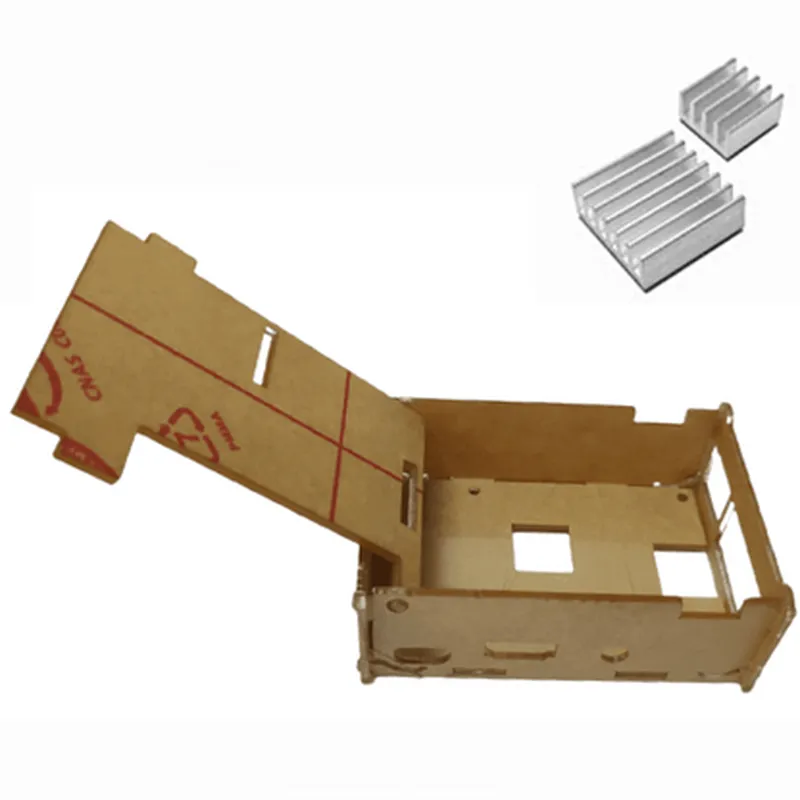
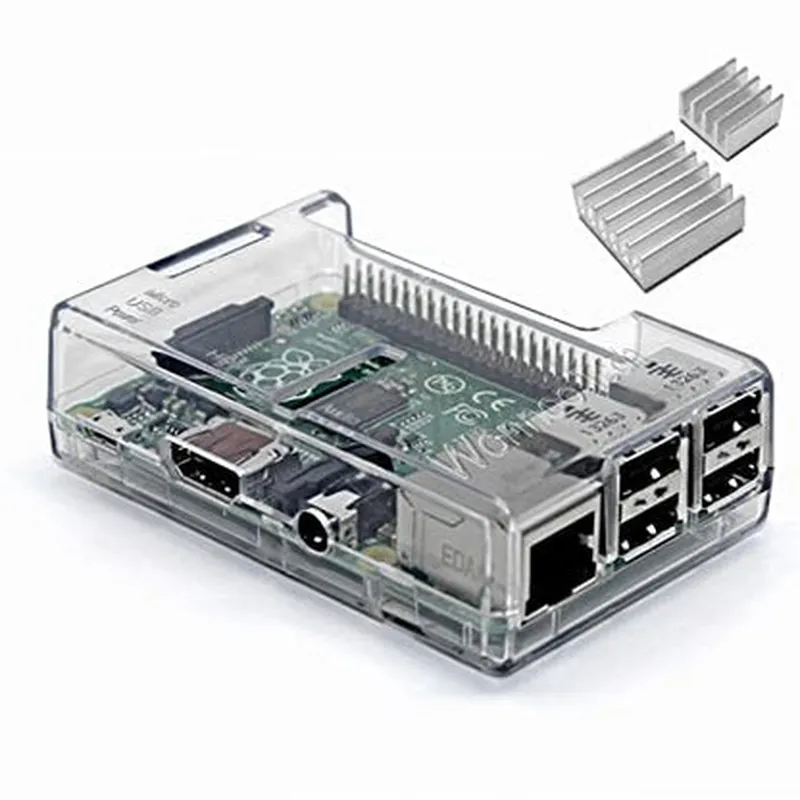
Raspberry Pi Transparent Case + Heat Sink (3pcs)

Buy Now on Stufin

Component Name

Raspberry Pi Transparent Case + Heat Sink (3pcs)

Overview

The Raspberry Pi Transparent Case + Heat Sink (3pcs) is a protective housing solution designed specifically for the Raspberry Pi single-board computer. This 3-piece set provides a clear transparent case and heat sinks to ensure efficient heat dissipation, while allowing for maximum visibility of the Raspberry Pi's components.

Functionality

  • Protection: The transparent case provides a protective enclosure for the Raspberry Pi, shielding it from environmental factors such as dust, moisture, and physical damage.
  • Heat Dissipation: The heat sinks, strategically placed on key components such as the CPU and RAM, help to dissipate heat generated by the Raspberry Pi during operation, ensuring stable performance and prolonging the lifespan of the device.
The Raspberry Pi Transparent Case + Heat Sink (3pcs) serves two primary purposes

Key Features

  • Transparent Case: The case is made of high-quality, clear polycarbonate material, allowing for optimal visibility of the Raspberry Pi's components and connections.
  • Heat Sink Design: The heat sinks are designed with precision-cut fins to maximize surface area, promoting efficient heat dissipation and reducing the risk of overheating.
  • Three-Piece Set: The kit includes three separate components: the transparent case, a heat sink for the CPU, and a heat sink for the RAM.
  • Easy Installation: The case and heat sinks are easy to install, with no soldering or technical expertise required.
  • Compatibility: The case and heat sinks are specifically designed for the Raspberry Pi, ensuring a precise fit and compatibility with all models.
  • Ventilation: The case features ventilation holes to facilitate airflow and further enhance heat dissipation.
  • Compact Design: The case is compact and lightweight, making it ideal for projects where space is limited.

Technical Specifications

Case Material

Polycarbonate

Heat Sink Material

Aluminum

Dimensions

+ Case85 x 56 x 25 mm (3.34 x 2.20 x 0.98 in)
+ Heat Sink (CPU)14 x 14 x 6 mm (0.55 x 0.55 x 0.24 in)
+ Heat Sink (RAM)10 x 10 x 6 mm (0.39 x 0.39 x 0.24 in)

Weight

approximately 50 grams (1.76 oz)

Compatibility

Raspberry Pi (all models)

Applications

The Raspberry Pi Transparent Case + Heat Sink (3pcs) is suitable for a wide range of projects and applications, including

IoT development

Robotics

Automation

Home automation

Media centers

Retro gaming consoles

By providing a protective enclosure and efficient heat dissipation, the Raspberry Pi Transparent Case + Heat Sink (3pcs) is an essential accessory for anyone building projects with the Raspberry Pi.

Pin Configuration

  • Raspberry Pi Transparent Case + Heat Sink (3pcs) Pinout Documentation
  • The Raspberry Pi Transparent Case + Heat Sink (3pcs) is a compact and versatile single-board computer designed for various IoT projects. This documentation provides a detailed explanation of the pins on the Raspberry Pi board, which is essential for connecting peripherals and components.
  • Pinout Structure:
  • The Raspberry Pi board has a 40-pin GPIO (General Purpose Input/Output) header, which is divided into two rows of 20 pins each. The pins are numbered from 1 to 40, with the top-left pin being Pin 1 and the bottom-right pin being Pin 40.
  • Pinout Description:
  • Here's a point-by-point explanation of each pin:
  • Row 1 ( Pins 1-20):
  • 1. 3V3 Power (3.3V Power Supply): Provides 3.3V power to the board.
  • 2. 5V Power (5V Power Supply): Provides 5V power to the board.
  • 3. GPIO 2 (General Purpose Input/Output): A digital input/output pin that can be used for various purposes.
  • 4. GPIO 3 (General Purpose Input/Output): A digital input/output pin that can be used for various purposes.
  • 5. GPIO 4 (General Purpose Input/Output): A digital input/output pin that can be used for various purposes.
  • 6. Ground (GND): A ground pin used for signal referencing and power supply grounding.
  • 7. GPIO 5 (General Purpose Input/Output): A digital input/output pin that can be used for various purposes.
  • 8. GPIO 6 (General Purpose Input/Output): A digital input/output pin that can be used for various purposes.
  • 9. GPIO 7 (General Purpose Input/Output): A digital input/output pin that can be used for various purposes.
  • 10. GPIO 8 (General Purpose Input/Output): A digital input/output pin that can be used for various purposes.
  • 11. GPIO 9 (General Purpose Input/Output): A digital input/output pin that can be used for various purposes.
  • 12. GPIO 10 (General Purpose Input/Output): A digital input/output pin that can be used for various purposes.
  • 13. GPIO 11 (General Purpose Input/Output): A digital input/output pin that can be used for various purposes.
  • 14. GPIO 12 (General Purpose Input/Output): A digital input/output pin that can be used for various purposes.
  • 15. GPIO 13 (General Purpose Input/Output): A digital input/output pin that can be used for various purposes.
  • 16. GPIO 14 (General Purpose Input/Output): A digital input/output pin that can be used for various purposes.
  • 17. 3V3 Power (3.3V Power Supply): Provides 3.3V power to the board.
  • 18. GPIO 15 (General Purpose Input/Output): A digital input/output pin that can be used for various purposes.
  • 19. GPIO 16 (General Purpose Input/Output): A digital input/output pin that can be used for various purposes.
  • 20. GPIO 17 (General Purpose Input/Output): A digital input/output pin that can be used for various purposes.
  • Row 2 (Pins 21-40):
  • 21. GPIO 18 (General Purpose Input/Output): A digital input/output pin that can be used for various purposes.
  • 22. GPIO 19 (General Purpose Input/Output): A digital input/output pin that can be used for various purposes.
  • 23. GPIO 20 (General Purpose Input/Output): A digital input/output pin that can be used for various purposes.
  • 24. Ground (GND): A ground pin used for signal referencing and power supply grounding.
  • 25. GPIO 21 (General Purpose Input/Output): A digital input/output pin that can be used for various purposes.
  • 26. GPIO 22 (General Purpose Input/Output): A digital input/output pin that can be used for various purposes.
  • 27. GPIO 23 (General Purpose Input/Output): A digital input/output pin that can be used for various purposes.
  • 28. GPIO 24 (General Purpose Input/Output): A digital input/output pin that can be used for various purposes.
  • 29. GPIO 25 (General Purpose Input/Output): A digital input/output pin that can be used for various purposes.
  • 30. Ground (GND): A ground pin used for signal referencing and power supply grounding.
  • 31. GPIO 26 (General Purpose Input/Output): A digital input/output pin that can be used for various purposes.
  • 32. GPIO 27 (General Purpose Input/Output): A digital input/output pin that can be used for various purposes.
  • 33. GPIO 28 (General Purpose Input/Output): A digital input/output pin that can be used for various purposes.
  • 34. GPIO 29 (General Purpose Input/Output): A digital input/output pin that can be used for various purposes.
  • 35. GPIO 30 (General Purpose Input/Output): A digital input/output pin that can be used for various purposes.
  • 36. GPIO 31 (General Purpose Input/Output): A digital input/output pin that can be used for various purposes.
  • 37. GPIO 32 (General Purpose Input/Output): A digital input/output pin that can be used for various purposes.
  • 38. GPIO 33 (General Purpose Input/Output): A digital input/output pin that can be used for various purposes.
  • 39. Ground (GND): A ground pin used for signal referencing and power supply grounding.
  • 40. GPIO 40 (General Purpose Input/Output): A digital input/output pin that can be used for various purposes.
  • Connecting Pins:
  • When connecting peripherals or components to the Raspberry Pi, make sure to follow these guidelines:
  • Use a breadboard or a PCB (Printed Circuit Board) to connect components.
  • Use jumper wires or suitable connectors to connect components to the GPIO pins.
  • Ensure that the voltage levels of the components match the Raspberry Pi's power supply voltage (3.3V or 5V).
  • Use resistors or voltage dividers if necessary to protect the Raspberry Pi from overvoltage or voltage spikes.
  • Consult the datasheet of the component you're trying to connect to ensure compatible voltage and signal levels.
  • By following this pinout documentation, you can successfully connect various peripherals and components to the Raspberry Pi, unlocking its full potential for your IoT projects.

Code Examples

Raspberry Pi Transparent Case + Heat Sink (3pcs) Documentation
Overview
The Raspberry Pi Transparent Case + Heat Sink (3pcs) is a protective encasement designed specifically for Raspberry Pi single-board computers. This case provides a clear transparent shell that showcases the Raspberry Pi's internal components while maintaining excellent airflow and heat dissipation. The included heat sink ensures efficient heat management, ensuring optimal performance and longevity of the Raspberry Pi.
Physical Characteristics
Material: High-quality transparent plastic
 Dimensions: 92mm x 60mm x 21mm (L x W x H)
 Weight: 50g (approx.)
 Compatible with: Raspberry Pi 3, 3+, 4, and later models
Technical Specifications
Heat Sink Material: Aluminum alloy
 Heat Sink Dimensions: 12mm x 12mm x 6mm (L x W x H)
 Thermal Interface Material (TIM): Pre-applied thermal tape
Code Examples
### Example 1: Basic Python Script for Temperature Monitoring
This example demonstrates how to use the Raspberry Pi Transparent Case + Heat Sink to monitor the temperature of the Raspberry Pi using Python.
Prerequisites
Raspberry Pi 4 or later model
 Raspbian OS (or compatible)
 Python 3.x or later
Code
```python
import os
import time
# Import the necessary libraries
import subprocess
while True:
    # Get the temperature reading from the system
    temp = subprocess.check_output(["vcgencmd", "measure_temp"])
    temp = temp.decode("utf-8").strip()
# Print the temperature reading
    print("Current Temperature: " + temp)
# Wait for 1 second before taking the next reading
    time.sleep(1)
```
This script uses the `vcgencmd` command to retrieve the current temperature of the Raspberry Pi and prints it to the console. The script runs indefinitely, updating the temperature reading every second.
### Example 2: Node.js Script for Real-Time Temperature Monitoring with Web Interface
This example demonstrates how to use the Raspberry Pi Transparent Case + Heat Sink to monitor the temperature of the Raspberry Pi in real-time using Node.js and a web interface.
Prerequisites
Raspberry Pi 4 or later model
 Raspbian OS (or compatible)
 Node.js 14.x or later
 Express.js framework
 Socket.IO library
Code
```javascript
const express = require('express');
const app = express();
const http = require('http').createServer(app);
const io = require('socket.io')(http);
const shell = require('shelljs');
app.get('/', (req, res) => {
  res.sendFile(__dirname + '/index.html');
});
io.on('connection', (socket) => {
  console.log('Client connected');
// Get the initial temperature reading
  const temp = shell.exec('vcgencmd measure_temp | cut -c 6-7').stdout.trim();
  socket.emit('temperature', temp);
// Update the temperature reading in real-time
  setInterval(() => {
    const temp = shell.exec('vcgencmd measure_temp | cut -c 6-7').stdout.trim();
    socket.emit('temperature', temp);
  }, 1000);
});
http.listen(3000, () => {
  console.log('Server started on port 3000');
});
```
index.html
```html
<!DOCTYPE html>
<html>
<head>
  <title>Real-Time Temperature Monitoring</title>
  <script src="/socket.io/socket.io.js"></script>
  <script>
    let socket = io();
socket.on('temperature', (temp) => {
      document.getElementById('temperature').innerHTML = `Current Temperature: ${temp}C`;
    });
  </script>
</head>
<body>
  <h1>Real-Time Temperature Monitoring</h1>
  <p id="temperature"></p>
</body>
</html>
```
This example sets up a Node.js server with a web interface that displays the current temperature of the Raspberry Pi in real-time. The temperature reading is updated every second using Socket.IO.
Note: These examples assume that the Raspberry Pi has been properly configured and is connected to the internet. Additionally, the provided code is for illustrative purposes only and may require modifications to fit specific use cases.