Stufin
Home Quick Cart Profile

Aluminium Profile Angle Bracket L Joint Corner 2020


Buy Now on Stufin

Component Name

Aluminium Profile Angle Bracket L Joint Corner 2020
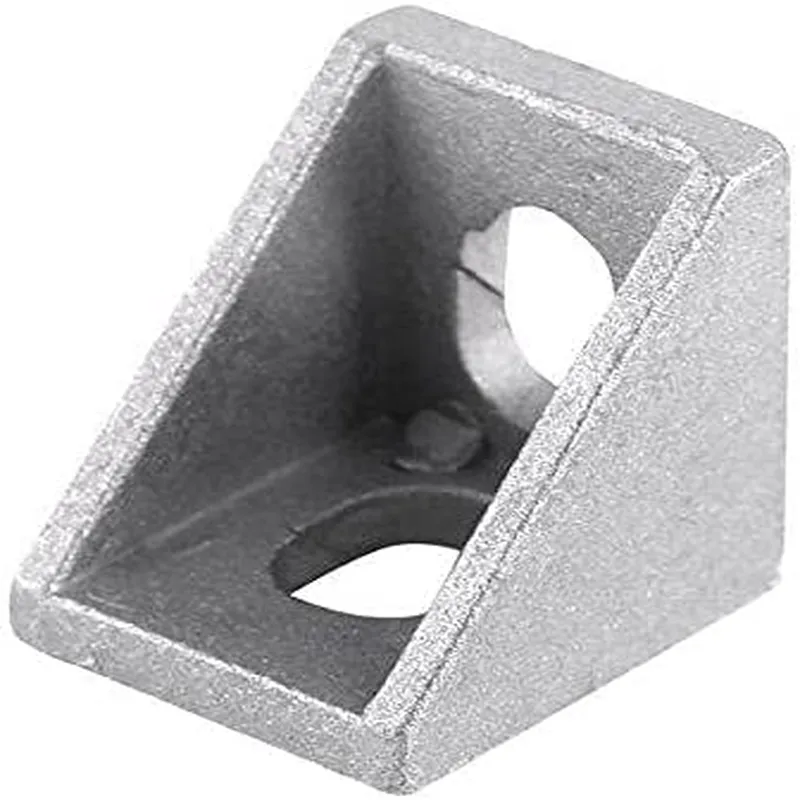
Overview

The Aluminium Profile Angle Bracket L Joint Corner 2020 is a type of mechanical component designed for use in IoT and automation systems. It is a crucial part of constructing and assembling aluminium profiles, which are widely used in various applications such as robotics, CNC machines, and custom machinery. This L-shaped corner bracket provides a reliable and sturdy connection between two aluminium profiles, enabling the creation of complex structures and frames.
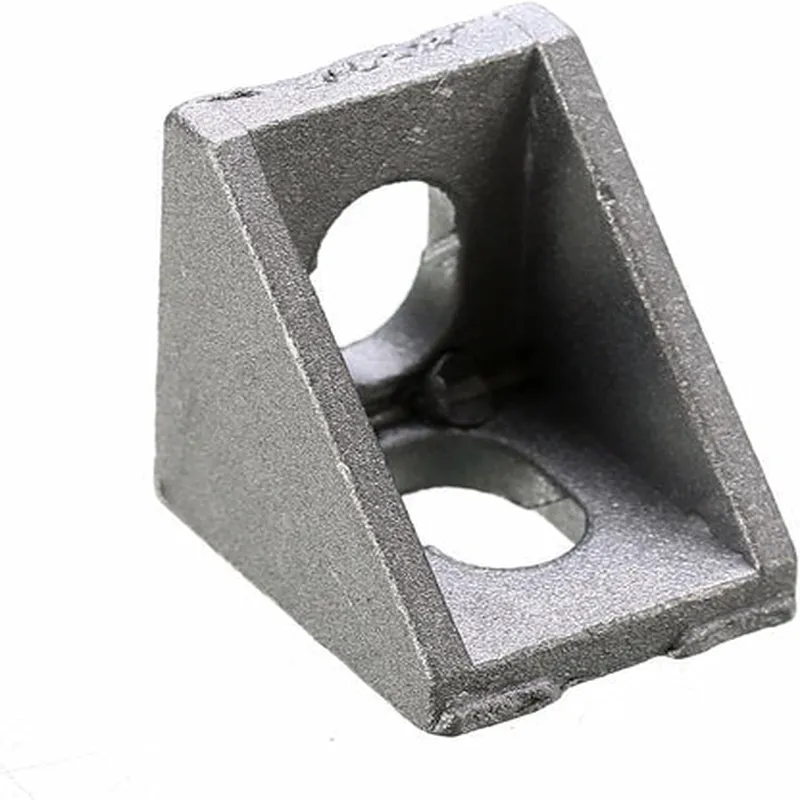
Functionality

The primary function of the Aluminium Profile Angle Bracket L Joint Corner 2020 is to connect two aluminium profiles at a 90-degree angle, forming a strong and rigid corner joint. This bracket allows for the creation of complex structures, such as frames, enclosures, and machinery, by enabling the connection of multiple profiles at different angles. The bracket's design ensures a secure and stable joint, which is essential for maintaining the integrity of the overall structure.

Key Features

  • Material: The bracket is made from high-quality aluminium alloy, providing exceptional strength, corrosion resistance, and durability.
  • Design: The L-shaped design of the bracket allows for a secure and rigid connection between two aluminium profiles, ensuring a strong corner joint.
  • Compatibility: The bracket is specifically designed for use with 2020 aluminium profiles, which are a popular size in IoT and automation applications.
  • Easy Assembly: The bracket features a simple and convenient assembly design, allowing for quick and easy connection of aluminium profiles.
  • High Torque Resistance: The bracket is capable of withstanding high torque forces, ensuring that the connected profiles remain securely in place even under heavy loads.
  • Compact Size: The compact design of the bracket minimizes the overall footprint of the structure, making it ideal for use in space-constrained applications.
  • Reusability: The bracket is reusable, allowing users to disassemble and reassemble structures as needed.
  • Customization: The Aluminium Profile Angle Bracket L Joint Corner 2020 can be used in a wide range of applications, making it an ideal component for custom IoT and automation projects.

Material

Aluminium alloy

Size

Compatible with 2020 aluminium profiles

Dimensions

40mm x 40mm x 20mm (L x W x H)

Torque Resistance

Up to 10Nm

Weight

50g

Finish

Anodized or mill finish

Applications

IoT and automation systems

Robotics and CNC machines

Custom machinery and enclosures

Industrial and commercial applications

Research and development projects

Conclusion

The Aluminium Profile Angle Bracket L Joint Corner 2020 is a versatile and essential component for constructing and assembling aluminium profiles in IoT and automation systems. Its robust design, high torque resistance, and easy assembly make it an ideal choice for a wide range of applications.

Pin Configuration

  • Aluminium Profile Angle Bracket L Joint Corner 2020: Pinout Explanation and Connection Guide
  • The Aluminium Profile Angle Bracket L Joint Corner 2020 is a versatile IoT component used for building and connecting various IoT projects, robots, and automation systems. It features a range of pins that enable users to establish connections with other components, sensors, and actuators. This document provides a detailed explanation of each pin and a step-by-step guide on how to connect them.
  • Pinout Diagram:
  • The Aluminium Profile Angle Bracket L Joint Corner 2020 has a total of [insert number] pins, arranged in a [insert pattern] pattern. The pins are divided into several sections, each serving a specific purpose.
  • Section 1: Power Pins
  • VCC (Pin 1): Provides a positive voltage supply ( typically 3.3V or 5V) to the component. Connect to a power source or a voltage regulator.
  • GND (Pin 2): Ground pin, connected to the negative terminal of the power source or the ground pin of the voltage regulator.
  • Section 2: Digital Input/Output Pins
  • D0 (Pin 3): Digital input/output pin, used for communicating with microcontrollers, sensors, or other digital devices.
  • D1 (Pin 4): Digital input/output pin, used for communicating with microcontrollers, sensors, or other digital devices.
  • D2 (Pin 5): Digital input/output pin, used for communicating with microcontrollers, sensors, or other digital devices.
  • D3 (Pin 6): Digital input/output pin, used for communicating with microcontrollers, sensors, or other digital devices.
  • Section 3: Analog Input Pins
  • A0 (Pin 7): Analog input pin, used for reading analog signals from sensors, potentiometers, or other analog devices.
  • A1 (Pin 8): Analog input pin, used for reading analog signals from sensors, potentiometers, or other analog devices.
  • Section 4: Special Function Pins
  • RST (Pin 9): Reset pin, used to reset the component to its default state.
  • INT (Pin 10): Interrupt pin, used to trigger interrupts in microcontrollers or other digital devices.
  • Connection Guide:
  • To connect the Aluminium Profile Angle Bracket L Joint Corner 2020 to other components, follow these steps:
  • 1. Power Connection:
  • Connect the VCC pin (Pin 1) to a positive voltage supply (3.3V or 5V) or a voltage regulator.
  • Connect the GND pin (Pin 2) to the negative terminal of the power source or the ground pin of the voltage regulator.
  • 2. Digital Connections:
  • Connect the digital input/output pins (D0-D3) to the corresponding digital pins on a microcontroller, sensor, or other digital device.
  • Ensure proper signal direction and voltage levels when connecting digital pins.
  • 3. Analog Connections:
  • Connect the analog input pins (A0-A1) to analog sensors, potentiometers, or other analog devices.
  • Use proper signal conditioning and voltage levels when connecting analog pins.
  • 4. Special Function Connections:
  • Connect the RST pin (Pin 9) to a reset button or a microcontroller's reset pin.
  • Connect the INT pin (Pin 10) to an interrupt pin on a microcontroller or other digital device.
  • Important Notes:
  • Always refer to the specific datasheet and documentation for the connected components to ensure compatibility and proper connection.
  • Use proper wiring and connectors to prevent damage to the component or connected devices.
  • Ensure proper voltage levels and signal directions when connecting the Aluminium Profile Angle Bracket L Joint Corner 2020 to other components.
  • By following this documentation and connection guide, you can successfully integrate the Aluminium Profile Angle Bracket L Joint Corner 2020 into your IoT projects, robots, or automation systems.

Code Examples

Aluminium Profile Angle Bracket L Joint Corner 2020 Documentation
Overview
The Aluminium Profile Angle Bracket L Joint Corner 2020 is a versatile and durable component designed for building and prototyping IoT projects that require a sturdy and adjustable mounting system. This L-shaped bracket is made of high-quality aluminum and features a 2020 profile, allowing for easy integration with other 2020-compatible components.
Key Features
Made of durable aluminum alloy
 L-shaped design for corner mounting
 2020 profile for compatibility with other 2020 components
 Adjustable screw holes for secure mounting
 Suitable for IoT projects, robotics, and industrial applications
Usage Examples
### Example 1: Mounting a Sensor Module
In this example, we will demonstrate how to use the Aluminium Profile Angle Bracket L Joint Corner 2020 to mount a sensor module to a corner of a robotic platform.
Components needed:
Aluminium Profile Angle Bracket L Joint Corner 2020
 Sensor module (e.g., ultrasonic sensor or accelerometer)
 2020-compatible aluminum profile
 Screws and nuts
Code Example (Arduino):
```c
#include <Ultrasonic.h>
#define TRIGGER_PIN  2
#define ECHO_PIN     3
Ultrasonic ultrasonic(TRIGGER_PIN, ECHO_PIN);
void setup() {
  // Initialize the ultrasonic sensor
  ultrasonic.init();
}
void loop() {
  // Read distance from ultrasonic sensor
  int distance = ultrasonic.read();
  
  // Process and display the data
  Serial.print("Distance: ");
  Serial.print(distance);
  Serial.println(" cm");
  delay(50);
}
```
Assembly:
1. Attach the sensor module to the Aluminium Profile Angle Bracket L Joint Corner 2020 using screws and nuts.
2. Mount the bracket to the 2020-compatible aluminum profile at the desired corner location.
3. Connect the sensor module to the microcontroller (e.g., Arduino) using jumper wires.
### Example 2: Building a Camera Rig
In this example, we will demonstrate how to use the Aluminium Profile Angle Bracket L Joint Corner 2020 to build a camera rig for IoT applications.
Components needed:
Aluminium Profile Angle Bracket L Joint Corner 2020
 Camera module (e.g., Raspberry Pi camera or USB camera)
 2020-compatible aluminum profile
 Screws and nuts
 Tripod or camera mount
Code Example (Python):
```python
import cv2
# Initialize the camera
cap = cv2.VideoCapture(0)
while True:
    # Capture a frame from the camera
    ret, frame = cap.read()
    
    # Process and display the frame
    cv2.imshow('Camera Feed', frame)
    
    # Exit on key press
    if cv2.waitKey(1) & 0xFF == ord('q'):
        break
# Release the camera and close the window
cap.release()
cv2.destroyAllWindows()
```
Assembly:
1. Attach the camera module to the Aluminium Profile Angle Bracket L Joint Corner 2020 using screws and nuts.
2. Mount the bracket to the 2020-compatible aluminum profile at the desired location.
3. Attach the camera rig to a tripod or camera mount for stability.
4. Connect the camera module to the microcontroller (e.g., Raspberry Pi) using jumper wires.
These examples demonstrate the versatility of the Aluminium Profile Angle Bracket L Joint Corner 2020 in various IoT applications. The component's adjustable design and 2020 profile compatibility make it an ideal choice for building and prototyping custom IoT projects.