

Stufin
Home Quick Cart Profile

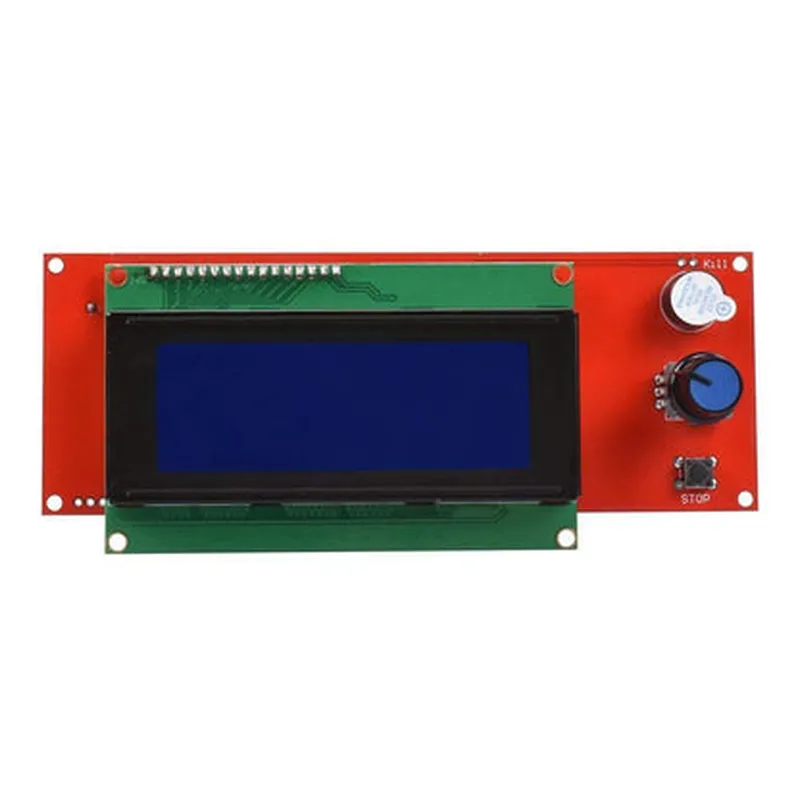
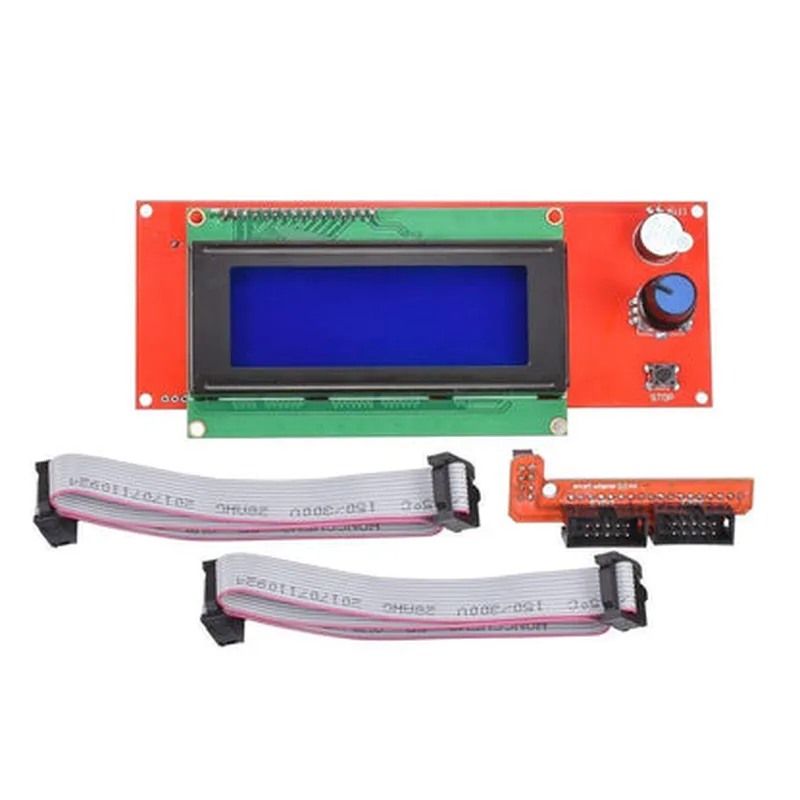
3D Printer - LCD 2004 Graphic Smart Display

Buy Now on Stufin

Component Name

3D Printer - LCD 2004 Graphic Smart Display

Overview

The LCD 2004 Graphic Smart Display is a compact and intelligent display module designed specifically for 3D printing applications. This module is an ideal addition to any 3D printer, providing a user-friendly interface for monitoring and controlling the printing process.

Functionality

  • Print status: Display the current print job's progress, including the layer number, elapsed time, and estimated completion time.
  • Temperature control: Monitor and adjust the temperature of the hotend, bed, and chamber (if applicable) in real-time.
  • Print settings: Allow users to adjust printing parameters, such as layer height, infill density, and support material, on the fly.
  • Error notifications: Alert the user to any issues, such as filament jams, temperature fluctuations, or power interruptions.
The LCD 2004 Graphic Smart Display is a graphic LCD module that communicates with the 3D printer's motherboard via a serial interface (UART, SPI, or I2C). Its primary function is to display vital information to the user, such as

Key Features

  • High-Resolution Display: The LCD 2004 features a 200x4 pixels graphic display, providing a clear and concise visual representation of the printing process.
  • Intuitive User Interface: A simple and easy-to-navigate menu system enables users to access various settings and functions with ease.
  • Customizable: The display can be customized to accommodate specific 3D printer models and firmware, allowing for seamless integration.
  • Multi-Language Support: The module supports multiple languages, making it accessible to users worldwide.
  • Adjustable Brightness: The display's brightness can be adjusted to suit different environments and preferences.
  • Wide Operating Temperature Range: The LCD 2004 operates reliably within a temperature range of 0C to 50C (32F to 122F), making it suitable for a variety of 3D printing applications.
  • Low Power Consumption: The module is designed to consume minimal power, reducing the overall energy footprint of the 3D printer.

Technical Specifications

  • Display Type: Graphic LCD (200x4 pixels)
  • Interface: UART, SPI, or I2C ( selectable)
  • Display Size: 48x84 mm (1.89x3.31 in)
  • Operating Voltage: 5V
  • Current Consumption: 20mA (average), 50mA (peak)
  • Communication Protocols: Supports various 3D printing firmware, including Marlin, Repetier, and Grbl

Applications

  • 3D Printers: Ideal for DIY and commercial 3D printing applications, including FFF/FDM, SLA, and SLS printers.
  • CNC Machines: Suitable for CNC mills, lathes, and routers, providing real-time monitoring and control.
  • Robotics and Automation: Can be used in robotic and automation projects, offering a user-friendly interface for monitoring and controlling various parameters.
The LCD 2004 Graphic Smart Display is an excellent addition to

Conclusion

The LCD 2004 Graphic Smart Display is a valuable component for 3D printing and other applications, providing a user-friendly interface for monitoring and controlling various parameters. Its compact design, low power consumption, and customization capabilities make it an ideal addition to any DIY or commercial project.

Pin Configuration

  • 3D Printer - LCD 2004 Graphic Smart Display Documentation
  • Overview
  • The LCD 2004 Graphic Smart Display is a 20-character, 4-line LCD module designed for 3D printing applications. This display module features a built-in ST7920 controller, which allows for easy interface with microcontrollers. This documentation provides a detailed explanation of the display's pinout and connection guidelines.
  • Pinout Description
  • The LCD 2004 Graphic Smart Display has a total of 16 pins, which can be broadly categorized into four groups: Power Supply, Interface, Data, and Control. Below is a point-by-point explanation of each pin:
  • Power Supply Pins (4)
  • 1. VCC (Pin 1): Power supply voltage (typically 5V) for the LCD module.
  • 2. GND (Pin 2): Ground connection for the LCD module.
  • 3. VCC_IO (Pin 15): Power supply voltage for the interface (typically 5V or 3.3V).
  • 4. GND_IO (Pin 16): Ground connection for the interface.
  • Interface Pins (4)
  • 1. SCL (Pin 13): I2C clock signal input.
  • 2. SDA (Pin 14): I2C data signal input/output.
  • 3. RX (Pin 3): UART receive data input.
  • 4. TX (Pin 4): UART transmit data output.
  • Data Pins (4)
  • 1. DB4 (Pin 5): Data bus bit 4 input.
  • 2. DB5 (Pin 6): Data bus bit 5 input.
  • 3. DB6 (Pin 7): Data bus bit 6 input.
  • 4. DB7 (Pin 8): Data bus bit 7 input.
  • Control Pins (4)
  • 1. RS (Pin 9): Register select input (High: Data, Low: Instruction).
  • 2. R/W (Pin 10): Read/Write control input (High: Read, Low: Write).
  • 3. EN (Pin 11): Enable input (High: Enable, Low: Disable).
  • 4. BL (Pin 12): Backlight control input (High: On, Low: Off).
  • Connection Guidelines
  • To ensure proper connection and operation of the LCD 2004 Graphic Smart Display, follow these guidelines:
  • Use a 5V power supply for VCC and VCC_IO, and connect GND and GND_IO to a common ground point.
  • For I2C interface, connect SCL to the microcontroller's I2C clock pin and SDA to the microcontroller's I2C data pin.
  • For UART interface, connect RX to the microcontroller's UART receive pin and TX to the microcontroller's UART transmit pin.
  • Connect the data bus pins (DB4-DB7) to the microcontroller's data bus pins or GPIO pins.
  • Connect the control pins (RS, R/W, EN, and BL) to the microcontroller's GPIO pins or digital control pins.
  • Important Notes
  • Before connecting the LCD module, ensure that the power supply voltage and interface voltage (VCC_IO) match the microcontroller's operating voltage.
  • Use suitable pull-up resistors for the I2C bus and ensure that the UART communication parameters (baud rate, parity, and stop bits) are correctly set in the microcontroller.
  • By following these guidelines and pinout explanations, you can successfully integrate the LCD 2004 Graphic Smart Display into your 3D printing project.

Code Examples

3D Printer - LCD 2004 Graphic Smart Display Documentation
Overview
The LCD 2004 Graphic Smart Display is a high-resolution graphic LCD display module designed specifically for 3D printing applications. It features a 20x4 character display with a built-in ST7066U controller and is compatible with a wide range of microcontrollers.
Technical Specifications
Display Type: STN Graphic LCD
 Resolution: 200x4 pixels
 Display Size: 85.5x27.5mm
 Operating Temperature: -20C to 70C
 Interface: Serial (SPI, I2C, UART)
 Power Supply: 5V DC
 Communication Protocol: ASCII command-based
Example 1: Basic Initialization and Text Display using Arduino
In this example, we will demonstrate how to initialize the LCD 2004 Graphic Smart Display and display a simple text message using an Arduino Uno board.
Hardware Requirements
LCD 2004 Graphic Smart Display
 Arduino Uno board
 Breadboard
 Jumper wires
Software Requirements
Arduino IDE (version 1.8.x or later)
Code Example
```c
#include <LiquidCrystal.h>
// Define the LCD pins
#define LCD_RST  8
#define LCD_EN   9
#define LCD_RS   10
#define LCD_D4   11
#define LCD_D5   12
#define LCD_D6   13
#define LCD_D7   14
LiquidCrystal_I2C lcd(LCD_RST, LCD_EN, LCD_RS, LCD_D4, LCD_D5, LCD_D6, LCD_D7);
void setup() {
  // Initialize the LCD
  lcd.begin(20, 4);
  lcd.setCursor(0, 0);
  lcd.print("Hello, 3D Printer!");
}
void loop() {
  // Display a scrolling message
  lcd.setCursor(0, 1);
  lcd.print("Printing in progress...");
  delay(500);
  lcd.setCursor(0, 1);
  lcd.print("                    ");
  delay(500);
}
```
Example 2: Graphic Display using Raspberry Pi
In this example, we will demonstrate how to display a custom graphic image on the LCD 2004 Graphic Smart Display using a Raspberry Pi.
Hardware Requirements
LCD 2004 Graphic Smart Display
 Raspberry Pi (any model)
 Breadboard
 Jumper wires
Software Requirements
Raspbian OS (latest version)
 Python 3.x
Code Example
```python
import time
import RPi.GPIO as GPIO
import pygame
# Define the LCD pins
LCD_RST = 17
LCD_EN = 23
LCD_RS = 24
LCD_D4 = 25
LCD_D5 = 8
LCD_D6 = 7
LCD_D7 = 1
# Initialize the GPIO library
GPIO.setmode(GPIO.BCM)
GPIO.setup(LCD_RST, GPIO.OUT)
GPIO.setup(LCD_EN, GPIO.OUT)
GPIO.setup(LCD_RS, GPIO.OUT)
GPIO.setup(LCD_D4, GPIO.OUT)
GPIO.setup(LCD_D5, GPIO.OUT)
GPIO.setup(LCD_D6, GPIO.OUT)
GPIO.setup(LCD_D7, GPIO.OUT)
# Initialize the LCD
GPIO.output(LCD_RST, GPIO.HIGH)
GPIO.output(LCD_EN, GPIO.LOW)
GPIO.output(LCD_RS, GPIO.LOW)
time.sleep(0.001)
GPIO.output(LCD_EN, GPIO.HIGH)
time.sleep(0.001)
# Create a pygame surface for the graphic image
surface = pygame.Surface((200, 4))
surface.fill((255, 255, 255))
# Draw a custom graphic image
pygame.draw.rect(surface, (0, 0, 0), (10, 10, 20, 20))
pygame.draw.circle(surface, (255, 0, 0), (50, 20), 10)
# Send the graphic image to the LCD
for y in range(4):
    for x in range(200):
        if surface.get_at((x, y))[0] == 255:
            GPIO.output(LCD_D4, GPIO.HIGH)
        else:
            GPIO.output(LCD_D4, GPIO.LOW)
        if surface.get_at((x, y))[1] == 255:
            GPIO.output(LCD_D5, GPIO.HIGH)
        else:
            GPIO.output(LCD_D5, GPIO.LOW)
        if surface.get_at((x, y))[2] == 255:
            GPIO.output(LCD_D6, GPIO.HIGH)
        else:
            GPIO.output(LCD_D6, GPIO.LOW)
        GPIO.output(LCD_EN, GPIO.LOW)
        time.sleep(0.001)
        GPIO.output(LCD_EN, GPIO.HIGH)
        time.sleep(0.001)
while True:
    # Update the display
    GPIO.output(LCD_EN, GPIO.LOW)
    time.sleep(0.001)
    GPIO.output(LCD_EN, GPIO.HIGH)
    time.sleep(0.001)
```
These examples demonstrate the basic functionality of the LCD 2004 Graphic Smart Display and its compatibility with popular microcontrollers. You can customize the code to suit your specific 3D printing application needs.