Stufin
Home Quick Cart Profile

Multitec MT-02DX Wire Stripper


Buy Now on Stufin

Component Name

Multitec MT-02DX Wire Stripper
Description

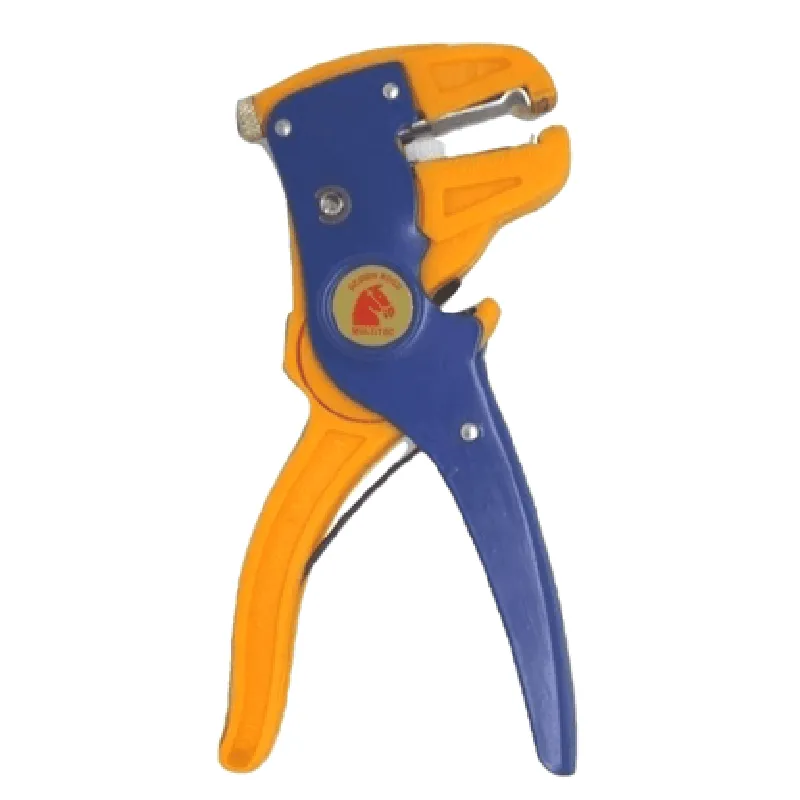
The Multitec MT-02DX Wire Stripper is a compact, handheld device designed for stripping insulation from electrical wires. This tool is an essential component in various industries, including electronics, automotive, aerospace, and telecommunications, where precise wire stripping is crucial.
Functionality

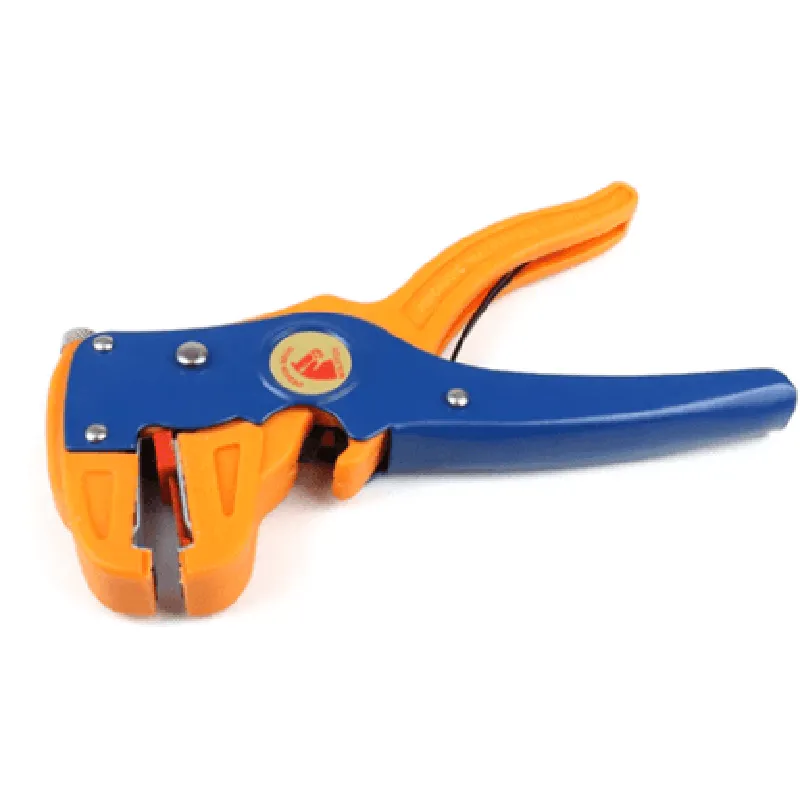
The Multitec MT-02DX Wire Stripper is used to remove insulation from electrical wires, allowing for secure connections, repairs, and terminations. The tool's primary function is to strip the insulation from the wire, exposing the conductor underneath, without damaging the wire itself.

Key Features

  • Adjustable Stripping Length: The MT-02DX features an adjustable stripping length, allowing users to customize the stripping distance according to their specific requirements.
  • Wire Size Range: The tool is capable of stripping wires with diameters ranging from 0.5 mm to 2.5 mm (20 AWG to 12 AWG), making it suitable for a wide range of applications.
  • Precise Stripping Action: The MT-02DX uses a precision-ground stripping blade, ensuring a clean and accurate stripping process that minimizes damage to the wire conductor.
  • Ergonomic Design: The tool's ergonomic design and contoured grip provide comfort and control during extended use, reducing fatigue and improving user efficiency.
  • Compact Size: The Multitec MT-02DX Wire Stripper is compact and lightweight, making it easy to carry and store in toolboxes, workbenches, or on-site.
  • Durable Construction: The tool features a rugged, high-quality construction that withstands heavy use and harsh environments, ensuring a long service life.
  • Easy Blade Replacement: The MT-02DX has a quick-release mechanism that allows for easy blade replacement, reducing downtime and maintenance costs.
  • Safety Features: The tool is designed with safety in mind, featuring a protective guard that prevents accidental contact with the stripping blade, and a secure grip that reduces the risk of slippage.

Weight

150 g (5.29 oz)

Dimensions

120 mm x 55 mm x 30 mm (4.72 in x 2.17 in x 1.18 in)

Material

High-quality steel and durable plastics

Operating Temperature

-20C to 80C (-4F to 176F)

Stripping Capacity

0.5 mm to 2.5 mm (20 AWG to 12 AWG)

Applications

The Multitec MT-02DX Wire Stripper is suitable for various industries and applications, including

Electronics manufacturing and repair

Automotive wire harnessing and repair

Aerospace wire stripping and termination

Telecommunications and data communications

Industrial control systems and automation

Certifications and Compliance

The Multitec MT-02DX Wire Stripper complies with relevant industry standards and regulations, including

RoHS (Restriction of Hazardous Substances) compliant

CE (Conformit Europene) certified

Meets or exceeds ANSI (American National Standards Institute) and IEEE (Institute of Electrical and Electronics Engineers) standards for wire stripping and termination.

Pin Configuration

  • Multitec MT-02DX Wire Stripper Documentation
  • Pin Configuration:
  • The Multitec MT-02DX Wire Stripper has a total of 10 pins, which are used to connect to a microcontroller or other digital devices. Here's a detailed explanation of each pin:
  • Pin 1: VCC
  • Function: Power Supply
  • Description: This pin is used to connect the positive power supply (VCC) to the wire stripper.
  • Recommended Voltage: 5V DC
  • Connection: Connect to a 5V DC power source.
  • Pin 2: GND
  • Function: Ground
  • Description: This pin is used to connect the negative power supply (GND) to the wire stripper.
  • Connection: Connect to a common ground point in the system.
  • Pin 3: Clock (CLK)
  • Function: Clock Signal
  • Description: This pin is used to receive the clock signal from the microcontroller or other digital devices.
  • Frequency: Up to 20 kHz
  • Connection: Connect to the clock output of the microcontroller or other digital devices.
  • Pin 4: Data (DATA)
  • Function: Data Signal
  • Description: This pin is used to receive the data signal from the microcontroller or other digital devices.
  • Connection: Connect to the data output of the microcontroller or other digital devices.
  • Pin 5: Mode (MODE)
  • Function: Mode Selection
  • Description: This pin is used to select the operating mode of the wire stripper.
  • Connection: Connect to a digital output of the microcontroller or other digital devices to select the desired mode.
  • Pin 6: Strip (STRIP)
  • Function: Strip Signal
  • Description: This pin is used to receive the strip signal from the microcontroller or other digital devices.
  • Connection: Connect to the strip output of the microcontroller or other digital devices.
  • Pin 7: Hold (HOLD)
  • Function: Hold Signal
  • Description: This pin is used to receive the hold signal from the microcontroller or other digital devices.
  • Connection: Connect to the hold output of the microcontroller or other digital devices.
  • Pin 8: Cut (CUT)
  • Function: Cut Signal
  • Description: This pin is used to receive the cut signal from the microcontroller or other digital devices.
  • Connection: Connect to the cut output of the microcontroller or other digital devices.
  • Pin 9: NC (No Connection)
  • Function: No Connection
  • Description: This pin is not connected to any internal circuitry and is reserved for future use.
  • Connection: Do not connect anything to this pin.
  • Pin 10: NC (No Connection)
  • Function: No Connection
  • Description: This pin is not connected to any internal circuitry and is reserved for future use.
  • Connection: Do not connect anything to this pin.
  • Connection Structure:
  • Here's a sample connection structure for the Multitec MT-02DX Wire Stripper:
  • Connect Pin 1 (VCC) to a 5V DC power source.
  • Connect Pin 2 (GND) to a common ground point in the system.
  • Connect Pin 3 (CLK) to the clock output of the microcontroller or other digital devices.
  • Connect Pin 4 (DATA) to the data output of the microcontroller or other digital devices.
  • Connect Pin 5 (MODE) to a digital output of the microcontroller or other digital devices to select the desired mode.
  • Connect Pin 6 (STRIP) to the strip output of the microcontroller or other digital devices.
  • Connect Pin 7 (HOLD) to the hold output of the microcontroller or other digital devices.
  • Connect Pin 8 (CUT) to the cut output of the microcontroller or other digital devices.
  • Do not connect anything to Pins 9 and 10 (NC).
  • Note:
  • Make sure to follow the recommended voltage and frequency ratings for the power supply and clock signal.
  • Use appropriate pull-up or pull-down resistors for the data, mode, strip, hold, and cut signals as required.
  • Refer to the datasheet and user manual for more detailed information on the Multitec MT-02DX Wire Stripper and its applications.

Code Examples

Multitec MT-02DX Wire Stripper Documentation
Overview
The Multitec MT-02DX Wire Stripper is a manual wire stripper designed for efficient and precise stripping of insulation from electrical wires. This component is commonly used in IoT projects, electronics prototyping, and repair applications.
Technical Specifications
Stripping range: 0.5 mm to 2.5 mm (AWG 20 to 14)
Wire types: Copper, aluminum, and tin-plated wires
 Insulation types: PVC, Teflon, and rubber
 Dimensions: 110 mm x 55 mm x 20 mm (4.33 in x 2.17 in x 0.79 in)
 Weight: 120 g (4.26 oz)
Using the Multitec MT-02DX Wire Stripper in IoT Projects
### Example 1: Wire Preparation for Sensor Interface
In this example, we will demonstrate how to use the Multitec MT-02DX Wire Stripper to prepare wires for connecting a temperature sensor to a microcontroller.
Materials needed:
Multitec MT-02DX Wire Stripper
 Temperature sensor (e.g., DS18B20)
 Jumper wires (20 AWG)
 Microcontroller (e.g., Arduino Uno)
Code Example (Arduino):
```c
#include <OneWire.h>
// Define the temperature sensor pin
#define TEMP_SENSOR_PIN 2
OneWire ds(TEMP_SENSOR_PIN);
void setup() {
  Serial.begin(9600);
}
void loop() {
  byte data[12];
  ds.reset();
  ds.write(0xCC, 0xB4, 0x4B, 0<quote>, 0<quote>);
  ds.write(0x01);
  ds.read(data, 9);
  float tempC = data[8] + (data[7]  256) + (data[6]  65536) / 16;
  Serial.print("Temperature: ");
  Serial.print(tempC);
  Serial.println("C");
  delay(1000);
}
```
Wire Preparation:
1. Cut three jumper wires to the desired length.
2. Use the Multitec MT-02DX Wire Stripper to strip approximately 1 cm (0.4 in) of insulation from each wire.
3. Connect the wires to the temperature sensor and microcontroller according to the datasheet.
### Example 2: Wire Repair for IoT Devices
In this example, we will demonstrate how to use the Multitec MT-02DX Wire Stripper to repair a damaged wire on an IoT device, such as a wireless weather station.
Materials needed:
Multitec MT-02DX Wire Stripper
 Damaged wire
 Wire nuts or connectors (optional)
Steps:
1. Identify the damaged section of the wire and cut it using wire cutters.
2. Use the Multitec MT-02DX Wire Stripper to strip the insulation from the cut ends of the wire.
3. Reconnect the wire using wire nuts or connectors, ensuring a secure and reliable connection.
4. Verify the repair by testing the IoT device.
By following these examples, you can effectively utilize the Multitec MT-02DX Wire Stripper in various IoT projects and applications.