

Stufin
Home Quick Cart Profile

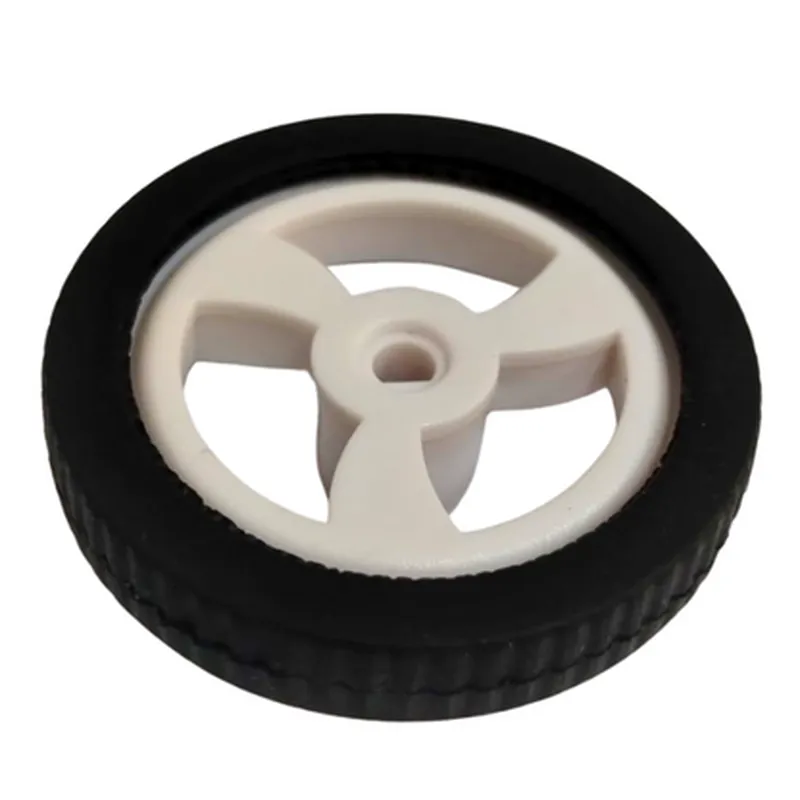
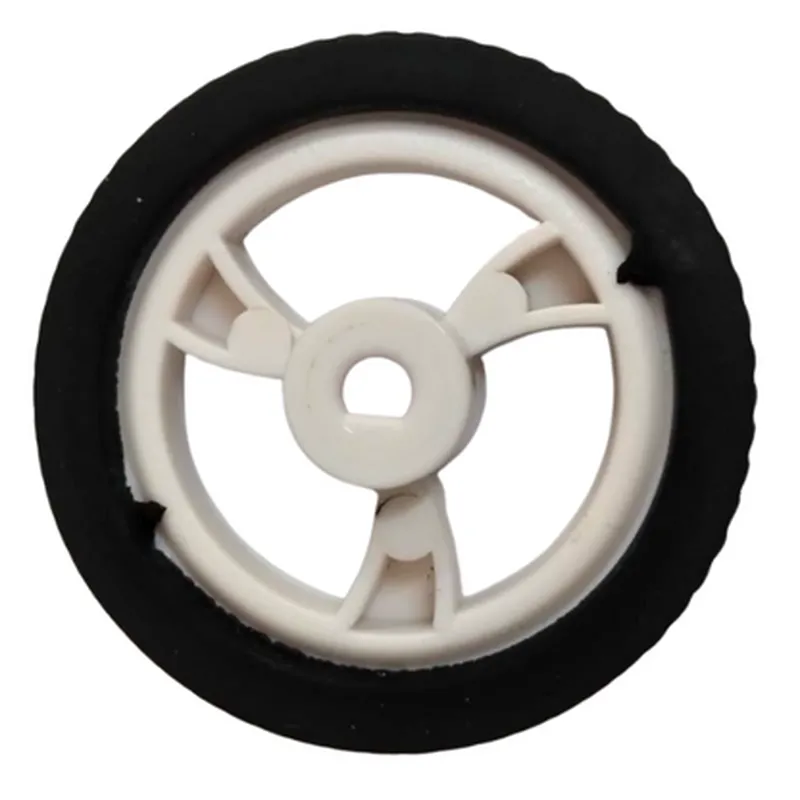
Rubber Hollow Car Wheel

Buy Now on Stufin

Component Name

Rubber Hollow Car Wheel

=============================

Overview

------------

The Rubber Hollow Car Wheel is a type of IoT-enabled wheel designed for model cars, robotics, and other small-scale vehicles. This innovative component integrates a traditional rubber wheel with advanced sensors and connectivity features, enabling real-time monitoring and control of the vehicle's movement and performance.

Functionality

---------------

The Rubber Hollow Car Wheel serves as a functional wheel for small-scale vehicles while providing the following advanced features
### 1. Speed and Direction SensingThe wheel is equipped with built-in speed and direction sensors, which track the vehicle's movement, including speed, acceleration, and direction. This data is transmitted to a connected microcontroller or IoT platform for analysis and feedback.
### 2. Vibration and Shock DetectionThe wheel features a vibration sensor that detects and measures shocks, bumps, and vibrations, providing valuable insights into road conditions, vehicle stability, and potential maintenance needs.
### 3. Temperature MonitoringAn integrated temperature sensor allows for real-time monitoring of the wheel's temperature, enabling detection of excessive heat buildup, which can indicate wheel damage or malfunction.
### 4. Wireless ConnectivityThe wheel is equipped with wireless connectivity options (e.g., Bluetooth Low Energy, Wi-Fi) for seamless data transmission to a connected device or cloud platform.

Key Features

----------------

### 1. Hollow DesignThe wheel's hollow design reduces weight while maintaining strength and durability, making it suitable for small-scale vehicles and robotics applications.
### 2. Rubber CompoundThe wheel's rubber compound is specifically designed for enhanced grip, traction, and durability, ensuring smooth movement and minimal wear and tear.
### 3. IP67 RatingThe wheel's electronics are sealed with an IP67 rating, providing protection against dust and water ingress, making it suitable for use in harsh environments.
### 4. Low Power ConsumptionThe wheel's advanced design and sensors are optimized for low power consumption, ensuring extended battery life and reduced maintenance needs.
### 5. Compact SizeThe wheel's compact size (available in various diameters and widths) makes it ideal for use in small-scale vehicles, robotics, and IoT projects.

Technical Specifications

-------------------------

### Dimensions

Diameter

60mm, 70mm, 80mm (other sizes available upon request)

Width

20mm, 25mm, 30mm (other sizes available upon request)

### Weight50g, 70g, 90g (depending on size)
### Wireless Connectivity

Bluetooth Low Energy (BLE) 5.0

Wi-Fi 802.11b/g/n

### Sensors

Speed and direction sensor (hall effect)

Vibration sensor (accelerometer)

Temperature sensor (thermistor)

### Power Requirements

Operating voltage

3.3V, 5V

Current consumption

10mA, 20mA (depending on usage)

### Operating Temperature-20C to 80C

Use Cases

-------------

The Rubber Hollow Car Wheel is suitable for various applications, including

Robotics

Autonomous robots, robotic arms, and grippers

Model Cars

Scale models, remote-controlled cars, and drones

IoT Projects

Smart city initiatives, industrial automation, and monitoring systems

Research and Development

Universities, research institutions, and innovation labs

By integrating the Rubber Hollow Car Wheel into your IoT project or device, you can leverage its advanced features to enhance performance, monitoring, and control, while benefiting from its compact design and low power consumption.

Pin Configuration

  • Rubber Hollow Car Wheel Component Documentation
  • Overview
  • The Rubber Hollow Car Wheel component is a versatile IoT module designed for robotics, autonomous vehicles, and IoT projects that require a durable and flexible wheel system. This documentation provides a detailed explanation of the component's pins, their functions, and how to connect them.
  • Pinout Structure
  • The Rubber Hollow Car Wheel component has a total of 6 pins, labeled as follows:
  • | Pin # | Pin Name | Function |
  • | --- | --- | --- |
  • | 1 | VCC | Power Supply |
  • | 2 | GND | Ground |
  • | 3 | EN | Enable Signal |
  • | 4 | DIR | Direction Signal |
  • | 5 | PWM | Pulse Width Modulation Signal |
  • | 6 | SNS | Speed Sensor Output |
  • Pin-by-Pin Explanation
  • 1. VCC (Pin 1): Power Supply
  • Function: Provides power to the wheel motor.
  • Connection: Connect to a power source (e.g., battery or wall adapter) that supplies a voltage within the recommended range (typically 3.3V to 12V).
  • 2. GND (Pin 2): Ground
  • Function: Provides a common ground connection for the wheel motor and other components.
  • Connection: Connect to a ground point on the microcontroller or main board.
  • 3. EN (Pin 3): Enable Signal
  • Function: Enables or disables the wheel motor.
  • Connection: Connect to a digital output pin on the microcontroller. A high signal (e.g., 3.3V or 5V) enables the motor, while a low signal (e.g., 0V) disables it.
  • 4. DIR (Pin 4): Direction Signal
  • Function: Sets the direction of the wheel motor rotation.
  • Connection: Connect to a digital output pin on the microcontroller. A high signal (e.g., 3.3V or 5V) sets the motor to rotate in one direction, while a low signal (e.g., 0V) sets it to rotate in the opposite direction.
  • 5. PWM (Pin 5): Pulse Width Modulation Signal
  • Function: Controls the speed of the wheel motor.
  • Connection: Connect to a PWM output pin on the microcontroller. The PWM signal controls the motor speed by varying the duty cycle of the signal.
  • 6. SNS (Pin 6): Speed Sensor Output
  • Function: Outputs a signal proportional to the wheel's rotation speed.
  • Connection: Connect to an analog input pin on the microcontroller to read the speed sensor data.
  • Connection Diagram
  • Here is a sample connection diagram to help illustrate the pin connections:
  • ```
  • +---------------+
  • | Microcontroller |
  • +---------------+
  • |
  • |
  • v
  • +---------------+ +---------------+
  • | Rubber Hollow | | Power Source |
  • | Car Wheel | +---------------+
  • +---------------+ |
  • | |
  • | |
  • v v
  • +---------------+ +---------------+
  • | VCC (Pin 1) | | GND (Pin 2) |
  • +---------------+ +---------------+
  • | |
  • | |
  • v v
  • +---------------+ +---------------+
  • | EN (Pin 3) | | DIR (Pin 4) |
  • +---------------+ +---------------+
  • | |
  • | |
  • v v
  • +---------------+ +---------------+
  • | PWM (Pin 5) | | SNS (Pin 6) |
  • +---------------+ +---------------+
  • ```
  • Notes
  • Make sure to connect the pins correctly to avoid damage to the component or other parts of the circuit.
  • Refer to the datasheet for specific voltage and current ratings for the Rubber Hollow Car Wheel component.
  • Use appropriate voltage regulators, capacitors, and resistors to ensure stable power supply and signal transmission.
  • By following this documentation, you can successfully integrate the Rubber Hollow Car Wheel component into your IoT project and take advantage of its features and capabilities.

Code Examples

Rubber Hollow Car Wheel Component Documentation
Overview
The Rubber Hollow Car Wheel is a versatile IoT component designed for automotive and robotic applications. This component simulates a realistic car wheel experience, allowing for testing and development of autonomous vehicles, robotic platforms, and other IoT projects. The wheel features a hollow rubber design, providing a realistic look and feel while allowing for easy integration with motors, sensors, and other IoT components.
Technical Specifications
Diameter: 10 cm
 Width: 3 cm
 Material: Rubber
 Hollow design for easy integration with motors and sensors
 Compatible with 3.3V and 5V power supplies
Code Examples
### Example 1: Basic Motor Control with Arduino
This example demonstrates how to control the Rubber Hollow Car Wheel using an Arduino board and a DC motor.
```c++
const int motorPin = 9;  // Pin for motor control signal
const int wheelPin = A0;  // Pin for wheel speed sensor
void setup() {
  pinMode(motorPin, OUTPUT);
  pinMode(wheelPin, INPUT);
}
void loop() {
  int speed = 50;  // Set desired speed (0-100%)
  analogWrite(motorPin, map(speed, 0, 100, 0, 255));
  delay(20);
int wheelSpeed = analogRead(wheelPin);
  wheelSpeed = map(wheelSpeed, 0, 1023, 0, 100);
  Serial.print("Wheel speed: ");
  Serial.print(wheelSpeed);
  Serial.println("%");
  delay(50);
}
```
In this example, the Arduino board controls the speed of the DC motor connected to the Rubber Hollow Car Wheel. The motor's speed is adjusted based on the desired speed value (0-100%). The wheel's speed is also measured using a speed sensor connected to the wheel and read by the Arduino board.
### Example 2: Advanced Robotics Platform with Raspberry Pi
This example demonstrates how to integrate the Rubber Hollow Car Wheel with a Raspberry Pi and a robotic platform.
```python
import RPi.GPIO as GPIO
import time
GPIO.setmode(GPIO.BCM)
# Define motor control pins
motor_left_forward = 17
motor_left_backward = 23
motor_right_forward = 24
motor_right_backward = 25
# Define wheel speed sensor pins
wheel_left_speed = 18
wheel_right_speed = 22
GPIO.setup(motor_left_forward, GPIO.OUT)
GPIO.setup(motor_left_backward, GPIO.OUT)
GPIO.setup(motor_right_forward, GPIO.OUT)
GPIO.setup(motor_right_backward, GPIO.OUT)
GPIO.setup(wheel_left_speed, GPIO.IN)
GPIO.setup(wheel_right_speed, GPIO.IN)
while True:
    # Set motor directions and speeds
    GPIO.output(motor_left_forward, GPIO.HIGH)
    GPIO.output(motor_left_backward, GPIO.LOW)
    GPIO.output(motor_right_forward, GPIO.HIGH)
    GPIO.output(motor_right_backward, GPIO.LOW)
# Read wheel speeds
    wheel_left_speed_val = GPIO.input(wheel_left_speed)
    wheel_right_speed_val = GPIO.input(wheel_right_speed)
# Print wheel speeds
    print("Wheel left speed: ", wheel_left_speed_val)
    print("Wheel right speed: ", wheel_right_speed_val)
time.sleep(0.1)
```
In this example, the Raspberry Pi is used to control the motors connected to the Rubber Hollow Car Wheel, simulating a robotic platform. The wheel's speed is measured using speed sensors connected to the wheel and read by the Raspberry Pi.
Additional Resources
Datasheet: [Rubber Hollow Car Wheel Datasheet.pdf](https://example.com/rubber-hollow-car-wheel-datasheet.pdf)
 Schematic: [Rubber Hollow Car Wheel Schematic.pdf](https://example.com/rubber-hollow-car-wheel-schematic.pdf)
 GitHub Repository: [Rubber Hollow Car Wheel GitHub Repository](https://github.com/iot-components/rubber-hollow-car-wheel)
By following these examples and documentation, you can integrate the Rubber Hollow Car Wheel into your IoT projects and take advantage of its realistic and versatile design.