Stufin
Home Quick Cart Profile

Micro:Bit T-type GPIO board

Buy Now on Stufin

Micro

Bit T-type GPIO Board


The Micro

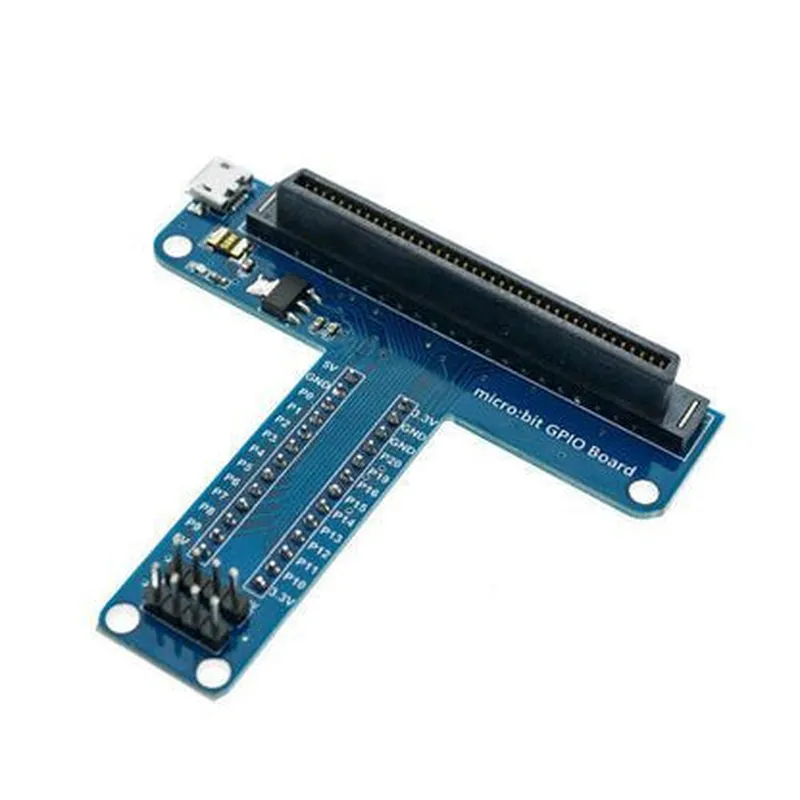
Bit T-type GPIO Board is a versatile and convenient expansion board for the BBC microbit, offering a range of features and interfaces to enhance the capabilities of the micro:bit. Its compact design, easy assembly, and built-in power supply make it an ideal choice for IoT projects and prototyping applications.
Key Features

  • T-type Interface: The board features a T-type interface, providing a secure and easy-to-use connection to the micro:bit.
  • GPIO Expansion: The board exposes the micro:bit's GPIO pins, allowing users to connect and control external devices, sensors, and peripherals.
  • Built-in Power Supply: The board includes a built-in power supply, which can be used to power external devices connected to the board.
  • Voltage Regulator: The board features a voltage regulator, ensuring a stable voltage supply to the connected devices.
  • Multiple I/O Ports: The board provides multiple I/O ports, including digital, analog, and I2C interfaces, enabling users to connect a variety of devices.
  • Compact Design: The board's compact design makes it ideal for use in space-constrained projects and IoT applications.
  • Easy Assembly: The board is easy to assemble and disassemble, allowing users to quickly connect and disconnect devices.

Operating Voltage

3.3V

GPIO Pins

20 (accessible through the T-type interface)

Analog Inputs

3

Digital Inputs/Outputs10
I2C Interface1

Power Supply

Built-in voltage regulator

Dimensions

50mm x 40mm x 15mm

Pin Configuration

  • Micro: Bit T-type GPIO Board Pinout Explanation
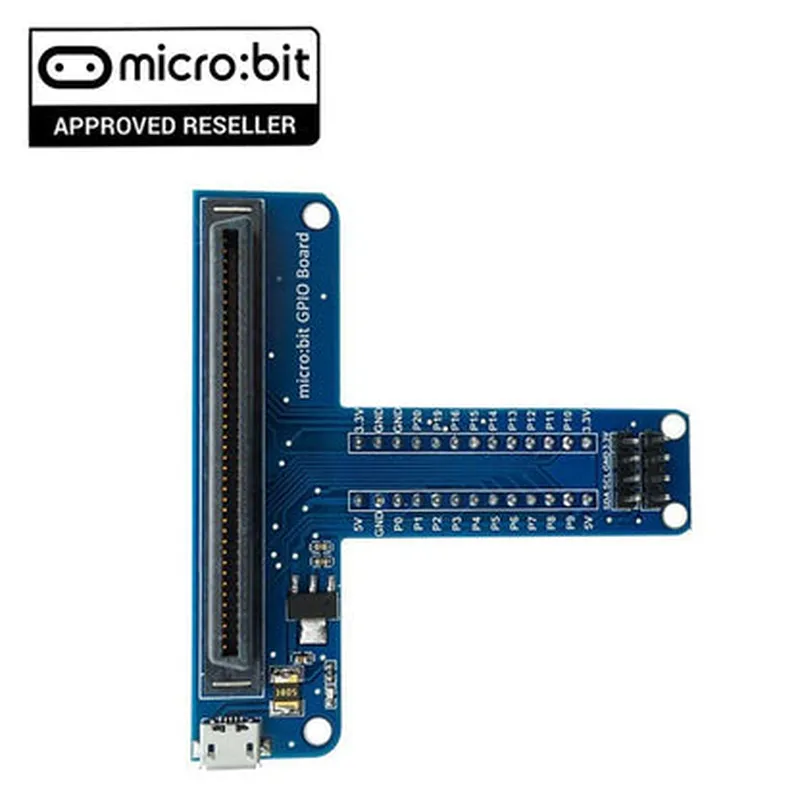
  • The Micro:Bit T-type GPIO board is a compact, versatile expansion board designed specifically for the BBC micro:bit, providing easy access to the microcontroller's GPIO pins. This documentation will guide you through the pinout explanation of the Micro:Bit T-type GPIO board, detailing each pin's function and how to connect them.
  • Pinout Structure:
  • The Micro:Bit T-type GPIO board features 21 pins, arranged in three rows:
  • Top Row ( Pins 1-7)
  • 1. 3V:
  • Description: 3.3V power output from the micro:bit.
  • Connection: Connect to devices that require a 3.3V power supply.
  • 2. GND:
  • Description: Ground pin.
  • Connection: Connect to the ground pin of your device or circuit.
  • 3. P0:
  • Description: Digital input/output pin.
  • Connection: Use as a digital input or output for controlling devices or reading sensor data.
  • 4. P1:
  • Description: Digital input/output pin.
  • Connection: Use as a digital input or output for controlling devices or reading sensor data.
  • 5. P2:
  • Description: Digital input/output pin.
  • Connection: Use as a digital input or output for controlling devices or reading sensor data.
  • 6. P8:
  • Description: Digital input/output pin.
  • Connection: Use as a digital input or output for controlling devices or reading sensor data.
  • 7. P12:
  • Description: Digital input/output pin.
  • Connection: Use as a digital input or output for controlling devices or reading sensor data.
  • Middle Row (Pins 8-14)
  • 8. P3:
  • Description: Digital input/output pin.
  • Connection: Use as a digital input or output for controlling devices or reading sensor data.
  • 9. P4:
  • Description: Digital input/output pin.
  • Connection: Use as a digital input or output for controlling devices or reading sensor data.
  • 10. P5:
  • Description: Digital input/output pin.
  • Connection: Use as a digital input or output for controlling devices or reading sensor data.
  • 11. P6:
  • Description: Digital input/output pin.
  • Connection: Use as a digital input or output for controlling devices or reading sensor data.
  • 12. P7:
  • Description: Digital input/output pin.
  • Connection: Use as a digital input or output for controlling devices or reading sensor data.
  • 13. P9:
  • Description: Digital input/output pin.
  • Connection: Use as a digital input or output for controlling devices or reading sensor data.
  • 14. P10:
  • Description: Digital input/output pin.
  • Connection: Use as a digital input or output for controlling devices or reading sensor data.
  • Bottom Row (Pins 15-21)
  • 15. P11:
  • Description: Digital input/output pin.
  • Connection: Use as a digital input or output for controlling devices or reading sensor data.
  • 16. P13:
  • Description: Digital input/output pin.
  • Connection: Use as a digital input or output for controlling devices or reading sensor data.
  • 17. P14:
  • Description: Digital input/output pin.
  • Connection: Use as a digital input or output for controlling devices or reading sensor data.
  • 18. P15:
  • Description: Digital input/output pin.
  • Connection: Use as a digital input or output for controlling devices or reading sensor data.
  • 19. P16:
  • Description: Digital input/output pin.
  • Connection: Use as a digital input or output for controlling devices or reading sensor data.
  • 20. P19:
  • Description: Digital input/output pin.
  • Connection: Use as a digital input or output for controlling devices or reading sensor data.
  • 21. P20:
  • Description: Digital input/output pin.
  • Connection: Use as a digital input or output for controlling devices or reading sensor data.
  • Connecting the Pins:
  • When connecting devices or circuits to the Micro:Bit T-type GPIO board, ensure:
  • Use suitable jumper wires or connectors to connect devices to the pins.
  • Observe the correct polarity when connecting components (e.g., LEDs, motors).
  • Refer to the device or circuit documentation for specific connection requirements.
  • Be cautious when handling the pins and connectors to avoid damage or electrical shock.
  • By following this pinout explanation and connection guidelines, you can effectively utilize the Micro:Bit T-type GPIO board to expand the capabilities of your BBC micro:bit projects.

Code Examples

Micro:Bit T-type GPIO Board Documentation
Overview
The Micro:Bit T-type GPIO board is a compact, breadboard-friendly expansion board designed specifically for the BBC micro:bit microcontroller. It provides a convenient way to access and utilize the micro:bit's GPIO pins, making it ideal for various IoT projects and prototyping applications.
Features
21 GPIO pins broken out into 3 rows of 7 pins each
 Compatible with both 3.3V and 5V systems
 Supports digital input/output, analog input, I2C, SPI, and UART communication protocols
 Onboard power and ground rails for convenient prototyping
Pinout
The Micro:Bit T-type GPIO board has the following pinout:
| Row 1  | Row 2  | Row 3  |
| ---   | ---   | ---   |
| P0    | P8    | P16   |
| P1    | P9    | P17   |
| P2    | P10   | P18   |
| GND   | GND   | GND   |
| 3.3V  | 3.3V  | 3.3V  |
| P3    | P11   | P19   |
| P4    | P12   | P20   |
| P5    | P13   | P21   |
| P6    | P14   |       |
| P7    | P15   |       |
Code Examples
### Example 1: Digital Input with Push Button
In this example, we'll use the Micro:Bit T-type GPIO board to read the state of a push button connected to pin P0.
Code (MicroPython)
```python
from microbit import
# Set pin P0 as an input
pin0 = pin0.setup(pin.IN)
while True:
    # Read the state of the push button
    if pin0.read_digital():
        print("Button pressed!")
    else:
        print("Button not pressed!")
    sleep(100)
```
Hardware Connection
Connect a push button between pin P0 and GND on the Micro:Bit T-type GPIO board.
 Connect the micro:bit to the GPIO board.
### Example 2: Analog Output with LED
In this example, we'll use the Micro:Bit T-type GPIO board to control the brightness of an LED connected to pin P1.
Code (MicroPython)
```python
from microbit import
# Set pin P1 as an analog output
pin1 = pin1.setup(pin.OUT, pin.ANALOG)
while True:
    # Output a PWM signal to control the LED brightness
    for i in range(0, 1024, 1):
        pin1.write_analog(i)
        sleep(10)
```
Hardware Connection
Connect an LED to pin P1 and GND on the Micro:Bit T-type GPIO board, with a 220 resistor in series with the LED.
 Connect the micro:bit to the GPIO board.
Note: These examples are just a starting point, and you can modify them to suit your specific project requirements. Make sure to check the micro:bit's documentation for more information on how to use its GPIO pins and features.