The board features a gigabit Ethernet port for fast and reliable network connectivity.


The board features a gigabit Ethernet port for fast and reliable network connectivity.
The board has built-in wireless LAN and Bluetooth capabilities, allowing for wireless connectivity and communication with other devices.
The board has a microSD card slot for storing the operating system and data.
Kit Contents
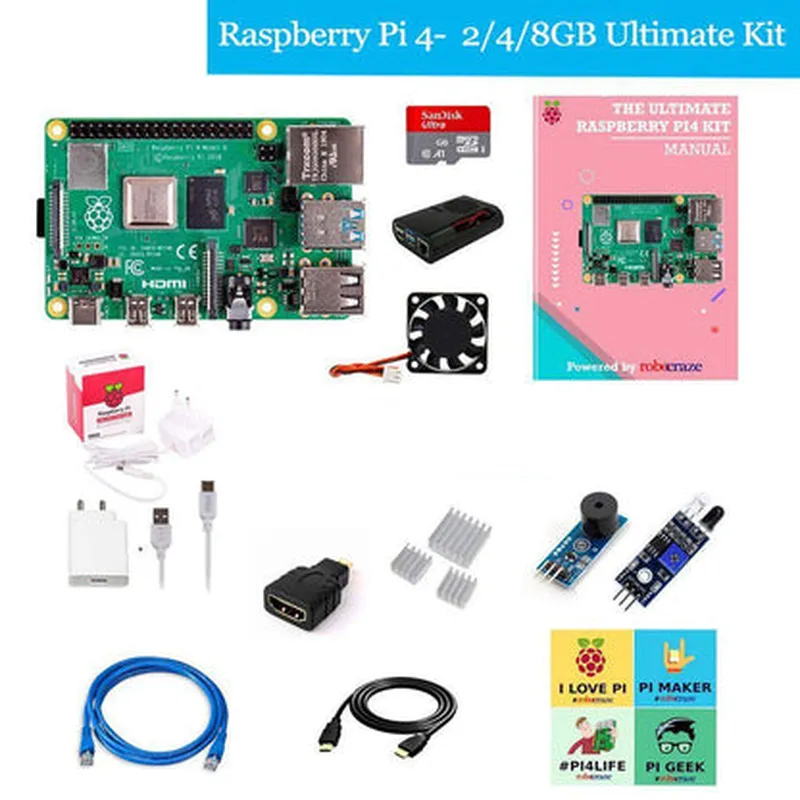
| The Raspberry Pi 4 Model 4B Ultimate Kit includes the following components | |
| Raspberry Pi 4 Model 4B Board | The brain of the kit, featuring the quad-core CPU, RAM, and various interfaces. |
A high-quality enclosure that protects the board and adds a professional touch to the setup.
A 5V, 3A power adapter that provides a stable power supply to the board.
A high-quality Ethernet cable for reliable network connectivity.
A microSD card pre-loaded with the Raspberry Pi OS, providing a ready-to-use operating system.
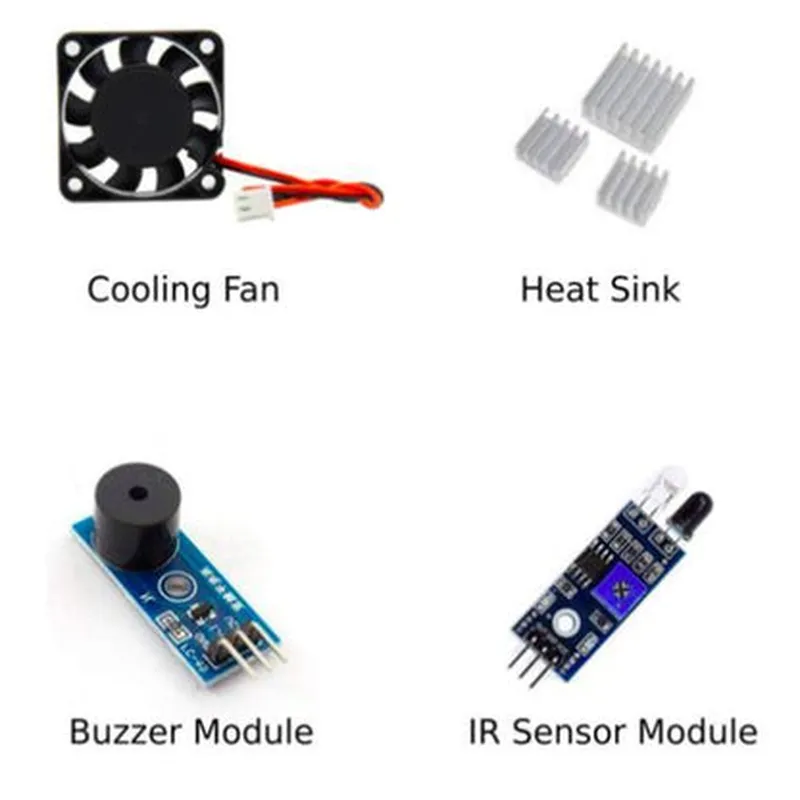
A selection of sensors, such as temperature, humidity, and motion sensors, to get started with IoT projects.
A comprehensive user manual that provides detailed instructions and guidelines for setting up and using the kit.
Functionality
| The Raspberry Pi 4 Model 4B Ultimate Kit is an incredibly versatile platform that can be used for a wide range of applications, including |
With its built-in wireless capabilities and range of interfaces, the kit is ideal for developing IoT projects, such as home automation, environmental monitoring, and industrial automation.
The kit can be used to build and control robots, leveraging its processing power and IO capabilities.
The kit can be used to build media centers, streaming devices, and other entertainment systems.
The kit is an excellent tool for learning programming languages, such as Python, Java, and C++, and for teaching computer science concepts.
Conclusion
The Raspberry Pi 4 Model 4B Ultimate Kit is an excellent choice for anyone looking to get started with IoT development, robotics, or other projects that require a powerful and flexible platform. With its comprehensive set of peripherals and accessories, this kit provides everything needed to get started quickly and efficiently.
Raspberry Pi 4 Model 4B Ultimate Kit DocumentationOverviewThe Raspberry Pi 4 Model 4B Ultimate Kit is a comprehensive bundle that includes the latest Raspberry Pi 4 single-board computer, a premium case, power adapter, Ethernet cable, SD card, sensors, and a manual. This kit provides everything needed to get started with IoT projects, robotics, and other applications.Technical SpecificationsRaspberry Pi 4 Model 4B
+ Processor: Quad-core Cortex-A72 CPU
+ RAM: 2GB, 4GB, or 8GB LPDDR4
+ Storage: MicroSD card slot
+ Operating System: Raspberry Pi OS, Ubuntu, Windows 10 IoT
Premium Case
+ Durable and compact design
+ Access to all ports and interfaces
Power Adapter
+ 5V, 3A output
+ Compatible with Raspberry Pi 4
Ethernet Cable
+ RJ-45 connector
+ 10/100Mbps Ethernet connection
SD Card
+ 16GB or 32GB capacity
+ Pre-installed with Raspberry Pi OS
Sensors
+ Temperature and humidity sensor (DHT11)
+ Motion sensor (HC-SR501)
Manual
+ Detailed instructions for getting started with the Raspberry Pi 4Code Examples### Example 1: Temperature and Humidity Monitoring using DHT11 SensorIn this example, we will use the DHT11 sensor to read temperature and humidity values and display them on the Raspberry Pi's terminal.Hardware RequirementsRaspberry Pi 4 Model 4B
DHT11 sensor
Breadboard and jumper wiresSoftware RequirementsRaspberry Pi OS ( latest version)
Python 3.xCode
```python
import dht11
import time# Initialize the DHT11 sensor
dht = dht11.DHT11(pin=17)while True:
# Read temperature and humidity values
temp, humidity = dht.read()
# Print the values
print("Temperature: {:.1f}C, Humidity: {:.1f}%".format(temp, humidity))
# Wait for 1 second before taking the next reading
time.sleep(1)
```
### Example 2: Motion Detection using HC-SR501 SensorIn this example, we will use the HC-SR501 motion sensor to detect motion and trigger an alert.Hardware RequirementsRaspberry Pi 4 Model 4B
HC-SR501 motion sensor
Breadboard and jumper wires
LED and resistor (optional)Software RequirementsRaspberry Pi OS (latest version)
Python 3.xCode
```python
import RPi.GPIO as GPIO
import time# Set up GPIO mode
GPIO.setmode(GPIO.BCM)# Define the motion sensor pin
motion_pin = 23# Set up the motion sensor pin as an input
GPIO.setup(motion_pin, GPIO.IN, pull_up_down=GPIO.PUD_DOWN)while True:
# Read the motion sensor value
motion_detected = GPIO.input(motion_pin)
# If motion is detected, print a message and toggle an LED (if connected)
if motion_detected:
print("Motion detected!")
if GPIO.input(24) == GPIO.HIGH:
GPIO.output(24, GPIO.LOW)
else:
GPIO.output(24, GPIO.HIGH)
# Wait for 0.5 seconds before checking again
time.sleep(0.5)
```
Note: In this example, we assume an LED is connected to GPIO pin 24. If you don't have an LED, you can remove the LED-related code.These examples demonstrate the basic usage of the Raspberry Pi 4 Model 4B Ultimate Kit and its included sensors. You can modify and expand these examples to suit your specific IoT projects and applications.