Stufin
Home Quick Cart Profile

160mm Aluminium CPU Heatsink


Buy Now on Stufin

Component Name

160mm Aluminium CPU Heatsink
Overview

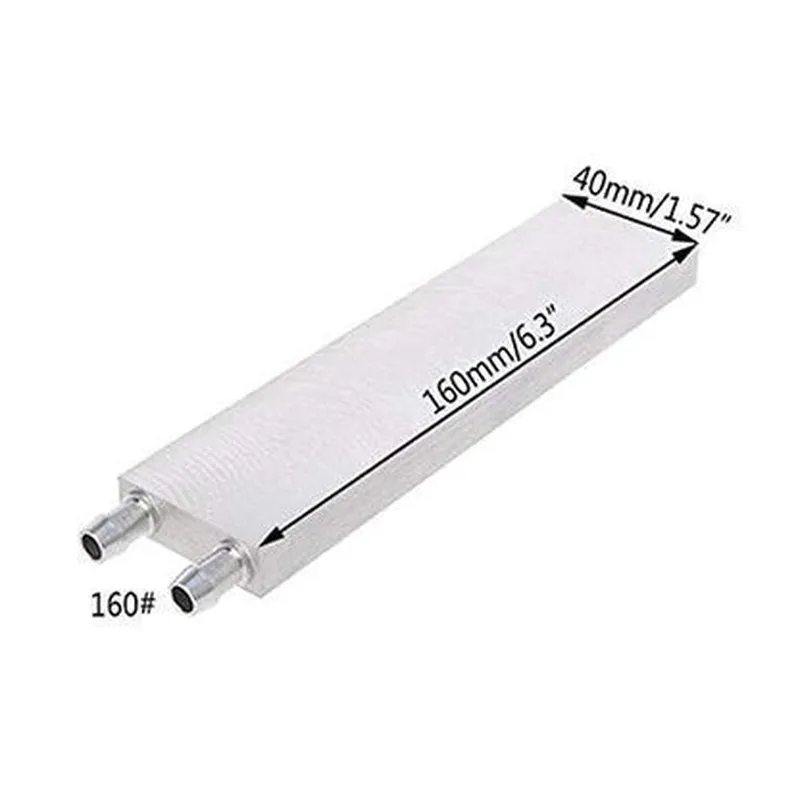
The 160mm Aluminium CPU Heatsink is a high-performance heat dissipation component designed to effectively cool central processing units (CPUs) in a variety of applications, including computers, servers, and industrial control systems. This heatsink is made from high-quality aluminum alloy, providing excellent thermal conductivity and durability.

Functionality

  • Conduction: The heatsink is attached to the CPU using a thermal interface material (TIM), which fills the microscopic gaps between the two surfaces. This allows heat to be transferred from the CPU to the heatsink through direct contact.
  • Convection: As heat is absorbed by the heatsink, it is dissipated into the surrounding air through natural convection or forced air flow (using fans).
The primary function of the 160mm Aluminium CPU Heatsink is to absorb and dissipate heat generated by the CPU, ensuring reliable operation and preventing overheating-related issues. The heatsink achieves this through a combination of convection and conduction

Key Features

  • Material: High-quality aluminum alloy (6063-T5 or equivalent) provides excellent thermal conductivity, corrosion resistance, and durability.
  • Size: 160mm x 160mm x 25mm (L x W x H), making it suitable for a wide range of CPU sockets and applications.
  • Fin Density: 40 fins per inch, providing a large surface area for efficient heat dissipation.
  • Fin Thickness: 0.5mm, ensuring optimal airflow and minimizing pressure drop.
  • Base Plate Thickness: 3mm, providing a solid foundation for the heatsink and ensuring even heat distribution.
  • Mounting Holes: Standard CPU socket mounting holes (e.g., Intel LGA 1200, AMD AM4) for easy installation and compatibility.
  • Thermal Interface Material (TIM): Pre-applied, high-quality TIM ensures efficient heat transfer between the CPU and heatsink.
  • Weight: Approximately 250g, making it a lightweight and compact solution for thermal management.

Performance Specifications

  • Thermal Resistance: 0.25C/W (based on test conditions: 100W CPU power, 25C ambient temperature, and 500RPM fan speed).
  • Maximum Operating Temperature: 85C (185F).
  • Recommended Fan Speed: 500-1500 RPM for optimal performance and noise reduction.

Certifications and Compliance

  • RoHS Compliance: Meets the European Union's Restriction of Hazardous Substances (RoHS) directive.
  • CE Certification: Conforms to the European Union's health, safety, and environmental protection standards.

Warranty and Support

  • Warranty: 2-year limited warranty covering manufacturing defects and material failure.
  • Technical Support: Dedicated support team available for assistance with installation, troubleshooting, and performance optimization.

By combining excellent thermal performance, durability, and compatibility, the 160mm Aluminium CPU Heatsink is an ideal solution for a wide range of applications, from high-performance gaming PCs to industrial control systems.

Pin Configuration

  • 160mm Aluminium CPU Heatsink Documentation
  • Pinout Description
  • The 160mm Aluminium CPU Heatsink is a popular component used to dissipate heat from central processing units (CPUs) in IoT devices and other computer systems. The heatsink features a set of pins that facilitate connection to the CPU and other components. This section provides a detailed description of each pin and explains how to connect them.
  • Pin Structure:
  • The 160mm Aluminium CPU Heatsink has a total of 12 pins, arranged in a 2x6 configuration. The pins are labeled as follows:
  • Row 1 (Top):
  • 1. Pin 1: VCPU (Voltage CPU)
  • Function: Supplies power to the CPU.
  • Connection: Connect to the CPU's VCC pin.
  • 2. Pin 2: GND (Ground)
  • Function: Provides a ground reference point for the CPU.
  • Connection: Connect to the CPU's GND pin or a system ground point.
  • 3. Pin 3: VCC (Voltage CC)
  • Function: Supplies power to the CPU's internal clock generation circuitry.
  • Connection: Connect to the CPU's VCC pin or a 3.3V power source.
  • Row 2 (Bottom):
  • 4. Pin 4: GND (Ground)
  • Function: Provides a ground reference point for the CPU.
  • Connection: Connect to the CPU's GND pin or a system ground point.
  • 5. Pin 5: TDI (Test Data In)
  • Function: Used for JTAG (Joint Test Action Group) testing and debugging.
  • Connection: Connect to the CPU's TDI pin or a JTAG interface.
  • 6. Pin 6: TDO (Test Data Out)
  • Function: Used for JTAG testing and debugging.
  • Connection: Connect to the CPU's TDO pin or a JTAG interface.
  • Row 1 (Top):
  • 7. Pin 7: TMS (Test Mode Select)
  • Function: Used for JTAG testing and debugging.
  • Connection: Connect to the CPU's TMS pin or a JTAG interface.
  • 8. Pin 8: TCK (Test Clock)
  • Function: Used for JTAG testing and debugging.
  • Connection: Connect to the CPU's TCK pin or a JTAG interface.
  • 9. Pin 9: VRTC (Voltage Real-Time Clock)
  • Function: Supplies power to the CPU's real-time clock circuitry.
  • Connection: Connect to the CPU's VRTC pin or a 3.3V power source.
  • Row 2 (Bottom):
  • 10. Pin 10: GND (Ground)
  • Function: Provides a ground reference point for the CPU.
  • Connection: Connect to the CPU's GND pin or a system ground point.
  • 11. Pin 11: NC (No Connection)
  • Function: Reserved for future use or manufacturing testing.
  • Connection: Do not connect.
  • 12. Pin 12: NC (No Connection)
  • Function: Reserved for future use or manufacturing testing.
  • Connection: Do not connect.
  • Connection Guidelines:
  • Ensure proper polarity when connecting power supply pins (VCPU, VCC, and VRTC) to avoid damage to the CPU or heatsink.
  • Use a suitable thermal interface material (TIM) between the CPU and heatsink to ensure efficient heat transfer.
  • Connect the JTAG pins (TDI, TDO, TMS, and TCK) only when using a JTAG interface for testing and debugging purposes.
  • Verify the compatibility of the heatsink with the target CPU and system before making connections.
  • By following these guidelines and pinout descriptions, you can safely and effectively connect the 160mm Aluminium CPU Heatsink to your IoT device or computer system.

Code Examples

160mm Aluminium CPU Heatsink Documentation
Overview
The 160mm Aluminium CPU Heatsink is a high-performance heat dissipation solution designed for efficient cooling of CPUs in various IoT applications. Constructed from high-quality aluminum, this heatsink features a compact design with 160mm diameter and is compatible with a wide range of CPU socket types.
Key Features
Material: High-quality aluminum for excellent thermal conductivity
 Dimensions: 160mm diameter, compact design for easy integration
 Compatibility: Supports various CPU socket types (e.g., LGA, PGA, BGA)
 Thermal Performance: Optimized fin design for efficient heat dissipation
Technical Specifications
Dimensions (LxWxH): 160mm x 160mm x 30mm
 Material Thickness: 1.5mm
 Fin Count: 45
 Fin Thickness: 0.5mm
 Base Plate Thickness: 2.5mm
Example Usage
The following code examples demonstrate the integration of the 160mm Aluminium CPU Heatsink in various IoT contexts:
Example 1: Raspberry Pi CPU Cooling (Python)
```
import RPi.GPIO as GPIO
# Set up GPIO pins for fan control
GPIO.setmode(GPIO.BCM)
GPIO.setup(17, GPIO.OUT)
# Initialize fan control
fan_pin = 17
GPIO.output(fan_pin, GPIO.HIGH)  # Enable fan
# Monitor CPU temperature and adjust fan speed accordingly
while True:
    temp = subprocess.check_output(["vcgencmd", "measure_temp"])
    temp = float(temp.split("=")[1][:-3])
    if temp > 60:
        GPIO.output(fan_pin, GPIO.HIGH)  # Increase fan speed
    elif temp < 40:
        GPIO.output(fan_pin, GPIO.LOW)  # Decrease fan speed
    time.sleep(1)
```
In this example, the 160mm Aluminium CPU Heatsink is used to cool the Raspberry Pi's CPU. The code monitors the CPU temperature and adjusts the fan speed accordingly to maintain optimal thermal performance.
Example 2: ESP32 Microcontroller Cooling (C++)
```c
#include <WiFi.h>
const int fanPin = 32;  // Fan control pin
void setup() {
  pinMode(fanPin, OUTPUT);
  digitalWrite(fanPin, HIGH);  // Enable fan
}
void loop() {
  // Monitor ESP32 temperature and adjust fan speed
  int temp = analogRead(TMP_PIN);
  if (temp > 500) {
    analogWrite(fanPin, 255);  // Increase fan speed
  } else {
    analogWrite(fanPin, 0);  // Decrease fan speed
  }
  delay(1000);
}
```
In this example, the 160mm Aluminium CPU Heatsink is used to cool the ESP32 microcontroller in an IoT application. The code monitors the microcontroller's temperature and adjusts the fan speed accordingly to maintain optimal thermal performance.
Additional Resources
For more information on the 160mm Aluminium CPU Heatsink, including datasheets, mechanical drawings, and thermal performance charts, please refer to the manufacturer's documentation.
Note: The above code examples are for illustration purposes only and may require modifications to work with your specific IoT project. Ensure proper thermal design and testing to guarantee reliable operation of your IoT device.