ESP8266 Serial WIFI Wireless Transceiver Module ESP-07 Send Receive LWIP AP Plus STA


ESP8266 Serial WIFI Wireless Transceiver Module ESP-07 Send Receive LWIP AP Plus STA
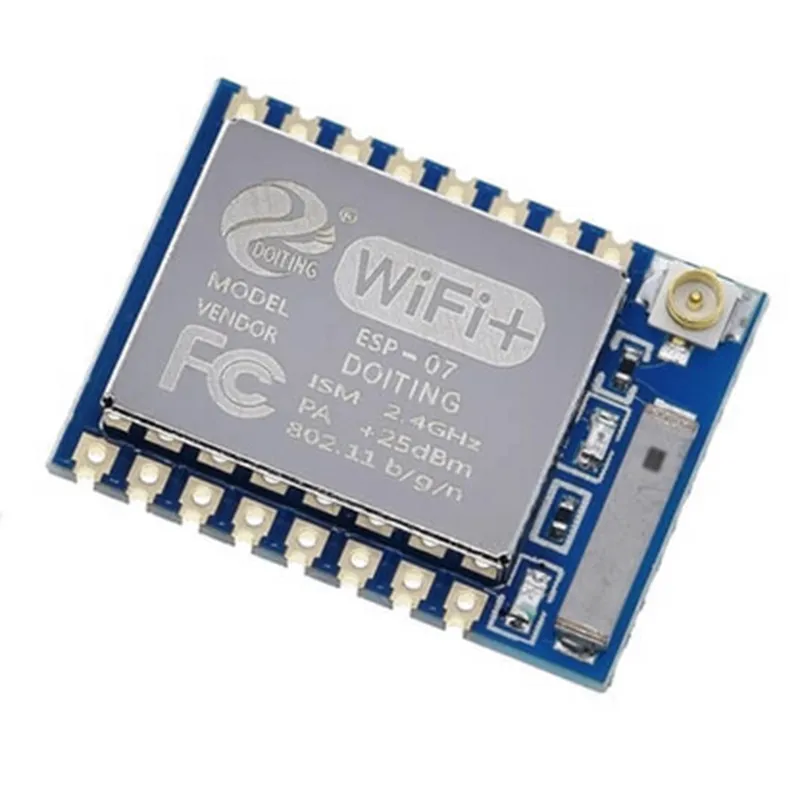
The ESP8266 Serial WIFI Wireless Transceiver Module ESP-07 is a low-cost, low-power system on a chip (SoC) with integrated Wi-Fi and microcontroller capabilities. This module is designed for IoT applications, providing a reliable and efficient way to connect devices to the internet.
| The ESP8266 Module ESP-07 is a Wi-Fi transceiver module that allows devices to send and receive data wirelessly over the internet. It can operate in two modes |
The module can also be configured to operate in both AP and STA modes simultaneously.
2.4 GHz
IEEE 802.11 b/g/n
Up to 150 Mbps
ESP8266, 32-bit
Up to 160 MHz
4 MB Flash, 96 KB RAM
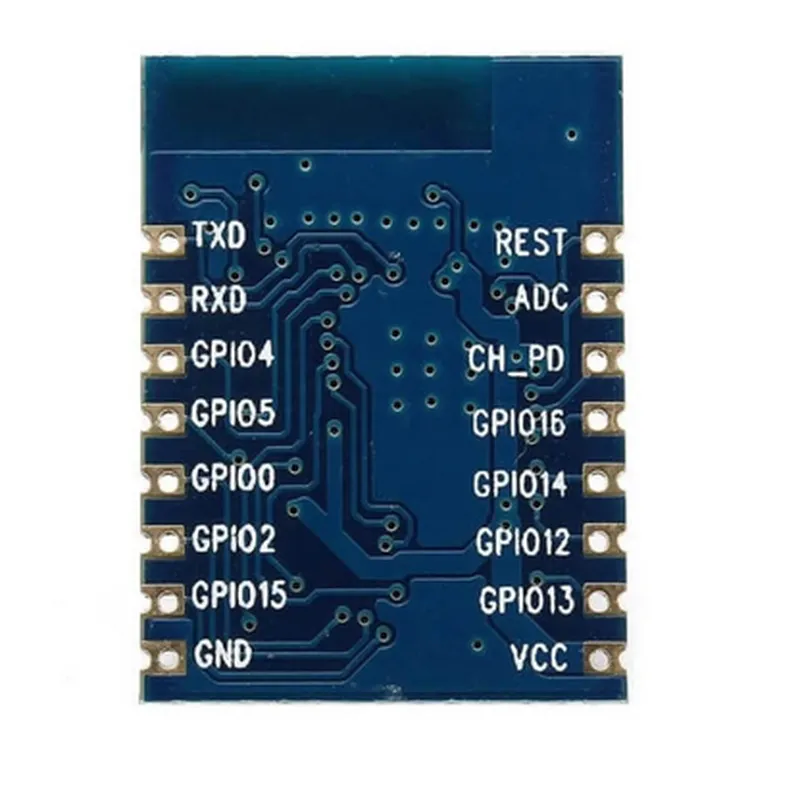
UART, SPI, I2C
< 200 mA (transmitting), < 10 mA (receiving)
-20C to 70C
-40C to 125C
| The ESP8266 Module ESP-07 is suitable for a wide range of IoT applications, including |
Smart Home Automation
Wearable Devices
Industrial Automation
Robotics
Wireless Sensors
Internet of Things (IoT) Devices
The module is certified by regulatory bodies such as FCC, CE, and RoHS, ensuring compliance with safety and electromagnetic compatibility standards.
ESP8266 Serial WIFI Wireless Transceiver Module ESP-07 Send Receive LWIP AP Plus STAOverviewThe ESP8266 Serial WIFI Wireless Transceiver Module ESP-07 is a low-cost, low-power system-on-a-chip (SoC) with integrated Wi-Fi and microcontroller capabilities. This module is designed to provide Wi-Fi connectivity to microcontroller-based projects, enabling IoT applications such as wireless sensor networks, smart home devices, and industrial automation.FeaturesIntegrated 802.11 b/g/n Wi-Fi transceiver
Microcontroller with 32-bit LX6 processor
4MB of flash memory
Support for both Access Point (AP) and Station (STA) modes
Serial communication interface (UART, SPI, I2C, I2S, etc.)
Low power consumption (<200mA)Code Examples### Example 1: Connecting to a Wi-Fi Network (STA Mode)This example demonstrates how to connect the ESP8266 module to a Wi-Fi network in Station (STA) mode. The module will connect to a router with the specified SSID and password.```c
#include <WiFi.h>const char ssid = "your_wifi_ssid";
const char password = "your_wifi_password";void setup() {
Serial.begin(115200);// Connect to Wi-Fi network
WiFi.begin(ssid, password);while (WiFi.status() != WL_CONNECTED) {
delay(1000);
Serial.println("Connecting to WiFi...");
}Serial.println("Connected to WiFi");
Serial.println("IP address: ");
Serial.println(WiFi.localIP());
}void loop() {
// Your code here
}
```### Example 2: Creating a Wi-Fi Access Point (AP Mode)This example demonstrates how to configure the ESP8266 module as a Wi-Fi Access Point (AP). The module will create a Wi-Fi network with the specified SSID and password.```c
#include <WiFi.h>const char apSsid = "ESP8266_AP";
const char apPassword = "12345678";void setup() {
Serial.begin(115200);// Create Wi-Fi Access Point
WiFi.softAP(apSsid, apPassword);Serial.println("ESP8266 AP started");
Serial.println("IP address: 192.168.4.1");
}void loop() {
// Your code here
}
```### Example 3: Sending and Receiving Data over Wi-Fi (LWIP)This example demonstrates how to send and receive data over Wi-Fi using the Lightweight IP (LWIP) stack. The example assumes that the module is connected to a Wi-Fi network and uses a simple TCP client to send a message to a server.```c
#include <WiFi.h>
#include <lwip/netdb.h>
#include <lwip/dns.h>const char ssid = "your_wifi_ssid";
const char password = "your_wifi_password";
const char serverIP = "192.168.1.100";
const int serverPort = 8080;WiFiClient client;void setup() {
Serial.begin(115200);// Connect to Wi-Fi network
WiFi.begin(ssid, password);while (WiFi.status() != WL_CONNECTED) {
delay(1000);
Serial.println("Connecting to WiFi...");
}Serial.println("Connected to WiFi");
}void loop() {
if (client.connect(serverIP, serverPort)) {
Serial.println("Connected to server");// Send data to server
client.println("Hello, server!");
client.println();// Receive data from server
while (client.available()) {
char c = client.read();
Serial.print(c);
}Serial.println();
client.stop();
} else {
Serial.println("Connection failed");
}delay(1000);
}
```Note: These examples are meant to demonstrate the basic functionality of the ESP8266 module and may require modification to fit specific use cases. Additionally, ensure that you have the necessary libraries and dependencies installed to compile and upload the code to the module.