Stufin
Home Quick Cart Profile

CP2102 Micro USB Module


Buy Now on Stufin

Component Name

CP2102 Micro USB Module
Overview

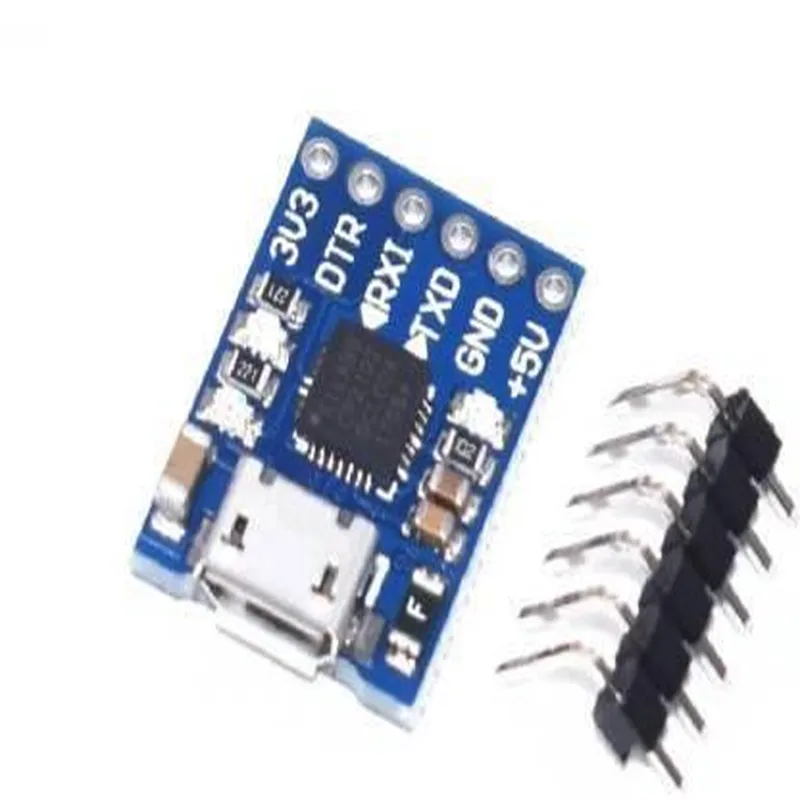
The CP2102 Micro USB Module is a widely used, compact, and versatile serial communication module that provides a convenient interface between a microcontroller or other digital devices and a computer. It is based on the CP2102 USB-to-UART bridge controller from Silicon Labs, which converts USB signals to serial UART signals, enabling easy communication between devices.
Functionality

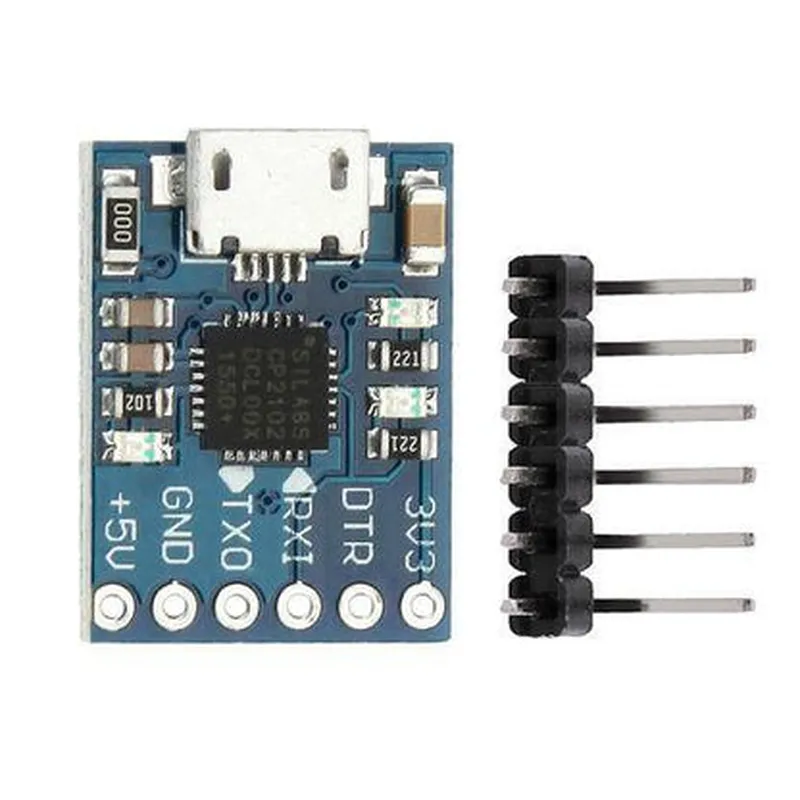
The CP2102 Micro USB Module acts as a USB-to-UART bridge, allowing devices to communicate with a computer or other USB-enabled devices. The module takes care of the USB protocol, enabling the connected device to focus on its primary function without worrying about the complexities of USB communication.

Key Features

  • USB 2.0 Compliance: The CP2102 Micro USB Module is fully compliant with the USB 2.0 specification, ensuring high-speed data transfer rates of up to 480 Mbps.
  • UART Interface: The module provides a standard UART interface with adjustable baud rates, allowing it to communicate with a wide range of microcontrollers and other devices.
  • TTL/CMOS Compatibility: The module's UART interface is compatible with both TTL (Transistor-Transistor Logic) and CMOS (Complementary Metal-Oxide-Semiconductor) logic levels.
  • Auto-Install Drivers: The module comes with auto-install drivers for Windows, Mac, and Linux operating systems, making it easy to integrate into various projects.
  • Low Power Consumption: The CP2102 Micro USB Module has low power consumption, making it suitable for battery-powered devices and other power-sensitive applications.
  • Compact Design: The module's compact design and Micro USB connector make it ideal for applications where space is limited.
  • Flexible Power Options: The module can be powered either through the USB bus or an external power source (VCC), providing flexibility in power management.
  • Multiple Operating Modes: The CP2102 supports multiple operating modes, including normal, suspend, and sleep modes, to conserve power and optimize performance.

Operating voltage

3.3V to 5V

Operating temperature

-40C to 85C

Data transfer rate

up to 480 Mbps

UART interface

3.3V or 5V tolerant

Baud rate

adjustable from 300 bps to 1 Mbps

Dimensions

17.5 mm x 14.5 mm x 4.5 mm

Applications

The CP2102 Micro USB Module is widely used in various applications, including

USB-based serial communication projects

Microcontroller development boards

Robotics and automation systems

Industrial control systems

Internet of Things (IoT) projects

Wearable devices and other battery-powered applications

Pin Configuration

  • CP2102 Micro USB Module Pinout Explanation
  • The CP2102 Micro USB Module is a popular and widely used USB-to-UART bridge controller that provides a convenient way to connect microcontrollers or other devices to a computer or other USB host. The module has a compact design and features a USB Micro-B connector, making it ideal for a variety of IoT and embedded system applications.
  • Pinout Description:
  • The CP2102 Micro USB Module has a total of 10 pins, which are explained below:
  • Pin 1: VCC (Voltage Supply)
  • Description: Input voltage supply pin, typically 5V or 3.3V
  • Function: Provides power to the module
  • Connection: Connect to a suitable voltage source (e.g., 5V or 3.3V) from your project or power supply
  • Pin 2: D- (USB Data Minus)
  • Description: USB data minus pin
  • Function: Part of the USB differential data pair
  • Connection: Connect to the USB host (e.g., computer) or other USB device
  • Pin 3: D+ (USB Data Plus)
  • Description: USB data plus pin
  • Function: Part of the USB differential data pair
  • Connection: Connect to the USB host (e.g., computer) or other USB device
  • Pin 4: GND (Ground)
  • Description: Ground pin
  • Function: Provides a common ground reference
  • Connection: Connect to the ground of your project or power supply
  • Pin 5: RST (Reset)
  • Description: Reset pin
  • Function: Active-low reset input, pulled up internally to VCC
  • Connection: Connect to a pull-up resistor (e.g., 1k) and a switch or a microcontroller pin to control the reset function
  • Pin 6: RTS (Request to Send)
  • Description: UART request to send output
  • Function: Used for flow control in UART communication
  • Connection: Connect to a microcontroller or other UART device's RTS input
  • Pin 7: TX (Transmit)
  • Description: UART transmit output
  • Function: Sends data from the module to the microcontroller or other UART device
  • Connection: Connect to a microcontroller or other UART device's RX input
  • Pin 8: RX (Receive)
  • Description: UART receive input
  • Function: Receives data from the microcontroller or other UART device
  • Connection: Connect to a microcontroller or other UART device's TX output
  • Pin 9: CTS (Clear to Send)
  • Description: UART clear to send input
  • Function: Used for flow control in UART communication
  • Connection: Connect to a microcontroller or other UART device's CTS output
  • Pin 10: GND (Ground)
  • Description: Ground pin
  • Function: Provides a common ground reference
  • Connection: Connect to the ground of your project or power supply
  • Connection Structure:
  • To use the CP2102 Micro USB Module, connect the pins as follows:
  • 1. Connect VCC (Pin 1) to a suitable voltage source (e.g., 5V or 3.3V).
  • 2. Connect D- (Pin 2) and D+ (Pin 3) to a USB host (e.g., computer) or other USB device.
  • 3. Connect GND (Pin 4) to the ground of your project or power supply.
  • 4. Connect RST (Pin 5) to a pull-up resistor (e.g., 1k) and a switch or a microcontroller pin to control the reset function.
  • 5. Connect RTS (Pin 6) to a microcontroller or other UART device's RTS input.
  • 6. Connect TX (Pin 7) to a microcontroller or other UART device's RX input.
  • 7. Connect RX (Pin 8) to a microcontroller or other UART device's TX output.
  • 8. Connect CTS (Pin 9) to a microcontroller or other UART device's CTS output.
  • 9. Connect GND (Pin 10) to the ground of your project or power supply.
  • Note: Make sure to follow proper soldering and connection techniques to avoid damaging the module or other components. Additionally, ensure that the module is properly powered and configured for your specific application.

Code Examples

CP2102 Micro USB Module Documentation
Overview
The CP2102 Micro USB Module is a compact, USB-to-UART bridge module based on the CP2102 chip from Silicon Labs. It provides a convenient and reliable way to add USB connectivity to microcontrollers, embedded systems, and other devices. This module is ideal for IoT, robotics, and other applications where a serial interface is required.
Features
USB 2.0 full-speed interface
 UART interface with RX, TX, RTS, and CTS signals
 Baud rate up to 1 Mbps
 Supports various operating systems, including Windows, macOS, and Linux
 Compact size: 18.5 x 15.5 mm
Pinout
| Pin | Function |
| --- | --- |
| VCC | Power supply (3.3V or 5V) |
| GND | Ground |
| RXD | UART receive data |
| TXD | UART transmit data |
| RTS | UART request to send |
| CTS | UART clear to send |
| D+ | USB data plus |
| D- | USB data minus |
Code Examples
### Example 1: Serial Communication with Arduino
In this example, we will use the CP2102 Micro USB Module to establish a serial communication between an Arduino board and a computer.
Hardware Connections
Connect the CP2102 module to the Arduino board as follows:
	+ VCC to Arduino 3.3V or 5V
	+ GND to Arduino GND
	+ RXD to Arduino TX (Digital Pin 1)
	+ TXD to Arduino RX (Digital Pin 0)
 Connect the CP2102 module to the computer using a micro-USB cable
Arduino Code (Serial Communication)
```c++
void setup() {
  Serial.begin(9600); // Initialize serial communication at 9600 bps
}
void loop() {
  Serial.println("Hello, World!"); // Send a string to the computer
  delay(1000);
}
```
Computer Code (Python)
```python
import serial
# Open the serial port
ser = serial.Serial('COM3', 9600, timeout=1)  # Replace COM3 with the actual port
while True:
    # Read data from the serial port
    data = ser.readline().decode().strip()
    if data:
        print(data)  # Print the received data
```
### Example 2: UART Communication with Raspberry Pi
In this example, we will use the CP2102 Micro USB Module to establish a UART communication between a Raspberry Pi and a microcontroller.
Hardware Connections
Connect the CP2102 module to the Raspberry Pi as follows:
	+ VCC to Raspberry Pi 3.3V
	+ GND to Raspberry Pi GND
	+ RXD to Raspberry Pi GPIO 14 (UART RX)
	+ TXD to Raspberry Pi GPIO 15 (UART TX)
 Connect the CP2102 module to the microcontroller as follows:
	+ RXD to microcontroller TX
	+ TXD to microcontroller RX
Raspberry Pi Code (Python)
```python
import serial
# Open the serial port
ser = serial.Serial('/dev/ttyUSB0', 9600, timeout=1)  # Replace ttyUSB0 with the actual port
while True:
    # Send data to the microcontroller
    ser.write(b'Hello, micro!)  # Send a byte string
    data = ser.readline().decode().strip()  # Read data from the microcontroller
    if data:
        print(data)  # Print the received data
```
Microcontroller Code (C)
```c
#include <uart.h>
#define UART_BAUDRATE 9600
int main() {
    uart_init(UART_BAUDRATE);  // Initialize UART at 9600 bps
while (1) {
        uart_puts("Hello, RPi!");  // Send a string to the Raspberry Pi
        char data[20];
        uart_gets(data, 20);  // Receive data from the Raspberry Pi
        printf("%s
", data);  // Print the received data
    }
}
```
Note: The above code examples are simplified and may require additional error handling and modifications to suit your specific application.