Stufin
Home Quick Cart Profile

DIY Colorful Wind Generator Car


Buy Now on Stufin

Component Name

DIY Colorful Wind Generator Car
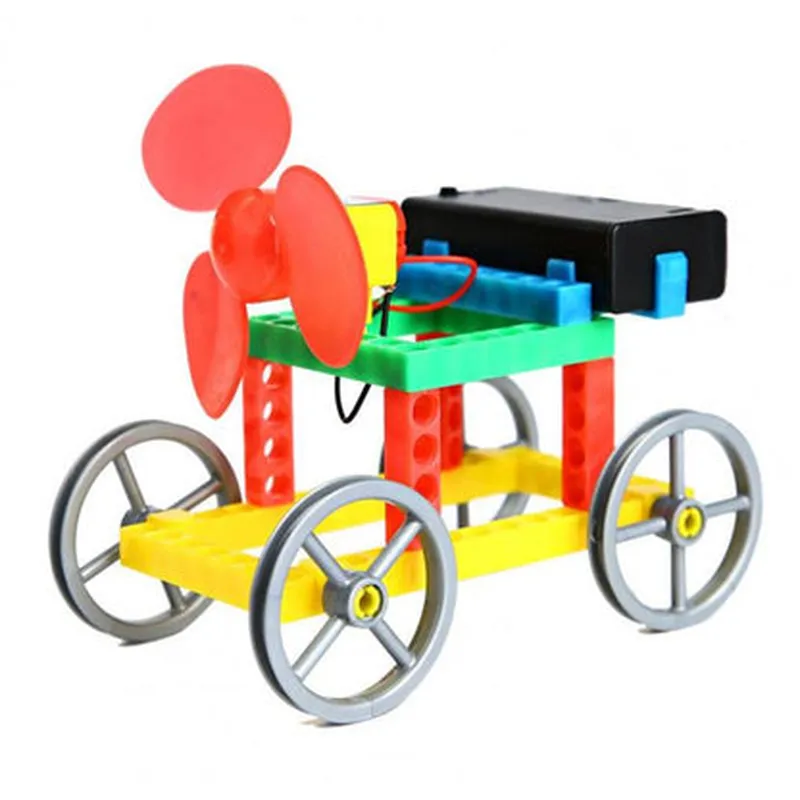
Overview

The DIY Colorful Wind Generator Car is an innovative and educational Internet of Things (IoT) component that combines renewable energy harvesting with a fun, interactive, and colorful design. This creative project enables users to build a miniature wind-powered car that generates electricity and transmits data to a mobile device or computer, promoting hands-on learning and exploration of IoT, energy harvesting, and environmental sustainability.
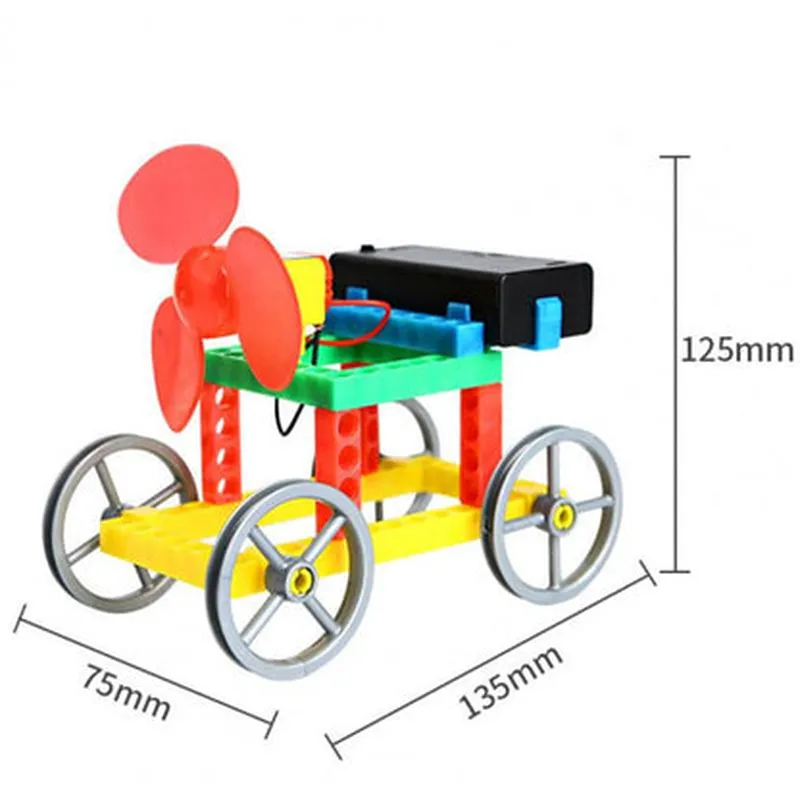
The DIY Colorful Wind Generator Car consists of the following modules

  • Wind Turbine Module: A small, colorful wind turbine converts wind energy into electrical energy using a DC generator.
  • Power Management Module: A voltage regulator and energy storage unit (e.g., battery or capacitor) manage and store the generated power.
  • Microcontroller Module: A microcontroller (e.g., Arduino or ESP32) processes and controls the system, reading sensor data and transmitting it wirelessly to a mobile device or computer.
  • Sensor Module: Integrated sensors (e.g., voltage, current, and temperature sensors) monitor and track the system's performance and environmental conditions.
  • Communication Module: A wireless communication module (e.g., Wi-Fi, Bluetooth, or LoRa) enables data transmission to a mobile device or computer.
  • Car Chassis Module: A colorful, 3D-printed or laser-cut car chassis houses the components, providing a visually appealing and interactive design.

Key Features

  • Renewable Energy Harvesting: The wind turbine module generates electricity from wind energy, demonstrating the principles of sustainable energy harvesting.
  • Real-time Data Transmission: The microcontroller module transmits sensor data wirelessly to a mobile device or computer, providing real-time insights into system performance and environmental conditions.
  • Customizable Design: The colorful, modular design allows users to personalize their wind generator car, encouraging creativity and innovation.
  • Educational Value: The DIY Colorful Wind Generator Car serves as an interactive, hands-on learning tool for IoT, energy harvesting, and environmental sustainability concepts.
  • Expandability: The modular design enables users to integrate additional sensors, modules, or features, promoting experimentation and innovation.

Operating Voltage

3.3V - 12V

Current Output

Up to 100mA

Wind Turbine Speed

Up to 500 RPM

Microcontroller

Arduino or ESP32-compatible

Communication Protocol

Wi-Fi, Bluetooth, or LoRa

Sensor Range

+ Voltage0-12V
+ Current0-100mA
+ Temperature-20C to 80C

Car Chassis Dimensions

10cm x 5cm x 5cm (L x W x H)

Target Applications

  • STEM Education: The DIY Colorful Wind Generator Car is an ideal learning tool for schools, universities, and educational institutions, promoting hands-on learning and exploration of IoT and renewable energy concepts.
  • Makers and Hobbyists: This innovative project appeals to makers, hobbyists, and DIY enthusiasts, encouraging creativity, innovation, and experimentation with IoT and energy harvesting technologies.
  • Environmental Awareness: The DIY Colorful Wind Generator Car raises awareness about the importance of renewable energy, environmental sustainability, and reducing carbon footprints.

accessories

  • Power Adapter: A wall adapter or USB cable for charging the energy storage unit.
  • Jumper Wires: Color-coded jumper wires for connecting components.
  • 3D Printing or Laser Cutting Files: Optional files for customizing the car chassis design.
  • User Manual and Tutorial: A comprehensive guide for assembling, programming, and operating the DIY Colorful Wind Generator Car.

Pin Configuration

  • DIY Colorful Wind Generator Car Component Documentation
  • Overview
  • The DIY Colorful Wind Generator Car is an innovative IoT component that combines a wind-powered generator with a colorful, motorized car. This component is designed to educate and entertain, demonstrating the principles of renewable energy and basic electronics. This documentation provides a detailed explanation of the component's pins and their connections.
  • Pinout Structure
  • The DIY Colorful Wind Generator Car has a total of 10 pins, divided into two rows of 5 pins each. The pins are labeled with their corresponding functions.
  • Pin Description and Connection Guide
  • Row 1:
  • 1. VCC (Red): Positive power supply pin. Connect to a 3-6V DC power source (e.g., batteries or a solar panel).
  • 2. GND (Black): Ground pin. Connect to the negative terminal of the power source or a common ground point.
  • 3. SIGNAL (Yellow): Signal pin for the wind generator. Connect to a microcontroller or a voltage sensor to measure the generated voltage.
  • 4. MOTOR+ (Blue): Positive motor pin. Connect to the positive terminal of the motor driver or an H-bridge IC.
  • 5. MOTOR- (Green): Negative motor pin. Connect to the negative terminal of the motor driver or an H-bridge IC.
  • Row 2:
  • 6. WS2812_DIN (White): Data input pin for the WS2812 addressable RGB LED strip. Connect to the DIN pin of the WS2812 LED strip.
  • 7. WS2812_VCC (Red): Power supply pin for the WS2812 addressable RGB LED strip. Connect to the VCC pin of the WS2812 LED strip.
  • 8. SWITCH (Grey): Push-button switch pin. Connect to a digital input pin on a microcontroller to read the switch state.
  • 9. VOUT (Orange): Output voltage pin from the wind generator. Connect to a voltage regulator or a capacitor to stabilize the output voltage.
  • 10. GND (Brown): Ground pin for the wind generator output. Connect to the negative terminal of the output voltage or a common ground point.
  • Connection Tips and Reminders
  • When connecting the wind generator, ensure the blades are securely attached and the generator is properly aligned.
  • Use appropriate power supply cables and voltage regulators to avoid damaging the component or other connected devices.
  • When connecting the motor, ensure proper motor driver or H-bridge IC configuration to avoid motor damage or overheating.
  • When using the WS2812 addressable RGB LED strip, ensure proper communication protocol and addressing to avoid LED strip malfunction.
  • When connecting the switch, ensure proper debouncing and pull-up/pull-down resistor configuration to avoid switch bounce or false readings.
  • Troubleshooting and Safety Precautions
  • Always handle the component with care, avoiding physical damage or electrical shock.
  • Ensure proper insulation and electrical isolation when working with the component.
  • If you encounter any issues or errors, consult the component's datasheet, user manual, or online resources for troubleshooting guidance.
  • By following this documentation, you should be able to successfully connect and use the DIY Colorful Wind Generator Car component in your IoT projects.

Code Examples

DIY Colorful Wind Generator Car Component Documentation
Overview
The DIY Colorful Wind Generator Car is an innovative IoT component that combines a small wind turbine with a colorful car chassis, allowing users to generate electricity while adding a decorative touch to their surroundings. This component is ideal for DIY enthusiasts, educators, and inventors looking to create interactive and educational projects.
Technical Specifications
Wind Turbine: 3V, 0.5A output
 Car Chassis: Colorful, durable plastic construction
 Dimensions: 10 cm (L) x 6 cm (W) x 4 cm (H)
 Weight: 150g
 Compatible with Arduino, Raspberry Pi, and other microcontrollers
Code Examples
### Example 1: Basic Wind Generator Car using Arduino
In this example, we'll connect the DIY Colorful Wind Generator Car to an Arduino board to read the generated voltage and display it on an LCD screen.
Hardware Requirements
DIY Colorful Wind Generator Car
 Arduino Uno board
 LCD screen (16x2)
 Breadboard and jumper wires
Code
```c
const int windTurbinePin = A0;  // Analog input pin for wind turbine
const int lcdRsPin = 12;      // LCD RS pin
const int lcdEnablePin = 11;  // LCD Enable pin
const int lcdDBus[] = {5, 4, 3, 2};  // LCD data bus pins
#include <LiquidCrystal.h>
LiquidCrystal_I2C lcd(lcdRsPin, lcdEnablePin, lcdDBus);
void setup() {
  Serial.begin(9600);
  lcd.begin(16, 2);
  lcd.setCursor(0, 0);
  lcd.print("Wind Generator Car");
  lcd.setCursor(0, 1);
  lcd.print("Voltage: ");
}
void loop() {
  int windVoltage = analogRead(windTurbinePin);
  float voltageValue = windVoltage  5.0 / 1023.0;
  lcd.setCursor(10, 1);
  lcd.print(voltageValue, 2);
  Serial.print("Voltage: ");
  Serial.println(voltageValue);
  delay(500);
}
```
Example 2: Raspberry Pi-based Wind Speed Monitoring System
In this example, we'll connect the DIY Colorful Wind Generator Car to a Raspberry Pi board to measure wind speed and display it on a GUI using Python and PyQt5.
Hardware Requirements
DIY Colorful Wind Generator Car
 Raspberry Pi 3 or 4 board
 Breadboard and jumper wires
Code
```python
import RPi.GPIO as GPIO
import time
import PyQt5.QtWidgets as QtWidgets
import PyQt5.QtCore as QtCore
# Set up GPIO pin for wind turbine
GPIO.setmode(GPIO.BCM)
GPIO.setup(17, GPIO.IN, pull_up_down=GPIO.PUD_UP)
class WindSpeedMonitor(QtWidgets.QMainWindow):
    def __init__(self):
        super().__init__()
self.initUI()
def initUI(self):
        self.setGeometry(300, 300, 400, 200)
        self.setWindowTitle('Wind Speed Monitor')
self.label = QtWidgets.QLabel('Wind Speed: ')
        self.label.setGeometry(50, 50, 150, 20)
self.windSpeedText = QtWidgets.QTextEdit()
        self.windSpeedText.setGeometry(50, 70, 150, 20)
self.timer = QtCore.QTimer(self)
        self.timer.timeout.connect(self.readWindSpeed)
        self.timer.start(1000)  # Update every 1 second
def readWindSpeed(self):
        windCount = 0
        startTime = time.time()
        while time.time() - startTime < 1:
            if GPIO.input(17) == 1:
                windCount += 1
        windSpeed = windCount  3.14 / 60  # Convert to m/s
        self.windSpeedText.setText(str(windSpeed))
if __name__ == '__main__':
    app = QtWidgets.QApplication([])
    window = WindSpeedMonitor()
    window.show()
    app.exec_()
```
These code examples demonstrate how to use the DIY Colorful Wind Generator Car in different contexts, showcasing its potential for creative and educational projects.