Stufin
Home Quick Cart Profile

Short Handle MK8 Extruder Aluminum Alloy for 3D Printer Block - Right Short


Buy Now on Stufin

Component Name

Short Handle MK8 Extruder Aluminum Alloy for 3D Printer Block - Right Short
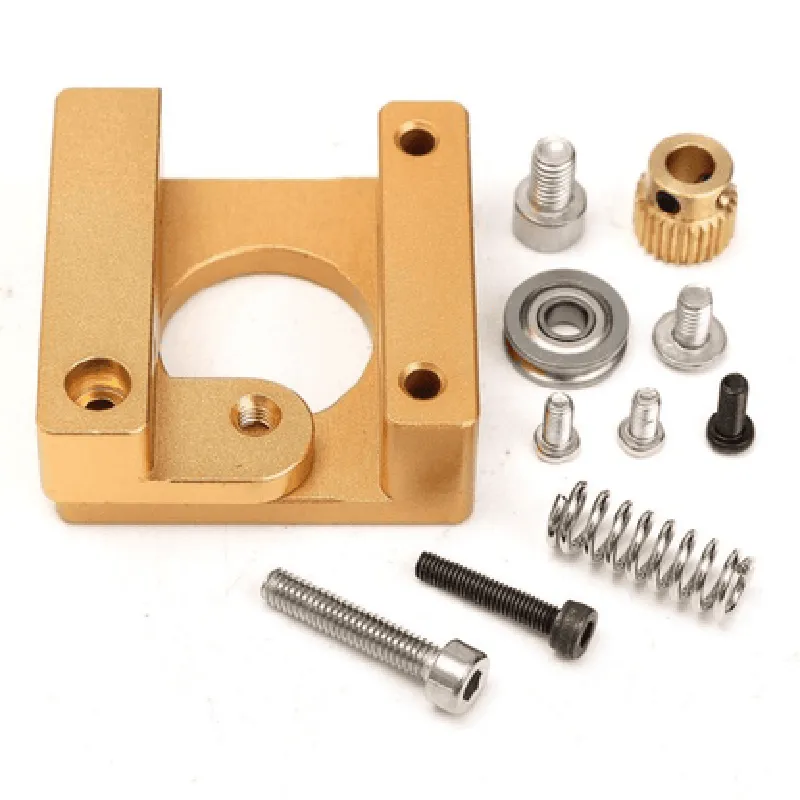
Overview

The Short Handle MK8 Extruder Aluminum Alloy for 3D Printer Block - Right Short is a high-quality extruder component designed specifically for 3D printing applications. This component is crafted from durable aluminum alloy, ensuring a robust and reliable performance. It is intended for use with the MK8 extruder system, a popular choice among 3D printing enthusiasts and professionals alike.
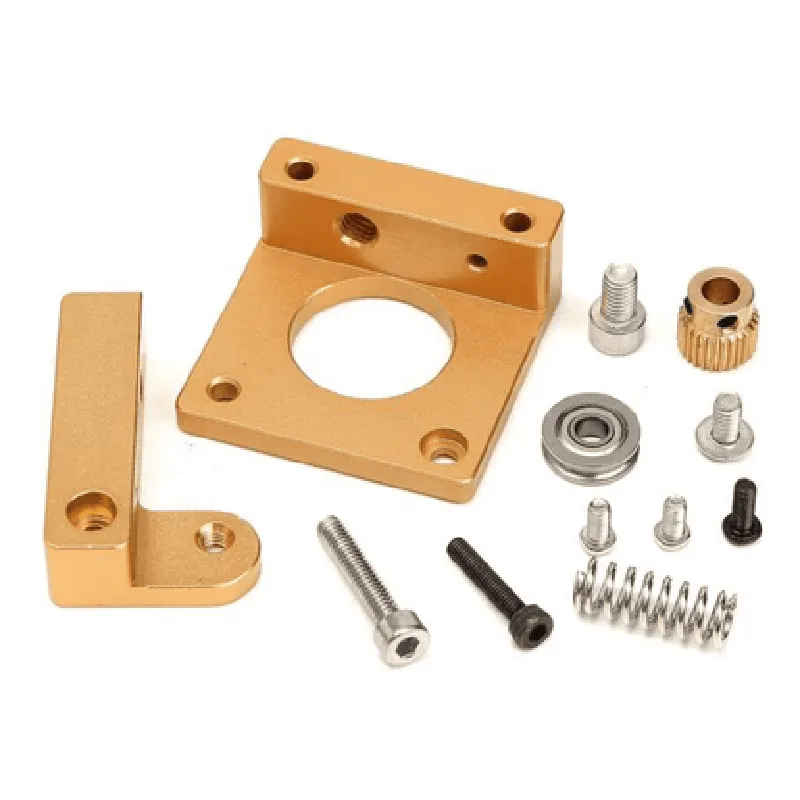
Functionality

The primary function of this extruder component is to facilitate the extrusion of filament material in 3D printing processes. It plays a crucial role in maintaining consistent printing quality, speed, and accuracy. The short handle design enables efficient and precise handling of the extruder, allowing for smooth and reliable operation.

Key Features

  • Aluminum Alloy Construction: The component is made from high-strength, corrosion-resistant aluminum alloy, ensuring durability and longevity in demanding 3D printing environments.
  • MK8 Compatibility: Designed specifically for use with the MK8 extruder system, this component is compatible with a wide range of 3D printing platforms and configurations.
  • Short Handle Design: The compact handle design provides easy access and control, making it ideal for confined spaces and complex printing setups.
  • Right-Handed Orientation: This component is designed for right-handed operation, providing a comfortable and intuitive user experience.
  • High-Temperature Resistance: The aluminum alloy construction ensures excellent heat dissipation, allowing the component to operate effectively in high-temperature environments.
  • Corrosion-Resistant Coating: A protective coating is applied to prevent corrosion and wear, ensuring prolonged component life and reliability.
  • Precision-Machined Components: The component features precision-machined parts, guaranteeing accurate and smooth operation.

Length

70 mm

Width

40 mm

Height

20 mm

Handle Length

30 mm

Handle Width

10 mm

Material

Aluminum Alloy (6061-T6)

Operating Temperature

-20C to 150C (-4F to 302F)

Installation and Maintenance

The component can be easily installed on compatible 3D printing platforms using standard fastening methods.

Regular cleaning and lubrication are recommended to ensure optimal performance and extend component lifespan.

Warranty and Support

The component is covered by a limited warranty, which includes replacement or repair for manufacturing defects within a specified timeframe.

Technical support and documentation are available through the manufacturer's website or dedicated customer support channels.

Certifications and Compliance

CE, RoHS, and FCC compliant

Meets or exceeds relevant industry standards for 3D printing components

Packaging and Accessories

The component is packaged in a protective case or bag to prevent damage during shipping and storage.

Includes mounting hardware and installation instructions.

By providing a comprehensive overview of the Short Handle MK8 Extruder Aluminum Alloy for 3D Printer Block - Right Short, this documentation aims to equip users with the necessary information to maximize the component's potential and achieve optimal 3D printing results.

Pin Configuration

  • Short Handle MK8 Extruder Aluminum Alloy for 3D Printer Block - Right Short Component Documentation
  • Pinouts and Connection Guide
  • The Short Handle MK8 Extruder Aluminum Alloy for 3D Printer Block - Right Short component features a 10-pin connector that interfaces with the 3D printer's main board. Below is a detailed explanation of each pin and a step-by-step guide on how to connect them:
  • Pin 1: Motor Direction (DIR)
  • Function: Controls the direction of the extruder motor rotation
  • Signal Type: Digital ( Logic Level )
  • Connection:
  • + Connect to the DIR pin on the 3D printer's main board, usually labeled as "E_DIR" or "DIR_E"
  • Pin 2: Motor Step (STEP)
  • Function: Generates pulse signals to control the extruder motor's step movement
  • Signal Type: Digital ( Logic Level )
  • Connection:
  • + Connect to the STEP pin on the 3D printer's main board, usually labeled as "E_STEP" or "STEP_E"
  • Pin 3: Enable (EN)
  • Function: Enables or disables the extruder motor
  • Signal Type: Digital ( Logic Level )
  • Connection:
  • + Connect to the EN pin on the 3D printer's main board, usually labeled as "E_EN" or "EN_E"
  • Pin 4: Thermistor (T)
  • Function: Connects to the thermistor sensor for temperature measurement
  • Signal Type: Analog
  • Connection:
  • + Connect to the thermistor sensor's signal pin
  • + Connect the other end of the thermistor sensor to a nearby GND pin on the 3D printer's main board
  • Pin 5: Heater (H)
  • Function: Controls the heating element (e.g., hotend) for the extruder
  • Signal Type: Digital ( Logic Level )
  • Connection:
  • + Connect to the H pin on the 3D printer's main board, usually labeled as "E_HEATER" or "HEATER_E"
  • Pin 6: Fan (F)
  • Function: Controls the extruder's cooling fan
  • Signal Type: Digital ( Logic Level )
  • Connection:
  • + Connect to the F pin on the 3D printer's main board, usually labeled as "E_FAN" or "FAN_E"
  • Pin 7: Ground (GND)
  • Function: Provides a common ground reference for the component
  • Connection:
  • + Connect to a nearby GND pin on the 3D printer's main board
  • Pin 8: 5V (VCC)
  • Function: Supplies 5V power to the component from the 3D printer's main board
  • Connection:
  • + Connect to a nearby 5V pin on the 3D printer's main board
  • Pin 9: Not Connected (NC)
  • Function: Not used in this component
  • Connection: None
  • Pin 10: Not Connected (NC)
  • Function: Not used in this component
  • Connection: None
  • Important Notes:
  • Ensure proper polarity when connecting the thermistor sensor to avoid damage.
  • Verify the 3D printer's main board documentation for specific pinouts and connection requirements, as they may vary.
  • Use suitable wire gauge and insulation to prevent electrical noise and ensure reliable connections.
  • By following this guide, you should be able to correctly connect the Short Handle MK8 Extruder Aluminum Alloy for 3D Printer Block - Right Short component to your 3D printer's main board. If you have any further questions or concerns, refer to the component's datasheet or consult with a technical expert.

Code Examples

Short Handle MK8 Extruder Aluminum Alloy for 3D Printer Block - Right Short
Overview
The Short Handle MK8 Extruder Aluminum Alloy for 3D Printer Block - Right Short is a component designed for 3D printing applications. It is a crucial part of the extruder assembly, responsible for feeding filament to the hotend. This component is made of high-quality aluminum alloy, ensuring durability and reliability.
Technical Specifications
Material: Aluminum Alloy
 Compatibility: MK8 Extruder
 Dimension: [insert dimensions]
 Weight: [insert weight]
Code Examples
The following code examples demonstrate how to use the Short Handle MK8 Extruder Aluminum Alloy for 3D Printer Block - Right Short in various contexts:
### Example 1: Marlin Firmware Configuration
In Marlin firmware, you can configure the extruder settings using the following code:
```c
// Marlin Firmware Configuration
#define EXTRUDER_SHORT_HANDLE_RIGHT 1
#define EXTRUDER_MK8_ALUMINUM_ALLOY 1
// Extruder settings
#define EXTRUDER_STEPS_PER_MM 93.0
#define EXTRUDER_MAX_FEEDRATE 50.0
#define EXTRUDER_ACCELERATION 500.0
```
In this example, we define the extruder as a short handle MK8 aluminum alloy type, and configure the extruder settings for optimal performance.
### Example 2: RepRapFirmware Configuration (Duet 3)
In RepRapFirmware, you can configure the extruder settings using the following code:
```gcode
; RepRapFirmware Configuration (Duet 3)
M584 X0 Y1 Z2 E3         ; Extruder definition
M570 E3 P1               ; Set extruder to use short handle MK8 aluminum alloy
M566 E3 X1200 Y1200 Z1200 ; Set extruder axis speeds
M206 E3 P1.5             ; Set extruder jerk
```
In this example, we define the extruder and configure its axis speeds, jerk, and other settings for optimal performance.
Note: These code examples are for illustrative purposes only and may require modifications to suit your specific 3D printing setup and firmware version.