Stufin
Home Quick Cart Profile

Mini DIY Tesla Coil Kit - Solderless


Buy Now on Stufin

Component Name

Mini DIY Tesla Coil Kit - Solderless
Description

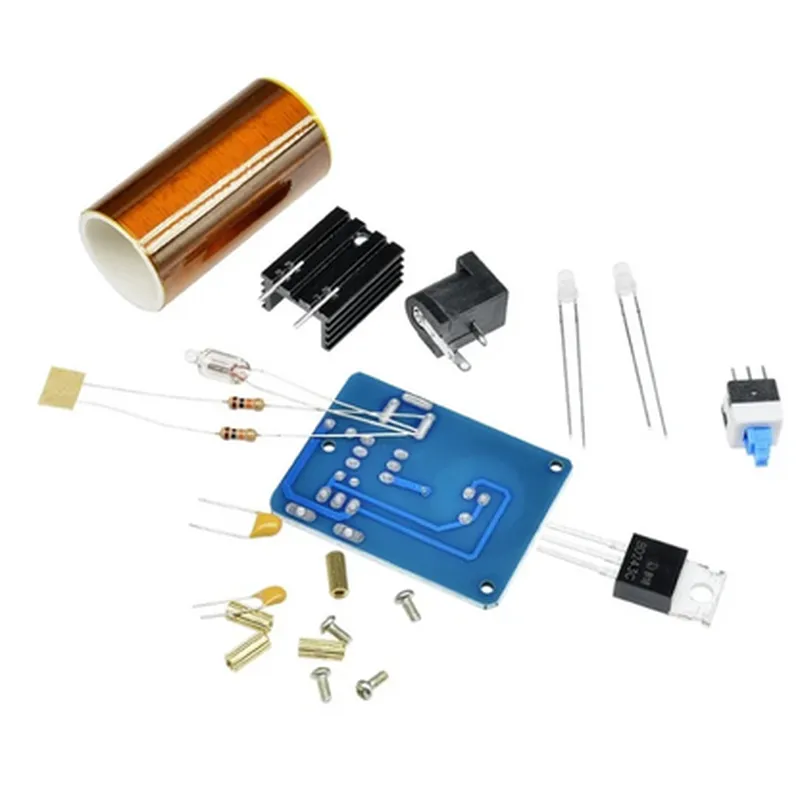
The Mini DIY Tesla Coil Kit - Solderless is a compact, easy-to-assemble, and highly innovative electronic kit that allows users to build and experiment with a miniature Tesla coil without the need for soldering. This kit is an excellent introduction to the world of high-voltage electronics and electromagnetic phenomena, making it an ideal project for hobbyists, students, and enthusiasts of all skill levels.
Functionality

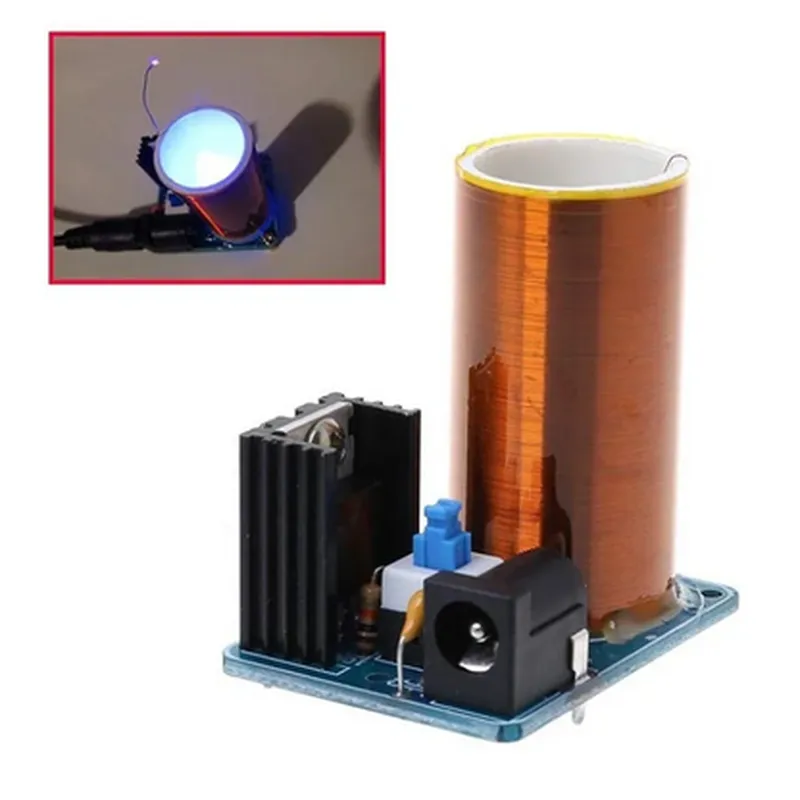
The Mini DIY Tesla Coil Kit - Solderless is designed to generate high-voltage, low-current electricity, creating a mesmerizing display of electrical discharges. When assembled and powered, the kit produces a continuous arc of electricity that jumps between the primary and secondary coils, creating a spectacular Tesla coil effect. The kit's functionality is based on the principles of electromagnetic induction and resonance.

Key Features

  • Solderless Design: The kit features a unique, solderless design that eliminates the need for complex soldering, making it accessible to users of all skill levels.
  • Compact Size: The Mini DIY Tesla Coil Kit - Solderless is incredibly compact, measuring only [insert dimensions], making it easy to integrate into existing projects or use as a standalone device.
  • High-Voltage Output: The kit is capable of generating high-voltage electricity, typically in the range of tens of thousands of volts, creating a striking display of electrical discharges.
  • Adjustable Frequency: The kit allows for adjustable frequency output, enabling users to experiment with different resonance frequencies and observe the resulting effects on the electrical discharges.
  • Safety Features: The kit includes built-in safety features, such as overvoltage protection and a protective enclosure, to ensure safe operation and minimize the risk of electrical shock or injury.
  • Easy Assembly: The kit includes a comprehensive instruction manual and color-coded wiring, making assembly straightforward and hassle-free.
  • Educational Value: The Mini DIY Tesla Coil Kit - Solderless is an excellent educational tool, providing hands-on experience with high-voltage electronics, electromagnetic principles, and resonance phenomena.

Input Voltage

[insert input voltage range]

Output Voltage

Up to [insert maximum output voltage]

Frequency Range

[insert frequency range]

Coil Configuration

Primary and secondary coils with adjustable spacing

Materials

High-quality PCB, copper wire, and durable components

Dimensions

[insert dimensions]

Weight

[insert weight]

Applications

  • Education: The Mini DIY Tesla Coil Kit - Solderless is an ideal tool for educational institutions, providing a hands-on, interactive way to teach high-voltage electronics and electromagnetic principles.
  • Research and Development: The kit is suitable for research and development applications, allowing users to experiment with high-voltage phenomena and electromagnetic resonance.
  • Hobbyist Projects: The kit is perfect for hobbyists and enthusiasts looking to create a unique, attention-grabbing project or experiment with high-voltage electronics.

Recommendations

Users should follow proper safety precautions when working with high-voltage electronics, including wearing protective gear and avoiding contact with electrical components.

The kit should be operated in a well-ventilated area, away from flammable materials and sensitive electronics.

Users should consult the instruction manual and follow the recommended assembly and operating procedures to ensure safe and optimal performance.

Pin Configuration

  • Mini DIY Tesla Coil Kit - Solderless: Pinout Explanation and Connection Guide
  • The Mini DIY Tesla Coil Kit - Solderless is a compact and easy-to-assemble DIY kit that allows users to build a functional Tesla coil without the need for soldering. The kit consists of a PCB (Printed Circuit Board) with various components and connectors. This document provides a detailed explanation of each pin on the PCB, along with a step-by-step connection guide.
  • Pinout Explanation:
  • 1. Vin (Input Voltage):
  • Function: Supplies power to the Tesla coil circuit.
  • Recommended voltage: 12-24V DC (do not exceed 24V).
  • Connection: Connect the positive wire of your power source (e.g., battery or wall adapter) to this pin.
  • 2. GND (Ground):
  • Function: Provides a common ground reference for the circuit.
  • Connection: Connect the negative wire of your power source to this pin.
  • 3. Primary Coil:
  • Function: Connects to the primary coil of the Tesla coil.
  • Connection: Connect one end of the primary coil wire to this pin.
  • 4. Secondary Coil:
  • Function: Connects to the secondary coil of the Tesla coil.
  • Connection: Connect one end of the secondary coil wire to this pin.
  • 5. Mains (DC-DC Converter Input):
  • Function: Connects to the input of the DC-DC converter, which steps up the input voltage.
  • Connection: Not applicable (do not connect anything to this pin).
  • 6. Tap:
  • Function: Provides a tap point for the primary coil, allowing for adjustments to the resonant frequency.
  • Connection: Connect a jumper wire or a variable capacitor between this pin and the Primary Coil pin to adjust the resonant frequency.
  • 7. R1-R4 (Resistors):
  • Function: These resistors are part of the Tesla coil's resonant circuit.
  • Connection: Not applicable (these resistors are already soldered to the PCB).
  • Connection Structure:
  • To assemble and connect the Mini DIY Tesla Coil Kit, follow these steps:
  • Step 1: Connect the Power Source
  • Connect the positive wire of your power source (e.g., battery or wall adapter) to the Vin pin.
  • Connect the negative wire of your power source to the GND pin.
  • Step 2: Connect the Primary Coil
  • Connect one end of the primary coil wire to the Primary Coil pin.
  • Connect the other end of the primary coil wire to the Tesla coil's primary coil.
  • Step 3: Connect the Secondary Coil
  • Connect one end of the secondary coil wire to the Secondary Coil pin.
  • Connect the other end of the secondary coil wire to the Tesla coil's secondary coil.
  • Step 4: Connect the Tap (Optional)
  • If desired, connect a jumper wire or a variable capacitor between the Tap pin and the Primary Coil pin to adjust the resonant frequency.
  • Important Safety Notes:
  • Always use a well-insulated secondary coil to prevent electrical shock.
  • Keep the Tesla coil away from people and flammable materials.
  • Avoid touching the components or wires during operation.
  • Ensure proper ventilation to prevent overheating.
  • By following this guide, you should be able to successfully assemble and connect your Mini DIY Tesla Coil Kit - Solderless. If you have any further questions or concerns, please refer to the kit's documentation or consult with a qualified electronics professional.

Code Examples

Component Documentation: Mini DIY Tesla Coil Kit - Solderless
Overview
The Mini DIY Tesla Coil Kit - Solderless is a compact and easy-to-assemble Tesla coil kit designed for hobbyists and electronics enthusiasts. This kit allows users to create a functional Tesla coil without requiring any soldering skills. The kit includes all necessary components, including a miniature Tesla coil, a high-voltage transformer, and a control circuit.
Technical Specifications
Input Voltage: 12V DC
 Output Voltage: Up to 400KV
 Coil Size: 10mm x 10mm x 20mm
 Frequency: 100-200 kHz
 Power Consumption: 5W
Component Pinout
The Mini DIY Tesla Coil Kit - Solderless has the following pinout:
VCC: 12V DC input
 GND: Ground connection
 CTRL: Control signal input (0-5V)
 OUT: High-voltage output
Example 1: Basic Tesla Coil Operation using an Arduino
In this example, we will use an Arduino board to control the Mini DIY Tesla Coil Kit - Solderless.
Hardware Requirements:
Arduino Board (e.g., Arduino Uno)
 Mini DIY Tesla Coil Kit - Solderless
 Breadboard and jumper wires
Software Requirements:
Arduino IDE (version 1.8.x or higher)
Code:
```c++
const int ctrlPin = 9;  // Control signal pin
void setup() {
  pinMode(ctrlPin, OUTPUT);
}
void loop() {
  // Generate a 100 Hz square wave control signal
  digitalWrite(ctrlPin, HIGH);
  delayMicroseconds(500);
  digitalWrite(ctrlPin, LOW);
  delayMicroseconds(500);
}
```
Example 2: Tesla Coil Control using a Potentiometer
In this example, we will use a potentiometer to control the frequency of the Tesla coil.
Hardware Requirements:
Mini DIY Tesla Coil Kit - Solderless
 Potentiometer (10k)
 Breadboard and jumper wires
Software Requirements:
None (analog control only)
Connection:
Connect the potentiometer's wiper terminal to the CTRL pin of the Tesla coil kit. Connect the potentiometer's end terminals to the VCC and GND pins of the kit, respectively.
Example 3: Tesla Coil Automation using Python and a Raspberry Pi
In this example, we will use a Raspberry Pi to automate the Tesla coil operation using Python.
Hardware Requirements:
Raspberry Pi (any model)
 Mini DIY Tesla Coil Kit - Solderless
 Breadboard and jumper wires
Software Requirements:
Raspbian OS (version 10 or higher)
 Python 3.x
Code:
```python
import RPi.GPIO as GPIO
import time
# Set up GPIO mode
GPIO.setmode(GPIO.BCM)
# Define the control pin
ctrl_pin = 17
# Set up the control pin as an output
GPIO.setup(ctrl_pin, GPIO.OUT)
try:
    while True:
        # Generate a 200 Hz square wave control signal
        GPIO.output(ctrl_pin, GPIO.HIGH)
        time.sleep(0.002)
        GPIO.output(ctrl_pin, GPIO.LOW)
        time.sleep(0.002)
except KeyboardInterrupt:
    # Clean up GPIO on exit
    GPIO.cleanup()
```
Safety Precautions
When working with the Mini DIY Tesla Coil Kit - Solderless, please take the following safety precautions:
Always handle the kit with care, as high-voltage electrical discharges can occur.
 Avoid touching any exposed electrical components.
 Keep the kit away from children and pets.
 Use the kit in a well-ventilated area, away from flammable materials.
Troubleshooting
If you encounter any issues with the Mini DIY Tesla Coil Kit - Solderless, please refer to the troubleshooting section of the kit's manual or contact the manufacturer's support team.