Stufin
Home Quick Cart Profile

Jetson Nano Metal Case


Buy Now on Stufin

Component Name

Jetson Nano Metal Case
Overview

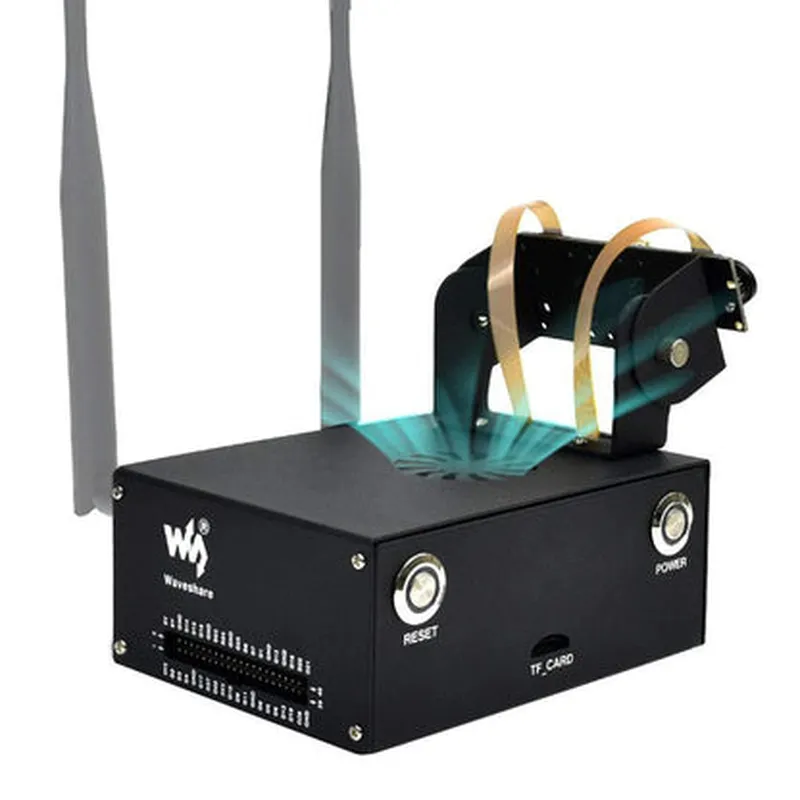
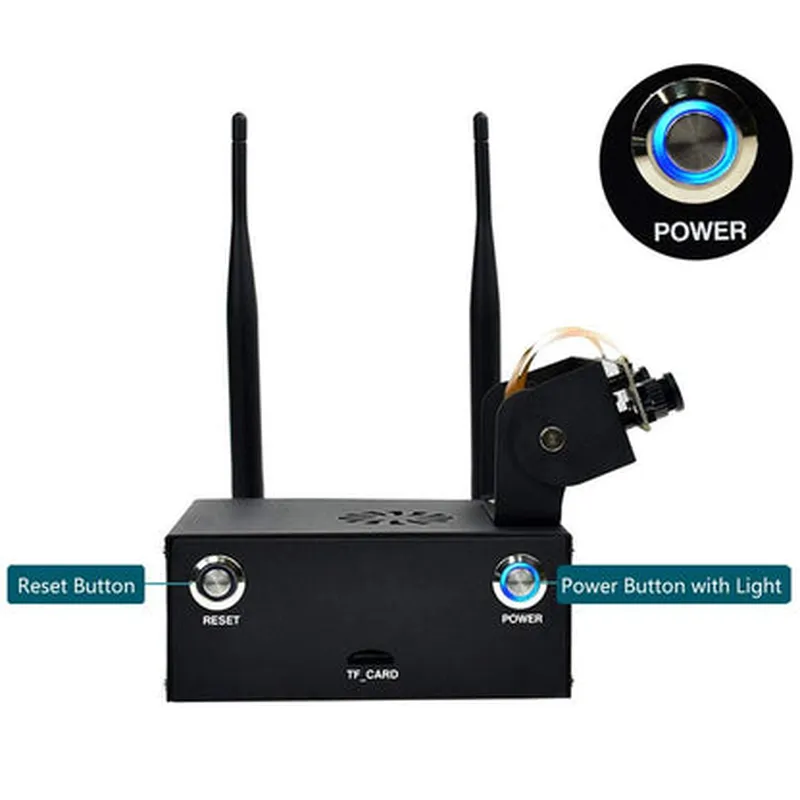
The Jetson Nano Metal Case is a premium enclosure designed specifically for the NVIDIA Jetson Nano AI computer. This metal case provides a rugged and durable housing for the Jetson Nano, protecting it from environmental factors and physical damage. The case is designed to ensure efficient heat dissipation, allowing the Jetson Nano to operate at optimal temperatures.
Functionality

  • Protect the Jetson Nano: The metal case shields the Jetson Nano from physical damage, dust, and moisture, ensuring reliable operation in various environments.
  • Improve Heat Dissipation: The case is designed to facilitate efficient heat dissipation, allowing the Jetson Nano to operate at optimal temperatures and preventing thermal throttling.
  • Enhance Durability: The rugged metal construction provides added durability, making the case suitable for industrial, commercial, and outdoor applications.
The primary function of the Jetson Nano Metal Case is to provide a secure and reliable environment for the NVIDIA Jetson Nano AI computer. The case is designed to

Key Features

  • Compact Design: The case is specifically designed to fit the Jetson Nano, providing a compact and sleek profile.
  • Aluminum Construction: The case is made from high-quality aluminum, providing excellent heat dissipation and durability.
  • Ventilation System: The case features a sophisticated ventilation system, including ventilation holes and channels, to ensure efficient airflow and heat dissipation.
  • Easy Access: The case provides easy access to the Jetson Nano's USB ports, HDMI port, and other interfaces, making it simple to connect peripherals and accessories.
  • Mounting Options: The case offers multiple mounting options, including screws, clips, and adhesive strips, allowing users to securely attach the case to various surfaces.
  • Customization: The case is designed to accommodate custom modifications, such as adding additional cooling systems or custom interfaces.
  • Compatibility: The case is compatible with the NVIDIA Jetson Nano AI computer, ensuring a seamless and secure fit.

Material

Aluminum

Dimensions

69.85mm x 45.04mm x 23.37mm (L x W x H)

Weight

120g

Operating Temperature

-20C to 40C (-4F to 104F)

RoHS Compliance

Yes

Applications

  • AI and Machine Learning Projects: The case provides a reliable and efficient environment for AI and machine learning applications, such as computer vision, natural language processing, and robotics.
  • Industrial Automation: The case is suitable for industrial automation applications, such as machine learning-based quality control, predictive maintenance, and process optimization.
  • Commercial Applications: The case is ideal for commercial applications, including digital signage, kiosks, and point-of-sale systems.
  • Outdoor and Environmental Monitoring: The case provides a rugged and reliable housing for outdoor and environmental monitoring applications, such as weather stations, air quality monitoring, and wildlife tracking.
The Jetson Nano Metal Case is ideal for a wide range of applications, including

Conclusion

The Jetson Nano Metal Case is a premium enclosure designed to provide a secure, durable, and efficient environment for the NVIDIA Jetson Nano AI computer. With its rugged aluminum construction, sophisticated ventilation system, and easy access to interfaces, this case is ideal for a wide range of applications, from AI and machine learning projects to industrial automation and commercial applications.

Pin Configuration

  • Jetson Nano Metal Case Pinout Documentation
  • The Jetson Nano Metal Case is a compact and rugged enclosure designed for the NVIDIA Jetson Nano module, providing a robust platform for IoT and AI applications. The case exposes the Jetson Nano's I/Os through a series of pins, which are used to connect peripherals, sensors, and other devices. This documentation provides a detailed explanation of each pin, their functions, and how to connect them.
  • Pinout Structure:
  • The Jetson Nano Metal Case has a 40-pin GPIO header, which is divided into two rows of 20 pins each. The pins are labeled as J1 (top row) and J2 (bottom row).
  • J1 (Top Row) Pins:
  • 1. 3.3V: Power pin, provides 3.3V output for external devices.
  • 2. 5V: Power pin, provides 5V output for external devices.
  • 3. GND: Ground pin, connects to the ground plane of the circuit.
  • 4. UART_TXD: UART transmission pin, used for serial communication.
  • 5. UART_RXD: UART reception pin, used for serial communication.
  • 6. UART_RTS: UART request-to-send pin, used for hardware flow control.
  • 7. UART_CTS: UART clear-to-send pin, used for hardware flow control.
  • 8. SPI_CLK: SPI clock pin, used for serial peripheral interface communication.
  • 9. SPI_MOSI: SPI master-out-slave-in pin, used for serial peripheral interface communication.
  • 10. SPI_MISO: SPI master-in-slave-out pin, used for serial peripheral interface communication.
  • 11. SPI_CS0: SPI chip select 0 pin, used for selecting SPI devices.
  • 12. SPI_CS1: SPI chip select 1 pin, used for selecting SPI devices.
  • 13. I2C_SCL: I2C serial clock pin, used for inter-integrated circuit communication.
  • 14. I2C_SDA: I2C serial data pin, used for inter-integrated circuit communication.
  • 15. GPIO13: General-purpose input/output pin 13, can be used for various applications.
  • 16. GPIO15: General-purpose input/output pin 15, can be used for various applications.
  • 17. GPIO16: General-purpose input/output pin 16, can be used for various applications.
  • 18. GPIO18: General-purpose input/output pin 18, can be used for various applications.
  • 19. GPIO19: General-purpose input/output pin 19, can be used for various applications.
  • 20. GPIO21: General-purpose input/output pin 21, can be used for various applications.
  • J2 (Bottom Row) Pins:
  • 1. GND: Ground pin, connects to the ground plane of the circuit.
  • 2. GPIO22: General-purpose input/output pin 22, can be used for various applications.
  • 3. GPIO23: General-purpose input/output pin 23, can be used for various applications.
  • 4. GPIO24: General-purpose input/output pin 24, can be used for various applications.
  • 5. GPIO25: General-purpose input/output pin 25, can be used for various applications.
  • 6. GPIO26: General-purpose input/output pin 26, can be used for various applications.
  • 7. GPIO27: General-purpose input/output pin 27, can be used for various applications.
  • 8. GPIO28: General-purpose input/output pin 28, can be used for various applications.
  • 9. GPIO29: General-purpose input/output pin 29, can be used for various applications.
  • 10. GPIO30: General-purpose input/output pin 30, can be used for various applications.
  • 11. GPIO31: General-purpose input/output pin 31, can be used for various applications.
  • 12. LCD_CLK: LCD clock pin, used for display interfaces.
  • 13. LCD_DE: LCD data enable pin, used for display interfaces.
  • 14. LCD_HSYNC: LCD horizontal sync pin, used for display interfaces.
  • 15. LCD_VSYNC: LCD vertical sync pin, used for display interfaces.
  • 16. CAMERA_CLK: Camera clock pin, used for camera interfaces.
  • 17. CAMERA_PWDN: Camera power down pin, used for camera interfaces.
  • 18. CAMERA_XCLK: Camera XCLK pin, used for camera interfaces.
  • 19. CAMERA_D0: Camera data 0 pin, used for camera interfaces.
  • 20. CAMERA_D1: Camera data 1 pin, used for camera interfaces.
  • Connecting the Pins:
  • When connecting peripherals or devices to the Jetson Nano Metal Case, ensure that the pins are properly aligned and securely connected. Use the following guidelines:
  • Use a 40-pin GPIO header or a compatible connector to connect peripherals or devices.
  • Ensure that the power pins (3.3V, 5V, and GND) are connected to a suitable power source and ground plane.
  • Use appropriate interface-specific connectors (e.g., SPI, I2C, UART) to connect peripherals or devices.
  • Verify the pinout and compatibility of the peripheral or device with the Jetson Nano Metal Case before connecting.
  • Consult the Jetson Nano module's documentation and the peripheral or device's documentation for specific connection guidelines and requirements.
  • Important Notes:
  • The pinout structure and functions may vary depending on the specific Jetson Nano module and firmware version used.
  • It is essential to consult the official documentation and datasheet for the Jetson Nano module and peripheral devices to ensure compatibility and proper usage.
  • Improper connections or misuse of the pins can cause damage to the Jetson Nano module, peripheral devices, or other components.
  • By following this documentation and adhering to proper connection guidelines, you can successfully integrate peripherals and devices with the Jetson Nano Metal Case, unlocking its full potential for IoT and AI applications.

Code Examples

Jetson Nano Metal Case Documentation
Overview
The Jetson Nano Metal Case is a durable and compact enclosure designed specifically for the NVIDIA Jetson Nano module. This case provides excellent heat dissipation, protects the module from environmental factors, and offers easy access to all GPIO pins and interfaces.
Specifications
Dimensions: 69mm x 45mm x 25mm
 Material: Aluminum alloy
 Compatibility: NVIDIA Jetson Nano module
 Features: GPIO pin access, heatsink for efficient heat dissipation, compact design for IoT applications
Setting Up the Jetson Nano Metal Case
To get started with the Jetson Nano Metal Case, follow these steps:
1. Mount the Jetson Nano module to the case using the provided screws and standoffs.
2. Connect the power supply to the module according to the Jetson Nano documentation.
3. Install the necessary software and dependencies for your project (e.g., Ubuntu, CUDA, cuDNN).
Code Examples
### Example 1: GPIO Control with Python
The following example demonstrates how to control the GPIO pins on the Jetson Nano using Python:
```python
import sys
import RPi.GPIO as GPIO
# Set up GPIO mode
GPIO.setmode(GPIO.BCM)
# Define GPIO pins for LED and button
LED_PIN = 17
BUTTON_PIN = 23
# Set up GPIO pins as output and input
GPIO.setup(LED_PIN, GPIO.OUT)
GPIO.setup(BUTTON_PIN, GPIO.IN, pull_up_down=GPIO.PUD_UP)
try:
    while True:
        # Read button state
        button_state = GPIO.input(BUTTON_PIN)
        if button_state == False:
            # Toggle LED on button press
            GPIO.output(LED_PIN, GPIO.HIGH)
            print("Button pressed!")
        else:
            GPIO.output(LED_PIN, GPIO.LOW)
            print("Button released!")
        # Wait for 0.1 seconds before checking again
        time.sleep(0.1)
except KeyboardInterrupt:
    # Clean up GPIO on exit
    GPIO.cleanup()
    sys.exit(0)
```
This code assumes an LED connected to GPIO pin 17 and a button connected to GPIO pin 23. The program toggles the LED on and off based on the button state.
### Example 2: Computer Vision with OpenCV
This example demonstrates how to use the Jetson Nano Metal Case with OpenCV for computer vision applications:
```python
import cv2
# Open the default camera device (e.g., USB camera)
cap = cv2.VideoCapture(0)
while True:
    # Capture frame from camera
    ret, frame = cap.read()
    if not ret:
        break
# Convert frame to grayscale
    gray = cv2.cvtColor(frame, cv2.COLOR_BGR2GRAY)
# Display the grayscale frame
    cv2.imshow('frame', gray)
# Exit on pressing 'q' key
    if cv2.waitKey(1) & 0xFF == ord('q'):
        break
# Release resources
cap.release()
cv2.destroyAllWindows()
```
This code captures frames from the default camera device, converts them to grayscale, and displays the output. You can modify this example to incorporate more advanced computer vision techniques using OpenCV.
Notes and Warnings
Ensure proper heat dissipation and cooling for the Jetson Nano module, as overheating can cause damage or throttling.
 Handle the module with care to avoid physical damage or electrical shock.
 Follow proper safety guidelines when working with electrical components and high-voltage power supplies.
By following these examples and guidelines, you can effectively utilize the Jetson Nano Metal Case for a wide range of IoT applications, from robotics to computer vision and more.