Stufin
Home Quick Cart Profile

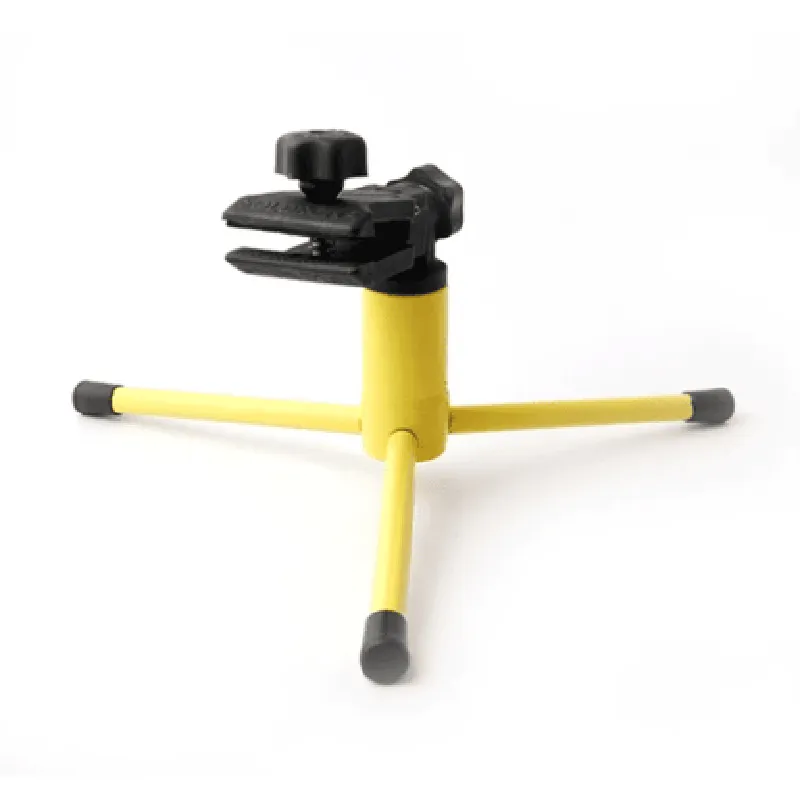
SOLDRON Tripod PCB Holder and Clamp

Buy Now on Stufin

Component Description

SOLDRON Tripod PCB Holder and Clamp

Overview

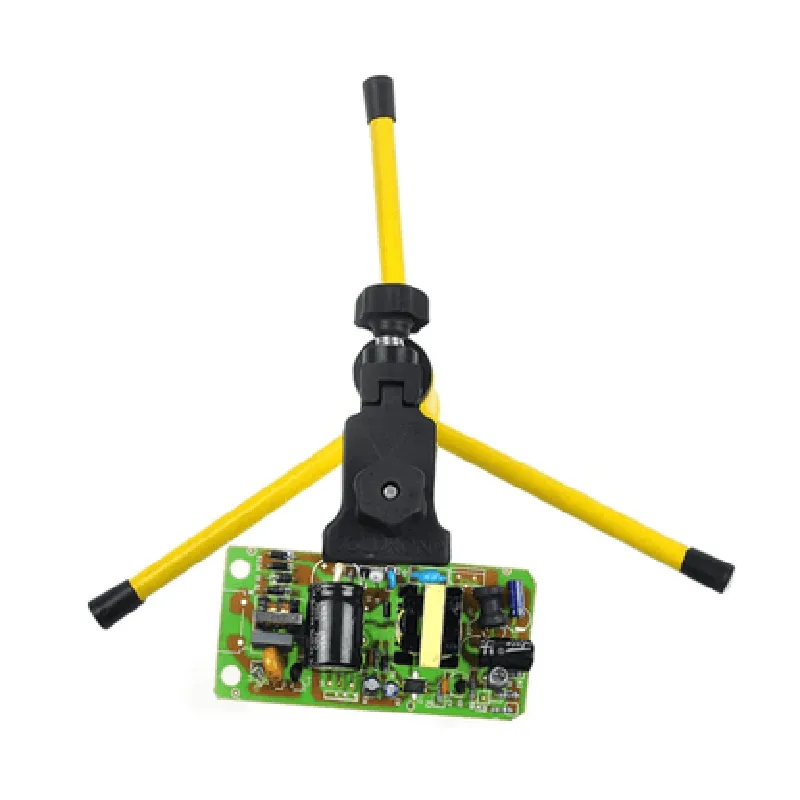
The SOLDRON Tripod PCB Holder and Clamp is a versatile and durable accessory designed for securely holding and positioning Printed Circuit Boards (PCBs) during various stages of electronics development, testing, and prototyping. This component provides a reliable and convenient way to mount and clamp PCBs, ensuring easy access and manipulation of components while working on IoT projects.

Functionality

  • Securely hold PCBs: The clamp mechanism grips the PCB firmly, preventing it from moving or shifting during handling, soldering, or testing.
  • Adjust PCB orientation: The tripod design enables users to adjust the PCB holder to various angles, making it easier to access components, connectors, or pins.
  • Free up workbench space: By elevating the PCB, the holder keeps the work surface clear, reducing clutter and allowing for more efficient workflow.
The SOLDRON Tripod PCB Holder and Clamp serves as a stable and adjustable platform for PCBs, allowing users to

Key Features

  • Robust construction: The SOLDRON Tripod PCB Holder and Clamp is built with durable materials, ensuring a long lifespan and withstanding regular use.
  • Adjustable clamp: The clamp's adjustable opening accommodates PCBs of various sizes, with a maximum width of [insert maximum width].
  • Precise angle adjustment: The tripod's adjustable joints allow for precise control over the PCB's orientation, with a range of [insert angle range, e.g., 0 to 90].
  • Non-slip base: The tripod's base features non-slip pads, preventing the holder from sliding or moving during use.
  • Compact design: The compact size of the holder minimizes desktop footprint, making it ideal for crowded workbenches.
  • Easy assembly and disassembly: The holder's simple design allows for quick and easy assembly and disassembly, reducing setup time.

Specifications

Material

Durable plastic or metal (depending on the version)

Maximum PCB width

[insert maximum width]

Adjustable angle range

[insert angle range, e.g., 0 to 90]

Base dimensions

[insert base dimensions, e.g., 100 mm x 100 mm]

Weight

[insert weight, e.g., 200 g]

Compatibility

Universal, suitable for most PCB sizes and types

Applications

  • Electronics prototyping and development
  • PCB testing and debugging
  • Soldering and assembly
  • Education and training
  • Hobbyist and DIY projects
The SOLDRON Tripod PCB Holder and Clamp is an essential tool for various IoT projects, including

By providing a stable and adjustable platform for PCBs, the SOLDRON Tripod PCB Holder and Clamp streamlines the electronics development process, saving time and increasing productivity.

Pin Configuration

  • SOLDRON Tripod PCB Holder and Clamp Pinout Documentation
  • The SOLDRON Tripod PCB Holder and Clamp is a versatile component designed for securing and connecting Printed Circuit Boards (PCBs) to tripods, providing a stable and adjustable platform for IoT projects and applications. This documentation will guide you through the pinout of the SOLDRON Tripod PCB Holder and Clamp, explaining the functions and connections of each pin.
  • Pinout Structure:
  • The SOLDRON Tripod PCB Holder and Clamp features a 10-pin male header connector, with the following pinout structure:
  • | Pin Number | Pin Name | Pin Function |
  • | --- | --- | --- |
  • | 1 | GND | Ground |
  • | 2 | VCC | Power Supply (3.3V or 5V) |
  • | 3 | SCL | I2C Clock |
  • | 4 | SDA | I2C Data |
  • | 5 | INT | Interrupt |
  • | 6 | RST | Reset |
  • | 7 | D0 | Digital Output 0 |
  • | 8 | D1 | Digital Output 1 |
  • | 9 | A0 | Analog Input 0 |
  • | 10 | A1 | Analog Input 1 |
  • Pin-by-Pin Explanation:
  • 1. GND (Pin 1): Ground pin, used for providing a common ground connection to the PCB. Connect to the ground pin of your power source and other components.
  • 2. VCC (Pin 2): Power supply pin, which can be powered by either 3.3V or 5V, depending on the requirements of your PCB and components. Ensure the voltage matches the specifications of your PCB and components.
  • 3. SCL (Pin 3): I2C Clock pin, used for I2C communication protocols. Connect to the SCL pin of your I2C devices.
  • 4. SDA (Pin 4): I2C Data pin, used for I2C communication protocols. Connect to the SDA pin of your I2C devices.
  • 5. INT (Pin 5): Interrupt pin, used to trigger interrupts in your microcontroller or other components. Connect to the INT pin of your microcontroller or interrupt-enabled components.
  • 6. RST (Pin 6): Reset pin, used to reset your microcontroller or other components. Connect to the RST pin of your microcontroller or reset-enabled components.
  • 7. D0 (Pin 7): Digital Output 0, a general-purpose digital output pin. Can be used for controlling LEDs, relays, or other digital components.
  • 8. D1 (Pin 8): Digital Output 1, a general-purpose digital output pin. Can be used for controlling LEDs, relays, or other digital components.
  • 9. A0 (Pin 9): Analog Input 0, a general-purpose analog input pin. Can be used for reading analog signals from sensors, potentiometers, or other analog devices.
  • 10. A1 (Pin 10): Analog Input 1, a general-purpose analog input pin. Can be used for reading analog signals from sensors, potentiometers, or other analog devices.
  • Connection Guidelines:
  • When connecting the SOLDRON Tripod PCB Holder and Clamp to your PCB and components, ensure the following:
  • Use proper wire gauge and insulation to prevent electrical shorts and damage.
  • Verify the voltage and power supply requirements of your PCB and components match the power supply pin (VCC).
  • Use pull-up or pull-down resistors as necessary for digital output pins (D0, D1).
  • Use voltage dividers or level shifters as necessary for analog input pins (A0, A1).
  • Consult the datasheets and documentation of your components and microcontrollers for specific connection requirements.
  • By following this pinout documentation and connection guidelines, you can successfully integrate the SOLDRON Tripod PCB Holder and Clamp into your IoT projects and applications.

Code Examples

SOLDRON Tripod PCB Holder and Clamp Documentation
Overview
The SOLDRON Tripod PCB Holder and Clamp is a versatile IoT component designed to securely hold and position printed circuit boards (PCBs) in various applications, including robotics, automation, and IoT projects. This component provides a sturdy tripod base and adjustable clamp to ensure stable and precise PCB positioning.
Technical Specifications
Material: Durable plastic and metal alloy
 PCB Size Compatibility: Up to 10 cm x 10 cm (3.94 in x 3.94 in)
 Tripod Leg Adjustment: 5 cm to 10 cm (1.97 in to 3.94 in)
 Clamp Adjustment: 0.5 mm to 3 mm (0.02 in to 0.12 in)
 Weight: 150 grams (5.29 oz)
Code Examples
### Example 1: Using the SOLDRON Tripod PCB Holder and Clamp with an Arduino Board
In this example, we will demonstrate how to use the SOLDRON Tripod PCB Holder and Clamp to hold an Arduino Uno board in place while connecting sensors and actuators to it.
```c
// Include necessary libraries
#include <Arduino.h>
// Define pin connections for sensors and actuators
const int sensorPin = A0;
const int ledPin = 13;
void setup() {
  // Initialize the LED pin as an output
  pinMode(ledPin, OUTPUT);
}
void loop() {
  // Read sensor values
  int sensorValue = analogRead(sensorPin);
// Perform actions based on sensor values
  if (sensorValue > 500) {
    digitalWrite(ledPin, HIGH);
  } else {
    digitalWrite(ledPin, LOW);
  }
// Wait for 50 milliseconds before taking the next reading
  delay(50);
}
```
In this example, the SOLDRON Tripod PCB Holder and Clamp provides a stable platform for the Arduino Uno board, allowing for easy connection of sensors and actuators.
### Example 2: Using the SOLDRON Tripod PCB Holder and Clamp with a Raspberry Pi in a Robotics Project
In this example, we will demonstrate how to use the SOLDRON Tripod PCB Holder and Clamp to hold a Raspberry Pi board in place while building a robotics project that involves camera vision and motor control.
```python
import RPi.GPIO as GPIO
import cv2
# Set up GPIO pins for motor control
GPIO.setmode(GPIO.BCM)
motor_pins = [17, 23, 24, 25]
for pin in motor_pins:
    GPIO.setup(pin, GPIO.OUT)
# Set up camera
camera = cv2.VideoCapture(0)
while True:
    # Capture image from camera
    ret, frame = camera.read()
# Process image using OpenCV
    gray = cv2.cvtColor(frame, cv2.COLOR_BGR2GRAY)
    cv2.imshow('Image', gray)
# Control motors based on image processing results
    # (this part is omitted for brevity)
# Exit on key press
    if cv2.waitKey(1) & 0xFF == ord('q'):
        break
# Clean up
camera.release()
cv2.destroyAllWindows()
GPIO.cleanup()
```
In this example, the SOLDRON Tripod PCB Holder and Clamp provides a sturdy base for the Raspberry Pi board, allowing for easy connection of peripherals such as cameras and motors while building a robotics project.
Note: These code examples are provided for illustration purposes only and may require modifications to work with your specific project setup.