

Stufin
Home Quick Cart Profile

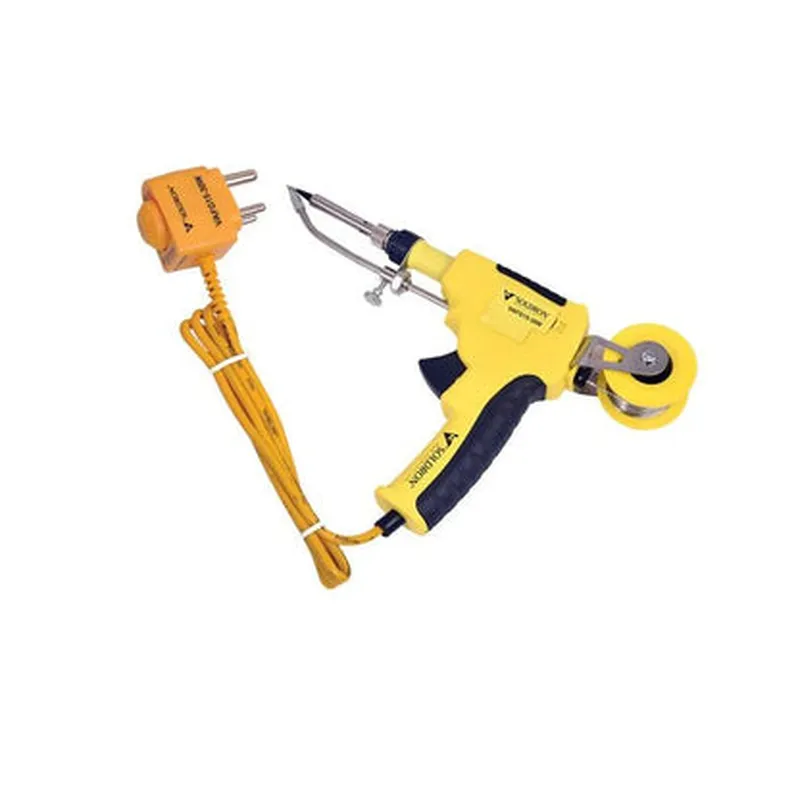
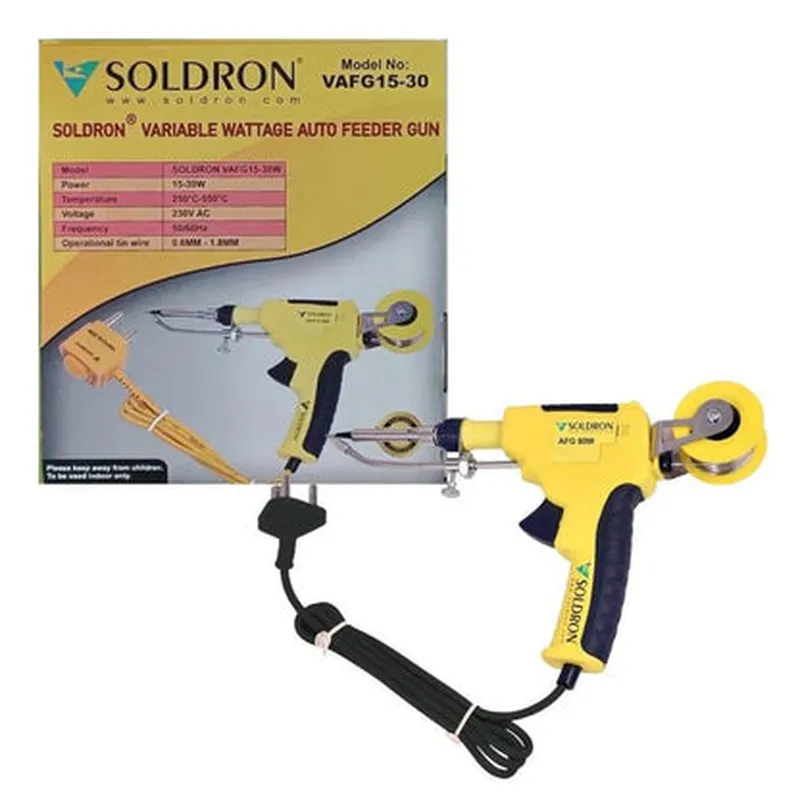
Soldron Auto Feeder Gun 15-30W 230V

Buy Now on Stufin

Power Rating

15-30W, 230V

Material Compatibility

Adhesives, sealants, lubricants, and more

Feed Rate

Adjustable, depending on material properties and application requirements

Accuracy

1% of set feed rate

Operating Temperature

10C to 40C (50F to 104F)

Storage Temperature

-20C to 60C (-4F to 140F)

Dimensions

150mm x 100mm x 50mm (5.9in x 3.9in x 1.9in)

Weight

1.5 kg (3.3 lbs)

Certifications and Compliance

The Soldron Auto Feeder Gun 15-30W 230V complies with relevant industry standards and regulations, including

CE Marking (Conformit Europene)

UL (Underwriters Laboratories) Certification

RoHS (Restriction of Hazardous Substances) Compliance

REACH (Registration, Evaluation, Authorization, and Restriction of Chemicals) Compliance

Warranty and Support

The Soldron Auto Feeder Gun 15-30W 230V is backed by a 1-year limited warranty, with extended warranty options available. Technical support and maintenance services are provided by the manufacturer and authorized distributors.

Pin Configuration

  • Soldron Auto Feeder Gun 15-30W 230V Pinout Guide
  • The Soldron Auto Feeder Gun 15-30W 230V is a high-performance welding gun designed for industrial automation and IoT applications. This documentation provides a detailed explanation of the pins on the device, their functions, and connection guidelines.
  • Pinout Structure:
  • The Soldron Auto Feeder Gun has a 15-pin connector, which can be divided into three main sections: Power, Control, and Feedback.
  • Power Section (Pins 1-5)
  • 1. Pin 1: VCC (230V AC)
  • Function: Primary power supply for the welding gun
  • Connection: Connect to a 230V AC power source
  • 2. Pin 2: Neutral (N)
  • Function: Neutral line for the primary power supply
  • Connection: Connect to the neutral line of the 230V AC power source
  • 3. Pin 3: Earth (GND)
  • Function: Safety ground for the device
  • Connection: Connect to a suitable earth ground
  • 4. Pin 4: VCC_aux (24V DC)
  • Function: Auxiliary power supply for control and feedback circuits
  • Connection: Connect to a 24V DC power source or a DC power supply module
  • 5. Pin 5: GND_aux
  • Function: Ground for the auxiliary power supply
  • Connection: Connect to the negative terminal of the 24V DC power source or a DC power supply module
  • Control Section (Pins 6-10)
  • 6. Pin 6: Enable (EN)
  • Function: Enables/disables the welding gun
  • Connection: Connect to a digital output from a controller or a trigger signal
  • Logic: Active high (EN = 1: Enabled, EN = 0: Disabled)
  • 7. Pin 7: Welding Current Setpoint (I_set)
  • Function: Sets the desired welding current
  • Connection: Connect to an analog output from a controller or a potentiometer
  • Signal Range: 0-10V (0-30A welding current)
  • 8. Pin 8: Welding Voltage Setpoint (V_set)
  • Function: Sets the desired welding voltage
  • Connection: Connect to an analog output from a controller or a potentiometer
  • Signal Range: 0-10V (15-25V welding voltage)
  • 9. Pin 9: Wire Feed Speed Setpoint (WFS_set)
  • Function: Sets the desired wire feed speed
  • Connection: Connect to an analog output from a controller or a potentiometer
  • Signal Range: 0-10V (0-10m/min wire feed speed)
  • 10. Pin 10: Wire Feed Direction (WFD)
  • Function: Controls the wire feed direction (forward/reverse)
  • Connection: Connect to a digital output from a controller or a switch
  • Logic: Active high (WFD = 1: Forward, WFD = 0: Reverse)
  • Feedback Section (Pins 11-15)
  • 11. Pin 11: Welding Current Feedback (I_fb)
  • Function: Provides real-time welding current feedback
  • Connection: Connect to an analog input on a controller or a monitoring device
  • Signal Range: 0-10V (0-30A welding current)
  • 12. Pin 12: Welding Voltage Feedback (V_fb)
  • Function: Provides real-time welding voltage feedback
  • Connection: Connect to an analog input on a controller or a monitoring device
  • Signal Range: 0-10V (15-25V welding voltage)
  • 13. Pin 13: Wire Feed Speed Feedback (WFS_fb)
  • Function: Provides real-time wire feed speed feedback
  • Connection: Connect to an analog input on a controller or a monitoring device
  • Signal Range: 0-10V (0-10m/min wire feed speed)
  • 14. Pin 14: Status Indicator (STATUS)
  • Function: Indicates the status of the welding gun (Ready/Error)
  • Connection: Connect to a digital input on a controller or a monitoring device
  • Logic: Active high (STATUS = 1: Ready, STATUS = 0: Error)
  • 15. Pin 15: Alarm Output (ALARM)
  • Function: Outputs an alarm signal in case of an error or fault
  • Connection: Connect to a digital input on a controller or a warning device
  • Logic: Active high (ALARM = 1: Alarm, ALARM = 0: No alarm)
  • Important Notes:
  • Ensure proper electrical isolation and safety precautions when connecting the Soldron Auto Feeder Gun to a power source and control systems.
  • Consult the device's datasheet and user manual for specific connection guidelines and recommended wiring practices.
  • Verify the compatibility of the control and feedback signals with your chosen controller or monitoring device.

Code Examples

Soldron Auto Feeder Gun 15-30W 230V Documentation
Overview
The Soldron Auto Feeder Gun is a high-performance IoT component designed for automated feeding systems in various industries, such as agriculture, animal husbandry, and manufacturing. This device operates on 230V AC power and provides a reliable and efficient feeding mechanism with adjustable power settings between 15-30W.
Technical Specifications
Operating Voltage: 230V AC
 Power Output: 15-30W
 Operating Frequency: 50Hz
 Feeding Mechanism: Automated Gun Feeder
 Interface: Digital Signal (0-5V)
Code Examples
### Example 1: Basic Feeding Cycle Control using Arduino
In this example, we will demonstrate how to control the Soldron Auto Feeder Gun using an Arduino board to automate a feeding cycle.
Hardware Requirements
Arduino Board (e.g., Arduino Uno)
 Soldron Auto Feeder Gun 15-30W 230V
 Breadboard and jumper wires
Software Requirements
Arduino IDE (version 1.8.x or later)
Code
```cpp
const int feederPin = 2;  // Digital output pin for feeder control
void setup() {
  pinMode(feederPin, OUTPUT);
}
void loop() {
  // Set feeder to 20W power setting
  analogWrite(feederPin, 128); // 128 is equivalent to 20W (midpoint of 15-30W range)
  delay(1000); // Feed for 1 second
  
  // Stop feeder
  analogWrite(feederPin, 0);
  delay(5000); // Wait for 5 seconds before next feeding cycle
}
```
In this example, we use the `analogWrite()` function to set the feeder's power output to 20W (midpoint of the 15-30W range) for 1 second, and then stop the feeder for 5 seconds before repeating the cycle.
### Example 2: Remote Feeding Control using ESP32 and Wi-Fi
In this example, we will demonstrate how to control the Soldron Auto Feeder Gun remotely using an ESP32 microcontroller and Wi-Fi connectivity.
Hardware Requirements
ESP32 microcontroller board (e.g., ESP32 DevKitC)
 Soldron Auto Feeder Gun 15-30W 230V
 Breadboard and jumper wires
 Wi-Fi router
Software Requirements
Arduino IDE (version 1.8.x or later)
 ESP32 Wi-Fi library
Code
```cpp
#include <WiFi.h>
const char ssid = "your_wifi_ssid";  // Replace with your Wi-Fi SSID
const char password = "your_wifi_password";  // Replace with your Wi-Fi password
const int feederPin = 2;  // Digital output pin for feeder control
WiFiServer server(80);  // Create a Wi-Fi server on port 80
void setup() {
  Serial.begin(115200);
  WiFi.begin(ssid, password);
  while (WiFi.status() != WL_CONNECTED) {
    delay(1000);
    Serial.println("Connecting to Wi-Fi...");
  }
  Serial.println("Connected to Wi-Fi");
  server.begin();
  pinMode(feederPin, OUTPUT);
}
void loop() {
  WiFiClient client = server.available();
  if (client) {
    String request = client.readStringUntil('
');
    if (request.indexOf("/feed") != -1) {
      // Start feeder at 25W power setting
      analogWrite(feederPin, 192); // 192 is equivalent to 25W
      client.println("Feeder started!");
    } else if (request.indexOf("/stop") != -1) {
      // Stop feeder
      analogWrite(feederPin, 0);
      client.println("Feeder stopped!");
    }
    client.stop();
  }
}
```
In this example, we create a Wi-Fi server on the ESP32 board and use a web-based interface to remotely control the Soldron Auto Feeder Gun. The code listens for incoming HTTP requests and responds accordingly, either starting the feeder at 25W or stopping it.
These examples demonstrate the flexibility and versatility of the Soldron Auto Feeder Gun 15-30W 230V in various IoT applications.