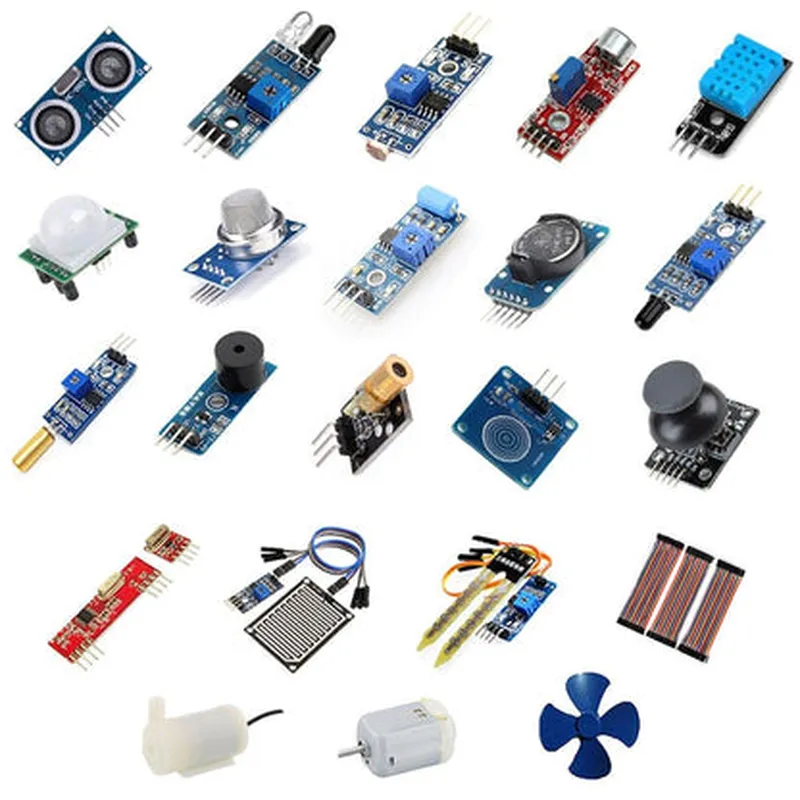
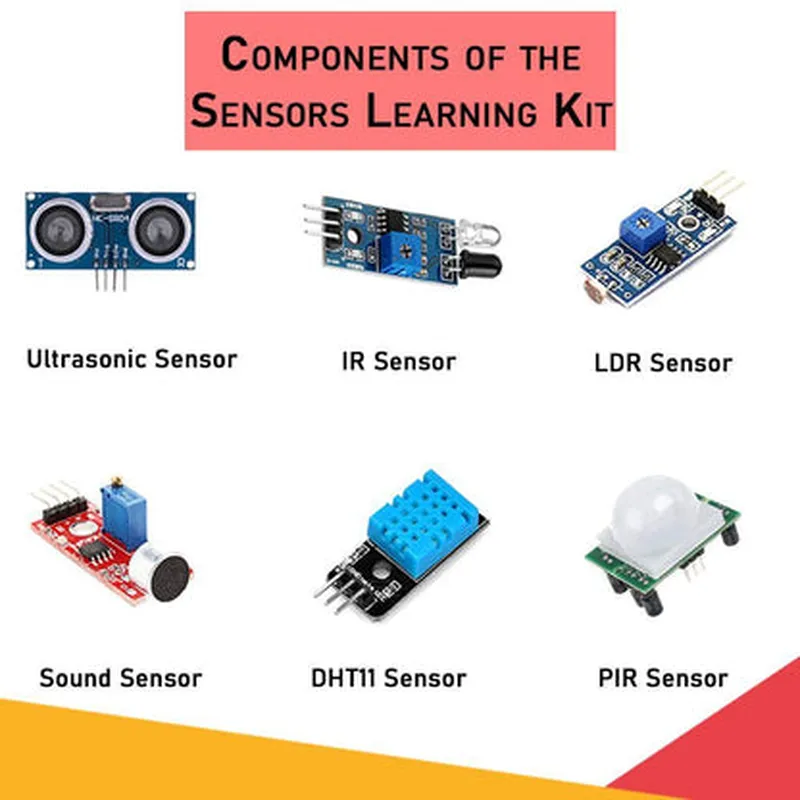
Component Documentation: 24 in 1 Sensors DIY Learning Kit
The 24 in 1 Sensors DIY Learning Kit is a comprehensive bundle of sensors designed for IoT enthusiasts, hobbyists, and professionals. This kit includes a diverse range of sensors, allowing users to explore and experiment with various IoT applications. The kit is ideal for learning, prototyping, and developing innovative projects.
The kit comprises 24 sensors, including:
1. Temperature sensors (DS18B20, TMP36)
2. Humidity sensors (DHT11, DHT22)
3. Light sensors (LDR, BH1750)
4. Sound sensors (KY-037)
5. Proximity sensors (HC-SR04, HC-SR05)
6. Motion sensors (PIR, ADXL345)
7. Vibration sensors (SW-420)
8. Tilt sensors (SW-520D)
9. Flame sensors (FLame sensor module)
10. Smoke sensors (MQ-2)
11. Gas sensors (MQ-135, MQ-6)
12. Air quality sensors (MQ-137)
13. Soil moisture sensors
14. Water level sensors
15. Wind speed sensors (Anemometer)
16. Raindrop sensors
17. Infrared sensors (VL53L0X)
18. Ultrasonic sensors (HC-SR04)
19. Gyroscopes (MPU-6050)
20. Accelerometers (ADXL345)
21. Barometers (BMP180)
22. Compasses (HMC5883L)
23. Ambient light sensors (BH1750)
24. Laser sensors (VL53L0X)
Here are three code examples demonstrating how to use the 24 in 1 Sensors DIY Learning Kit in various contexts:
Example 1: Temperature and Humidity Monitoring using DS18B20 and DHT11
In this example, we'll use the DS18B20 temperature sensor and DHT11 humidity sensor to monitor environmental conditions.
DS18B20 temperature sensor
 DHT11 humidity sensor
 Arduino Board (e.g., Arduino Uno)
 Breadboard
 Jumper wires
Code:
```c++
#include <DHT.h>
#include <OneWire.h>
#define DHT_PIN 2
#define DS18B20_PIN 3
DHT dht(DHT_PIN, DHT11);
OneWire ds(DS18B20_PIN);
void setup() {
  Serial.begin(9600);
  dht.begin();
}
void loop() {
  float temperature = dht.readTemperature();
  float humidity = dht.readHumidity();
  float dsTemp = getDSTemperature();
Serial.print("Temperature: ");
  Serial.print(temperature);
  Serial.println(" C");
Serial.print("Humidity: ");
  Serial.print(humidity);
  Serial.println(" %");
Serial.print("DS18B20 Temperature: ");
  Serial.print(dsTemp);
  Serial.println(" C");
float getDSTemperature() {
  byte i;
  byte present = 0;
  byte type_s;
  byte data[12];
  byte addr[8];
if (!ds.search(addr)) {
    Serial.println("No more addresses.");
    ds.reset_search();
    return -1;
  }
Serial.print("ROM =");
  for (i = 0; i < 8; i++) {
    Serial.write(' ');
    Serial.print(addr[i], HEX);
  }
if (OneWire::crc8(addr, 7) != addr[7]) {
    Serial.println("CRC is not valid!");
    return -1;
  }
ds.reset();
  ds.select(addr);
ds.write(0x44, 1); // start conversion, with parasite power on at the end
delay(750); // maybe 750ms is enough, maybe not
ds.reset();
  ds.select(addr);
  ds.write(0xBE);         // Read Scratchpad
for (i = 0; i < 9; i++) {
    data[i] = ds.read();
  }
int16_t raw = (data[1] << 8) | data[0];
  float celsius = raw  0.0625;
  return celsius;
}
```
Example 2: Obstacle Detection using HC-SR04 Ultrasonic Sensor
In this example, we'll use the HC-SR04 ultrasonic sensor to detect obstacles and measure distances.
HC-SR04 ultrasonic sensor
 Arduino Board (e.g., Arduino Uno)
 Breadboard
 Jumper wires
Code:
```c++
const int trigPin = 2;
const int echoPin = 3;
void setup() {
  Serial.begin(9600);
  pinMode(trigPin, OUTPUT);
  pinMode(echoPin, INPUT);
}
void loop() {
  int duration, distance;
  digitalWrite(trigPin, LOW);
  delayMicroseconds(2);
  digitalWrite(trigPin, HIGH);
  delayMicroseconds(10);
  digitalWrite(trigPin, LOW);
duration = pulseIn(echoPin, HIGH);
  distance = duration  0.034 / 2;
Serial.print("Distance: ");
  Serial.print(distance);
  Serial.println(" cm");
if (distance < 20) {
    Serial.println("Obstacle detected!");
  }
Example 3: Gesture Recognition using MPU-6050 Accelerometer and Gyroscope
In this example, we'll use the MPU-6050 accelerometer and gyroscope to recognize hand gestures.
MPU-6050 accelerometer and gyroscope module
 Arduino Board (e.g., Arduino Uno)
 Breadboard
 Jumper wires
Code:
```c++
#include <Wire.h>
const int MPU = 0x68; // I2C address of MPU-6050
void setup() {
  Serial.begin(9600);
  Wire.begin();
  Wire.beginTransmission(MPU);
  Wire.write(0x6B);  // PWR_MGMT_1 register
  Wire.write(0x00);  // wake up MPU-6050
  Wire.endTransmission(true);
}
void loop() {
  int16_t Ax, Ay, Az, Gx, Gy, Gz;
Wire.beginTransmission(MPU);
  Wire.write(0x3B);  // starting register for Accel Readings
  Wire.endTransmission(false);
  Wire.requestFrom(MPU, 6, true); // request 6 bytes from MPU
Ax = Wire.read() << 8 | Wire.read();
  Ay = Wire.read() << 8 | Wire.read();
  Az = Wire.read() << 8 | Wire.read();
// Calculate pitch and roll angles
  float roll = atan(Ay / sqrt(Ax  Ax + Az  Az))  180 / PI;
  float pitch = atan(-Ax / sqrt(Ay  Ay + Az  Az))  180 / PI;
// Read Gyroscope data
  Wire.beginTransmission(MPU);
  Wire.write(0x43);  // starting register for Gyro Readings
  Wire.endTransmission(false);
  Wire.requestFrom(MPU, 6, true); // request 6 bytes from MPU
Gx = Wire.read() << 8 | Wire.read();
  Gy = Wire.read() << 8 | Wire.read();
  Gz = Wire.read() << 8 | Wire.read();
// Calculate yaw angle
  float yaw = atan2(Gy, Gx)  180 / PI;
// Gesture recognition logic
  if (roll > 30 && pitch < -30) {
    Serial.println("Right gesture detected!");
  } else if (roll < -30 && pitch > 30) {
    Serial.println("Left gesture detected!");
  } else {
    Serial.println("No gesture detected.");
  }
delay(100);
}
```
These examples demonstrate how to use various sensors from the 24 in 1 Sensors DIY Learning Kit in different IoT applications. The kit provides a comprehensive platform for exploring and developing innovative projects.