HG7881 H-Bridge 4CH DC - 2CH Stepper Motor Driver Board Documentation
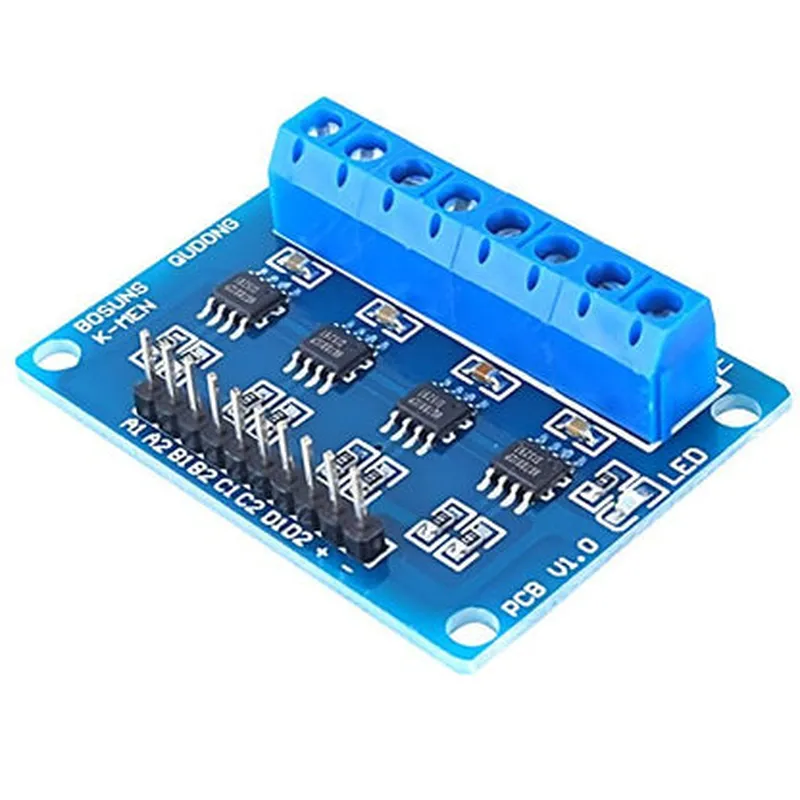
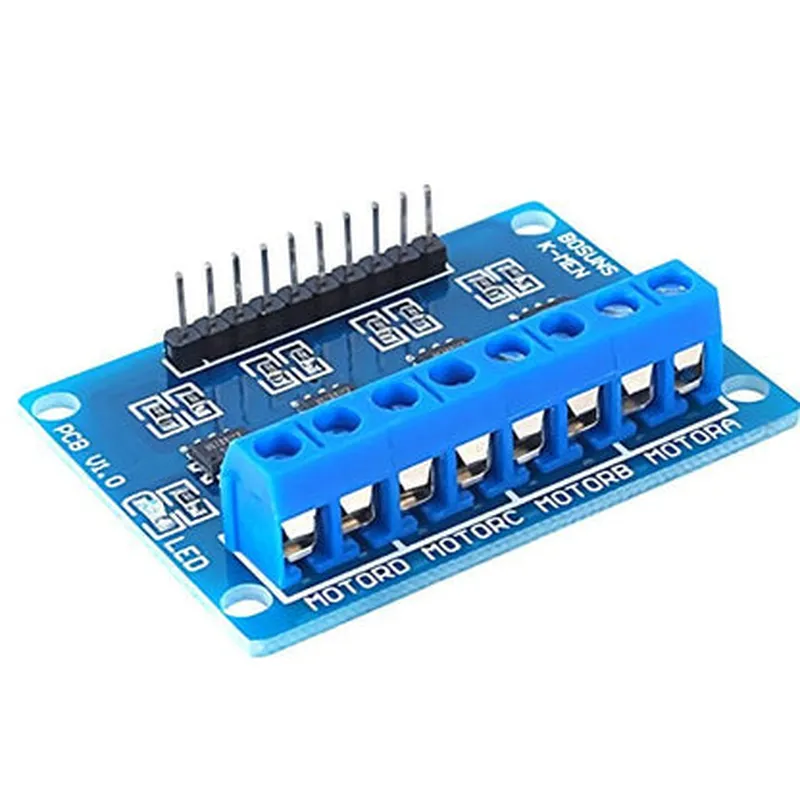
The HG7881 H-Bridge 4CH DC - 2CH Stepper Motor Driver Board is a versatile motor driver board suitable for driving various types of DC motors, including stepper motors. This board features four channels of H-bridge drivers, allowing for bidirectional control of four DC motors or two stepper motors. The board is based on the HG7881 motor driver IC, which provides efficient and reliable motor control.
The HG7881 motor driver board has the following pinouts and connections:
VCC: Power supply input (5V-35V)
 GND: Ground
 ENA (Enable): Enable input for Channel A ( Logic High to enable)
 IN1, IN2: Input control pins for Channel A (Logic High/Low to control motor direction and speed)
 OUT1, OUT2: Output pins for Channel A (connected to motor terminals)
 ENB (Enable): Enable input for Channel B (Logic High to enable)
 IN3, IN4: Input control pins for Channel B (Logic High/Low to control motor direction and speed)
 OUT3, OUT4: Output pins for Channel B (connected to motor terminals)
 EN5 (Enable): Enable input for Channel 5 (Logic High to enable)
 IN5, IN6: Input control pins for Channel 5 (Logic High/Low to control motor direction and speed)
 OUT5, OUT6: Output pins for Channel 5 (connected to motor terminals)
 EN6 (Enable): Enable input for Channel 6 (Logic High to enable)
 IN7, IN8: Input control pins for Channel 6 (Logic High/Low to control motor direction and speed)
 OUT7, OUT8: Output pins for Channel 6 (connected to motor terminals)
Here are a few code examples demonstrating how to use the HG7881 motor driver board in different contexts:
### Example 1: Controlling a DC Motor using an Arduino Board
In this example, we'll use an Arduino board to control a DC motor connected to Channel A of the HG7881 motor driver board.
```c++
const int enA = 2;  // Enable pin for Channel A
const int in1 = 3;  // Input control pin for Channel A
const int in2 = 4;  // Input control pin for Channel A
void setup() {
  pinMode(enA, OUTPUT);
  pinMode(in1, OUTPUT);
  pinMode(in2, OUTPUT);
}
void loop() {
  // Set the motor direction to forward
  digitalWrite(in1, HIGH);
  digitalWrite(in2, LOW);
// Set the motor speed to 50% duty cycle
  analogWrite(enA, 128);
// Set the motor direction to backward
  digitalWrite(in1, LOW);
  digitalWrite(in2, HIGH);
// Set the motor speed to 50% duty cycle
  analogWrite(enA, 128);
### Example 2: Controlling a Stepper Motor using a Raspberry Pi (Python)
In this example, we'll use a Raspberry Pi to control a stepper motor connected to Channels A and B of the HG7881 motor driver board.
```python
import RPi.GPIO as GPIO
import time
# Set up GPIO mode
GPIO.setmode(GPIO.BCM)
# Define the motor pins
ena = 17  # Enable pin for Channel A
in1 = 23  # Input control pin for Channel A
in2 = 24  # Input control pin for Channel A
enb = 20  # Enable pin for Channel B
in3 = 25  # Input control pin for Channel B
in4 = 26  # Input control pin for Channel B
# Set up the motor pins as outputs
GPIO.setup(ena, GPIO.OUT)
GPIO.setup(in1, GPIO.OUT)
GPIO.setup(in2, GPIO.OUT)
GPIO.setup(enb, GPIO.OUT)
GPIO.setup(in3, GPIO.OUT)
GPIO.setup(in4, GPIO.OUT)
# Define the stepper motor sequence
sequence = [[1, 0, 1, 0], [1, 0, 0, 1], [0, 1, 0, 1], [0, 1, 1, 0]]
# Set the motor speed (adjust the delay value as needed)
speed = 0.01
while True:
    for step in sequence:
        GPIO.output(in1, step[0])
        GPIO.output(in2, step[1])
        GPIO.output(in3, step[2])
        GPIO.output(in4, step[3])
        time.sleep(speed)
# Reverse the stepper motor sequence
    sequence.reverse()
```
These examples demonstrate the basic principles of controlling DC motors and stepper motors using the HG7881 motor driver board. You can modify the code to suit your specific project requirements and integrate the motor driver board with other components and sensors as needed.