Stufin
Home Quick Cart Profile

Raspberry Pi 3 ABS Black Case


Buy Now on Stufin

Component Name

Raspberry Pi 3 ABS Black Case
Overview

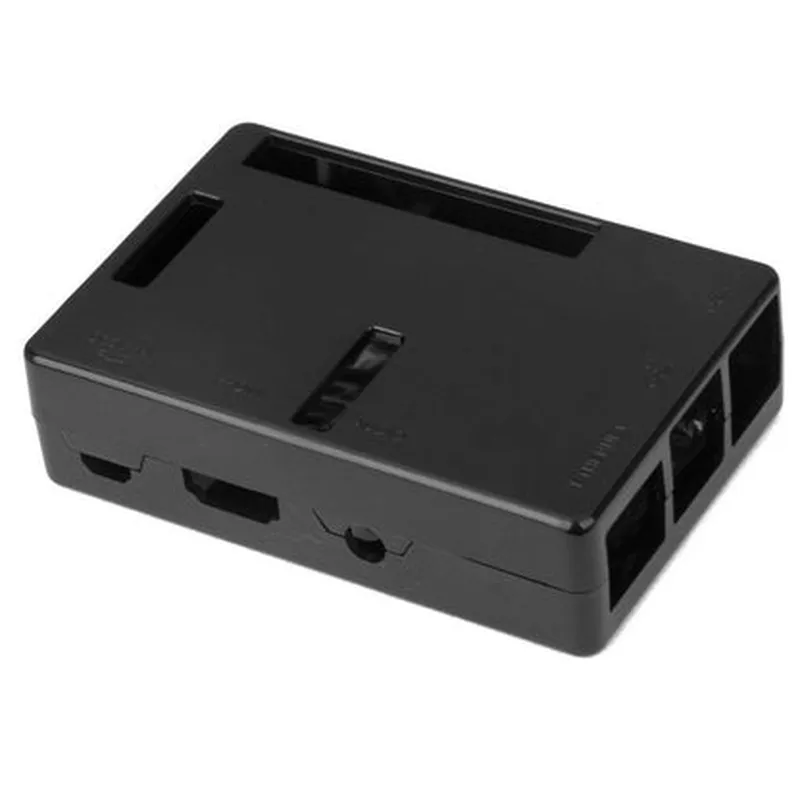
The Raspberry Pi 3 ABS Black Case is a high-quality enclosure designed specifically for the Raspberry Pi 3 Model B and B+ single-board computers. The case provides a compact, protective, and aesthetically pleasing housing for the Raspberry Pi 3, ensuring safe operation and easy integration into various projects and applications.
Functionality

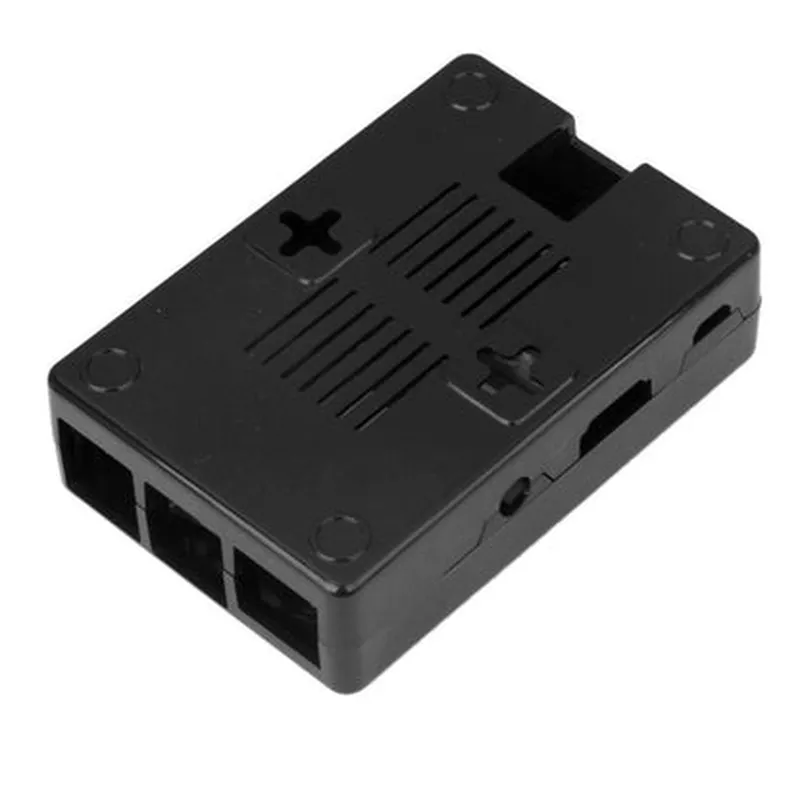
The primary function of the Raspberry Pi 3 ABS Black Case is to provide a secure and durable enclosure for the Raspberry Pi 3 board, protecting it from physical damage, dust, and other environmental factors. The case also facilitates easy access to the board's interfaces, making it simple to connect peripherals and accessories.

Key Features

### Design and Construction

Made from high-quality ABS plastic, ensuring durability and resistance to scratches and cracks

Compact design with precise cutouts for perfect fitment around the Raspberry Pi 3 board

Sleek black finish provides a professional and visually appealing appearance

### Protection and Shielding

Protects the Raspberry Pi 3 board from physical damage, dust, and moisture

Provides electromagnetic interference (EMI) shielding to reduce electromagnetic radiation

### Accessibility and Convenience

Easily accessible ports and interfaces, including USB, Ethernet, HDMI, and power connections

Features a removable top cover for simple installation and maintenance of the Raspberry Pi 3 board

### Thermal Management

Designed to allow for efficient airflow and heat dissipation from the Raspberry Pi 3 board

Helps to prevent overheating and ensures reliable operation

### Compatibility

Specifically designed for Raspberry Pi 3 Model B and B+ single-board computers

Compatible with a wide range of Raspberry Pi 3 projects and applications

Additional Information

The Raspberry Pi 3 ABS Black Case is an excellent choice for various projects, including home automation, media centers, retro game consoles, and IoT applications. Its compact design, ease of use, and protective features make it an ideal enclosure for both technical professionals and hobbyists.

Dimensions

The case measures 98 x 70 x 25 mm (3.86 x 2.76 x 0.98 in) in size, making it compact and easy to integrate into various projects.

Weight

The case weighs approximately 120 grams (4.26 oz), making it lightweight and easy to handle.

Color

The case features a sleek black finish, providing a professional and visually appealing appearance.

Material

The case is made from high-quality ABS plastic, ensuring durability and resistance to scratches and cracks.

Pin Configuration

  • Raspberry Pi 3 ABS Black Case Pinout Guide
  • The Raspberry Pi 3 ABS Black Case is a popular enclosure for the Raspberry Pi 3 single-board computer. The Raspberry Pi 3 has a 40-pin GPIO (General Purpose Input/Output) header that provides access to various interfaces and peripherals. Here's a detailed explanation of each pin, along with guidance on how to connect them:
  • GPIO Pins (1-40)
  • -row 1-
  • 1. 3V3 (Pin 1): 3.3V power output
  • Connect to: Devices requiring 3.3V power supply
  • 2. 5V (Pin 2): 5V power output
  • Connect to: Devices requiring 5V power supply
  • 3. SCL (Pin 3): I2C Clock ( Serial Clock)
  • Connect to: I2C devices (e.g., sensors, displays) for clock signal
  • 4. SDA (Pin 4): I2C Data (Serial Data)
  • Connect to: I2C devices (e.g., sensors, displays) for data transfer
  • 5. GPIO 4 (Pin 5): General Purpose Input/Output
  • Connect to: Custom circuits, sensors, or actuators
  • 6. GPIO 17 (Pin 6): General Purpose Input/Output
  • Connect to: Custom circuits, sensors, or actuators
  • 7. GPIO 23 (Pin 7): General Purpose Input/Output
  • Connect to: Custom circuits, sensors, or actuators
  • 8. GPIO 24 (Pin 8): General Purpose Input/Output
  • Connect to: Custom circuits, sensors, or actuators
  • -row 2-
  • 9. TxD (Pin 9): UART Transmit (Serial Data)
  • Connect to: UART devices (e.g., serial consoles, GPS modules) for transmission
  • 10. RXD (Pin 10): UART Receive (Serial Data)
  • Connect to: UART devices (e.g., serial consoles, GPS modules) for reception
  • 11. GPIO 25 (Pin 11): General Purpose Input/Output
  • Connect to: Custom circuits, sensors, or actuators
  • 12. GPIO 8 (Pin 12): General Purpose Input/Output
  • Connect to: Custom circuits, sensors, or actuators
  • 13. GPIO 7 (Pin 13): General Purpose Input/Output
  • Connect to: Custom circuits, sensors, or actuators
  • 14. GPIO 1 (Pin 14): General Purpose Input/Output
  • Connect to: Custom circuits, sensors, or actuators
  • -row 3-
  • 15. 3V3 (Pin 15): 3.3V power output
  • Connect to: Devices requiring 3.3V power supply
  • 16. GPIO 20 (Pin 16): General Purpose Input/Output
  • Connect to: Custom circuits, sensors, or actuators
  • 17. GPIO 21 (Pin 17): General Purpose Input/Output
  • Connect to: Custom circuits, sensors, or actuators
  • 18. GPIO 5 (Pin 18): General Purpose Input/Output
  • Connect to: Custom circuits, sensors, or actuators
  • 19. GPIO 6 (Pin 19): General Purpose Input/Output
  • Connect to: Custom circuits, sensors, or actuators
  • 20. MOSI (Pin 20): SPI Master Out Slave In
  • Connect to: SPI devices (e.g., displays, memory modules) for data transmission
  • -row 4-
  • 21. MISO (Pin 21): SPI Master In Slave Out
  • Connect to: SPI devices (e.g., displays, memory modules) for data reception
  • 22. SCLK (Pin 22): SPI Clock
  • Connect to: SPI devices (e.g., displays, memory modules) for clock signal
  • 23. CE0 (Pin 23): SPI Chip Enable 0
  • Connect to: SPI devices (e.g., displays, memory modules) for chip selection
  • 24. CE1 (Pin 24): SPI Chip Enable 1
  • Connect to: SPI devices (e.g., displays, memory modules) for chip selection
  • 25. GPIO 26 (Pin 25): General Purpose Input/Output
  • Connect to: Custom circuits, sensors, or actuators
  • -row 5-
  • 26. GPIO 19 (Pin 26): General Purpose Input/Output
  • Connect to: Custom circuits, sensors, or actuators
  • 27. GPIO 13 (Pin 27): General Purpose Input/Output
  • Connect to: Custom circuits, sensors, or actuators
  • 28. GPIO 6 (Pin 28): General Purpose Input/Output
  • Connect to: Custom circuits, sensors, or actuators
  • 29. GPIO 5 (Pin 29): General Purpose Input/Output
  • Connect to: Custom circuits, sensors, or actuators
  • 30. GPIO 11 (Pin 30): General Purpose Input/Output
  • Connect to: Custom circuits, sensors, or actuators
  • -row 6-
  • 31. GPIO 9 (Pin 31): General Purpose Input/Output
  • Connect to: Custom circuits, sensors, or actuators
  • 32. GPIO 10 (Pin 32): General Purpose Input/Output
  • Connect to: Custom circuits, sensors, or actuators
  • 33. GPIO 14 (Pin 33): General Purpose Input/Output
  • Connect to: Custom circuits, sensors, or actuators
  • 34. GPIO 15 (Pin 34): General Purpose Input/Output
  • Connect to: Custom circuits, sensors, or actuators
  • 35. GPIO 18 (Pin 35): General Purpose Input/Output
  • Connect to: Custom circuits, sensors, or actuators
  • 36. GPIO 22 (Pin 36): General Purpose Input/Output
  • Connect to: Custom circuits, sensors, or actuators
  • -row 7-
  • 37. GPIO 23 (Pin 37): General Purpose Input/Output
  • Connect to: Custom circuits, sensors, or actuators
  • 38. GPIO 24 (Pin 38): General Purpose Input/Output
  • Connect to: Custom circuits, sensors, or actuators
  • 39. GPIO 25 (Pin 39): General Purpose Input/Output
  • Connect to: Custom circuits, sensors, or actuators
  • 40. GND (Pin 40): Ground
  • Connect to: Grounding points on peripherals or custom circuits
  • Important Notes:
  • Make sure to connect the pins correctly to avoid damaging the Raspberry Pi or connected devices.
  • Use the correct voltage levels and current ratings when connecting devices to the GPIO pins.
  • Refer to the Raspberry Pi documentation and official resources for more information on pin usage and limitations.
  • This comprehensive pinout guide should help you understand the various functions and connections available on the Raspberry Pi 3 ABS Black Case.

Code Examples

Raspberry Pi 3 ABS Black Case Documentation
Overview
The Raspberry Pi 3 ABS Black Case is a protective enclosure designed specifically for the Raspberry Pi 3 single-board computer. The case is made of high-quality ABS plastic and provides a secure and stylish way to house your Raspberry Pi 3 project.
Features
Compatible with Raspberry Pi 3 model B and B+
 ABS plastic construction for durability and resistance to scratches and drops
 Easy to assemble and disassemble for access to GPIO pins and other components
 Ventilation holes for improved airflow and heat dissipation
 Sleek and compact design for a professional look
Getting Started
To get started with the Raspberry Pi 3 ABS Black Case, simply assemble the case according to the manufacturer's instructions and insert your Raspberry Pi 3 board. Connect power, keyboard, mouse, and any other desired peripherals, and you're ready to start coding!
Code Examples
### Example 1: Basic Python Script to Blink an LED (using GPIO)
This example demonstrates how to use the Raspberry Pi 3's GPIO pins to control an LED connected to the board.
Hardware Requirements:
Raspberry Pi 3
 Raspberry Pi 3 ABS Black Case
 Breadboard
 LED
 1 k resistor
 Jumper wires
Software Requirements:
Raspbian OS (latest version)
 Python 3.x (pre-installed on Raspbian)
Code:
```python
import RPi.GPIO as GPIO
import time
# Set up GPIO mode
GPIO.setmode(GPIO.BCM)
# Define LED pin
LED_PIN = 17
# Set up LED pin as output
GPIO.setup(LED_PIN, GPIO.OUT)
while True:
    # Turn LED on
    GPIO.output(LED_PIN, GPIO.HIGH)
    time.sleep(1)
    # Turn LED off
    GPIO.output(LED_PIN, GPIO.LOW)
    time.sleep(1)
```
### Example 2: Home Automation using IFTTT and Python (using Wi-Fi)
This example demonstrates how to use the Raspberry Pi 3's Wi-Fi capabilities to trigger an IFTTT (If This Then That) applet, which can control various smart devices in your home.
Hardware Requirements:
Raspberry Pi 3
 Raspberry Pi 3 ABS Black Case
 Wi-Fi router
 Smart device (e.g., Philips Hue bulb)
Software Requirements:
Raspbian OS (latest version)
 Python 3.x (pre-installed on Raspbian)
 IFTTT app (created and configured to control your smart device)
Code:
```python
import requests
# Set up IFTTT API key and event name
IFTTT_API_KEY = "YOUR_API_KEY"
EVENT_NAME = "turn_on_living_room_light"
while True:
    # Trigger IFTTT applet
    response = requests.post(f"https://maker.ifttt.com/trigger/{EVENT_NAME}/with/key/{IFTTT_API_KEY}")
    if response.status_code == 200:
        print("IFTTT applet triggered successfully!")
    else:
        print("Error triggering IFTTT applet:", response.text)
    time.sleep(60)  # Wait 1 minute before triggering again
```
These examples demonstrate the versatility and ease of use of the Raspberry Pi 3 ABS Black Case. With its compact design and robust construction, this case is perfect for a wide range of IoT projects, from simple automation scripts to complex machine learning applications.