Stufin
Home Quick Cart Profile

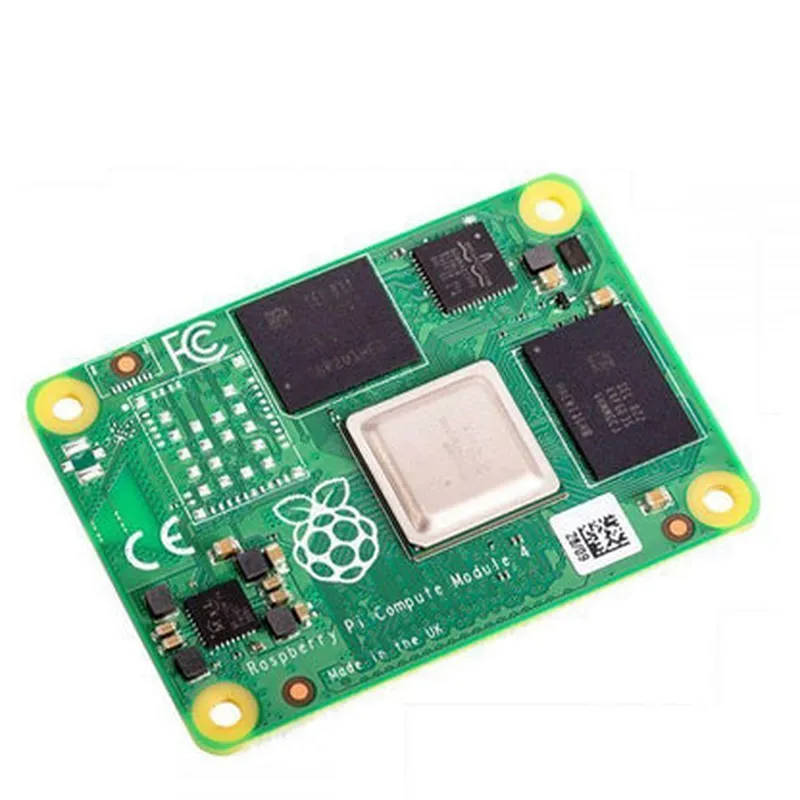
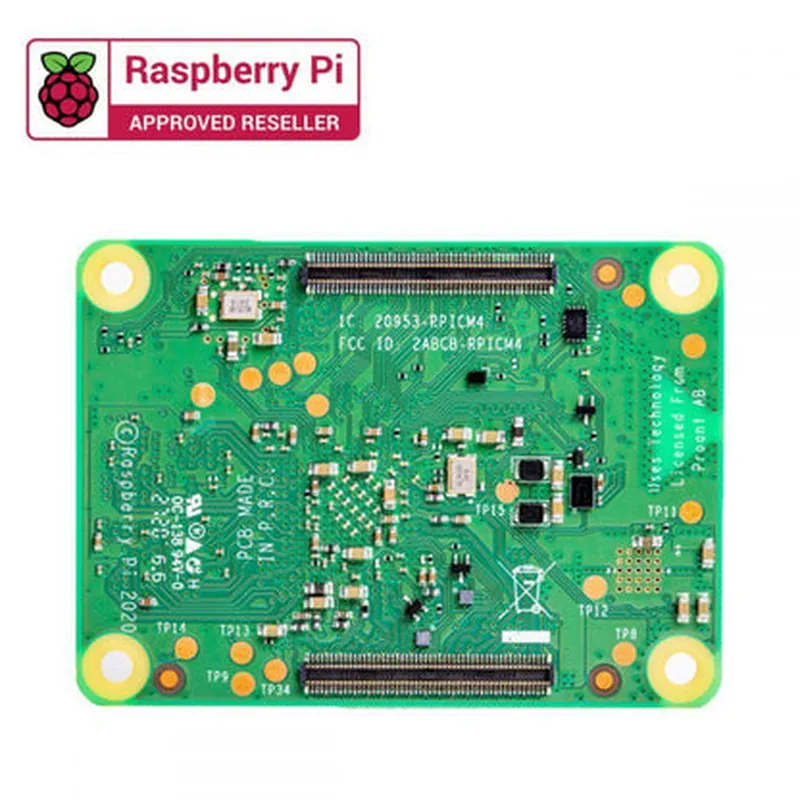
Raspberry Pi Compute Module 4 with 1GB RAM 32GB eMMC

Buy Now on Stufin

Power consumption

<5W (typical), <10W (max)

Support for USB Power Delivery (PD)

Integrated power management IC (PMIC) for efficient power delivery

  • Operating System:

Compatible with Raspberry Pi OS (based on Linux)

Supports other Linux distributions, such as Ubuntu and openSUSE

Potential for Windows 10 IoT Enterprise and other operating systems with additional development

  • Thermal Management:

Operating temperature range

0C to 80C

Thermal interface material (TIM) for efficient heat dissipation

  • Security:

Secure boot process with encryption and signing

Support for TPM (Trusted Platform Module) and cryptographic accelerators

  • Certifications and Compliance:

CE, FCC, and TELEC certifications

Compliance with RoHS and REACH directives

Conclusion

The Raspberry Pi Compute Module 4 with 1GB RAM and 32GB eMMC is a powerful and feature-rich embedded system module, ideal for a wide range of industrial and commercial applications. Its compact size, versatility, and high-performance capabilities make it an attractive solution for OEMs, engineers, and IoT developers looking to create innovative and reliable products.

Pin Configuration

  • Raspberry Pi Compute Module 4 with 1GB RAM and 32GB eMMC Pinout Guide
  • The Raspberry Pi Compute Module 4 (CM4) is a compact, powerful, and highly customizable system-on-module (SoM) designed for industrial and commercial applications. This guide provides a detailed explanation of the pins on the CM4, including their functions, and how to connect them.
  • Note: The CM4 has a total of 228 pins, but not all of them are available for use. Some pins are reserved for internal use or have special functions. This guide focuses on the available pins and their uses.
  • Pin Structure:
  • The CM4 has a DDR3-style SODIMM connector with 228 pins, divided into four rows of 57 pins each. The pins are numbered from 1 to 57 on the top row, and 58 to 114 on the second row, and so on.
  • Pinout Breakdown:
  • Here's a point-by-point explanation of the pins on the Raspberry Pi Compute Module 4:
  • Top Row (Pins 1-57):
  • 1. 3V3 Power: 3.3V power supply pin.
  • 2. GPIO0: General-purpose input/output pin, also used as a boot mode selection pin.
  • 3. GPIO1: General-purpose input/output pin.
  • 4. GPIO2: General-purpose input/output pin, also used as an I2C clock pin.
  • 5. GPIO3: General-purpose input/output pin, also used as an I2C data pin.
  • 6. GPIO4: General-purpose input/output pin.
  • 7. GPIO5: General-purpose input/output pin.
  • 8. GPIO6: General-purpose input/output pin.
  • 9. GPIO7: General-purpose input/output pin.
  • 10. GPIO8: General-purpose input/output pin.
  • 11. GPIO9: General-purpose input/output pin.
  • 12. GPIO10: General-purpose input/output pin.
  • 13. GPIO11: General-purpose input/output pin.
  • 14. GPIO12: General-purpose input/output pin.
  • 15. GPIO13: General-purpose input/output pin.
  • 16. GPIO14: General-purpose input/output pin, also used as a UART transmit pin.
  • 17. GPIO15: General-purpose input/output pin, also used as a UART receive pin.
  • 18. GPIO16: General-purpose input/output pin.
  • 19. GPIO17: General-purpose input/output pin.
  • 20. GPIO18: General-purpose input/output pin.
  • 21. GPIO19: General-purpose input/output pin.
  • 22. GPIO20: General-purpose input/output pin.
  • 23. GPIO21: General-purpose input/output pin.
  • 24. GPIO22: General-purpose input/output pin.
  • 25. GPIO23: General-purpose input/output pin.
  • 26. GPIO24: General-purpose input/output pin.
  • 27. GPIO25: General-purpose input/output pin.
  • 28. GPIO26: General-purpose input/output pin.
  • 29. GPIO27: General-purpose input/output pin.
  • 30. GPIO28: General-purpose input/output pin.
  • 31. GPIO29: General-purpose input/output pin.
  • 32. GPIO30: General-purpose input/output pin.
  • 33. GPIO31: General-purpose input/output pin.
  • 34. GPIO32: General-purpose input/output pin.
  • 35. GPIO33: General-purpose input/output pin.
  • 36. GPIO34: General-purpose input/output pin.
  • 37. GPIO35: General-purpose input/output pin.
  • 38. CAM0_DATA0: Camera interface data pin 0.
  • 39. CAM0_DATA1: Camera interface data pin 1.
  • 40. CAM0_DATA2: Camera interface data pin 2.
  • 41. CAM0_DATA3: Camera interface data pin 3.
  • 42. CAM0_CLOCK: Camera interface clock pin.
  • 43. CAM0_DATA4: Camera interface data pin 4.
  • 44. CAM0_DATA5: Camera interface data pin 5.
  • 45. CAM0_DATA6: Camera interface data pin 6.
  • 46. CAM0_DATA7: Camera interface data pin 7.
  • 47. CAM0_PCLK: Camera interface pixel clock pin.
  • 48. CAM0_VSYNC: Camera interface vertical sync pin.
  • 49. CAM0_HSYNC: Camera interface horizontal sync pin.
  • 50. CAM0_XCLK: Camera interface XCLK pin.
  • 51. Reserved: Reserved pin, do not use.
  • 52. Reserved: Reserved pin, do not use.
  • 53. Reserved: Reserved pin, do not use.
  • 54. Reserved: Reserved pin, do not use.
  • 55. Reserved: Reserved pin, do not use.
  • 56. Reserved: Reserved pin, do not use.
  • 57. Reserved: Reserved pin, do not use.
  • Second Row (Pins 58-114):
  • 58. GND: Ground pin.
  • 59. GPIO36: General-purpose input/output pin.
  • 60. GPIO37: General-purpose input/output pin.
  • 61. GPIO38: General-purpose input/output pin.
  • 62. GPIO39: General-purpose input/output pin.
  • 63. GPIO40: General-purpose input/output pin.
  • 64. GPIO41: General-purpose input/output pin.
  • 65. GPIO42: General-purpose input/output pin.
  • 66. GPIO43: General-purpose input/output pin.
  • 67. GPIO44: General-purpose input/output pin.
  • 68. GPIO45: General-purpose input/output pin.
  • 69. GPIO46: General-purpose input/output pin.
  • 70. GPIO47: General-purpose input/output pin.
  • 71. GPIO48: General-purpose input/output pin.
  • 72. GPIO49: General-purpose input/output pin.
  • 73. GPIO50: General-purpose input/output pin.
  • 74. GPIO51: General-purpose input/output pin.
  • 75. GPIO52: General-purpose input/output pin.
  • 76. GPIO53: General-purpose input/output pin.
  • 77. GPIO54: General-purpose input/output pin.
  • 78. GPIO55: General-purpose input/output pin.
  • 79. CAM1_DATA0: Camera interface data pin 0 (second camera interface).
  • 80. CAM1_DATA1: Camera interface data pin 1 (second camera interface).
  • 81. CAM1_DATA2: Camera interface data pin 2 (second camera interface).
  • 82. CAM1_DATA3: Camera interface data pin 3 (second camera interface).
  • 83. CAM1_CLOCK: Camera interface clock pin (second camera interface).
  • 84. CAM1_DATA4: Camera interface data pin 4 (second camera interface).
  • 85. CAM1_DATA5: Camera interface data pin 5 (second camera interface).
  • 86. CAM1_DATA6: Camera interface data pin 6 (second camera interface).
  • 87. CAM1_DATA7: Camera interface data pin 7 (second camera interface).
  • 88. CAM1_PCLK: Camera interface pixel clock pin (second camera interface).
  • 89. CAM1_VSYNC: Camera interface vertical sync pin (second camera interface).
  • 90. CAM1_HSYNC: Camera interface horizontal sync pin (second camera interface).
  • 91. CAM1_XCLK: Camera interface XCLK pin (second camera interface).
  • 92. Reserved: Reserved pin, do not use.
  • 93. Reserved: Reserved pin, do not use.
  • 94. Reserved: Reserved pin, do not use.
  • 95. Reserved: Reserved pin, do not use.
  • 96. Reserved: Reserved pin, do not use.
  • 97. Reserved: Reserved pin, do not use.
  • 98. Reserved: Reserved pin, do not use.
  • 99. Reserved: Reserved pin, do not use.
  • 100. Reserved: Reserved pin, do not use.
  • 101. Reserved: Reserved pin, do not use.
  • 102. Reserved: Reserved pin, do not use.
  • 103. Reserved: Reserved pin, do not use.
  • 104. Reserved: Reserved pin, do not use.
  • 105. Reserved: Reserved pin, do not use.
  • 106. Reserved: Reserved pin, do not use.
  • 107. Reserved: Reserved pin, do not use.
  • 108. Reserved: Reserved pin, do not use.
  • 109. Reserved: Reserved pin, do not use.
  • 110. Reserved: Reserved pin, do not use.
  • 111. Reserved: Reserved pin, do not use.
  • 112. Reserved: Reserved pin, do not use.
  • 113. Reserved: Reserved pin, do not use.
  • 114. Reserved: Reserved pin, do not use.
  • Third Row (Pins 115-171):
  • 115. GND: Ground pin.
  • 116. SDCARD_CLK: SD card clock pin.
  • 117. SDCARD_CMD: SD card command pin.
  • 118. SDCARD_DATA0: SD card data pin 0.
  • 119. SDCARD_DATA1: SD card data pin 1.
  • 120. SDCARD_DATA2: SD card data pin 2.
  • 121. SDCARD_DATA3: SD card data pin 3.
  • 122. UART0_TXD: UART transmit pin 0.
  • 123. UART0_RXD: UART receive pin 0.
  • 124. UART1_TXD: UART transmit pin 1.
  • 125. UART1_RXD: UART receive pin 1.
  • 126. SPI0_CE0_N: SPI chip select 0, active low.
  • 127. SPI0_CE1_N: SPI chip select 1, active low.
  • 128. SPI0_MISO: SPI master in, slave out pin.
  • 129. SPI0_MOSI: SPI master out, slave in pin.
  • 130. SPI0_SCLK: SPI clock pin.
  • 131. I2C0_SDA: I2C data pin 0.
  • 132. I2C0_SCL: I2C clock pin 0.
  • 133. I2C1_SDA: I2C data pin 1.
  • 134. I2C1_SCL: I2C clock pin 1.
  • 135. PWM0: PWM output pin 0.
  • 136. PWM1: PWM output pin 1.
  • 137. Reserved: Reserved pin, do not use.
  • 138. Reserved: Reserved pin, do not use.
  • 139. Reserved: Reserved pin, do not use.
  • 140. Reserved: Reserved pin, do not use.
  • 141. Reserved: Reserved pin, do not use.
  • 142. Reserved: Reserved pin, do not use.
  • 143. Reserved: Reserved pin, do not use.
  • 144. Reserved: Reserved pin, do not use.
  • 145. Reserved: Reserved pin, do not use.
  • 146. Reserved: Reserved pin, do not use.
  • 147. Reserved: Reserved pin, do not use.
  • 148. Reserved: Reserved pin, do not use.
  • 149. Reserved: Reserved pin, do not use.
  • 150. Reserved: Reserved pin, do not use.
  • 151. Reserved: Reserved pin, do not use.
  • 152. Reserved: Reserved pin, do not use.
  • 153. Reserved: Reserved pin, do not use.
  • 154. Reserved: Reserved pin, do not use.
  • 155. Reserved: Reserved pin, do not use.
  • 156. Reserved: Reserved pin, do not use.
  • 157. Reserved: Reserved pin, do not use.
  • 158. Reserved: Reserved pin, do not use.
  • 159. Reserved: Reserved pin, do not use.
  • 160. Reserved: Reserved pin, do not use.
  • 161. Reserved: Reserved pin, do not use.
  • 162. Reserved: Reserved pin, do not use.
  • 163. Reserved: Reserved pin, do not use.
  • 164. Reserved: Reserved pin, do not use.
  • 165. Reserved: Reserved pin, do not use.
  • 166. Reserved: Reserved pin, do not use.
  • 167. Reserved: Reserved pin, do not use.
  • 168. Reserved: Reserved pin, do not use.
  • 169. Reserved: Reserved pin, do not use.
  • 170. Reserved: Reserved pin, do not use.
  • 171. Reserved: Reserved pin, do not use.
  • Fourth Row (Pins 172-228):
  • 172. GND: Ground pin.
  • 173. VDD_1V8: 1.8V power supply pin.
  • 174. VDD_3V3: 3.3V power supply pin.
  • 175. VDD_IO: I/O power supply pin.
  • 176. _reserved: Reserved pin, do not use.
  • 177. _reserved: Reserved pin, do not use.
  • 178. _reserved: Reserved pin, do not use.
  • 179. _reserved: Reserved pin, do not use.
  • 180. _reserved: Reserved pin, do not use.
  • 181. _reserved: Reserved pin, do not use.
  • 182. _reserved: Reserved pin, do not use.
  • 183. _reserved: Reserved pin, do not use.
  • 184. _reserved: Reserved pin, do not use.
  • 185. _reserved: Reserved pin, do not use.
  • 186. _reserved: Reserved pin, do not use.
  • 187. _reserved: Reserved pin, do not use.
  • 188. _reserved: Reserved pin, do not use.
  • 189. _reserved: Reserved pin, do not use.
  • 190. _reserved: Reserved pin, do not use.
  • 191. _reserved: Reserved pin, do not use.
  • 192. _reserved: Reserved pin, do not use.
  • 193. _reserved: Reserved pin, do not use.
  • 194. _reserved: Reserved pin, do not use.
  • 195. _reserved: Reserved pin, do not use.
  • 196. _reserved: Reserved pin, do not use.
  • 197. _reserved: Reserved pin, do not use.
  • 198. _reserved: Reserved pin, do not use.
  • 199. _reserved: Reserved pin, do not use.
  • 200. _reserved: Reserved pin, do not use.
  • 201. _reserved: Reserved pin, do not use.
  • 202. _reserved: Reserved pin, do not use.
  • 203. _reserved: Reserved pin, do not use.
  • 204. _reserved: Reserved pin, do not use.
  • 205. _reserved: Reserved pin, do not use.
  • 206. _reserved: Reserved pin, do not use.
  • 207. _reserved: Reserved pin, do not use.
  • 208. _reserved: Reserved pin, do not use.
  • 209. _reserved: Reserved pin, do not use.
  • 210. _reserved: Reserved pin, do not use.
  • 211. _reserved: Reserved pin, do not use.
  • 212. _reserved: Reserved pin, do not use.
  • 213. _reserved: Reserved pin, do not use.
  • 214. _reserved: Reserved pin, do not use.
  • 215. _reserved: Reserved pin, do not use.
  • 216. _reserved: Reserved pin, do not use.
  • 217. _reserved: Reserved pin, do not use.
  • 218. _reserved: Reserved pin, do not use.
  • 219. _reserved: Reserved pin, do not use.
  • 220. _reserved: Reserved pin, do not use.
  • 221. _reserved: Reserved pin, do not use.
  • 222. _reserved: Reserved pin, do not use.
  • 223. _reserved: Reserved pin, do not use.
  • 224. _reserved: Reserved pin, do not use.
  • 225. _reserved: Reserved pin, do not use.
  • 226. _reserved: Reserved pin, do not use.
  • 227. _reserved: Reserved pin, do not use.
  • 228. _reserved: Reserved pin, do not use.
  • Connecting the Pins:
  • When connecting the pins on the Raspberry Pi Compute Module 4, ensure that you follow proper soldering and wiring practices to avoid damaging the module or other components. Here are some general guidelines:
  • Use a soldering iron with a fine tip to connect wires to the pins.
  • Use a suitable gauge wire (e.g., 30 AWG) to connect the pins to your circuit or module.
  • Ensure that the wires are long enough to reach the desired connections without putting excessive strain on the pins.
  • Use a voltage regulator or power supply that can provide the required voltage and current for your application.
  • Always double-check your connections to ensure that you have connected the correct pins to the correct components or circuits.
  • Remember to consult the official Raspberry Pi documentation and datasheets for more information on pinouts, specifications, and guidelines for using the Raspberry Pi Compute Module 4.

Code Examples

Raspberry Pi Compute Module 4 with 1GB RAM 32GB eMMC Documentation
Overview
The Raspberry Pi Compute Module 4 (CM4) with 1GB RAM and 32GB eMMC is a powerful and compact system-on-module (SoM) designed for industrial and commercial applications. It is a cost-effective and highly customizable solution for developing IoT projects, robots, and other embedded systems.
Features
Broadcom BCM2711B0 quad-core Cortex-A72 CPU
 1GB LPDDR4-2400 SDRAM
 32GB eMMC flash storage
 Dual-band 802.11ac wireless LAN and Bluetooth 5.0
 Gigabit Ethernet
 HDMI 2.0a, USB 3.0, and UART interfaces
 Supports multiple operating systems, including Raspbian, Ubuntu, and Yocto Project
Getting Started
To get started with the Raspberry Pi Compute Module 4, you'll need:
A Raspberry Pi Compute Module 4 with 1GB RAM 32GB eMMC
 A compatible carrier board (e.g., Raspberry Pi IO Board or a custom design)
 Power supply (5V, 2.5A recommended)
 MicroSD card (for booting and additional storage)
 HDMI display and peripherals (optional)
Code Examples
### Example 1: Python Script for Reading Temperature and Humidity using DHT11 Sensor
In this example, we'll use the Raspberry Pi Compute Module 4 to read temperature and humidity data from a DHT11 sensor using Python.
Hardware Requirements
DHT11 temperature and humidity sensor
 Breadboard and jumper wires
Software Requirements
Raspbian operating system
 Python 3.x
 DHT11 library for Python
Code
```python
import Adafruit_DHT
import time
# Set up DHT11 sensor
dht_sensor = Adafruit_DHT.DHT11
# Set pin for DHT11 data pin
dht_pin = 17
while True:
    # Read temperature and humidity data
    humidity, temperature = Adafruit_DHT.read_retry(dht_sensor, dht_pin)
# Print data to console
    print("Temperature: {:.1f}C, Humidity: {:.1f}%".format(temperature, humidity))
# Wait 1 second before taking the next reading
    time.sleep(1)
```
### Example 2: C++ Program for Controlling LEDs using GPIO
In this example, we'll use the Raspberry Pi Compute Module 4 to control LEDs using C++ and the WiringPi library.
Hardware Requirements
LEDs (2-3)
 Resistors (2-3)
 Breadboard and jumper wires
Software Requirements
Raspbian operating system
 WiringPi library (install using `sudo apt-get install wiringpi`)
Code
```cpp
#include <wiringPi.h>
#define LED1 17 // GPIO pin for LED 1
#define LED2 23 // GPIO pin for LED 2
#define LED3 24 // GPIO pin for LED 3
int main() {
    wiringPiSetup();
pinMode(LED1, OUTPUT);
    pinMode(LED2, OUTPUT);
    pinMode(LED3, OUTPUT);
while (1) {
        // Toggle LEDs
        digitalWrite(LED1, HIGH);
        delay(500);
        digitalWrite(LED1, LOW);
        delay(500);
digitalWrite(LED2, HIGH);
        delay(500);
        digitalWrite(LED2, LOW);
        delay(500);
digitalWrite(LED3, HIGH);
        delay(500);
        digitalWrite(LED3, LOW);
        delay(500);
    }
return 0;
}
```
Compile the code using `gcc` and run it using `./led_control`. This program will toggle the LEDs connected to GPIO pins 17, 23, and 24.
These examples demonstrate the versatility of the Raspberry Pi Compute Module 4 in various IoT applications. With its impressive performance, compact design, and extensive software support, the CM4 is an ideal choice for developing innovative projects.