

Stufin
Home Quick Cart Profile

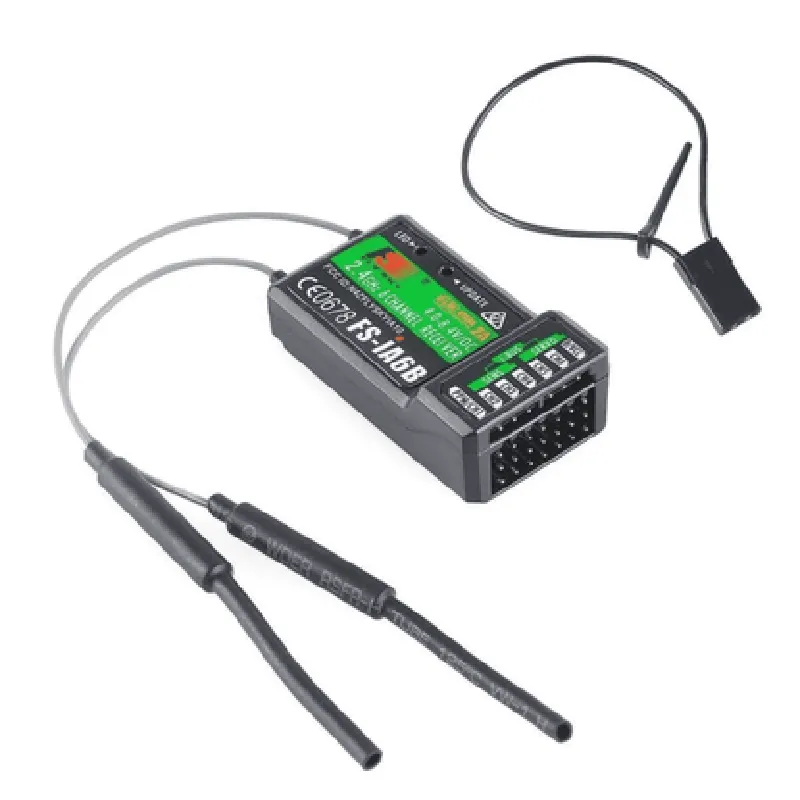
FlySky FS-IA6B RF 2.4GHz 6CH PPM Output with iBus Port Receiver

Buy Now on Stufin

Component Name

FlySky FS-IA6B RF 2.4GHz 6CH PPM Output with iBus Port Receiver

Overview

The FlySky FS-IA6B is a 2.4GHz, 6-channel radio frequency (RF) receiver designed for use in remote-controlled (RC) models, drones, and other IoT applications. This compact receiver features a PPM (Pulse Position Modulation) output and an iBus port, making it an ideal choice for a wide range of applications.

Functionality

The FlySky FS-IA6B receiver is designed to receive radio frequency signals from a compatible transmitter and transmit the received data to a connected device, such as a flight controller, servo, or other IoT module. The receiver's primary function is to convert the RF signal into a format that can be understood by the connected device, enabling precise control and communication.

Key Features

  • Frequency: 2.4GHz, reducing interference from other devices and providing a reliable connection.
  • Channels: 6 channels, allowing for control of multiple devices or functions simultaneously.
  • PPM Output: Provides a standardized PPM signal output, compatible with most flight controllers and servo systems.
  • iBus Port: Features an integrated iBus port, enabling communication with iBus-compatible devices, such as flight controllers and sensors.
  • High-Sensitivity Receiver: Ensures reliable signal reception and accurate data transmission, even in noisy or interference-prone environments.
  • Compact Design: Measuring only 24.5 x 17.5 x 6.5 mm, the receiver is ideal for use in small spaces or weight-critical applications.
  • Low Power Consumption: Operates on a low power consumption of 15mA, minimizing the impact on battery life.
  • compatibility: Compatible with FlySky transmitters and other iBus-compatible devices.

Technical Specifications

Operating Frequency

2.4GHz

Channel Count

6

Output

PPM (Pulse Position Modulation)

iBus Port

Yes

Receiver Sensitivity

-95dBm

Operating Voltage

3.3V - 5V

Power Consumption

15mA

Dimensions

24.5 x 17.5 x 6.5 mm

Weight

2.5g

Applications

The FlySky FS-IA6B receiver is suitable for use in a variety of IoT applications, including

Remote-controlled models (aircraft, cars, boats, etc.)

Drones and unmanned aerial vehicles (UAVs)

Robotics and autonomous systems

Industrial automation and control systems

IoT projects and prototypes

Conclusion

The FlySky FS-IA6B RF 2.4GHz 6CH PPM Output with iBus Port Receiver is a reliable and versatile component ideal for use in IoT applications requiring precise control and communication. Its compact design, low power consumption, and compatibility with iBus devices make it an attractive choice for a wide range of projects.

Pin Configuration

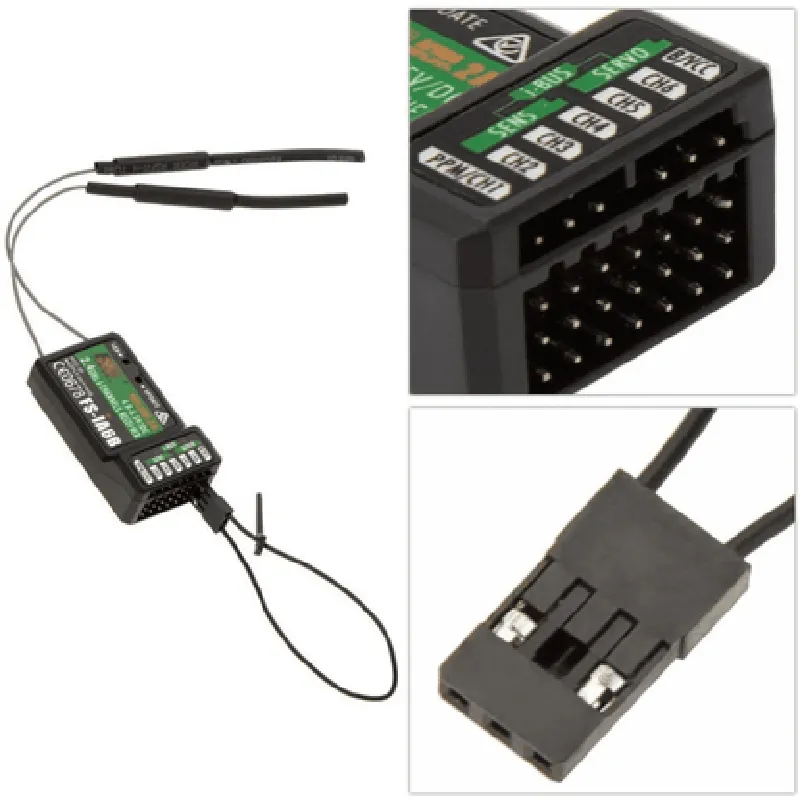
  • FlySky FS-IA6B RF 2.4GHz 6CH PPM Output with iBus Port Receiver Pinout Guide
  • The FlySky FS-IA6B receiver is a 6-channel RF receiver with a 2.4GHz frequency band, PPM output, and iBus port. It is commonly used in RC models, drones, and other IoT applications. This guide provides a detailed explanation of each pin on the receiver, along with connection instructions.
  • Pinout:
  • 1. VCC (Red wire)
  • Function: Power supply voltage (3.5-6V)
  • Connection: Connect to a power source, such as a battery or a voltage regulator output.
  • 2. GND (Black wire)
  • Function: Ground connection
  • Connection: Connect to the ground of the power source and other components in the system.
  • 3. PPM (Yellow wire)
  • Function: PPM (Pulse Position Modulation) output signal
  • Connection: Connect to the input of a flight controller, servo controller, or other devices that accept PPM signals.
  • 4. iBus (White wire)
  • Function: iBus serial communication port
  • Connection: Connect to an iBus-compatible device, such as a flight controller or telemetry module.
  • 5. CH1-CH6 (Brown, Orange, Yellow, Green, Blue, and Red wires)
  • Function: Channel 1-6 outputs (analog signals)
  • Connection: Connect to corresponding servo or actuator inputs. Each channel can control a single servo or actuator.
  • Note: Channel 1 is usually assigned to the throttle, Channel 2 to the aileron, Channel 3 to the elevator, and so on.
  • Connection Structure:
  • To connect the FlySky FS-IA6B receiver to a flight controller or other devices:
  • 1. Connect the VCC (Red) wire to the power source (e.g., a 5V voltage regulator output).
  • 2. Connect the GND (Black) wire to the ground of the power source and other components in the system.
  • 3. Connect the PPM (Yellow) wire to the PPM input of the flight controller or servo controller.
  • 4. Connect the iBus (White) wire to the iBus input of the flight controller or telemetry module (if used).
  • 5. Connect the CH1-CH6 (Brown, Orange, Yellow, Green, Blue, and Red) wires to the corresponding servo or actuator inputs.
  • Important Notes:
  • Ensure proper power supply and ground connections to avoid damage to the receiver and other components.
  • Use a suitable power source with a voltage range of 3.5-6V to power the receiver.
  • Verify the compatibility of the iBus port with the connected device before making connections.
  • When using the PPM output, ensure that the connected device is configured to accept PPM signals.
  • Consult the datasheets and user manuals of connected devices for specific connection and configuration instructions.

Code Examples

FlySky FS-IA6B RF 2.4GHz 6CH PPM Output with iBus Port Receiver Documentation
Overview
The FlySky FS-IA6B is a 2.4GHz 6-channel receiver featuring PPM output and an iBus port. It is designed for use with FlySky transmitters and is compatible with a wide range of devices, including drones, robots, and other IoT projects.
Technical Specifications
Frequency: 2.4GHz
 Channels: 6
 Output: PPM (Pulse Position Modulation)
 iBus Port: Yes
 Operating Voltage: 4.0V - 8.4V
 Current Consumption: <20mA
 Antenna: Integrated PCB antenna
 Dimensions: 32x20x10mm
Connection Diagram
The FlySky FS-IA6B receiver has the following connections:
VCC: Power supply (4.0V - 8.4V)
 GND: Ground
 PPM: PPM output signal
 iBus: iBus port for serial communication
 CH1-CH6: Individual channel output signals (optional)
Code Examples
### Example 1: Using the FlySky FS-IA6B with an Arduino Board
This example demonstrates how to use the FlySky FS-IA6B receiver with an Arduino board to control a servo motor.
```cpp
#include <Servo.h>
Servo myServo;  // Create a servo object
void setup() {
  myServo.attach(9);  // Attach the servo to digital pin 9
}
void loop() {
  int ppmSignal = pulseIn(2, HIGH, 25000);  // Read the PPM signal from digital pin 2
  int servoValue = map(ppmSignal, 1000, 2000, 0, 180);  // Map the PPM signal to a servo value
  myServo.write(servoValue);  // Set the servo position
  delay(20);
}
```
### Example 2: Using the FlySky FS-IA6B with a Raspberry Pi (Python)
This example demonstrates how to use the FlySky FS-IA6B receiver with a Raspberry Pi to read the iBus serial data and control a GPIO pin.
```python
import serial
import RPi.GPIO as GPIO
# Set up the serial connection
ser = serial.Serial('/dev/ttyUSB0', 115200)
# Set up the GPIO pin
GPIO.setmode(GPIO.BCM)
GPIO.setup(17, GPIO.OUT)
while True:
    # Read the iBus data
    ibus_data = ser.readline().decode().strip()
    channel_values = ibus_data.split(',')
# Control the GPIO pin based on channel 1 value
    if int(channel_values[0]) > 1500:
        GPIO.output(17, GPIO.HIGH)
    else:
        GPIO.output(17, GPIO.LOW)
```
### Example 3: Using the FlySky FS-IA6B with a ESP32 Board (MicroPython)
This example demonstrates how to use the FlySky FS-IA6B receiver with an ESP32 board to read the PPM signal and control an LED.
```python
import machine
import utime
# Set up the PPM input pin
ppm_pin = machine.Pin(32, machine.Pin.IN)
while True:
    # Read the PPM signal
    ppm_signal = machine.time_pulse_us(ppm_pin, 1, 25000)
# Control the LED based on the PPM signal value
    if ppm_signal > 1500:
        machine.Pin(2, machine.Pin.OUT).value(1)
    else:
        machine.Pin(2, machine.Pin.OUT).value(0)
utime.sleep_ms(20)
```
Note: These examples are for illustrative purposes only and may require modification to suit your specific use case. Ensure that you follow proper safety precautions when working with electrical components.