Durable ABS plastic


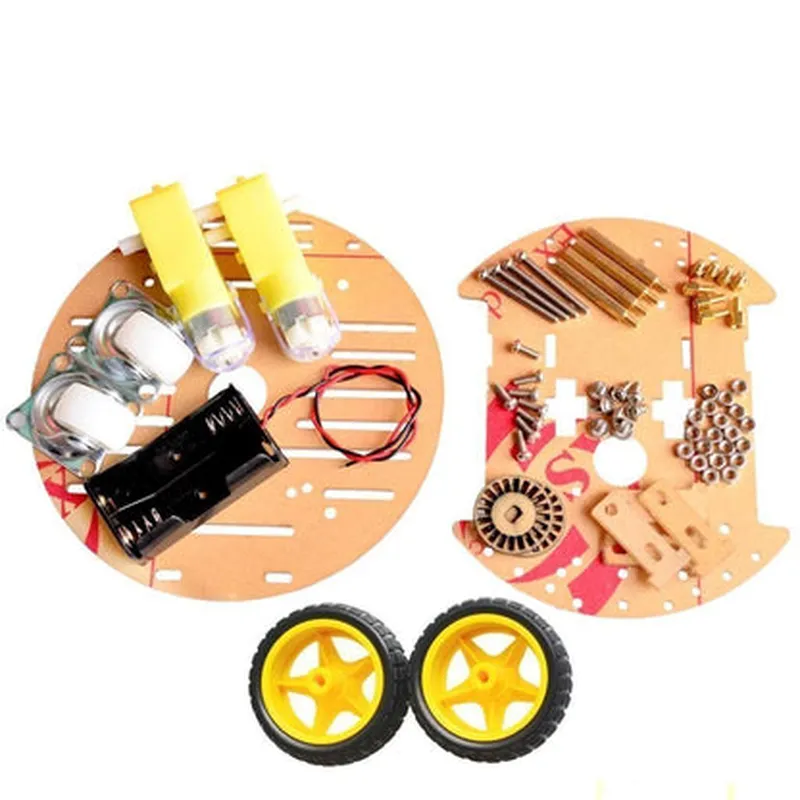
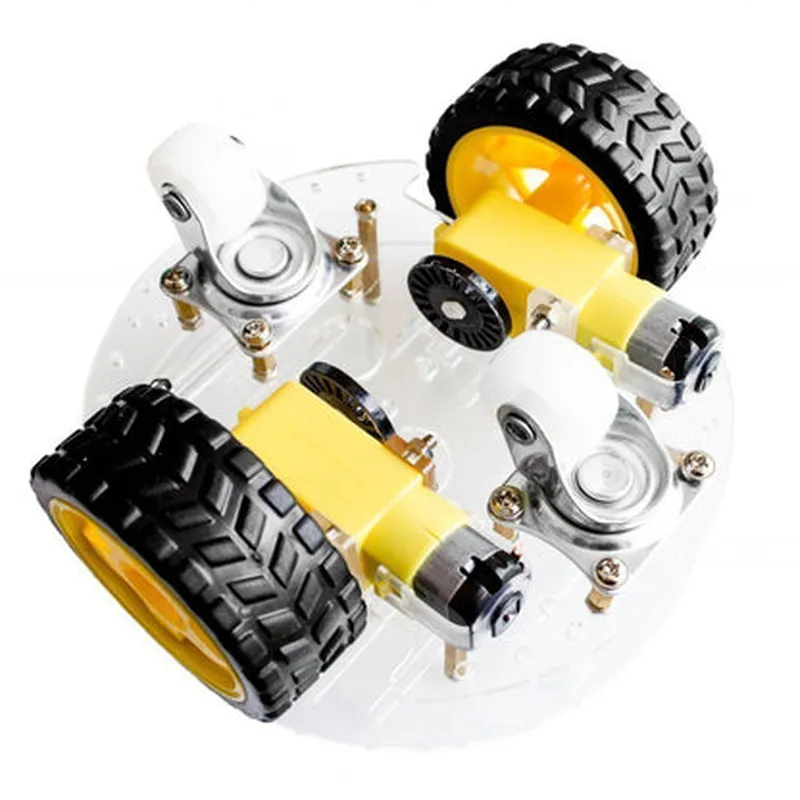
Durable ABS plastic
200 x 150 x 80 mm (7.9 x 5.9 x 3.1 in)
High-torque DC motor (2x)
12V, 500mA (each)
Up to 200 RPM
4x (ultrasonic, infrared, lidar, and custom)
Arduino, Raspberry Pi, ESP32, and other popular platforms
Built-in voltage regulator and power distribution module
-20C to 80C (-4F to 176F)
Target Applications
| The DIY 2WD Smart Chassis Car Kit is ideal for a wide range of applications, including |
Robotics and automation projects
IoT and smart home applications
Artificial intelligence and machine learning experiments
STEM education and research projects
Hobbyist and enthusiast projects
Conclusion
The DIY 2WD Smart Chassis Car Kit provides a comprehensive foundation for building intelligent vehicles and exploring the world of IoT, robotics, and artificial intelligence. With its modular design, high-torque DC motors, and sensor mounts, this kit offers endless possibilities for customization and innovation.
DIY 2WD Smart Chassis Car Kit DocumentationOverviewThe DIY 2WD Smart Chassis Car Kit is a versatile and customizable IoT component designed for robotics and automation projects. This kit provides a 2-wheel drive (2WD) chassis with a built-in motor driver, making it easy to create intelligent and connected vehicles. The kit is compatible with popular microcontrollers such as Arduino, Raspberry Pi, and ESP32.Key Features2WD chassis with built-in motor driver
Supports DC motors up to 12V and 1A
Compatible with Arduino, Raspberry Pi, and ESP32 microcontrollers
Includes wheels, motors, and chassis assemblyHardware ConnectionsMotor connections: M1 and M2 (positive and negative terminals)
Power connections: VCC and GND
Microcontroller connections: depends on the microcontroller used (e.g., Arduino: digital pins 2-5, Raspberry Pi: GPIO pins 17-23)Code Examples### Example 1: Basic Motor Control using ArduinoIn this example, we will use an Arduino Uno board to control the motors of the DIY 2WD Smart Chassis Car Kit.Hardware RequirementsArduino Uno board
DIY 2WD Smart Chassis Car Kit
Jumper wiresSoftware RequirementsArduino IDE (version 1.8.x or later)Code
```c
const int leftMotorForward = 2; // Pin for left motor forward
const int leftMotorBackward = 3; // Pin for left motor backward
const int rightMotorForward = 4; // Pin for right motor forward
const int rightMotorBackward = 5; // Pin for right motor backwardvoid setup() {
pinMode(leftMotorForward, OUTPUT);
pinMode(leftMotorBackward, OUTPUT);
pinMode(rightMotorForward, OUTPUT);
pinMode(rightMotorBackward, OUTPUT);
}void loop() {
// Move forward
digitalWrite(leftMotorForward, HIGH);
digitalWrite(rightMotorForward, HIGH);
delay(1000);
// Move backward
digitalWrite(leftMotorBackward, HIGH);
digitalWrite(rightMotorBackward, HIGH);
delay(1000);
// Stop
digitalWrite(leftMotorForward, LOW);
digitalWrite(rightMotorForward, LOW);
digitalWrite(leftMotorBackward, LOW);
digitalWrite(rightMotorBackward, LOW);
delay(1000);
}
```
### Example 2: Line Follower using Raspberry Pi and PythonIn this example, we will use a Raspberry Pi board to create a line follower robot using the DIY 2WD Smart Chassis Car Kit.Hardware RequirementsRaspberry Pi board (any model)
DIY 2WD Smart Chassis Car Kit
Infrared line sensor module (e.g., VL53L0X)
Jumper wiresSoftware RequirementsRaspbian OS (latest version)
Python 3.xCode
```python
import RPi.GPIO as GPIO
import time# Set up GPIO pins
GPIO.setmode(GPIO.BCM)
left_motor_forward = 17
left_motor_backward = 23
right_motor_forward = 24
right_motor_backward = 25
GPIO.setup(left_motor_forward, GPIO.OUT)
GPIO.setup(left_motor_backward, GPIO.OUT)
GPIO.setup(right_motor_forward, GPIO.OUT)
GPIO.setup(right_motor_backward, GPIO.OUT)# Set up line sensor
line_sensor_pin = 18
GPIO.setup(line_sensor_pin, GPIO.IN)while True:
# Read line sensor value
line_sensor_value = GPIO.input(line_sensor_pin)
if line_sensor_value == 0: # Black line detected
# Move forward
GPIO.output(left_motor_forward, GPIO.HIGH)
GPIO.output(right_motor_forward, GPIO.HIGH)
else: # White surface detected
# Move backward
GPIO.output(left_motor_backward, GPIO.HIGH)
GPIO.output(right_motor_backward, GPIO.HIGH)
time.sleep(0.1)
```
These examples demonstrate the basic usage of the DIY 2WD Smart Chassis Car Kit with popular microcontrollers. You can modify and extend these examples to create more complex and intelligent robotics projects.