FlySky FS-GR3E 2.4G 3CH Receiver



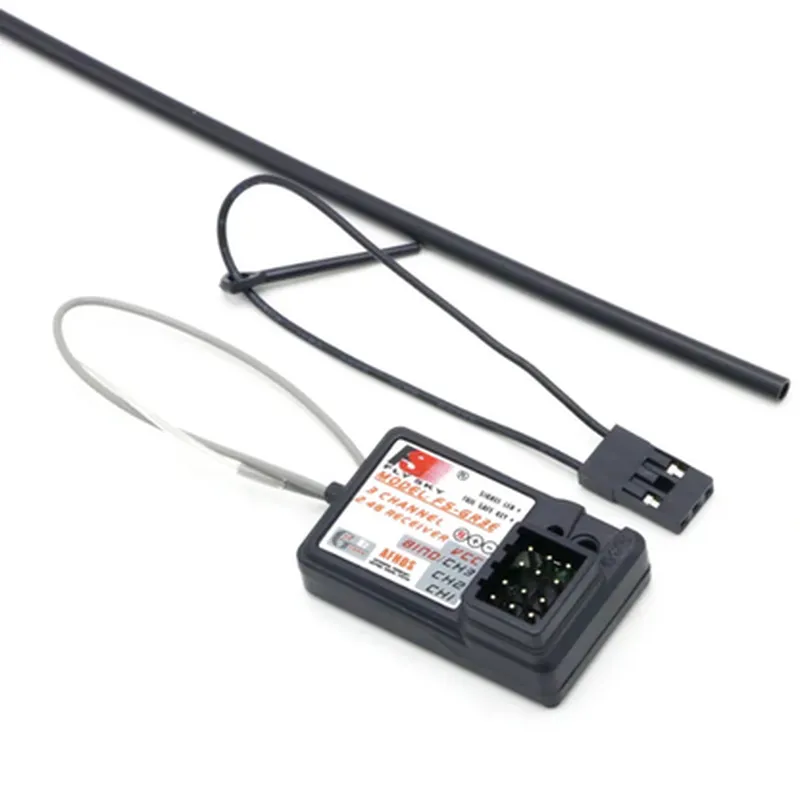
FlySky FS-GR3E 2.4G 3CH Receiver
The FlySky FS-GR3E 2.4G 3CH Receiver is a compact, lightweight, and high-performance radio frequency (RF) receiver designed for remote control (RC) systems, robotics, and other IoT applications. This 3-channel receiver is compatible with FlySky 2.4GHz transmitters and provides a reliable and interference-free communication link.
The FS-GR3E receiver is designed to receive radio signals transmitted by a compatible FlySky 2.4GHz transmitter and convert them into digital control signals. These signals can then be used to control various devices, such as servos, motors, and other actuators, in RC systems, robots, drones, and other IoT applications.
| ### Technical Specifications |
2.4GHz
3
GFSK (Gaussian Frequency Shift Keying)
500 kbps
-95 dBm
4.8-6.0V
25mA
32.5 x 20 x 10.5 mm
6g
| ### Performance Characteristics |
Up to 400 meters (1312 feet) in open air
10ms
| Anti-Interference Ability | High-frequency noise resistance and error correction ensure reliable data transmission |
| ### Additional Features |
Lightweight and compact design for easy installation in small spaces
Supports binding with multiple transmitters for increased flexibility
Provides visual feedback on signal strength and binding status
| Built-in Antenna | Saves space and simplifies installation |
| ### Compatibility |
Compatible with FlySky 2.4GHz transmitters, including the FS-i4, FS-i6, and FS-i10 models
Can control a wide range of devices, including servos, motors, ESCs, and other IoT devices
| ### Applications |
Ideal for remote control cars, trucks, boats, planes, and drones
Suitable for robotics, autonomous systems, and IoT projects
Can be used in various IoT applications, such as home automation, industrial control systems, and more
By providing a reliable and high-performance communication link, the FlySky FS-GR3E 2.4G 3CH Receiver is an ideal component for a wide range of IoT applications.
FlySky FS-GR3E 2.4G 3CH Receiver DocumentationThe FlySky FS-GR3E is a 2.4GHz 3-channel receiver designed for use in radio control systems, particularly in RC models, robots, and drones. This receiver is compatible with FlySky transmitters and provides a reliable and interference-resistant connection.Pinout and Connection DiagramThe FS-GR3E receiver has a 3-pin header connector with the following pinout:| Pin | Function |
| --- | --- |
| 1 | VCC (Positive Power Supply, typically 5V) |
| 2 | GND (Ground) |
| 3 | Signal (PPM or PWM Output) |Microcontroller Connection and Code ExamplesTo use the FS-GR3E receiver with a microcontroller, connect the VCC pin to a 5V power source, GND to ground, and the Signal pin to a digital input on the microcontroller.Example 1: Arduino Uno with FlySky FS-GR3E ReceiverIn this example, we will read the channel values from the FS-GR3E receiver using an Arduino Uno microcontroller.```cpp
const int channelPin = 2; // Connect the Signal pin to digital pin 2 on Arduino Unovoid setup() {
Serial.begin(9600);
}void loop() {
int channelValue = pulseIn(channelPin, HIGH); // Read the pulse width from the receiver
Serial.print("Channel value: ");
Serial.println(channelValue);
delay(50);
}
```Example 2: ESP32 with FlySky FS-GR3E Receiver (using ESP32Interrupt library)In this example, we will use the ESP32Interrupt library to read the channel values from the FS-GR3E receiver using an ESP32 microcontroller.```cpp
#include <ESP32Interrupt.h>const int channelPin = 18; // Connect the Signal pin to GPIO 18 on ESP32volatile uint16_t channelValue = 0;void IRAM_ATTR interruptHandler() {
channelValue = pulseIn(channelPin, HIGH);
}void setup() {
Serial.begin(115200);
pinMode(channelPin, INPUT);
attachInterrupt(channelPin, interruptHandler, RISING);
}void loop() {
Serial.print("Channel value: ");
Serial.println(channelValue);
delay(50);
}
```Example 3: Raspberry Pi with FlySky FS-GR3E Receiver (using Python and RPi.GPIO library)In this example, we will read the channel values from the FS-GR3E receiver using a Raspberry Pi single-board computer with the RPi.GPIO library.```python
import RPi.GPIO as GPIO
import timechannel_pin = 17 # Connect the Signal pin to GPIO 17 on Raspberry PiGPIO.setmode(GPIO.BCM)
GPIO.setup(channel_pin, GPIO.IN)while True:
channel_value = GPIO.input(channel_pin)
print("Channel value:", channel_value)
time.sleep(0.05)
```These code examples demonstrate how to connect and read the channel values from the FlySky FS-GR3E 2.4G 3CH Receiver using Arduino, ESP32, and Raspberry Pi platforms. The examples can be modified to suit specific project requirements, such as controlling servos, motors, or other actuators based on the received channel values.