

Stufin
Home Quick Cart Profile

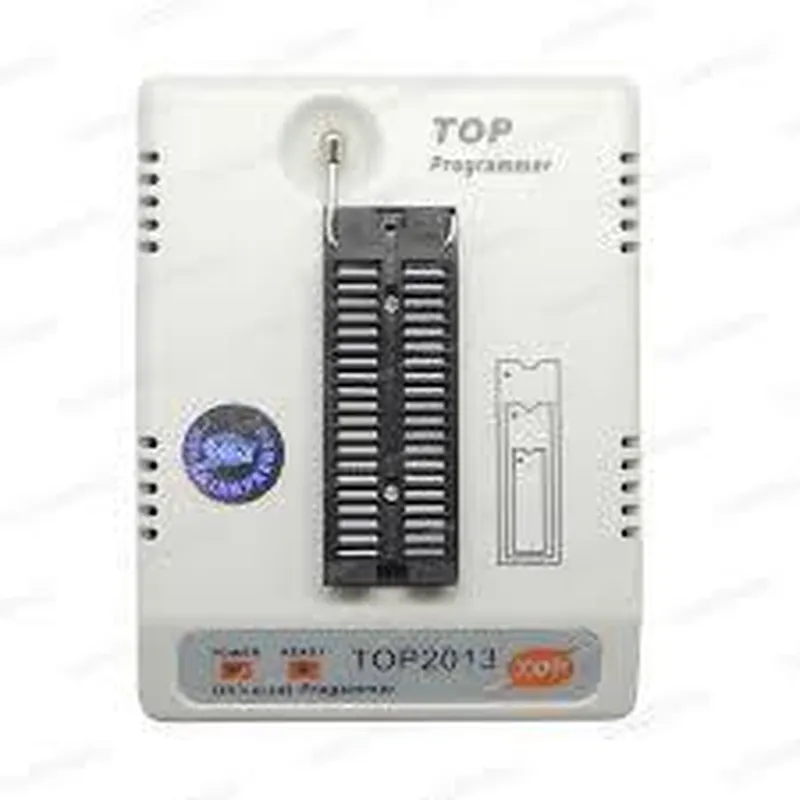
Universal Programmer TOP2013

Buy Now on Stufin

Programming Speed

Up to 2 MB/s

Power Supply

USB bus-powered, no external power source required

Operating Temperature

0C to 40C

Dimensions

100 mm x 60 mm x 20 mm

Applications

The Universal Programmer TOP2013 is an ideal tool for a wide range of applications, including

IoT device development

Microcontroller-based projects

Embedded system design

Robotics and automation

Industrial control systems

Education and research

Overall, the Universal Programmer TOP2013 is a powerful and versatile tool that provides a comprehensive solution for programming and debugging microcontrollers, making it an essential component for anyone working with IoT devices.

Pin Configuration

  • Universal Programmer TOP2013 Pinout Explanation
  • The Universal Programmer TOP2013 is a versatile programming device that supports a wide range of programmable devices, including flash memories, EPROMs, EEPROMs, and microcontrollers. This component has 40 pins, which are divided into several functional groups. In this section, we will explain each pin's function and provide guidance on how to connect them correctly.
  • Pinout Structure:
  • The Universal Programmer TOP2013 has a 40-pin DIP (Dual In-Line Package) structure, with 20 pins on each row. The pins are labeled from 1 to 40, with pins 1-20 on the top row and pins 21-40 on the bottom row.
  • Pins 1-5: Power Supply and Ground
  • Pin 1: VCC (Positive Power Supply): Connect to a 5V power source, typically from a USB port or a regulated power supply.
  • Pin 2: GND (Ground): Connect to the circuit's ground or 0V reference point.
  • Pin 3: VPP (Programming Voltage): Typically connected to 12V or 25V, depending on the device being programmed.
  • Pin 4: VCC (Positive Power Supply): Repeat of Pin 1, providing additional power pins for improved current handling.
  • Pin 5: GND (Ground): Repeat of Pin 2, providing additional ground pins for improved signal integrity.
  • Pins 6-15: Data Bus
  • Pin 6: D0 (Data Bus 0): One of the 8-bit data bus lines, connected to the device being programmed.
  • Pin 7: D1 (Data Bus 1): One of the 8-bit data bus lines, connected to the device being programmed.
  • Pin 8: D2 (Data Bus 2): One of the 8-bit data bus lines, connected to the device being programmed.
  • Pin 9: D3 (Data Bus 3): One of the 8-bit data bus lines, connected to the device being programmed.
  • Pin 10: D4 (Data Bus 4): One of the 8-bit data bus lines, connected to the device being programmed.
  • Pin 11: D5 (Data Bus 5): One of the 8-bit data bus lines, connected to the device being programmed.
  • Pin 12: D6 (Data Bus 6): One of the 8-bit data bus lines, connected to the device being programmed.
  • Pin 13: D7 (Data Bus 7): One of the 8-bit data bus lines, connected to the device being programmed.
  • Pin 14: A0 (Address Bus 0): One of the address bus lines, connected to the device being programmed.
  • Pin 15: A1 (Address Bus 1): One of the address bus lines, connected to the device being programmed.
  • Pins 16-20: Address Bus and Control Signals
  • Pin 16: A2 (Address Bus 2): One of the address bus lines, connected to the device being programmed.
  • Pin 17: A3 (Address Bus 3): One of the address bus lines, connected to the device being programmed.
  • Pin 18: A4 (Address Bus 4): One of the address bus lines, connected to the device being programmed.
  • Pin 19: A5 (Address Bus 5): One of the address bus lines, connected to the device being programmed.
  • Pin 20: RDY/BUSY (Ready/Busy): Indicates the programmer's status, with a low signal indicating the programmer is busy.
  • Pins 21-25: Control Signals
  • Pin 21: PGM (Program): Initiates the programming sequence.
  • Pin 22: VCCEN (VCC Enable): Enables the power supply to the device being programmed.
  • Pin 23: OE (Output Enable): Enables the output drivers of the programmer.
  • Pin 24: WE (Write Enable): Enables write operations to the device being programmed.
  • Pin 25: RE (Read Enable): Enables read operations from the device being programmed.
  • Pins 26-30: Additional Control Signals
  • Pin 26: CE (Chip Enable): Enables the device being programmed.
  • Pin 27: Presidency (Prescaler): Used for clock signal generation.
  • Pin 28: CLK (Clock): Provides a clock signal to the device being programmed.
  • Pin 29: RST (Reset): Resets the device being programmed.
  • Pin 30: INT (Interrupt): Generates an interrupt signal.
  • Pins 31-35: Additional Data Bus Lines
  • Pin 31: D8 (Data Bus 8): One of the additional data bus lines, connected to the device being programmed.
  • Pin 32: D9 (Data Bus 9): One of the additional data bus lines, connected to the device being programmed.
  • Pin 33: D10 (Data Bus 10): One of the additional data bus lines, connected to the device being programmed.
  • Pin 34: D11 (Data Bus 11): One of the additional data bus lines, connected to the device being programmed.
  • Pin 35: D12 (Data Bus 12): One of the additional data bus lines, connected to the device being programmed.
  • Pins 36-40: No Connection
  • Pin 36: NC (No Connection)
  • Pin 37: NC (No Connection)
  • Pin 38: NC (No Connection)
  • Pin 39: NC (No Connection)
  • Pin 40: NC (No Connection)
  • Connection Guidance:
  • When connecting the Universal Programmer TOP2013 to a device, ensure that the pinouts match the specific device's pinout. Use the device's datasheet to identify the corresponding pins and connect them accordingly.
  • Always connect the power supply pins (VCC, GND, and VPP) correctly to avoid damage to the programmer or the device being programmed.
  • Ensure that the data bus and address bus lines are connected correctly to the device being programmed.
  • Use proper shielding and grounding techniques to minimize noise and interference.
  • Refer to the device's datasheet and the programmer's user manual for specific connection diagrams and guidance.

Code Examples

Universal Programmer TOP2013 Documentation
Overview
The TOP2013 is a universal programmer designed for programming and debugging a wide range of microcontrollers, flash memories, and other programmable devices. This programmer supports various programming algorithms and protocols, making it a versatile tool for IoT development.
Hardware Interface
The TOP2013 has a 40-pin ZIF (Zero Insertion Force) socket, allowing for easy insertion and removal of devices. It also features a USB interface for connecting to a host computer.
Software Interface
The TOP2013 is supported by a range of software tools, including:
Top2013 Programming Software: A Windows-based application for programming and debugging devices.
 OpenOCD: An open-source, cross-platform tool for debugging and programming devices.
Code Examples
### Example 1: Programming an ATmega328P Microcontroller using Top2013 Programming Software
Language: C (using AVR-GCC compiler)
Hardware: ATmega328P microcontroller, TOP2013 programmer, breadboard, and necessary jumper wires.
Software: Top2013 Programming Software
Code:
```c
#include <avr/io.h>
int main(void) {
    DDRB = 0xFF; // Set PORTB as output
    while (1) {
        PORTB = 0xFF; // Set all pins high
        _delay_ms(1000); // Delay 1 second
        PORTB = 0x00; // Set all pins low
        _delay_ms(1000); // Delay 1 second
    }
    return 0;
}
```
Steps:
1. Connect the ATmega328P microcontroller to the TOP2013 programmer.
2. Open the Top2013 Programming Software and select the ATmega328P device.
3. Load the compiled hex file into the software.
4. Click "Program" to upload the code to the microcontroller.
5. Verify the code is running by observing the microcontroller's pin states.
### Example 2: Debugging an STM32F103RB Microcontroller using OpenOCD and GDB
Language: C (using ARM-GCC compiler)
Hardware: STM32F103RB microcontroller, TOP2013 programmer, breadboard, and necessary jumper wires.
Software: OpenOCD, GDB
Code:
```c
#include <stm32f10x.h>
int main(void) {
    GPIO_InitTypeDef GPIO_InitStruct;
// Initialize GPIO port
    RCC_APB2PeriphClockCmd(RCC_APB2Periph_GPIOA, ENABLE);
    GPIO_InitStruct.GPIO_Mode = GPIO_Mode_Out_PP;
    GPIO_InitStruct.GPIO_Pin = GPIO_Pin_5;
    GPIO_Init(GPIOA, &GPIO_InitStruct);
while (1) {
        GPIOA->BSRR = GPIO_Pin_5; // Set pin PA5 high
        delay(1000);
        GPIOA->BRR = GPIO_Pin_5; // Set pin PA5 low
        delay(1000);
    }
}
```
Steps:
1. Connect the STM32F103RB microcontroller to the TOP2013 programmer.
2. Install and configure OpenOCD on the host computer.
3. Open a terminal and run OpenOCD with the following command: `openocd -f interface/top2013.cfg -f target/stm32f1x.cfg`
4. In another terminal, run GDB with the compiled ELF file: `gdb -ex "target remote :3333" -ex "load" -ex "continue" your_program.elf`
5. Verify the code is running by observing the microcontroller's pin states.
Note: The provided code examples are simplified and intended to demonstrate the basic usage of the TOP2013 programmer. In a real-world scenario, you would need to add error handling and other necessary functionality to your code.