69 x 53 mm (2.7 x 2.1 inches)
4 x Mounting holes for secure attachment to a project enclosure or breadboard
- Operating Conditions:


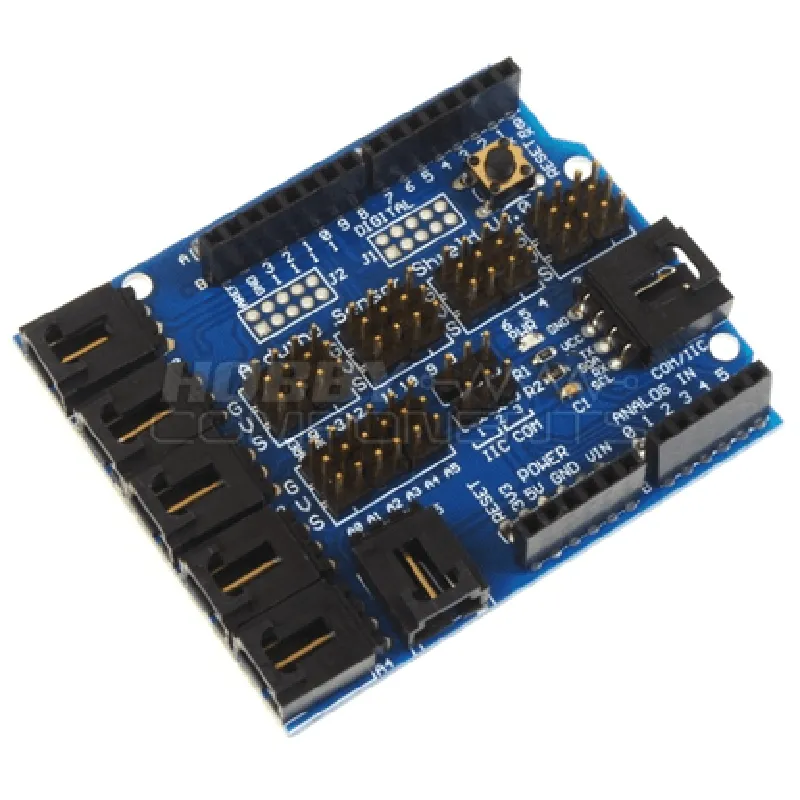
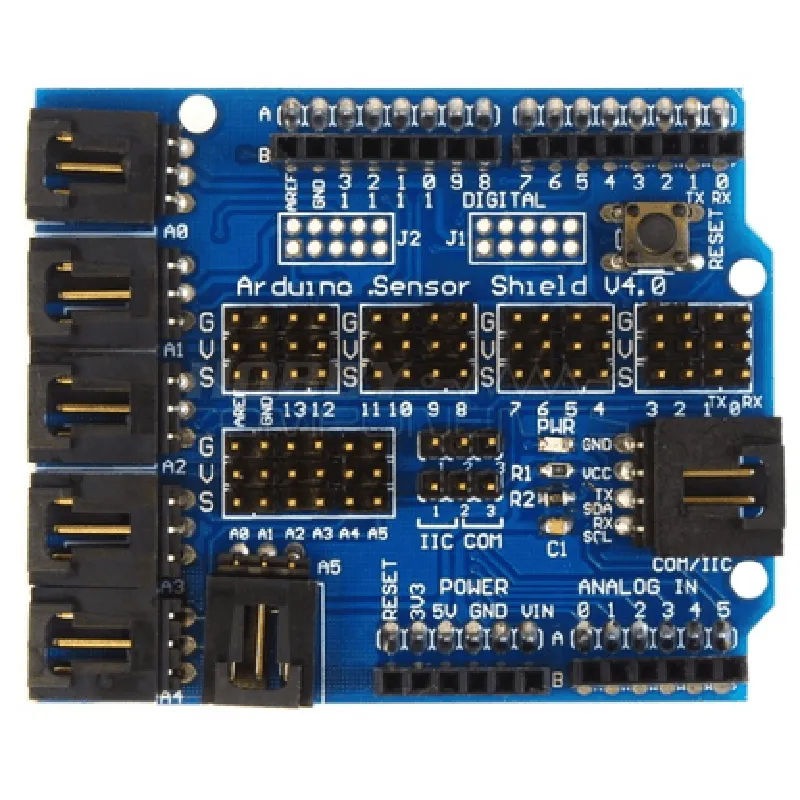
69 x 53 mm (2.7 x 2.1 inches)
4 x Mounting holes for secure attachment to a project enclosure or breadboard
-20C to 70C (-4F to 158F)
5V (recommended), 3.3V (optional)
Applications
| The Arduino Sensor Shield V4.0 Expansion Board is ideal for a wide range of applications, including |
IoT projects (e.g., environmental monitoring, home automation)
Robotics and robotic arms
Sensor-based projects (e.g., temperature, humidity, pressure, light, sound)
Automation and control systems
Prototyping and proof-of-concept development
Conclusion
The Arduino Sensor Shield V4.0 Expansion Board is a versatile and feature-rich component that provides a convenient and easy-to-use platform for connecting and interfacing with a wide range of sensors and modules. Its comprehensive set of interfaces, power management features, and prototyping area make it an ideal choice for IoT projects, robotics, and other applications that require sensor integration.
Arduino Sensor Shield V4.0 Expansion Board DocumentationOverviewThe Arduino Sensor Shield V4.0 Expansion Board is a versatile expansion board designed to facilitate the connection of various sensors and modules to Arduino boards. It provides a convenient platform for prototyping and developing IoT projects, offering a range of features and interfaces to simplify the integration of sensors and other peripherals.FeaturesCompatible with Arduino Uno, Arduino Mega, and Arduino Due boards
3 x I2C interfaces
1 x SPI interface
1 x UART interface
16 x Digital I/O pins
6 x Analog input pins
Power supply pins (5V, 3.3V, and GND)
Onboard voltage regulator (5V to 3.3V)PinoutThe Arduino Sensor Shield V4.0 Expansion Board has the following pinout:| Pin | Function |
| --- | --- |
| D0-D13 | Digital I/O pins |
| A0-A5 | Analog input pins |
| SCL, SDA | I2C interface 1 |
| SCL1, SDA1 | I2C interface 2 |
| SCL2, SDA2 | I2C interface 3 |
| MOSI, MISO, SCK | SPI interface |
| RX, TX | UART interface |
| 5V, 3.3V, GND | Power supply pins |Code Examples### Example 1: Reading Temperature and Humidity using DHT11 SensorIn this example, we will use the Arduino Sensor Shield V4.0 Expansion Board to connect a DHT11 temperature and humidity sensor to an Arduino Uno board.Hardware RequirementsArduino Uno board
Arduino Sensor Shield V4.0 Expansion Board
DHT11 temperature and humidity sensorSoftware RequirementsArduino IDE (version 1.8 or later)
DHT11 library (available in the Arduino Library section)Code
```c++
#include <DHT.h>#define DHTPIN 2 // Digital pin 2 for DHT11 sensor
#define DHTTYPE DHT11DHT dht(DHTPIN, DHTTYPE);void setup() {
Serial.begin(9600);
dht.begin();
}void loop() {
int t = dht.readTemperature();
int h = dht.readHumidity();
Serial.print("Temperature: ");
Serial.print(t);
Serial.println(" C");
Serial.print("Humidity: ");
Serial.print(h);
Serial.println(" %");
delay(2000);
}
```
Example 2: Reading Accelerometer Data using ADXL345 SensorIn this example, we will use the Arduino Sensor Shield V4.0 Expansion Board to connect an ADXL345 accelerometer sensor to an Arduino Mega board.Hardware RequirementsArduino Mega board
Arduino Sensor Shield V4.0 Expansion Board
ADXL345 accelerometer sensorSoftware RequirementsArduino IDE (version 1.8 or later)
ADXL345 library (available in the Arduino Library section)Code
```c++
#include <ADXL345.h>ADXL345 adxl;void setup() {
Serial.begin(9600);
adxl.powerOn();
}void loop() {
int x, y, z;
adxl.readAccel(&x, &y, &z);
Serial.print("Acceleration (m/s^2): ");
Serial.print("X: ");
Serial.print(x);
Serial.print(" Y: ");
Serial.print(y);
Serial.print(" Z: ");
Serial.println(z);
delay(500);
}
```
Example 3: Using the UART Interface to Communicate with a GPS ModuleIn this example, we will use the Arduino Sensor Shield V4.0 Expansion Board to connect a GPS module to an Arduino Due board using the UART interface.Hardware RequirementsArduino Due board
Arduino Sensor Shield V4.0 Expansion Board
GPS module (e.g., Ublox NEO-6M)Software RequirementsArduino IDE (version 1.8 or later)Code
```c++
#include <SoftwareSerial.h>SoftwareSerial gpsSerial(10, 11); // RX, TX pins for GPS modulevoid setup() {
Serial.begin(9600);
gpsSerial.begin(9600);
}void loop() {
if (gpsSerial.available() > 0) {
String gpsData = gpsSerial.readStringUntil('
');
Serial.println(gpsData);
}
delay(1000);
}
```
These examples demonstrate the versatility of the Arduino Sensor Shield V4.0 Expansion Board in connecting various sensors and modules to Arduino boards. By providing a convenient platform for prototyping and developing IoT projects, this expansion board simplifies the integration of sensors and peripherals, making it an ideal choice for technical professionals and informed hobbyists alike.